Ranked on response time and HDMI support first, since office strengths do not transfer to gaming.
The Best Portable Monitors for Gaming (2026)
Portable monitors for handhelds, laptops, and consoles, judged on response time, inputs, and refresh rate.
Our top picks at a glance
Best for casual gaming
 ASUS ZenScreen MB16AH
Buyers who want the ZenScreen name with broader device support than the MB16ACV.
Best HDMI gaming portable
 ViewSonic VA1655
Buyers who connect more than a laptop: consoles, cameras, and older machines included.
Best 4K gaming portable
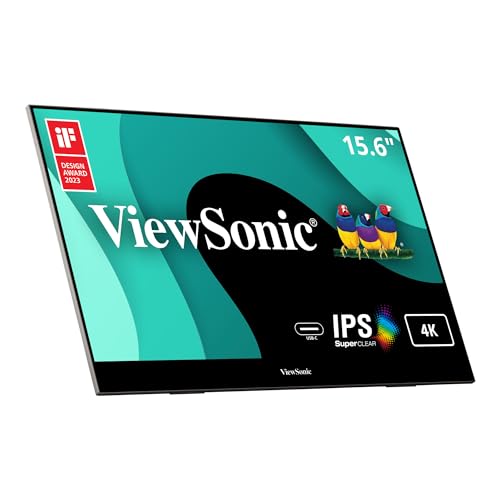 ViewSonic VX1655-4K
Photographers and video editors who need pixel-level detail away from a desk.
For casual and console gaming, the ZenScreen MB16AH with FreeSync and HDMI is the sensible pick, while the VA1655 adds a faster 7 ms panel. Competitive players should note that every screen here is 60 Hz: these are travel gaming screens, not replacements for a high-refresh desk monitor.
The picks, ranked
| Pick | Panel | Connectivity | Audio | Buy |
|---|---|---|---|---|
| Best for casual gamingASUS ZenScreen MB16AH | 15.6 inch IPS, 1920 x 1080, 60 Hz | USB-C, micro-HDMI | Built-in speakers | Check price |
| Best HDMI gaming portableViewSonic VA1655 | 15.6 inch IPS, 1920 x 1080, 60 Hz | Mini HDMI, USB-C with 60 W two-way power | - | Check price |
| Best 4K gaming portableViewSonic VX1655-4K | 15.6 inch IPS, 3840 x 2160 (4K UHD), 60 Hz | Mini HDMI, USB-C with 60 W two-way power | Dual built-in speakers | Check price |
 Best for laptop gamingViewSonic VG1655 | 15.6 inch IPS, 1920 x 1080, 60 Hz | - | Dual built-in speakers | Check price |
 Best for fast laptop gamesASUS ZenScreen MB16ACV | 15.6 inch IPS, 1920 x 1080, 60 Hz | USB-C hybrid-signal (power and video in one cable) | - | Check price |
Best for casual gaming
ASUS ZenScreen MB16AH
The ZenScreen with HDMI: USB-C and micro-HDMI for any laptop or console.
Strengths
- Micro-HDMI alongside USB-C connects consoles and older laptops that the MB16ACV cannot, which widens its useful life considerably.
- Built-in speakers and a protective sleeve in the box mean no extra purchases for basic video calls and travel.
- FreeSync support smooths casual gaming, a feature most office portables skip.
Limitations
- 1080p resolution limits detailed creative work, as with most of the mid-range field.
- No battery, so it always needs a host or a charger for power.
- The sleeve is protection, not a stand, so angle adjustment depends on the kickstand.
What owners report
Commonly praised
- Micro-HDMI alongside USB-C connects consoles and older laptops too
- Built-in speakers and a protective sleeve in the box mean no extra purchases
- Smoothed casual gaming support that most office portables skip
Common complaints
- Resolution limits detailed creative work, as with most mid-range portables
- No battery, so it always needs a host or charger for power
- Sleeve protects but does not stand, so angle adjustment depends on the kickstand
Recurring themes from owner reviews on retailers and forums, summarised by our editors. Updated October 2026.
| Panel | 15.6 inch IPS, 1920 x 1080, 60 Hz |
|---|---|
| Connectivity | USB-C, micro-HDMI |
| Audio | Built-in speakers |
| Gaming | FreeSync support |
| Warranty | 3 years per ASUS |
Best for: Buyers who want the ZenScreen name with broader device support than the MB16ACV.
Skip if: You need a battery, or you want the lightest ZenScreen available.
Best HDMI gaming portable
ViewSonic VA1655
The flexible ViewSonic: USB-C plus mini HDMI for laptops, consoles, and cameras.
Strengths
- Mini HDMI alongside USB-C opens the monitor to games consoles, cameras, and laptops whose USB-C ports lack video output, which is the main weakness of USB-C-only rivals.
- The same 60 W two-way USB-C power as the VG1655 keeps charging simple at a desk or on the move.
- Under 2 lb with a protective cover included, it travels well for a 15.6 inch screen.
Limitations
- 1080p resolution again limits detailed creative work.
- Mini HDMI needs a cable or adapter that full-size HDMI devices do not include.
- No built-in battery, so it depends on the host device or a charger.
What owners report
Commonly praised
- Mini HDMI opens the monitor to consoles, cameras, and older laptops
- Same two-way USB-C power keeps charging simple at a desk or on the move
- Travels well for a larger screen, with a protective cover included
Common complaints
- Resolution again limits detailed creative work
- Mini HDMI needs a cable or adapter that full-size devices do not include
- No built-in battery, so it depends on the host device or a charger
Recurring themes from owner reviews on retailers and forums, summarised by our editors. Updated October 2026.
| Panel | 15.6 inch IPS, 1920 x 1080, 60 Hz |
|---|---|
| Response time | 7 ms |
| Connectivity | Mini HDMI, USB-C with 60 W two-way power |
| Weight | Under 0.9 kg (under 2 lb) |
| Warranty | 3 years per ViewSonic |
Best for: Buyers who connect more than a laptop: consoles, cameras, and older machines included.
Skip if: You only ever use USB-C and want the lightest panel available.
Best 4K gaming portable
ViewSonic VX1655-4K
The 4K portable: ultra sharp detail for photo, video, and design work on the move.
Strengths
- A true 4K UHD panel shows fine detail that 1080p screens blur, which matters when checking focus or grading colour on location.
- Mini HDMI and 60 W two-way USB-C cover laptops, cameras, and consoles without a dongle drawer.
- A tripod mount and dual speakers make it usable as a client preview screen or a field monitor, not just a laptop accessory.
Limitations
- 4K over USB-C draws more power and drains a laptop battery faster than 1080p models.
- Small text at native 4K needs scaling on most systems, so the benefit shows in images more than in text.
- Premium pricing for a screen that most office work does not need.
What owners report
Commonly praised
- True high resolution shows fine detail that lower screens blur
- Mini HDMI and two-way USB-C cover laptops, cameras, and consoles
- Tripod mount and dual speakers make it usable as a client preview screen
Common complaints
- High resolution over USB-C draws more power and drains a laptop battery faster
- Small text at native resolution needs scaling, so the benefit shows in images more than text
- Premium pricing for a screen most office work does not need
Recurring themes from owner reviews on retailers and forums, summarised by our editors. Updated October 2026.
| Panel | 15.6 inch IPS, 3840 x 2160 (4K UHD), 60 Hz |
|---|---|
| Response time | 7 ms |
| Connectivity | Mini HDMI, USB-C with 60 W two-way power |
| Audio | Dual built-in speakers |
| Mounting | Tripod mount compatible |
Best for: Photographers and video editors who need pixel-level detail away from a desk.
Skip if: You mainly write documents, or your laptop battery is already stretched thin.
Best for laptop gaming
ViewSonic VG1655
The office-ready portable: built-in stand, speakers, and two-way USB-C power.
Strengths
- A built-in stand and magnetic cover mean no separate accessory to forget: the monitor props itself up and protects itself in the same package.
- Two-way powered USB-C delivers up to 60 W, so the monitor can charge a laptop or run from it depending on which device has power.
- Dual speakers save a separate audio device for video calls, which is a small thing that matters in hot-desking.
Limitations
- 1080p resolution is fine for office work but not for detailed creative work.
- At 1.8 lb it is heavier than the slimmest 14 inch rivals.
- No HDMI input, so consoles and older laptops still need an adapter.
What owners report
Commonly praised
- Built-in stand and magnetic cover mean no separate accessory to forget
- Two-way USB-C power lets the monitor charge a laptop or run from it
- Dual speakers save a separate audio device for video calls
Common complaints
- Resolution is fine for office work but not detailed creative work
- Heavier than the slimmest smaller rivals
- No HDMI input, so consoles and older laptops still need an adapter
Recurring themes from owner reviews on retailers and forums, summarised by our editors. Updated October 2026.
| Panel | 15.6 inch IPS, 1920 x 1080, 60 Hz |
|---|---|
| USB-C power | Two-way 60 W power delivery |
| Audio | Dual built-in speakers |
| Stand | Built-in stand with magnetic cover |
| Weight | 0.82 kg (1.8 lb) |
Best for: Hybrid workers who set up at a different desk every day and want no extra accessories.
Skip if: You need 4K resolution, or you want the lightest possible panel.
Best for fast laptop games
ASUS ZenScreen MB16ACV
The dependable travel screen: light, sharp, and powered by a single USB-C cable.
Strengths
- A single USB-C hybrid cable carries both video and power from a compatible laptop, so the monitor needs no separate charger or second cable on a train or in a cafe.
- At 0.83 kg with a fold-out kickstand, it adds a genuine second workspace without turning a laptop bag into a suitcase.
- An IPS panel with 178 degree viewing angles keeps colours and contrast steady when a colleague leans in from the side, which matters for shared desk work.
Limitations
- No HDMI input, so devices without USB-C video need an adapter or a different monitor.
- 1080p resolution suits office work but not detailed photo editing at this size.
- The kickstand offers limited tilt adjustment compared with a proper desk stand.
What owners report
Commonly praised
- Single cable carries video and power, so no second cable on a train or in a cafe
- Lightweight with a fold-out stand, adding a real second workspace to a laptop bag
- Wide viewing angles keep colours steady when a colleague leans in
Common complaints
- No HDMI input, so devices without USB-C video need an adapter
- Resolution suits office work but not detailed photo editing
- Kickstand offers limited tilt adjustment compared with a proper desk stand
Recurring themes from owner reviews on retailers and forums, summarised by our editors. Updated October 2026.
| Panel | 15.6 inch IPS, 1920 x 1080, 60 Hz |
|---|---|
| Viewing angles | 178 degrees horizontal and vertical |
| Response time | 5 ms |
| Connectivity | USB-C hybrid-signal (power and video in one cable) |
| Weight | 0.83 kg |
Best for: Laptop workers who want a second screen in every bag without extra chargers.
Skip if: You need HDMI for a console or an older laptop without USB-C video output.
Questions, answered
Is 60 Hz enough for portable gaming?
For story games, handhelds, and casual console play, yes. For competitive shooters, no: a 144 Hz or faster desk monitor is the right tool, and a portable is a travel compromise.
Why does response time matter here?
Slow response times smear fast motion, which is why the listed 20 ms and 30 ms figures on budget and design screens were flagged rather than hidden. Under 10 ms suits most gaming; above it, stick to slower genres.
Can a portable monitor run a games console?
Yes if it has HDMI: the VA1655, VX1655-4K, MB16AH, MB16AHP, and 16T20 all do. USB-C-only models need an adapter and a separate power source for the console.