Ranked on student life: note-taking with a stylus, all-day battery, a keyboard that works in lectures, and a price a student budget tolerates.
The Best Tablets for Students (2026)
Student tablets compared on note-taking, battery, keyboard options, and price, from the S Pen Galaxies to the iPad Air.
Our top picks at a glance
Best student tablet
 Samsung Galaxy Tab S9 FE+
Note-takers, students, and media lovers who want a large Android tablet without flagship pricing.
Best student iPad
 Apple iPad 11-inch (A16)
Most buyers: browsing, video, reading, schoolwork, and light creativity, with years of software support ahead.
Best portable student tablet
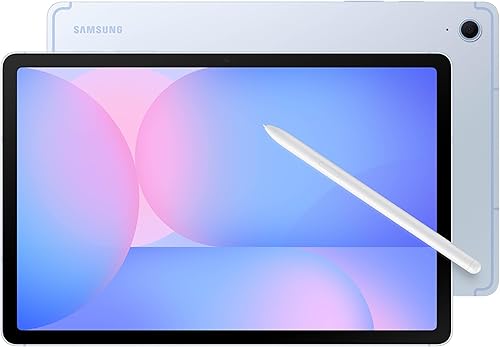 Samsung Galaxy Tab S10 FE
Students and families who want the newest Samsung mid-range tablet, with stylus note-taking and a portable size.
The Galaxy Tab S9 FE+ is the student pick: a big screen for split-screen reading and notes, a stylus included, and a price that leaves money for everything else. iPad loyalists should buy the iPad A16 with a keyboard, and students whose course demands Windows software should buy the Surface Pro 11 bundle and carry one device instead of two.
The picks, ranked
| Pick | Display | Chip | Storage | Buy |
|---|---|---|---|---|
| Best student tabletSamsung Galaxy Tab S9 FE+ | 12.4 inch, 90Hz | Samsung Exynos 1380 | 128GB (this configuration), microSD expandable | Check price |
| Best student iPadApple iPad 11-inch (A16) | 11 inch Liquid Retina | Apple A16 | 128GB (this configuration) | Check price |
| Best portable student tabletSamsung Galaxy Tab S10 FE | 10.9 inch, 90Hz | Samsung Exynos 1580 | 128GB (this configuration), microSD expandable | Check price |
 Best student laptop replacementMicrosoft Surface Pro 11 Bundle | 13 inch PixelSense Flow touchscreen | Snapdragon X Plus | - | Check price |
 Best budget student tabletLenovo Tab M11 | 11 inch, 90Hz | MediaTek Helio G88 | 128GB (this configuration), microSD expandable | Check price |
Best student tablet
Samsung Galaxy Tab S9 FE+
The big-screen Android tablet that includes the stylus: a 12.4 inch display, water resistance, and a pen in the box.
Strengths
- The S Pen is included, not an extra, and it slots into Samsung Notes with handwriting conversion and PDF annotation that students use daily.
- The 12.4 inch display gives split-screen multitasking room to breathe, and the IP68 rating means a spill or a rainy commute is an annoyance, not a disaster.
- Samsung's DeX mode offers a desktop-like workspace with windows and a taskbar, which makes the tablet far more useful for document work than its price suggests.
Limitations
- The Exynos chip is capable rather than class-leading, and heavy games and video exports take longer than on the iPad Air or flagship Galaxy Tabs.
- Android tablet apps remain fewer and less polished than iPad apps in some categories, particularly professional creative tools.
- The large size makes one-handed use impractical, and the tablet needs a case or cover for comfortable handheld reading.
What owners report
Commonly praised
- S Pen included makes note-taking and annotation immediate
- Large screen gives split-screen work room to breathe
- DeX mode turns the tablet into a credible document workstation
Common complaints
- Chip lags behind flagships on demanding games and exports
- Android tablet apps feel thinner than iPad apps in creative categories
- Size makes comfortable one-handed use impractical
Recurring themes from owner reviews on retailers and forums, summarised by our editors. Updated October 2026.
| Display | 12.4 inch, 90Hz |
|---|---|
| Chip | Samsung Exynos 1380 |
| Storage | 128GB (this configuration), microSD expandable |
| Stylus | S Pen included |
| Durability | IP68 dust and water resistance |
Best for: Note-takers, students, and media lovers who want a large Android tablet without flagship pricing.
Skip if: You want the fastest Samsung chip, or you live inside Apple's ecosystem and its app library.
Best student iPad
Apple iPad 11-inch (A16)
The default tablet, done right: a bright 11 inch screen, a fast A16 chip, and the iPad app library nobody else matches.
Strengths
- The A16 chip keeps everyday work fluid, from split-screen multitasking to photo editing, with headroom that should keep the tablet feeling fast for years.
- The 11 inch Liquid Retina screen is bright and colour-accurate for video and reading, and the huge iPad app library means almost every task has a polished app waiting.
- Touch ID in the top button, USB-C charging, and all-day battery habits make it a low-friction device for the whole household, from children to grandparents.
Limitations
- The screen is not laminated and lacks the anti-reflective coating of the Air, so reflections are more visible in bright rooms and the display feels slightly less premium.
- Apple Pencil support is limited compared with the Air, and the keyboard and stylus accessories are sold separately, which adds to the real cost.
- 128GB is generous for most, but buyers who store large video libraries offline should consider larger storage or cloud habits before ordering.
What owners report
Commonly praised
- Everyday speed stays fluid through browsing and split-screen work
- Bright screen suits video, reading, and schoolwork alike
- Long software support keeps the tablet feeling current for years
Common complaints
- Non-laminated screen reflects more in bright rooms than the Air
- Keyboard and stylus add substantially to the headline price
- Pencil support is limited compared with the iPad Air range
Recurring themes from owner reviews on retailers and forums, summarised by our editors. Updated October 2026.
| Display | 11 inch Liquid Retina |
|---|---|
| Chip | Apple A16 |
| Storage | 128GB (this configuration) |
| Connectivity | Wi-Fi 6, USB-C, Bluetooth |
| Security | Touch ID in top button |
Best for: Most buyers: browsing, video, reading, schoolwork, and light creativity, with years of software support ahead.
Skip if: You need a laminated anti-reflective screen, a faster chip for heavy video work, or a stylus in the box.
Best portable student tablet
Samsung Galaxy Tab S10 FE
The newer mid-range Galaxy: a brighter 10.9 inch screen, an S Pen in the box, and Samsung's latest software.
Strengths
- The S Pen is included, so note-taking, annotation, and sketching work immediately, with Samsung Notes and handwriting tools that students rely on.
- The 10.9 inch screen is brighter than the previous FE generation, and the size hits a sweet spot: large enough for split-screen work, small enough for a bag.
- IP68 resistance, microSD expansion, and DeX desktop mode give it durability, storage flexibility, and a work mode that budget tablets cannot offer.
Limitations
- The chip is mid-range, so demanding games and heavy exports lag behind the iPad Air and flagship Galaxy Tabs.
- Android tablet apps still trail iPad apps in some creative categories, and buyers should check their must-have apps before committing.
- The keyboard is sold separately, so the full laptop-style setup costs more than the tablet price alone.
What owners report
Commonly praised
- S Pen included keeps note-taking and sketching immediately available
- Brighter screen and portable size suit bags that are already heavy
- Water and dust resistance adds confidence for daily carrying
Common complaints
- Mid-range chip lags on demanding games and heavy exports
- Creative Android apps still trail the iPad catalogue in places
- Keyboard for laptop-style work costs extra on top of the tablet
Recurring themes from owner reviews on retailers and forums, summarised by our editors. Updated October 2026.
| Display | 10.9 inch, 90Hz |
|---|---|
| Chip | Samsung Exynos 1580 |
| Storage | 128GB (this configuration), microSD expandable |
| Stylus | S Pen included |
| Durability | IP68 dust and water resistance |
Best for: Students and families who want the newest Samsung mid-range tablet, with stylus note-taking and a portable size.
Skip if: You want the largest screen, where the S9 FE+ wins, or the iPad app library, where Apple still leads.
Best student laptop replacement
Microsoft Surface Pro 11 Bundle
Not a tablet with ambitions, a laptop in tablet form: Windows 11, a keyboard and pen included, and AI features built in.
Strengths
- This bundle includes the Pro Keyboard and Slim Pen, so the laptop setup is complete out of the box rather than a second shopping trip.
- Full Windows 11 runs the software other tablets cannot: desktop Office, browsers with extensions, and professional tools, with Copilot+ AI features on top.
- The Snapdragon X Plus chip gives strong performance with quiet, cool running and battery habits that finally make Windows on ARM feel like a tablet, not a compromise.
Limitations
- As a pure tablet it is heavier and less app-friendly than an iPad, and the Windows tablet experience still lags behind iPadOS for touch-first use.
- Some older Windows apps run through emulation on ARM, which can mean slower performance or quirks for niche software, so check critical apps before buying.
- The premium price buys a computer, not a media slate, and buyers who mainly watch video are paying for capability they will not use.
What owners report
Commonly praised
- Full Windows runs software other tablets simply cannot
- Keyboard and pen included make the laptop setup complete immediately
- Snapdragon chip runs quiet and cool with tablet-like battery habits
Common complaints
- Heavier and less touch-friendly than an iPad as a pure tablet
- Some older Windows apps run through emulation with occasional quirks
- Premium price buys computer capability media-only buyers will not use
Recurring themes from owner reviews on retailers and forums, summarised by our editors. Updated October 2026.
| Display | 13 inch PixelSense Flow touchscreen |
|---|---|
| Chip | Snapdragon X Plus |
| Memory and storage | 16GB RAM, 512GB SSD (this bundle) |
| Included | Sapphire Pro Keyboard and Slim Pen (this bundle) |
| System | Windows 11, Copilot+ PC |
Best for: Workers and students who want one device for documents, video calls, and full Windows software, with tablet portability.
Skip if: You want a simple media tablet, an iPad app library, or a device that never needs a desk and a keyboard.
Best budget student tablet
Lenovo Tab M11
The value tablet that includes the case: an 11 inch screen, a folio in the box, and a price that leaves room for a stylus later.
Strengths
- This configuration includes a folio case, so the tablet is protected from day one without a separate purchase, which matters for children and school bags.
- The 11 inch display and quad speakers handle video and video calls well, and the clean Android interface stays out of the way.
- 128GB of storage with microSD expansion gives room for downloads and schoolwork, and the tablet's light weight makes it easy to carry all day.
Limitations
- The Helio chip is a budget performer, so demanding games and heavy multitasking are not its strengths, and buyers should set expectations accordingly.
- Lenovo's software update promise is shorter than Samsung's or Apple's, so the tablet's supported life is more limited.
- The stylus is an optional extra rather than included, so note-takers must add that cost to the headline price.
What owners report
Commonly praised
- Folio case in the box protects the tablet from day one
- Display and speakers handle video calls and homework well
- Light weight makes all-day carrying painless
Common complaints
- Budget chip struggles under sustained heavy use
- Software support window is shorter than Samsung and Apple offer
- Stylus must be bought separately by note-takers
Recurring themes from owner reviews on retailers and forums, summarised by our editors. Updated October 2026.
| Display | 11 inch, 90Hz |
|---|---|
| Chip | MediaTek Helio G88 |
| Storage | 128GB (this configuration), microSD expandable |
| Included | Folio case in the box (this configuration) |
| Audio | Quad speakers, Dolby Atmos support |
Best for: Households that want a capable Android tablet with a case included, for homework, video, and reading.
Skip if: You need a stylus in the box, flagship performance, or Samsung's DeX desktop mode.
Questions, answered
Is a tablet enough for university work?
For most humanities and social science courses, yes, especially with a keyboard. Science, engineering, and design courses that need specialist desktop software may still need a laptop, so check course requirements before relying on a tablet alone.
Should students buy a stylus?
Yes, if the course involves diagrams, equations, or annotation. Handwritten notes on a tablet combine the flexibility of paper with search and backup, and Samsung's included S Pen makes the experiment cost nothing extra.
How important is battery life for students?
Very. A tablet that survives a full day of lectures, library sessions, and an evening of reading without hunting for a socket changes how it gets used. All the picks here manage a student day with sensible brightness and app habits.