Best of
The Best Webcams for 2026
The best webcams for video calls, streaming, low light, and budgets, researched from manufacturer specs and expert reviews.
Our top picks at a glance
The Logitech Brio 4K is the best webcam for most people, with true 4K, HDR, and an adjustable field of view. Streamers should get the Elgato Facecam for uncompressed 1080p60, dim-room workers the Razer Kiyo Pro for its adaptive light sensor, and budget buyers the Anker PowerConf C200 for 2K quality at a budget-friendly price.
The picks, ranked
| Pick | Max resolution | 1080p | FOV | Buy |
|---|---|---|---|---|
 Best overallLogitech Brio 4K Best overallLogitech Brio 4K | 4K (3840 × 2160) at 30fps | Up to 60fps | 65/78/90 degrees adjustable | Check price |
 Best for streamingElgato Facecam Best for streamingElgato Facecam | 1080p at 60fps (uncompressed) | — | — | Check price |
 Best in low lightRazer Kiyo Pro Best in low lightRazer Kiyo Pro | — | — | — | Check price |
 Best budgetAnker PowerConf C200 Best budgetAnker PowerConf C200 | 2K (2560 × 1440) at 30fps | — | 95 degrees | Check price |
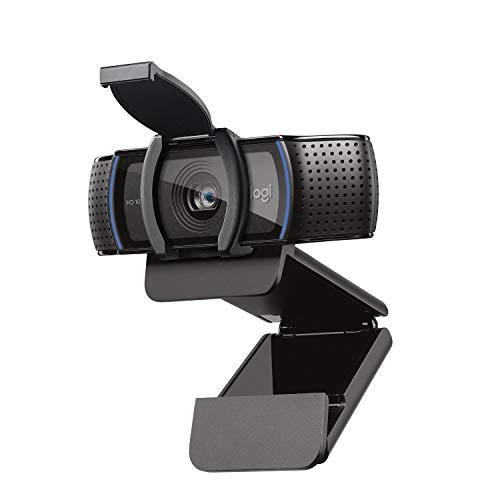 Best no-fuss classicLogitech C920s Best no-fuss classicLogitech C920s | 1080p at 30fps | — | 78 degrees | Check price |
 Best USB-C creator camLogitech StreamCam Best USB-C creator camLogitech StreamCam | — | — | — | Check price |
 Best AI trackingOBSBOT Tiny 2 Best AI trackingOBSBOT Tiny 2 | 4K at 30fps | — | — | Check price |
 Best auto-framingDell UltraSharp WB7022 Best auto-framingDell UltraSharp WB7022 | 4K (3840 × 2160) at 30fps | — | 90 degrees | Check price |
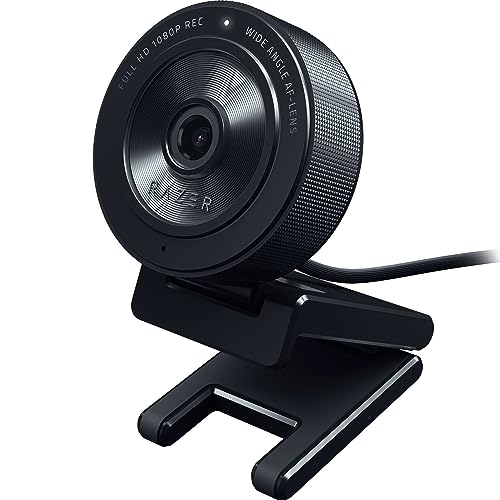 Best for beginner streamersRazer Kiyo X Best for beginner streamersRazer Kiyo X | 1080p at 30fps (720p at 60fps) | — | 82 degrees | Check price |
 Best cheap and simpleNexiGo N60 Best cheap and simpleNexiGo N60 | 1080p at 30fps | — | 110 degrees | Check price |
Best overall
Logitech Brio 4K
4K sharpness with Windows Hello.
Strengths
- True 4K sensor
- HDR and RightLight auto exposure
- Windows Hello facial recognition
- Dual noise-cancelling mics
Limitations
- 4K at 30fps only
- Pricey for a webcam
- Software is basic
What owners report
Commonly praised
- Sharp image with good HDR in well-lit rooms
- Windows Hello face login works well
- The adjustable field of view suits different setups
Common complaints
- Most video call apps compress the feed, so 4K rarely shows
- Logitech's software can be unreliable, especially on Macs
- Some owners find the image no better than cheaper webcams in low light
Recurring themes from owner reviews on retailers and forums, summarised by our editors. Updated October 2026.
| Max resolution | 4K (3840 × 2160) at 30fps |
|---|---|
| 1080p | Up to 60fps |
| FOV | 65/78/90 degrees adjustable |
| Extras | Windows Hello, HDR |
Best for: Professionals who want the sharpest image and Windows Hello login.
Skip if: You stream at 60fps or want manual camera controls.
Best for streaming
Elgato Facecam
Uncompressed 1080p60 for streamers.
Strengths
- Uncompressed 1080p60 video
- Prime lens with excellent optics
- Full manual control via Camera Hub
- No built-in mic means no tinny audio surprises
Limitations
- No microphone at all
- Fixed focus
- Needs good lighting to shine
What owners report
Commonly praised
- Crisp, uncompressed 1080p60 that looks natural
- Camera Hub gives detailed manual control over exposure and colour
- Settings save to the camera itself
Common complaints
- The fixed focus and lack of lens correction can look slightly distorted up close
- The plastic housing feels cheap for the price
- Some conferencing apps do not play well with it, and there is no microphone
Recurring themes from owner reviews on retailers and forums, summarised by our editors. Updated October 2026.
| Max resolution | 1080p at 60fps (uncompressed) |
|---|---|
| Optics | Prime lens, f/2.4 |
| Focus | Fixed |
| Microphone | None |
Best for: Streamers who want clean 60fps video with full manual control.
Skip if: You need a microphone or 4K.
Best in low light
Razer Kiyo Pro
The low-light webcam that keeps you clear after dark.
Strengths
- Adaptive light sensor adjusts to dim rooms automatically.
- Uncompressed 1080p60 over USB 3.0 looks noticeably cleaner.
- Wide-angle lens options cover solo or group framing.
- Razer Synapse software adds fine exposure control.
Limitations
- Needs USB 3.0 for full 1080p60; USB 2.0 caps quality.
- Autofocus can hunt in very low light.
- Pricier than basic 1080p webcams.
What owners report
Commonly praised
- Strong low-light performance thanks to its large sensor
- Smooth 1080p60 with HDR
- The wide-angle lens can be adjusted in software
Common complaints
- Many owners report the camera disconnecting or freezing mid-call
- Autofocus can hunt, and some find firmware updates did not help
- Support experiences are often poor
Recurring themes from owner reviews on retailers and forums, summarised by our editors. Updated October 2026.
| Resolution | 1080p60 uncompressed |
|---|---|
| Sensor | Adaptive light sensor |
| Connection | USB 3.0 |
| Field of view | Adjustable wide angle |
| Software | Razer Synapse control |
Best for: Streamers who broadcast in dim rooms without studio lights.
Skip if: You have good lighting; cheaper 1080p webcams suffice.
Best budget
Anker PowerConf C200
2K clarity on a budget.
Strengths
- 2K resolution at a budget price
- Decent low-light performance
- Dual mics with AI noise reduction
Limitations
- 30fps only
- Fixed, narrow feature set
- Build is plasticky
| Max resolution | 2K (2560 × 1440) at 30fps |
|---|---|
| FOV | 95 degrees |
| Microphone | Dual, AI noise reduction |
Best for: Remote workers who want a visible step up from a laptop camera for little money.
Skip if: You need 60fps or advanced controls.
Best no-fuss classic
Logitech C920s
The longtime 1080p workhorse, now with a shutter.
Strengths
- Proven 1080p image quality
- Autofocus keeps you sharp
- Privacy shutter built in
- Works everywhere with zero setup
Limitations
- 30fps only
- Fixed 78-degree field of view
- Low-light performance is modest
| Max resolution | 1080p at 30fps |
|---|---|
| Focus | Autofocus |
| FOV | 78 degrees |
| Microphone | Dual stereo mics |
| Privacy | Built-in shutter |
Best for: Anyone who wants dependable 1080p calls without research or setup fuss.
Skip if: You want 60fps, 4K, or advanced image tuning.
Best USB-C creator cam
Logitech StreamCam
1080p60 with autofocus that tracks your face.
Strengths
- 1080p60 capture with fast, accurate autofocus
- AI auto-framing keeps you centered as you move
- Dual front-facing microphones for backup audio
Limitations
- 1080p max; no 4K option
- USB-C only, with a fixed non-detachable cable
- Auto-framing can crop tighter than some creators like
What owners report
Commonly praised
- Sharp 1080p at 60fps that looks smooth on stream
- The mount rotates for vertical video
- It is usually plug and play over USB-C
Common complaints
- Autofocus can hunt or react slowly
- Colours and white balance can look off under mixed lighting
- Some owners hit driver or recognition problems, and Mac software support is weaker
Recurring themes from owner reviews on retailers and forums, summarised by our editors. Updated October 2026.
| Resolution | 1080p at 60 fps |
|---|---|
| Focus | Autofocus with AI auto-framing |
| Field of view | 78 degrees |
| Connection | USB-C (fixed 5 ft cable) |
| Mounting | Monitor mount included, tripod thread |
Best for: Streamers who want a set-and-forget face camera with reliable autofocus and 60 fps motion.
Skip if: You want 4K resolution or already own a mirrorless camera with a capture card.
Best AI tracking
OBSBOT Tiny 2
4K gimbal webcam that follows you around.
Strengths
- True 4K sensor
- 2-axis gimbal with AI subject tracking
- Gesture control for zoom and tracking
- Large 1/1.5-inch sensor for the class
Limitations
- Premium price
- Tracking can be distracting in shared spaces
- Needs the desktop app for full features
| Max resolution | 4K at 30fps |
|---|---|
| Sensor | 1/1.5-inch CMOS |
| Tracking | 2-axis gimbal, AI auto-tracking |
| Control | Gesture control |
| Microphone | Dual omnidirectional mics |
Best for: Presenters and teachers who move while on camera and want the lens to track them.
Skip if: You sit still and want a simpler, cheaper camera.
Best auto-framing
Dell UltraSharp WB7022
4K with a large Sony STARVIS sensor.
Strengths
- 4K from a large Sony STARVIS sensor
- AI auto-framing
- Windows Hello support
- Excellent low-light performance for a webcam
Limitations
- 4K at 30fps only
- Premium price
- Bulky on thin laptop lids
| Max resolution | 4K (3840 × 2160) at 30fps |
|---|---|
| Sensor | Sony STARVIS CMOS |
| FOV | 90 degrees |
| Extras | AI auto-framing, Windows Hello |
| Microphone | Noise-reduction mics |
Best for: Professionals who want the best 4K image quality Dell makes, with AI framing.
Skip if: You want 60fps or a lower price.
Best for beginner streamers
Razer Kiyo X
Streamer-friendly 1080p at an entry price.
Strengths
- Affordable entry to streamer webcams
- Auto-focus with decent sharpness
- Works with Razer Synapse tuning
- Compact and simple to mount
Limitations
- 1080p at 30fps; 60fps only at 720p
- No built-in light like the original Kiyo
- Low-light performance is average
| Max resolution | 1080p at 30fps (720p at 60fps) |
|---|---|
| Focus | Autofocus |
| FOV | 82 degrees |
| Microphone | Built-in mic |
| Software | Razer Synapse support |
Best for: New streamers and gamers who want Razer's software tuning for little money.
Skip if: You need 1080p60 or a built-in ring light.
Best cheap and simple
NexiGo N60
Basic 1080p that just works.
Strengths
- Very affordable 1080p
- Plug-and-play with no drivers
- Privacy cover included
- Built-in noise-reduction mic
Limitations
- Fixed focus
- 30fps only
- Image softens in dim light
| Max resolution | 1080p at 30fps |
|---|---|
| Focus | Fixed |
| FOV | 110 degrees |
| Microphone | Noise-reduction mic |
| Privacy | Clip-on cover included |
Best for: Buyers who want the cheapest credible 1080p upgrade over a laptop camera.
Skip if: You want 60fps, autofocus, or advanced features.
How we chose
Resolution truth
Sensor resolution and output resolution are different things. A camera can upscale a smaller sensor to 4K output, so look for the actual sensor size and whether the stated resolution is native or interpolated.
Frame rate
30fps is fine for meetings. 60fps matters for streaming and recording, where motion looks noticeably smoother.
Field of view
Around 78 to 90 degrees suits solo callers. Wider angles fit groups but can distort faces at the edges, so adjustable FOV is a genuine advantage.
Low-light handling
Larger sensors collect more light. If your room is dim, prioritize sensor size and light-adaptive features over raw resolution numbers.
Questions, answered
Is a 4K webcam worth it for video calls?
For professional presence, yes: 4K gives sharper detail and lets you crop or digitally zoom without the image falling apart. Most conferencing apps compress the stream anyway, so the bigger win is the better sensor and optics that usually accompany 4K models.
Do I need an external microphone with a webcam?
Webcam mics have improved and are fine for casual calls, but a dedicated USB mic or headset sounds markedly better. If you present or record regularly, treat the webcam mic as a backup.
What field of view should I choose?
For a solo caller at a desk, 78 to 90 degrees frames head and shoulders naturally. Wider than 90 degrees suits small groups but stretches faces near the edges. Adjustable FOV, as on the Brio, covers both cases.
Why does my webcam look bad in low light?
Small sensors need abundant light. Adding a simple desk lamp or ring light in front of you improves image quality more than upgrading the camera, though low-light specialists like the Razer Kiyo Pro narrow the gap.