Ranked on wireless usefulness: connection choice, multi-device switching, battery practicality, and whether the ergonomic shape survives the wireless compromise.
The Best Wireless Ergonomic Keyboards (2026)
Wireless ergonomic keyboards compared: Bluetooth and receiver options, battery behaviour, and multi-device switching, led by the Logitech Ergo K860.
Our top picks at a glance
Best wireless overall
 Logitech Ergo K860
Office workers and writers who want a proven ergonomic shape with a full-size layout, quiet keys, and wireless freedom.
Best compact wireless
 Logitech Wave Keys
Buyers trying ergonomics for the first time, smaller desks, and anyone who wants wireless comfort without relearning how to type.
Best wireless mechanical
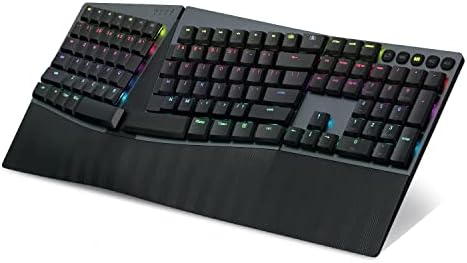 Perixx PERIBOARD-835BL
Mechanical fans who refuse to give up wireless, and multi-device typists who switch between a desktop, laptop, and tablet.
Buy the Logitech Ergo K860 if you want the best wireless split without compromise. Buy the Logitech Wave Keys for a smaller desk, the Perixx PERIBOARD-835BL for wireless mechanical typing, and the ProtoArc EK01 Plus if backlighting matters and the budget is tight. Note that the ProtoArc charges over USB-C but cannot type over a cable, so keep it charged.
The picks, ranked
| Pick | Layout | Keys | Wrist rest | Buy |
|---|---|---|---|---|
| Best wireless overallLogitech Ergo K860 | Full-size with curved split keyframe | PerfectStroke scissor keys | Built-in pillowed rest with stain-resistant fabric | Check price |
| Best compact wirelessLogitech Wave Keys | Compact wave keyframe, no number pad | Quiet membrane keys | Cushioned palm rest with memory foam | Check price |
| Best wireless mechanicalPerixx PERIBOARD-835BL | Full-size split keyframe with number pad | - | - | Check price |
 Best backlit wirelessProtoArc EK01 Plus | Full-size curved split frame | Scissor-style membrane keys | - | Check price |
 Best compact wireless valuePerixx PERIBOARD-613B | Compact split keyframe, no number pad | Membrane switches with long travel | Wide integrated palm rest | Check price |
Best wireless overall
Logitech Ergo K860
The default ergonomic keyboard: a curved split frame, a pillowed wrist rest, and a typing feel that needs no adjustment period.
Strengths
- The curved split keyframe angles each half of the board outward, so hands, wrists, and forearms sit straighter than on a flat keyboard without any learning curve.
- The pillowed wrist rest is built into the board and covered in a stain-resistant fabric, giving continuous support that a loose rest never quite matches.
- PerfectStroke scissor keys feel smooth and quiet, with scooped keycaps that guide fingertips, making long documents and long email sessions easy on the fingers.
Limitations
- The two halves are fixed in one frame, so you cannot widen the split, change the tent angle beyond the built-in tilt legs, or park a mouse between the halves.
- The board is wide and deep, so smaller desks and keyboard trays can struggle to fit it alongside a mouse and notebook.
- It is a membrane board, so typists who love the crisp feedback of mechanical switches will find the feel polite rather than exciting.
What owners report
Commonly praised
- The curved split layout lets long documents flow without the usual wrist twist at the end of the day
- The pillowed rest feels supportive from the first morning and stays comfortable through afternoon typing
- Quiet keys make it easy to share a room without disturbing anyone nearby
Common complaints
- The single fixed frame leaves no way to widen the split for broader shoulders
- Its wide footprint crowds smaller desks once a mouse and notebook join the setup
- The membrane feel strikes some typists as too soft after years on clickier boards
Recurring themes from owner reviews on retailers and forums, summarised by our editors. Updated October 2026.
| Layout | Full-size with curved split keyframe |
|---|---|
| Keys | PerfectStroke scissor keys |
| Wrist rest | Built-in pillowed rest with stain-resistant fabric |
| Connectivity | Bluetooth and Unifying USB receiver, Easy-Switch across devices |
| Tilt | Adjustable palm lift legs for seated or standing use |
Best for: Office workers and writers who want a proven ergonomic shape with a full-size layout, quiet keys, and wireless freedom.
Skip if: You want two fully separate halves, mechanical switches, or a compact board, since the K860 is one fixed, full-size piece.
Best compact wireless
Logitech Wave Keys
The gentle introduction: a familiar wave curve in a compact wireless board, for buyers who find a full split too strange.
Strengths
- The wave-shaped keyframe curves gently to meet the natural arc of the hands, giving real ergonomic benefit with zero adjustment period.
- The compact layout pulls the mouse closer to the body, which eases shoulder reach on smaller desks and in laptop-first setups.
- A cushioned palm rest with memory foam supports the wrists all day, and Bluetooth plus Logi Bolt wireless cover laptops, tablets, and desktops.
Limitations
- There is no number pad, so spreadsheet-heavy users will need a separate pad or a different board.
- The wave curve is milder than a true split, so typists with established wrist trouble may outgrow it and want the K860 or a Freestyle2 later.
- It is a membrane board with a soft, quiet feel, which will not satisfy typists who prefer crisp mechanical feedback.
What owners report
Commonly praised
- The gentle wave shape feels familiar at once, so there is no awkward retraining week to get through
- Compact size pulls the mouse inward and eases shoulder reach on cramped desks
- Soft keys and a plush rest suit quiet shared rooms and late-evening work alike
Common complaints
- Missing number pad frustrates anyone who lives in spreadsheets or data entry
- Mild curve may feel too subtle for typists hoping for a dramatic posture change
- Membrane keys lack the crisp snap that mechanical fans look for in a daily board
Recurring themes from owner reviews on retailers and forums, summarised by our editors. Updated October 2026.
| Layout | Compact wave keyframe, no number pad |
|---|---|
| Keys | Quiet membrane keys |
| Wrist rest | Cushioned palm rest with memory foam |
| Connectivity | Bluetooth and Logi Bolt receiver, Easy-Switch across devices |
| Software | Customisable through the Logi Options+ app |
Best for: Buyers trying ergonomics for the first time, smaller desks, and anyone who wants wireless comfort without relearning how to type.
Skip if: You need a truly split board, a number pad, or mechanical switches, since Wave Keys is a one-piece wave board.
Best wireless mechanical
Perixx PERIBOARD-835BL
The wireless mechanical split: clicky blue switches, RGB backlighting, and four-device switching in one full-size frame.
Strengths
- Four-device connection covers wired USB, 2.4 GHz wireless, and two Bluetooth pairings, so one board serves a whole desk of devices.
- Low-profile blue clicky switches give loud, crisp feedback with fast reset, which fast typists and coders tend to love.
- RGB backlighting with preset modes and programmable keys makes the board easy to personalise, and the rechargeable battery charges over USB-C.
Limitations
- The clicky switches are genuinely noisy, which can irritate colleagues, housemates, and anyone on a call nearby.
- The full-size split frame is heavy and wide, so it dominates smaller desks and is not a travel board by any stretch.
- RGB lighting and software settings add fiddling that plain-ergonomics buyers may never touch, and the software is needed for the best features.
What owners report
Commonly praised
- Switching between four connected devices from one board simplifies a crowded multi-machine desk
- Clicky switches deliver crisp audible feedback that fast typists find motivating
- Custom lighting and macros let the board reflect personal workflow and taste
Common complaints
- Loud clicks carry across quiet rooms and can irritate colleagues on shared calls
- Heavy full-size frame dominates smaller desks and resists travel entirely
- Software setup adds a layer of fiddling that simple plug-and-play buyers may resent
Recurring themes from owner reviews on retailers and forums, summarised by our editors. Updated October 2026.
| Layout | Full-size split keyframe with number pad |
|---|---|
| Switches | Low-profile blue clicky mechanical switches |
| Connectivity | Wired USB, 2.4 GHz wireless, and two Bluetooth pairings |
| Lighting | Customisable RGB backlighting with preset modes |
| Extras | Programmable keys and macros, USB-C rechargeable battery |
Best for: Mechanical fans who refuse to give up wireless, and multi-device typists who switch between a desktop, laptop, and tablet.
Skip if: You share a quiet room, since the blue clicky switches are loud, or you want a compact board.
Best backlit wireless
ProtoArc EK01 Plus
The backlit budget split: a curved split frame, a cushioned wrist rest, and soft white backlighting for evening typists.
Strengths
- Soft white LED backlighting with adjustable brightness makes evening typing comfortable, and it switches off entirely to save battery.
- The curved split frame and cushioned wrist rest give a genuinely ergonomic shape at a budget price, with adjustable tilt feet for different postures.
- Three-device switching across Bluetooth and 2.4 GHz wireless covers a laptop, tablet, and desktop from one board, with USB-C charging.
Limitations
- The USB-C cable charges only and cannot carry a wired connection, so a dead battery means waiting, not plugging in to type.
- Backlighting drains the battery quickly at high brightness, so heavy backlight users will charge far more often than the headline battery life suggests.
- The keys are not programmable, and in 2.4 GHz mode some function keys behave differently on Mac systems, so Mac users should use Bluetooth.
What owners report
Commonly praised
- Adjustable backlight makes evening typing pleasant without harsh glare or eye strain
- Curved split frame and cushioned rest bring real ergonomic shape to a modest budget
- Multi-device wireless switching covers laptop, tablet, and desktop from a single board
Common complaints
- Charging-only USB cable leaves the board unusable while its battery recovers
- Bright backlight settings drain power noticeably faster than unlit typing
- Fixed key layout offers no remapping for users who customise every shortcut
Recurring themes from owner reviews on retailers and forums, summarised by our editors. Updated October 2026.
| Layout | Full-size curved split frame |
|---|---|
| Keys | Scissor-style membrane keys |
| Lighting | White LED backlighting with adjustable brightness |
| Connectivity | Bluetooth and 2.4 GHz wireless, three-device switching |
| Extras | Cushioned wrist rest, adjustable tilt feet, USB-C rechargeable |
Best for: Evening and dim-room typists on a budget who want a full-size split with backlighting and multi-device wireless.
Skip if: You want mechanical switches, a wired connection, or programmable keys, since the EK01 Plus is membrane, wireless-only, and fixed in layout.
Best compact wireless value
Perixx PERIBOARD-613B
The compact wireless split: a smaller split frame with dual wireless modes and a wide palm rest, for tighter desks.
Strengths
- The compact split frame keeps the ergonomic curve while freeing desk space, and the wide integrated palm rest supports the whole wrist.
- Dual wireless modes cover Bluetooth and 2.4 GHz, with the nano receiver stored in a compartment underneath the board.
- Long key travel and a tactile membrane feel give satisfying, accurate typing that avoids the mushiness of cheaper compact boards.
Limitations
- There is no number pad, so number-heavy work needs a separate pad or a full-size board.
- The membrane keys, while good, will not satisfy mechanical fans, and there is no switch choice on this model.
- Windows-first design means Mac users should check key labelling and function-key behaviour before ordering.
What owners report
Commonly praised
- Compact split shape fits tight desks while still giving wrists a properly angled home
- Dual wireless modes move smoothly between a desktop and a laptop without cable swapping
- Wide palm rest supports the whole wrist and reduces the urge to hover awkwardly
Common complaints
- Absence of a number pad forces number-heavy users toward a separate accessory
- Membrane keys feel less exciting than mechanical alternatives for enthusiastic typists
- Mac labelling quirks mean Apple users should check key behaviour before committing
Recurring themes from owner reviews on retailers and forums, summarised by our editors. Updated October 2026.
| Layout | Compact split keyframe, no number pad |
|---|---|
| Keys | Membrane switches with long travel |
| Wrist rest | Wide integrated palm rest |
| Connectivity | Bluetooth and 2.4 GHz wireless with stored nano receiver |
| Compatibility | Windows and Mac OS |
Best for: Smaller desks, smaller hands, and wireless buyers who want a split shape without a full-size footprint.
Skip if: You need a number pad, mechanical switches, or backlighting, since the 613B is compact, membrane, and unlit.
Questions, answered
Is Bluetooth or a USB receiver better for a wireless keyboard?
A receiver usually gives a more stable connection with less fuss, while Bluetooth suits laptops and tablets without a spare USB port. Boards with both, like the K860 and Wave Keys, let you choose per device, which is the most flexible setup.
Do wireless ergonomic keyboards work with tablets and phones?
Most Bluetooth boards do, including the Wave Keys, K860, and ProtoArc EK01 Plus. Receiver-only boards like the Arteck HW315 need a USB port, so they suit desktops and laptops rather than tablets.
What happens when a rechargeable wireless keyboard runs flat?
It depends on the board. Some boards keep typing over USB while charging, but the ProtoArc EK01 Plus charges only, so it must be recharged before use. Battery-powered boards like the K860 simply need fresh cells, so check the charging behaviour before buying.