In-depth review
Samsung T9 Portable SSD Review (2026)
In-depth research review of the Samsung T9: 2,000 MB/s speeds, thermal behavior, port requirements, and who should buy it.
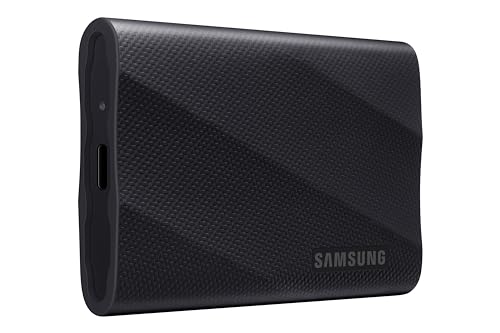
Samsung T9 Portable SSD
2,000 MB/s for editors with USB 3.2 Gen 2x2.
Our verdict
The T9 is great for video editors and creators whose machines have USB 3.2 Gen 2x2 ports: 2,000 MB/s sustained with Dynamic Thermal Guard keeping long exports fast. But buyers without a Gen 2x2 port should look at the Samsung T7 instead, because on 10 Gbps ports the T9 falls back to the same speeds as the cheaper T7, and paying double the throughput you cannot use is wasted money.
What we like
- Up to 2,000 MB/s read and write, double the T7
- Dynamic Thermal Guard prevents heat throttling
- Works with phones and tablets over USB-C
What to watch out for
- Needs USB 3.2 Gen 2x2 (20 Gbps) for full speed
- Falls back to slower speeds on older ports
- Premium price per gigabyte
Who it is for
Video editors, 3D artists, and creators with USB 3.2 Gen 2x2 (20 Gbps) ports who move huge files daily.
The 2,000 MB/s promise and its condition
Samsung rates the T9 at up to 2,000 MB/s sequential read and write, double the T7. Published benchmarks confirm those numbers, but only on USB 3.2 Gen 2x2 (20 Gbps) ports. On the 10 Gbps Gen 2 ports found on most laptops, the T9 negotiates down to roughly 1,000 MB/s, identical to the T7. Check your computer's port specifications before buying; this single detail decides whether the T9 is worth it.
Thermals under sustained load
Dynamic Thermal Guard is the T9's underrated advantage: it manages heat during long writes so speeds stay consistent through hour-long exports. Published testing shows it sustains performance better than the SanDisk Extreme Portable under continuous load, which is exactly the video-editing scenario the T9 targets.
Build and compatibility
The rubberized design is grippier than the T7's smooth aluminum and survives desk life well, though it carries no IP rating. It works over USB-C with phones, tablets, and cameras, and comes in 1 TB, 2 TB, and 4 TB capacities. Like the T7 it includes Samsung's portable SSD software for password protection, though encryption is software-based rather than the T7's hardware AES.
How it stacks up
Against the Samsung T7: on Gen 2x2 ports the T9 is twice as fast; on Gen 2 ports they are equals, and the T7 is cheaper and has hardware encryption the T9 lacks. The buying rule is simple: Gen 2x2 port means T9, anything else means T7. Against the Crucial X9 Pro: the Crucial is the budget alternative at 1,050 MB/s with IP55, roughly half the T9's speed for notably less money; video editors who cannot justify the T9's premium but want ruggedness land here.
What owners report
Commonly praised
- Very fast transfers on USB 3.2 Gen 2x2
- Handles heat well under long writes
- Durable rubberized shell
Common complaints
- Top speed needs a Gen 2x2 port, which few laptops have
- Pricier than the T7
- Software is basic
Recurring themes from owner reviews on retailers and forums, summarised by our editors. Updated October 2026.
Key specifications
- Sequential read
- Up to 2,000 MB/s
- Sequential write
- Up to 2,000 MB/s
- Interface
- USB 3.2 Gen 2x2 (20 Gbps)
- Thermal
- Dynamic Thermal Guard
- Capacities
- 1 TB, 2 TB, 4 TB
Also consider

Samsung T7 Portable SSD
The 1,050 MB/s benchmark with hardware encryption.
- Sequential read: Up to 1,050 MB/s
- Sequential write: Up to 1,000 MB/s

SanDisk Extreme Portable SSD
IP55 ruggedness with a carabiner loop for the field.
- Sequential read: Up to 1,050 MB/s
- Sequential write: Up to 1,000 MB/s
Research-based assessment. ThePickLedger has not hands-on tested this product; this evaluation synthesizes manufacturer specifications, retailer documentation, and published expert reviews.
Questions, answered
How do I know if my computer has USB 3.2 Gen 2x2?
Check the manufacturer's port specifications: look for 20 Gbps, USB 3.2 Gen 2x2, or USB4. Many laptops top out at 10 Gbps Gen 2 or Thunderbolt, neither of which unlocks the T9's full 2,000 MB/s.
Is the T9 worth it for photo editing?
No. Photo workflows never saturate 1,050 MB/s, so the T9's extra speed goes unused. The T7 or Crucial X9 Pro is the smarter buy for stills.
Does the T9 get hot?
It gets warm under sustained writes like all fast SSDs, but Dynamic Thermal Guard prevents the sharp throttling that plagues lesser drives. Warm to the touch is normal; sudden speed drops are not.