Ranked on budget honesty: purchase cost plus running cost, functions included, and a clear statement of what each cheap printer gives up.
The Best Budget Home Printers (2026)
Budget home printers compared honestly: which cheap printers still print well, and where a low outlay genuinely costs more later.
Our top picks at a glance
Best cheapest printer
 HP DeskJet 2755e Wireless Colour Inkjet Printer
Light printers, students, and anyone testing whether a home printer earns its keep.
Best budget all-in-one
 Canon PIXMA TR4720 All-in-One Wireless Printer
Budget buyers who still need fax and a feeder, and who print in modest volume.
Best budget laser
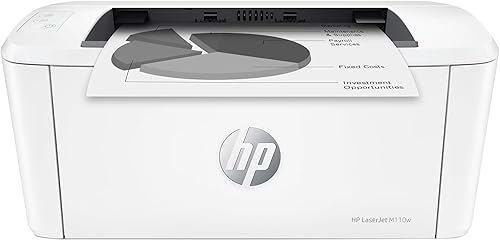 HP LaserJet M110w Wireless Monochrome Printer
Small rooms and students who print black documents and need a printer that almost disappears.
The HP DeskJet 2755e is the budget pick for light use, and the Canon PIXMA TR4720 is the budget all-in-one for households that need fax and a feeder. Budget buyers who print steadily should stretch to the Epson EcoTank ET-2800, since tank ink makes it the cheapest printer to own over a few years despite the higher purchase cost.
The picks, ranked
| Pick | Functions | Print technology | Cartridges | Buy |
|---|---|---|---|---|
| Best cheapest printerHP DeskJet 2755e Wireless Colour Inkjet Printer | Print, scan, copy | Colour inkjet | HP 67 series | Check price |
| Best budget all-in-oneCanon PIXMA TR4720 All-in-One Wireless Printer | Print, scan, copy, fax | Colour inkjet | Canon PG-275 black, CL-276 colour | Check price |
| Best budget laserHP LaserJet M110w Wireless Monochrome Printer | Print only | Monochrome laser | - | Check price |
 Best budget laser step upBrother HL-L2460DW Wireless Compact Monochrome Laser Printer | Print only | Monochrome laser | - | Check price |
 Best budget long-term buyEpson EcoTank ET-2800 All-in-One Supertank Printer | Print, scan, copy | - | - | Check price |
Best cheapest printer
HP DeskJet 2755e Wireless Colour Inkjet Printer
The cheapest way in: a simple colour all-in-one for light printing, homework, and the odd photo.
Strengths
- The lowest purchase cost here makes it a low-risk first printer for a household that prints occasionally.
- Simple setup and wireless printing from a phone mean it works for users who just want to print and move on.
- Its small size fits a bedroom desk or a shelf without rearranging the room.
Limitations
- No automatic duplex and no document feeder, so two-sided and multi-page jobs are manual work.
- Cartridge capacity is small, so frequent printers replace cartridges often and pay more per page.
- Print speeds are slow, and the paper tray suits light use rather than batch printing.
What owners report
Commonly praised
- The low price makes a first printer an easy decision
- Simple phone printing covers homework and forms with no fuss
- The small size fits a bedroom desk without rearranging anything
Common complaints
- Two-sided printing means flipping pages by hand
- Cartridges run out quickly for anyone printing regularly
- The tray suits light use and struggles with batch jobs
Recurring themes from owner reviews on retailers and forums, summarised by our editors. Updated October 2026.
| Functions | Print, scan, copy |
|---|---|
| Print technology | Colour inkjet |
| Cartridges | HP 67 series |
| Connectivity | Wi-Fi, USB |
| Duplex | Manual two-sided printing |
Best for: Light printers, students, and anyone testing whether a home printer earns its keep.
Skip if: You print often, need duplex, or want a feeder for multi-page scanning.
Best budget all-in-one
Canon PIXMA TR4720 All-in-One Wireless Printer
The budget all-in-one that still does fax: print, scan, copy, and fax for the price of a basic printer.
Strengths
- Fax plus a document feeder at a budget position is rare, and it covers paperwork that cheaper printers simply cannot handle.
- Canon colour output suits photos and school projects better than most printers at this level.
- Wireless and mobile printing work from phones without a computer in the loop.
Limitations
- Cartridge costs add up for heavy users, and the small cartridges need replacing more often than tank ink.
- Print speeds are slow, so long documents and large colour jobs test patience.
- The paper tray is modest, and the control panel is basic compared with touchscreen models.
What owners report
Commonly praised
- Fax at this price feels like a genuine bonus for paperwork households
- Colour output suits photos and school projects nicely
- The feeder saves time on multi-page copying jobs
Common complaints
- Small cartridges need replacing more often than owners would like
- Print speeds feel slow on longer documents
- The basic control panel offers little guidance for new users
Recurring themes from owner reviews on retailers and forums, summarised by our editors. Updated October 2026.
| Functions | Print, scan, copy, fax |
|---|---|
| Print technology | Colour inkjet |
| Document feeder | 20 pages, automatic |
| Cartridges | Canon PG-275 black, CL-276 colour |
| Connectivity | Wi-Fi, USB |
Best for: Budget buyers who still need fax and a feeder, and who print in modest volume.
Skip if: You print heavily, where cartridges get expensive, or you want fast colour output.
Best budget laser
HP LaserJet M110w Wireless Monochrome Printer
The smallest laser here: a tiny black-only printer for desks, shelves, and rooms where space is the whole problem.
Strengths
- Its tiny footprint fits shelves and small desks where most printers cannot go, which is its whole reason to exist.
- Laser output gives crisp black text that does not smudge, and toner stays ready after long idle periods.
- Setup through the HP Smart app is quick, and wireless printing from a phone covers most home needs.
Limitations
- It prints only, with no scanner, so copying and scanning need a phone camera or another device.
- The paper tray is small, so frequent printers refill it often.
- Manual duplex means two-sided documents need a second pass through the printer by hand.
What owners report
Commonly praised
- The tiny body tucks onto a shelf where no other printer would fit
- Black text comes out crisp and clean every time
- Phone setup finishes quickly with little fuss
Common complaints
- No scanning or copying forces owners to improvise with a phone camera
- The small tray empties fast during batch printing
- Two-sided documents need manual flipping through a second pass
Recurring themes from owner reviews on retailers and forums, summarised by our editors. Updated October 2026.
| Functions | Print only |
|---|---|
| Print technology | Monochrome laser |
| Connectivity | Wi-Fi, USB |
| Duplex | Manual two-sided printing |
| Design | Compact, smallest in its laser class |
Best for: Small rooms and students who print black documents and need a printer that almost disappears.
Skip if: You need colour, scanning, or copying, or you print long documents daily where a bigger tray helps.
Best budget laser step up
Brother HL-L2460DW Wireless Compact Monochrome Laser Printer
The mono laser sweet spot: fast black text, automatic duplex, and a compact body that does not waste desk space.
Strengths
- Up to 36 pages per minute in black makes short work of long documents, far faster than any inkjet here.
- Automatic duplex printing saves paper on two-sided documents without manual page flipping.
- Toner does not dry out or clog the way inkjet ink can, so a laser left idle for weeks prints cleanly on return.
Limitations
- It prints black only, so colour documents and photos need another machine or a print shop.
- There is no scanner or copier, so a separate scanning route is needed for paperwork.
- Toner cartridges cost more up front than ink cartridges, even though each one lasts for many pages.
What owners report
Commonly praised
- Long text documents finish in moments rather than minutes
- Two-sided printing saves paper without any manual flipping
- Toner stays ready even after weeks of the printer sitting idle
Common complaints
- Black-only output forces colour jobs elsewhere
- No scanner means paperwork still needs another route
- Replacement toner costs more upfront than a set of ink cartridges
Recurring themes from owner reviews on retailers and forums, summarised by our editors. Updated October 2026.
| Functions | Print only |
|---|---|
| Print technology | Monochrome laser |
| Print speed | Up to 36 ppm black |
| Duplex | Automatic two-sided printing |
| Toner | Brother TN-830 series |
Best for: Households that print mostly black text, forms, and homework and want speed plus low fuss.
Skip if: You need colour printing, scanning, or copying, none of which a print-only laser provides.
Best budget long-term buy
Epson EcoTank ET-2800 All-in-One Supertank Printer
The entry tank printer: cartridge-free printing for a household that has had enough of running out of ink.
Strengths
- Bottled ink included in the box covers a large volume of printing before any refill is needed, which changes how a family thinks about printing.
- Wireless printing from phones and tablets is straightforward, and the control panel stays simple enough for occasional users.
- Running costs stay low for years, since a bottle of ink costs far less per page than a set of cartridges.
Limitations
- There is no automatic document feeder, so multi-page scanning and copying means lifting the lid for each page.
- Print speeds are modest, so long documents take their time compared with a laser or a faster OfficeJet.
- The input tray holds 100 sheets, so heavy users refill paper more often than on office-style machines.
What owners report
Commonly praised
- Ink lasts so long that families stop rationing school printing
- Phone printing works smoothly for homework and everyday documents
- The simple controls suit occasional users who dislike fiddly menus
Common complaints
- Scanning several pages means lifting the lid for each one
- Long documents print at an unhurried pace
- The paper tray needs refilling sooner than on larger office machines
Recurring themes from owner reviews on retailers and forums, summarised by our editors. Updated October 2026.
| Functions | Print, scan, copy |
|---|---|
| Ink system | EcoTank refillable tanks, 522 ink bottles |
| Input tray | 100 sheets |
| Connectivity | Wi-Fi, Wi-Fi Direct, USB |
| Duplex | Manual two-sided printing |
Best for: Families that print steadily through the school year and want ink costs to stop being a recurring worry.
Skip if: You need a document feeder, fax, or Ethernet, all of which the ET-4850 adds.
Questions, answered
What do budget printers give up?
Usually speed, duplex, feeders, and tray size, in that order, plus cheaper printers use smaller cartridges. Check those four things before purchase cost, since a missing feeder or duplex setting costs time on every multi-page job.
Is a very cheap printer a false economy?
It can be, if cartridge costs quickly pass the purchase cost. A cheap printer that prints daily on small cartridges often costs more in a year than a tank printer or a laser, so match the printer to your real print volume, not just the sticker cost.
Should I buy a used printer instead?
Rarely, for inkjets, since dried ink, worn feed rollers, and missing setup cartridges are hard to judge. A used laser from a known seller is a safer bet, but new budget printers with a warranty are usually the better value for most households.