Best of
The Best Home Printers (2026)
The best home printers of 2026: HP OfficeJet Pro 9015e, Epson EcoTank ET-4850, Epson EcoTank ET-2800, Canon MegaTank G3270, Brother HL-L2460DW, and more, compared on running costs and everyday reliability.
Our top picks at a glance
Best overall
 HP OfficeJet Pro 9015e All-in-One Printer
Working households that print, scan, and copy regularly and want one machine to cover the lot.
Best for a busy home office
 Epson EcoTank ET-4850 All-in-One Supertank Printer
Households and home offices that print a lot and want fax, a feeder, and low running costs in one machine.
Best tank printer for light use
 Epson EcoTank ET-2800 All-in-One Supertank Printer
Families that print steadily through the school year and want ink costs to stop being a recurring worry.
For most households, the HP OfficeJet Pro 9015e is the pick: it prints, scans, copies, and faxes well, with two-sided handling that cheaper machines lack. Heavy printers should buy a tank instead, the Epson EcoTank ET-2800 for light use or the ET-4850 for a busy home office. Households that print mostly black text should buy the Brother HL-L2460DW laser, and light printers on a tight budget should buy the HP DeskJet 2755e.
The picks, ranked
Best overall
HP OfficeJet Pro 9015e All-in-One Printer
The home-office all-rounder: fast colour printing, automatic two-sided scanning, and a paper capacity that suits a working household.
Strengths
- Automatic two-sided printing and scanning, plus a document feeder, make multi-page jobs far less fiddly than on basic all-in-ones.
- Print speeds suit a busy household, so a stack of school forms or work documents does not become a long wait by the printer.
- Wireless printing from phones and laptops, plus a touchscreen for copying and scanning without a computer, covers the ways families actually print.
Limitations
- It uses cartridges rather than tanks, so heavy printers will feel the running cost more than on an EcoTank or MegaTank rival.
- The footprint is larger than a compact DeskJet, so it needs a proper desk or shelf rather than a narrow windowsill.
- Full use of the HP Smart app features and ink subscription options needs an HP account, which some buyers would rather skip.
What owners report
Commonly praised
- Two-sided scanning turns a stack of forms into a single quick job
- The roomy paper tray means long documents finish without a mid-job refill
- Copying from the touchscreen without switching on a computer feels genuinely convenient
Common complaints
- Cartridge costs sting for households that print in high volume
- The body is too large for a narrow shelf or a cramped corner desk
- Setting up the app features takes longer than owners expect on day one
Recurring themes from owner reviews on retailers and forums, summarised by our editors. Updated October 2026.
| Functions | Print, scan, copy, fax |
|---|---|
| Print technology | Colour inkjet |
| Duplex | Automatic two-sided printing and scanning |
| Input tray | 250 sheets |
| Connectivity | Wi-Fi, Ethernet, USB |
Best for: Working households that print, scan, and copy regularly and want one machine to cover the lot.
Skip if: You print only a few pages a month, or you want the lowest possible cost per page over years of heavy use.
Best for a busy home office
Epson EcoTank ET-4850 All-in-One Supertank Printer
The tank printer for a busy home office: fax, feeder, Ethernet, and bottled ink that keeps heavy printing affordable.
Strengths
- Refillable tanks with bottled ink cut the cost of each page well below cartridge printing, which matters most for heavy users.
- A 30-sheet automatic document feeder and fax make it a genuine office machine, not just a printer with a scanner lid.
- Ethernet alongside Wi-Fi gives a wired option for a desk setup where wireless can be flaky.
Limitations
- The purchase cost is well above a basic inkjet, so light printers pay for capacity they may never use.
- Tank printers reward regular use, and a machine left idle for months needs more care before printing well again.
- Photo printing is good for a tank all-in-one but not a match for a dedicated photo printer with more ink colours.
What owners report
Commonly praised
- Bottled ink ends the worry about cartridges running out mid-project
- The feeder handles multi-page paperwork without constant lid lifting
- A wired network option keeps a fixed desk setup steady and dependable
Common complaints
- The upfront cost feels steep for anyone who prints only occasionally
- First-time tank setup and ink charging demand patience
- Photo output pleases for everyday prints but does not match a dedicated photo machine
Recurring themes from owner reviews on retailers and forums, summarised by our editors. Updated October 2026.
| Functions | Print, scan, copy, fax |
|---|---|
| Ink system | EcoTank refillable tanks, 502 ink bottles |
| Document feeder | 30 sheets, automatic |
| Duplex | Automatic two-sided printing |
| Connectivity | Wi-Fi, Ethernet, USB |
Best for: Households and home offices that print a lot and want fax, a feeder, and low running costs in one machine.
Skip if: You print rarely, since the higher purchase cost takes a long time to pay back on light use.
Best tank printer for light use
Epson EcoTank ET-2800 All-in-One Supertank Printer
The entry tank printer: cartridge-free printing for a household that has had enough of running out of ink.
Strengths
- Bottled ink included in the box covers a large volume of printing before any refill is needed, which changes how a family thinks about printing.
- Wireless printing from phones and tablets is straightforward, and the control panel stays simple enough for occasional users.
- Running costs stay low for years, since a bottle of ink costs far less per page than a set of cartridges.
Limitations
- There is no automatic document feeder, so multi-page scanning and copying means lifting the lid for each page.
- Print speeds are modest, so long documents take their time compared with a laser or a faster OfficeJet.
- The input tray holds 100 sheets, so heavy users refill paper more often than on office-style machines.
What owners report
Commonly praised
- Ink lasts so long that families stop rationing school printing
- Phone printing works smoothly for homework and everyday documents
- The simple controls suit occasional users who dislike fiddly menus
Common complaints
- Scanning several pages means lifting the lid for each one
- Long documents print at an unhurried pace
- The paper tray needs refilling sooner than on larger office machines
Recurring themes from owner reviews on retailers and forums, summarised by our editors. Updated October 2026.
| Functions | Print, scan, copy |
|---|---|
| Ink system | EcoTank refillable tanks, 522 ink bottles |
| Input tray | 100 sheets |
| Connectivity | Wi-Fi, Wi-Fi Direct, USB |
| Duplex | Manual two-sided printing |
Best for: Families that print steadily through the school year and want ink costs to stop being a recurring worry.
Skip if: You need a document feeder, fax, or Ethernet, all of which the ET-4850 adds.
Best Canon tank value
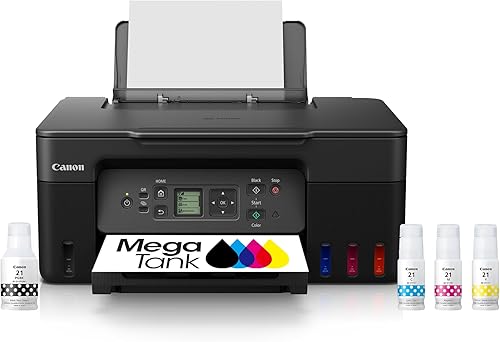
Canon PIXMA MegaTank G3270 All-in-One Printer
Canon's tank answer for the home: low-cost colour printing with Canon photo quality, in a compact all-in-one.
Strengths
- MegaTank bottles give the same low-cost-per-page logic as Epson tanks, with Canon colour handling that suits photos and school projects.
- The compact body fits a home desk better than larger office tank machines, while still covering print, scan, and copy.
- Wireless printing from phones works through Canon's app, and the front-facing tanks make ink levels easy to see at a glance.
Limitations
- There is no fax and no automatic document feeder, so office-style multi-page work is slower than on the ET-4850.
- Print speeds are unhurried, which shows on long colour documents.
- Tank setup takes longer than slotting in cartridges, with an initial ink-charging step that needs patience on day one.
What owners report
Commonly praised
- Colour prints look warm and pleasing for school projects and family photos
- Front tanks make checking ink levels a glance rather than a chore
- The compact body sits comfortably on an ordinary home desk
Common complaints
- No feeder makes multi-page scanning a slow manual task
- First setup takes a while while the tanks charge
- Long colour jobs test patience with their steady pace
Recurring themes from owner reviews on retailers and forums, summarised by our editors. Updated October 2026.
| Functions | Print, scan, copy |
|---|---|
| Ink system | MegaTank refillable tanks, GI-21 ink bottles |
| Connectivity | Wi-Fi, USB |
| Duplex | Manual two-sided printing |
| Design | Front-facing ink tanks with visible levels |
Best for: Households that print colour documents and photos and want Canon output without cartridge costs.
Skip if: You need fax or a document feeder, or you print mostly black text where a laser is cheaper to run.
Best compact all-in-one
Brother MFC-J1010DW Wireless Colour Inkjet All-in-One Printer
The compact Brother all-in-one: duplex, a feeder, and a small footprint for a desk that has no room to spare.

Strengths
- Automatic duplex printing and a 20-page feeder pack office features into a body that fits a small desk.
- A 150-sheet input tray is generous for a compact machine, so paper refills are less frequent than on cheaper rivals.
- Wireless, Wi-Fi Direct, and USB connections cover phones, laptops, and a shared household without fuss.
Limitations
- It still uses cartridges, so the cost per page is higher than on any tank printer here over a busy year.
- Colour print speeds are modest, so large colour jobs take a while.
- The small colour display is functional rather than generous, and deeper settings need the computer or app.
What owners report
Commonly praised
- A feeder and two-sided printing in such a small body surprise owners pleasantly
- The tray holds enough paper to avoid constant topping up
- Wireless sharing across a household works without repeated reconnection
Common complaints
- Cartridge changes come around sooner than tank owners would like
- Colour jobs take their time on larger documents
- The small display makes deeper settings harder to reach
Recurring themes from owner reviews on retailers and forums, summarised by our editors. Updated October 2026.
| Functions | Print, scan, copy, fax |
|---|---|
| Print technology | Colour inkjet |
| Print speed | Up to 17 ppm black, 9.5 ppm colour |
| Document feeder | 20 pages, automatic |
| Input tray | 150 sheets |
Best for: Small desks and home offices that need print, scan, copy, and fax without a large machine.
Skip if: You print in high volume, where tank running costs beat cartridges, or you want photo-lab quality colour.
Best mono laser value
Brother HL-L2460DW Wireless Compact Monochrome Laser Printer
The mono laser sweet spot: fast black text, automatic duplex, and a compact body that does not waste desk space.

Strengths
- Up to 36 pages per minute in black makes short work of long documents, far faster than any inkjet here.
- Automatic duplex printing saves paper on two-sided documents without manual page flipping.
- Toner does not dry out or clog the way inkjet ink can, so a laser left idle for weeks prints cleanly on return.
Limitations
- It prints black only, so colour documents and photos need another machine or a print shop.
- There is no scanner or copier, so a separate scanning route is needed for paperwork.
- Toner cartridges cost more up front than ink cartridges, even though each one lasts for many pages.
What owners report
Commonly praised
- Long text documents finish in moments rather than minutes
- Two-sided printing saves paper without any manual flipping
- Toner stays ready even after weeks of the printer sitting idle
Common complaints
- Black-only output forces colour jobs elsewhere
- No scanner means paperwork still needs another route
- Replacement toner costs more upfront than a set of ink cartridges
Recurring themes from owner reviews on retailers and forums, summarised by our editors. Updated October 2026.
| Functions | Print only |
|---|---|
| Print technology | Monochrome laser |
| Print speed | Up to 36 ppm black |
| Duplex | Automatic two-sided printing |
| Toner | Brother TN-830 series |
Best for: Households that print mostly black text, forms, and homework and want speed plus low fuss.
Skip if: You need colour printing, scanning, or copying, none of which a print-only laser provides.
Best mono laser all-in-one
Brother MFC-L2710DW Wireless Monochrome Laser All-in-One Printer
The mono laser that does everything in black: print, scan, copy, and fax, with a feeder for paperwork days.

Strengths
- A 50-sheet feeder and automatic duplex make multi-page scanning and two-sided printing genuinely painless.
- Laser text stays sharp and smudge-resistant, which suits forms, contracts, and documents that get handled and filed.
- Wireless printing plus a wired network option suit a shared household or a small office with several users.
Limitations
- Black-only output rules out colour documents, photos, and school projects that need colour.
- It is a full-size laser all-in-one, so it needs more desk depth than the compact inkjets here.
- The display is a simple two-line screen, so menu navigation feels dated next to touchscreen rivals.
What owners report
Commonly praised
- The feeder swallows a pile of paperwork and returns tidy scans
- Printed text stays sharp and smudge-free even after filing
- Wireless and wired options suit a house with several computers
Common complaints
- The full-size body demands real desk depth
- The plain two-line screen feels old-fashioned beside touchscreens
- Colour work of any kind is simply out of scope
Recurring themes from owner reviews on retailers and forums, summarised by our editors. Updated October 2026.
| Functions | Print, scan, copy, fax |
|---|---|
| Print technology | Monochrome laser |
| Print speed | Up to 32 ppm black |
| Document feeder | 50 sheets, automatic |
| Duplex | Automatic two-sided printing |
Best for: Home offices that live on black paperwork and want one laser machine for printing, scanning, copying, and fax.
Skip if: You need colour at all, or your desk cannot take a full-size laser all-in-one.
Best tiny mono laser
HP LaserJet M110w Wireless Monochrome Printer
The smallest laser here: a tiny black-only printer for desks, shelves, and rooms where space is the whole problem.

Strengths
- Its tiny footprint fits shelves and small desks where most printers cannot go, which is its whole reason to exist.
- Laser output gives crisp black text that does not smudge, and toner stays ready after long idle periods.
- Setup through the HP Smart app is quick, and wireless printing from a phone covers most home needs.
Limitations
- It prints only, with no scanner, so copying and scanning need a phone camera or another device.
- The paper tray is small, so frequent printers refill it often.
- Manual duplex means two-sided documents need a second pass through the printer by hand.
What owners report
Commonly praised
- The tiny body tucks onto a shelf where no other printer would fit
- Black text comes out crisp and clean every time
- Phone setup finishes quickly with little fuss
Common complaints
- No scanning or copying forces owners to improvise with a phone camera
- The small tray empties fast during batch printing
- Two-sided documents need manual flipping through a second pass
Recurring themes from owner reviews on retailers and forums, summarised by our editors. Updated October 2026.
| Functions | Print only |
|---|---|
| Print technology | Monochrome laser |
| Connectivity | Wi-Fi, USB |
| Duplex | Manual two-sided printing |
| Design | Compact, smallest in its laser class |
Best for: Small rooms and students who print black documents and need a printer that almost disappears.
Skip if: You need colour, scanning, or copying, or you print long documents daily where a bigger tray helps.
Best budget all-in-one with fax
Canon PIXMA TR4720 All-in-One Wireless Printer
The budget all-in-one that still does fax: print, scan, copy, and fax for the price of a basic printer.

Strengths
- Fax plus a document feeder at a budget position is rare, and it covers paperwork that cheaper printers simply cannot handle.
- Canon colour output suits photos and school projects better than most printers at this level.
- Wireless and mobile printing work from phones without a computer in the loop.
Limitations
- Cartridge costs add up for heavy users, and the small cartridges need replacing more often than tank ink.
- Print speeds are slow, so long documents and large colour jobs test patience.
- The paper tray is modest, and the control panel is basic compared with touchscreen models.
What owners report
Commonly praised
- Fax at this price feels like a genuine bonus for paperwork households
- Colour output suits photos and school projects nicely
- The feeder saves time on multi-page copying jobs
Common complaints
- Small cartridges need replacing more often than owners would like
- Print speeds feel slow on longer documents
- The basic control panel offers little guidance for new users
Recurring themes from owner reviews on retailers and forums, summarised by our editors. Updated October 2026.
| Functions | Print, scan, copy, fax |
|---|---|
| Print technology | Colour inkjet |
| Document feeder | 20 pages, automatic |
| Cartridges | Canon PG-275 black, CL-276 colour |
| Connectivity | Wi-Fi, USB |
Best for: Budget buyers who still need fax and a feeder, and who print in modest volume.
Skip if: You print heavily, where cartridges get expensive, or you want fast colour output.
Best cheapest starter
HP DeskJet 2755e Wireless Colour Inkjet Printer
The cheapest way in: a simple colour all-in-one for light printing, homework, and the odd photo.

Strengths
- The lowest purchase cost here makes it a low-risk first printer for a household that prints occasionally.
- Simple setup and wireless printing from a phone mean it works for users who just want to print and move on.
- Its small size fits a bedroom desk or a shelf without rearranging the room.
Limitations
- No automatic duplex and no document feeder, so two-sided and multi-page jobs are manual work.
- Cartridge capacity is small, so frequent printers replace cartridges often and pay more per page.
- Print speeds are slow, and the paper tray suits light use rather than batch printing.
What owners report
Commonly praised
- The low price makes a first printer an easy decision
- Simple phone printing covers homework and forms with no fuss
- The small size fits a bedroom desk without rearranging anything
Common complaints
- Two-sided printing means flipping pages by hand
- Cartridges run out quickly for anyone printing regularly
- The tray suits light use and struggles with batch jobs
Recurring themes from owner reviews on retailers and forums, summarised by our editors. Updated October 2026.
| Functions | Print, scan, copy |
|---|---|
| Print technology | Colour inkjet |
| Cartridges | HP 67 series |
| Connectivity | Wi-Fi, USB |
| Duplex | Manual two-sided printing |
Best for: Light printers, students, and anyone testing whether a home printer earns its keep.
Skip if: You print often, need duplex, or want a feeder for multi-page scanning.
How we chose
Running costs before purchase cost
A cheap printer with expensive cartridges can cost more in a year than a dearer tank printer. We compared cartridge, tank, and toner economics for light, steady, and heavy use, and weighted running costs heavily for anyone printing more than a few pages a week.
Everyday reliability
Wireless setup that stays done, paper that feeds straight, and ink or toner that survives idle weeks all matter more than headline speed. We credited duplex, feeders, and tray capacity where they remove daily friction.
Honest functions
We recorded only the functions each listing actually includes. A print-only laser is not credited for scanning, and a printer without a feeder is not presented as an office machine.
Room fit
A printer that does not fit its desk is a problem, not a purchase. We matched compact models to small rooms and full-size lasers and office tanks to households with proper desk space.
Questions, answered
Inkjet, tank, or laser for home use?
Choose a tank printer if you print a lot of colour and want low running costs. Choose a mono laser if you print mostly black text and want speed plus toner that never dries out. Choose a basic inkjet only if you print rarely and want the lowest purchase cost, since cartridges are the dearest way to print in volume.
Do tank printers really save money?
For steady and heavy printers, yes, by a wide margin, because a bottle of ink prints far more pages than a cartridge at a similar or lower cost. For very light printers, the saving takes years to appear, since the higher purchase cost dominates, so light users should not buy a tank on cost alone.
Can I print from my phone without a computer?
Yes, for every printer here. Each one supports wireless printing from a phone or tablet through its maker's app or the phone's built-in printing, and most also support Wi-Fi Direct for printing without joining a home network first.