Ranked on wireless usefulness: Bluetooth reliability, wired fallback quality, and whether the pair still sounds good with Bluetooth off.
The Best Computer Speakers with Bluetooth (2026)
Computer speakers with Bluetooth compared: bookshelf pairs, 2.1 systems, and compact pairs that stream from a phone as well as a computer.
Our top picks at a glance
Best Bluetooth bookshelf pair
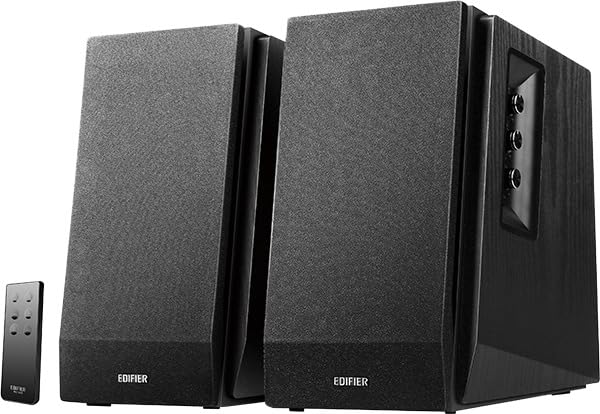 Edifier R1700BT, Black
Listeners who want one pair for a desk and a small room, with Bluetooth for a phone and wired inputs for a computer.
Best value Bluetooth pair
 Edifier R1280DBs, Wood Grain
Buyers who want bookshelf sound, Bluetooth, and a subwoofer upgrade path, without paying for the larger R1700BT cabinets.
Best Bluetooth 2.1 system
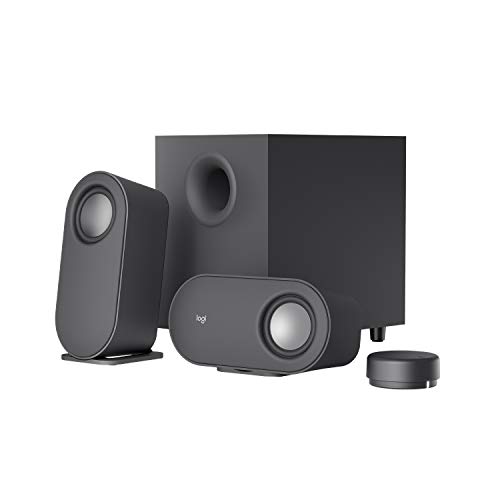 Logitech Z407
Buyers who want subwoofer bass plus Bluetooth and a control dial they can use without reaching for the speakers.
Buy the Edifier R1700BT if Bluetooth is one input among several and sound quality leads. Buy the Logitech Z407 if Bluetooth plus a subwoofer matters most, and the Creative Pebble V3 if Bluetooth is wanted on the smallest budget. Avoid buying a Bluetooth pair for Bluetooth alone when a wired pair sounds better for the same outlay and a phone can connect by cable.
The picks, ranked
| Pick | Configuration | Power | Drivers | Buy |
|---|---|---|---|---|
| Best Bluetooth bookshelf pairEdifier R1700BT, Black | 2.0 powered bookshelf pair | 66W RMS total | 4-inch mid-range and bass drivers, 0.75-inch silk dome tweeters | Check price |
| Best value Bluetooth pairEdifier R1280DBs, Wood Grain | 2.0 powered bookshelf pair | 42W RMS total | 4-inch woofers, 0.5-inch tweeters | Check price |
| Best Bluetooth 2.1 systemLogitech Z407 | 2.1 system with down-firing subwoofer | 80W peak, 40W RMS | - | Check price |
 Best budget Bluetooth pairCreative Pebble V3 | 2.0 USB desktop pair | 8W RMS, 16W peak | 2.25-inch full-range drivers, custom tuned | Check price |
 Best Bluetooth design pairHarman Kardon SoundSticks 4, White | 2.1 system with transparent dome subwoofer | - | - | Check price |
Best Bluetooth bookshelf pair
Edifier R1700BT, Black
The desk-and-room pair: bigger drivers, Bluetooth, and a sound that fills more than the space in front of a monitor.
Strengths
- The larger cabinets and 4-inch drivers give music a fullness that compact USB pairs cannot match, with bass that sounds present rather than implied.
- Bluetooth plus wired inputs cover a computer, a phone, and a second source without swapping cables, and the included remote keeps volume and input changes within reach.
- The wooden enclosures look like proper bookshelf speakers rather than computer accessories, so the pair suits a living room shelf as well as a desk.
Limitations
- No subwoofer is included, so bass lovers who want deep film rumble will need to add one through the subwoofer output or choose a 2.1 system instead.
- The cabinets are wide for a crowded desk, and they sound best with some space around them rather than pushed hard against a wall.
- There is no USB audio input, so a computer connects over analogue or Bluetooth rather than a direct digital link.
What owners report
Commonly praised
- Owners praise the full and warm sound that fills a desk and a small room without strain
- Owners praise the easy Bluetooth pairing that makes phone playback feel effortless
- Owners praise the wooden cabinets that look like proper bookshelf speakers rather than computer accessories
Common complaints
- Owners complain that the wide cabinets crowd smaller desks and leave little room for anything else
- Owners complain about the missing USB audio input when connecting a computer directly
- Owners complain that the rear connections are awkward to reach once the pair is placed against a wall
Recurring themes from owner reviews on retailers and forums, summarised by our editors. Updated October 2026.
| Configuration | 2.0 powered bookshelf pair |
|---|---|
| Power | 66W RMS total |
| Drivers | 4-inch mid-range and bass drivers, 0.75-inch silk dome tweeters |
| Connectivity | Bluetooth, dual RCA and 3.5mm analogue inputs |
| Extras | Subwoofer output, wireless remote control |
Best for: Listeners who want one pair for a desk and a small room, with Bluetooth for a phone and wired inputs for a computer.
Skip if: Your desk is very small, since these bookshelf cabinets need real width and depth, or you want a subwoofer in the box.
Best value Bluetooth pair
Edifier R1280DBs, Wood Grain
The value bookshelf pair: Bluetooth, optical input, and a subwoofer output at a price that embarrasses bigger names.
Strengths
- Bluetooth, optical, and dual analogue inputs cover a computer, a television, and a phone, which is rare breadth at this level.
- The subwoofer output means the pair can grow: add a subwoofer later instead of replacing the whole system when bass starts to matter.
- The wood-grain cabinets and front-facing controls look considered on a desk, and the remote covers volume, mute, and input switching.
Limitations
- Bass is polite rather than powerful on its own, so film lovers should budget for a subwoofer or choose a 2.1 system from the start.
- The smaller drivers cannot fill a large room the way the R1700BT pair can, and they sound best at desk distance.
- The side-panel controls are fiddly to reach once the speakers are placed, so most owners end up relying on the remote.
What owners report
Commonly praised
- Owners praise the wide choice of inputs that covers a computer, television, and phone at once
- Owners praise the warm and balanced sound that suits long listening sessions
- Owners praise the subwoofer output that leaves a simple upgrade path for deeper bass
Common complaints
- Owners complain that bass on its own feels polite and underpowered for films
- Owners complain that the side-panel controls are hard to reach once the speakers are in place
- Owners complain that the remote feels light and less solid than the speakers themselves
Recurring themes from owner reviews on retailers and forums, summarised by our editors. Updated October 2026.
| Configuration | 2.0 powered bookshelf pair |
|---|---|
| Power | 42W RMS total |
| Drivers | 4-inch woofers, 0.5-inch tweeters |
| Connectivity | Bluetooth, optical, dual RCA and 3.5mm analogue inputs |
| Extras | Subwoofer line output, wireless remote control |
Best for: Buyers who want bookshelf sound, Bluetooth, and a subwoofer upgrade path, without paying for the larger R1700BT cabinets.
Skip if: You need deep bass without adding a subwoofer, since these smaller cabinets trade low-end extension for desk fit.
Best Bluetooth 2.1 system
Logitech Z407
The modern 2.1 system: Bluetooth, a down-firing subwoofer, and a wireless dial that works from across the room.
Strengths
- Bluetooth, USB, and 3.5mm inputs cover a computer and a phone, so music moves from desk work to phone playback without replugging.
- The wireless control dial adjusts volume from across the room and runs for months on its batteries, which suits living-room desks and shared spaces.
- The oval satellites can stand upright or lie flat, and the down-firing subwoofer tucks under a desk without dominating the room.
Limitations
- Bass is present but not room-shaking, so buyers chasing the Z623 low end will find this system restrained by comparison.
- The satellites are small, and at high volume they compress sooner than the larger bookshelf pairs here.
- Setup needs a USB data cable for computer audio, which is not included in every configuration, so check the listing before ordering.
What owners report
Commonly praised
- Owners praise the wireless dial that adjusts volume comfortably from across the room
- Owners praise the neat oval satellites that fit a desk without dominating it
- Owners praise the simple Bluetooth setup that gets phone music playing in moments
Common complaints
- Owners complain that bass lacks the depth of larger 2.1 systems
- Owners complain that the satellites distort sooner than expected at high volume
- Owners complain about the missing USB data cable in some configurations that delays setup
Recurring themes from owner reviews on retailers and forums, summarised by our editors. Updated October 2026.
| Configuration | 2.1 system with down-firing subwoofer |
|---|---|
| Power | 80W peak, 40W RMS |
| Connectivity | Bluetooth 5.0, USB, and 3.5mm inputs |
| Controls | Wireless control dial with volume, play, pause, and mute |
| Satellites | Oval design, upright or horizontal placement |
Best for: Buyers who want subwoofer bass plus Bluetooth and a control dial they can use without reaching for the speakers.
Skip if: You want the raw power of the Z623, since this is a smaller, more polite system built for desks rather than rooms.
Best budget Bluetooth pair
Creative Pebble V3
The tiny desk fix: one USB-C cable, Bluetooth, and a sound far bigger than the spheres suggest.
Strengths
- A single USB-C cable carries both power and audio from a computer, so setup is one cable and nothing else to configure.
- Bluetooth adds phone playback without a cable, which is unusual in a pair this small and this affordable.
- The raised, angled spheres aim sound up towards the listener, which helps voices and video calls sound clear at a desk.
Limitations
- Bass is limited by the small drivers, so music sounds thin on tracks that rely on low end, and there is no subwoofer output.
- Volume suits a desk, not a room, and pushing the pair hard makes the sound congested rather than louder in a useful way.
- The linking cable between the spheres is fixed in length, so very wide monitor setups may need to plan placement around it.
What owners report
Commonly praised
- Owners praise the single-cable USB setup that takes almost no time at all
- Owners praise the surprisingly spacious sound from such tiny spheres
- Owners praise the angled design that aims voices clearly towards the listener
Common complaints
- Owners complain that bass is thin and unsatisfying on music that relies on low end
- Owners complain that maximum volume suits a desk only and not a room
- Owners complain that the fixed link cable restricts placement on very wide monitor setups
Recurring themes from owner reviews on retailers and forums, summarised by our editors. Updated October 2026.
| Configuration | 2.0 USB desktop pair |
|---|---|
| Power | 8W RMS, 16W peak |
| Drivers | 2.25-inch full-range drivers, custom tuned |
| Connectivity | USB-C audio, Bluetooth 5.0, 3.5mm analogue input |
| Extras | Clear dialog enhancement mode, USB-A converter included |
Best for: Small desks, laptops, and anyone whose monitor speakers are the current problem and who wants a simple, cheap cure.
Skip if: You want deep bass or room-filling volume, since these small spheres are built for near-field listening, not parties.
Best Bluetooth design pair
Harman Kardon SoundSticks 4, White
The design statement: a transparent dome subwoofer, slim satellites, and Bluetooth, for desks where looks matter as much as sound.
Strengths
- The transparent dome subwoofer is genuinely distinctive, and the slim satellites take up little desk width for a 2.1 system.
- Bluetooth streaming from a phone is simple and stable, so the system doubles as a room speaker when the computer is off.
- The sound is clear and spacious for a desk system, with the subwoofer adding warmth that the slim satellites could not manage alone.
Limitations
- The transparent dome shows dust quickly, so the subwoofer needs regular wiping to keep its showpiece look.
- There is no remote, and volume control sits on a satellite, so across-the-room adjustment means walking to the desk.
- The premium styling carries a premium outlay, and buyers who only care about sound get more performance per spend from the Z623 or Klipsch systems.
What owners report
Commonly praised
- Owners praise the striking transparent subwoofer that draws compliments from visitors
- Owners praise the clear and spacious sound that belies the slim satellites
- Owners praise the straightforward Bluetooth pairing with phones and tablets
Common complaints
- Owners complain that the transparent dome shows dust and needs frequent wiping
- Owners complain about the lack of a remote for across-the-room volume changes
- Owners complain that the premium styling costs more than the sound alone would justify
Recurring themes from owner reviews on retailers and forums, summarised by our editors. Updated October 2026.
| Configuration | 2.1 system with transparent dome subwoofer |
|---|---|
| Connectivity | Bluetooth and 3.5mm analogue input |
| Satellites | Slim transparent-styled satellite pair |
| Subwoofer | Down-firing dome subwoofer |
| Controls | Touch-style controls on the satellite |
Best for: Buyers who want a 2.1 system that looks like a piece of design, with Bluetooth for a phone and a subwoofer for films.
Skip if: You want a plain, understated desk, since the transparent subwoofer is made to be noticed, or you need a remote control.
Questions, answered
Does Bluetooth make computer speakers sound worse?
Slightly, compared with a wired or USB link, since Bluetooth compresses audio. The difference is small on desk speakers at normal volume and matters most on detailed, quiet music. For critical listening, use the wired or USB input and keep Bluetooth for casual phone playback.
Can I connect two devices at once over Bluetooth?
Usually one Bluetooth device plays at a time, though many pairs remember several paired devices and switch between them. For two always-connected sources, use one Bluetooth source plus one wired source, which every Bluetooth pair here supports.
Will Bluetooth speakers work with a television?
Yes, if the television supports Bluetooth audio output, though lip-sync delay can appear on some televisions. A wired optical or analogue link, as on the Edifier R1280DBs, avoids delay and is the better television connection where available.