Best of
The Best Graphics Cards (2026)
The best graphics cards of 2026: ASUS TUF RTX 4070, Gigabyte RTX 4070 Super, ASRock RX 7700 XT, MSI RTX 4060 Ventus, and more, compared on memory, cooling, and resolution.
Our top picks at a glance
Best overall
 ASUS TUF Gaming RTX 4070 OC Edition
1440p gamers who want one card that does everything well: strong raster speed, capable ray tracing, DLSS 3, and durable build quality.
Best for 1440p high refresh
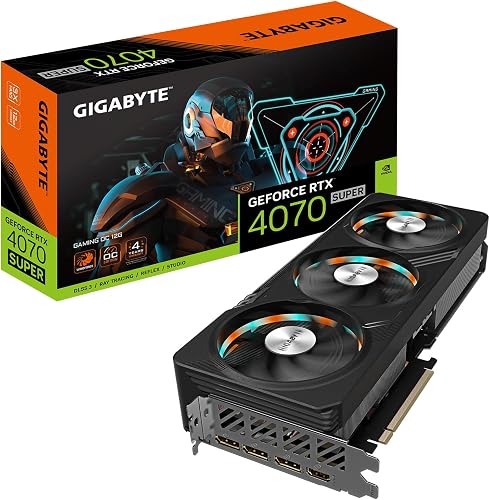 Gigabyte GeForce RTX 4070 Super Gaming OC 12G
1440p gamers with a high-refresh monitor who want the strongest performance in this lineup and are happy to pay for it.
Best 1440p value
 ASRock Radeon RX 7700 XT Challenger 12GB OC
1440p gamers who want memory headroom and strong raster performance without paying for a flagship cooler or lighting.
For most buyers, the ASUS TUF RTX 4070 OC is the pick: 12GB of memory, DLSS 3, and durable build quality that suit 1440p for years. Budget builders should buy the XFX RX 6600 for basic 1080p play or the MSI RTX 4060 Ventus 2X for DLSS 3, and 1440p value hunters should look at the ASRock RX 7700 XT Challenger. High-refresh 1440p gamers should stretch to the Gigabyte RTX 4070 Super Gaming OC.
The picks, ranked
| Pick | GPU | Memory | Cooling | Buy |
|---|---|---|---|---|
| Best overallASUS TUF Gaming RTX 4070 OC Edition | NVIDIA GeForce RTX 4070, Ada Lovelace | 12GB GDDR6X, 192-bit interface | Triple Axial-tech fans, 0dB technology | Check price |
| Best for 1440p high refreshGigabyte GeForce RTX 4070 Super Gaming OC 12G | NVIDIA GeForce RTX 4070 Super, Ada Lovelace | 12GB GDDR6X, 192-bit interface | Triple WINDFORCE fans with alternate spinning | Check price |
| Best 1440p valueASRock Radeon RX 7700 XT Challenger 12GB OC | AMD Radeon RX 7700 XT, RDNA 3 | 12GB GDDR6, 192-bit interface, 18 Gbps | Dual-fan Challenger with 0dB silent cooling | Check price |
 Best value RTX 4060MSI GeForce RTX 4060 Ventus 2X Black 8G OC | NVIDIA GeForce RTX 4060, Ada Lovelace | 8GB GDDR6, 128-bit interface | Dual TORX Fan 4.0 with Zero Frozr | Check price |
 Best budgetXFX Speedster SWFT 210 RX 6600 CORE | AMD Radeon RX 6600, RDNA 2 | 8GB GDDR6, 128-bit interface | Dual-fan SWFT 210 design | Check price |
 Best AMD 1080p cardSapphire Pulse RX 7600 Gaming OC | AMD Radeon RX 7600, RDNA 3 | 8GB GDDR6, 128-bit interface | Dual-fan Pulse design with dual ball bearings | Check price |
 Best for white buildsASUS Dual RTX 4060 EVO White OC Edition | NVIDIA GeForce RTX 4060, Ada Lovelace | 8GB GDDR6, 128-bit interface | Dual Axial-tech fans, 0dB technology, Dual BIOS | Check price |
 Best cooled RTX 4060MSI GeForce RTX 4060 Gaming X 8G | NVIDIA GeForce RTX 4060, Ada Lovelace | 8GB GDDR6, 128-bit interface, 17 Gbps | Twin FROZR 9 with dual TORX Fan 5.0 | Check price |
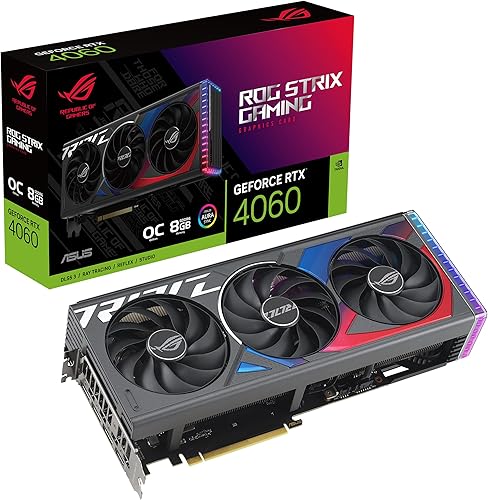 Best premium RTX 4060ASUS ROG Strix RTX 4060 OC Edition | NVIDIA GeForce RTX 4060, Ada Lovelace | 8GB GDDR6, 128-bit interface | Axial-tech fans, 0dB technology | Check price |
 Best 1080p high-refresh cardMSI GeForce RTX 4060 Ti Ventus 3X 8G OC | NVIDIA GeForce RTX 4060 Ti, Ada Lovelace | 8GB GDDR6, 128-bit interface | Triple-fan Ventus with TORX Fan 4.0 | Check price |
Best overall
ASUS TUF Gaming RTX 4070 OC Edition
The tough 1440p all-rounder: military-grade components, Axial-tech cooling, and DLSS 3 in a card built to be left alone for years.
Strengths
- 12GB of GDDR6X memory gives it genuine 1440p staying power, with room for high texture settings that 8GB cards must compromise on.
- DLSS 3 frame generation plus capable ray tracing make it the most versatile card here, handling both fast competitive titles and demanding single-player games.
- TUF build quality, with military-grade capacitors and a metal exoskeleton, suits buyers who want a card that feels engineered to last rather than dressed to impress.
Limitations
- The large triple-fan cooler needs case length and slot clearance that compact builds may not offer, so measure before ordering.
- It draws more power than the RTX 4060 cards, so older or low-wattage power supplies may need an upgrade alongside the card.
- TUF styling is industrial and restrained, which suits some builds and underwhelms buyers who want bold lighting as a feature.
What owners report
Commonly praised
- Owners often describe this card as the settled choice for a 1440p build that should last several years
- Many appreciate the combination of upscaling support and capable ray tracing in one purchase
- Several say the tough, industrial build inspires confidence that the card will simply keep working
Common complaints
- Some owners find the large cooler demands careful case measurement before it will fit
- A few note that an older power supply may need replacing alongside the card
- Others mention that the restrained styling underwhelms buyers who wanted bold lighting
Recurring themes from owner reviews on retailers and forums, summarised by our editors. Updated October 2026.
| GPU | NVIDIA GeForce RTX 4070, Ada Lovelace |
|---|---|
| Memory | 12GB GDDR6X, 192-bit interface |
| Cooling | Triple Axial-tech fans, 0dB technology |
| Build | Military-grade capacitors, metal exoskeleton |
| Outputs | DisplayPort 1.4a plus HDMI 2.1 |
Best for: 1440p gamers who want one card that does everything well: strong raster speed, capable ray tracing, DLSS 3, and durable build quality.
Skip if: Your budget stops at 1080p cards, or your case and power supply cannot comfortably house a large triple-fan card.
Best for 1440p high refresh
Gigabyte GeForce RTX 4070 Super Gaming OC 12G
The fastest card here: Super silicon, triple WINDFORCE cooling, and 12GB of memory for 1440p at high refresh rates.
Strengths
- Super silicon sits a clear step above the standard RTX 4070, which shows up most on a high-refresh 1440p monitor where headroom turns into smoother play.
- Triple WINDFORCE fans with alternate spinning keep the large heatsink cool without the noise penalty of a smaller cooler working hard.
- RGB Fusion lighting, Dual BIOS, and an anti-sag bracket cover the practical details, from looks to a choice of quiet or performance fan behaviour.
Limitations
- It is the most expensive card in this lineup, and buyers with a standard 1440p 60Hz monitor will see less benefit than high-refresh owners.
- The long triple-fan card and its power draw demand a roomy case and a capable power supply, so it is not a drop-in upgrade for every older PC.
- Gigabyte's software for lighting and fan control divides opinion, so buyers who dislike extra utilities may prefer to leave it at defaults.
What owners report
Commonly praised
- Owners frequently say the added speed over a standard RTX 4070 is most obvious on a high-refresh 1440p display
- Many appreciate the triple-fan arrangement for keeping temperatures steady during long sessions
- Several value the included support bracket for easing worry about sag in a tall case
Common complaints
- Some owners feel the outlay is wasted on a standard refresh monitor that cannot show the extra speed
- A few note that the long card and power needs rule out smaller or older machines
- Others mention that the companion software for lighting feels less polished than the hardware itself
Recurring themes from owner reviews on retailers and forums, summarised by our editors. Updated October 2026.
| GPU | NVIDIA GeForce RTX 4070 Super, Ada Lovelace |
|---|---|
| Memory | 12GB GDDR6X, 192-bit interface |
| Cooling | Triple WINDFORCE fans with alternate spinning |
| Extras | RGB Fusion, Dual BIOS, anti-sag bracket |
| Outputs | DisplayPort plus HDMI |
Best for: 1440p gamers with a high-refresh monitor who want the strongest performance in this lineup and are happy to pay for it.
Skip if: Your monitor is 1080p, where this card's speed is largely wasted, or your case cannot take a long triple-fan card.
Best 1440p value
ASRock Radeon RX 7700 XT Challenger 12GB OC
The 1440p value play: 12GB of memory, a wide bus, and DisplayPort 2.1 in a plain dual-fan card that spends its budget on the chip.
Strengths
- 12GB of GDDR6 on a 192-bit bus gives this card real headroom at 1440p, where 8GB cards start asking for texture compromises in demanding titles.
- DisplayPort 2.1 outputs suit newer high-refresh monitors, a forward-looking detail that many cards in this bracket still omit.
- The dual-fan Challenger cooler with 0dB silent cooling stays quiet under light loads and keeps the card to a manageable length for mid-tower cases.
Limitations
- Ray tracing performance trails Nvidia rivals, so ray-traced titles need lower settings or upscaling to stay smooth at 1440p.
- The plain Challenger styling is functional rather than handsome, with an LED indicator rather than full lighting, which suits closed cases more than windowed showcases.
- AMD driver features differ from Nvidia's, so buyers invested in Nvidia-only tools like DLSS should check their workflow before switching sides.
What owners report
Commonly praised
- Owners frequently highlight the generous memory as the reason demanding 1440p titles stay smooth with high textures
- Many appreciate the modern display outputs for pairing with a newer high-refresh monitor
- Several say the plain design keeps attention on performance rather than decoration
Common complaints
- Some owners note that ray-traced games need lower settings or upscaling to stay fluid
- A few feel the styling looks functional rather than exciting in a windowed case
- Others mention that switching from Nvidia tools takes a short adjustment period
Recurring themes from owner reviews on retailers and forums, summarised by our editors. Updated October 2026.
| GPU | AMD Radeon RX 7700 XT, RDNA 3 |
|---|---|
| Memory | 12GB GDDR6, 192-bit interface, 18 Gbps |
| Boost clock | Up to 2584 MHz |
| Cooling | Dual-fan Challenger with 0dB silent cooling |
| Outputs | 3 DisplayPort 2.1 plus HDMI 2.1 |
Best for: 1440p gamers who want memory headroom and strong raster performance without paying for a flagship cooler or lighting.
Skip if: Ray tracing is your top priority, or you want a premium-feeling card with extensive lighting and a heavy backplate.
Best value RTX 4060
MSI GeForce RTX 4060 Ventus 2X Black 8G OC
The no-nonsense RTX 4060: a compact twin-fan card with DLSS 3, honest cooling, and nothing you did not ask for.
Strengths
- DLSS 3 frame generation and strong ray tracing support give this card a feature advantage over AMD rivals at a similar outlay, especially in supported titles.
- The Ventus twin-fan cooler with TORX Fan 4.0 keeps the efficient Ada Lovelace chip quiet, and Zero Frozr stops the fans entirely under light loads.
- Its compact two-fan footprint fits small cases and leaves room around it for airflow, which matters in builds with a front-mounted radiator or tight drive bays.
Limitations
- The plain black styling and plastic shroud look functional rather than premium, which disappoints buyers who want their card to be a visual centrepiece.
- 8GB of memory limits headroom in texture-heavy games, so buyers planning a move to 1440p should weigh the 12GB cards here instead.
- The factory overclock is modest, so this card is best judged on its stock performance and features rather than on tuning headroom.
What owners report
Commonly praised
- Owners often highlight how easily this card drops into a small case and starts working with existing cabling
- Many value the upscaling support in supported games for keeping frame rates comfortable
- Several appreciate that the fans fall silent when the machine is only browsing or streaming video
Common complaints
- Some owners feel the black plastic shroud looks ordinary next to more decorative cards
- A few note that texture-heavy games can press against the memory limit at higher settings
- Others mention that the factory overclock adds little beyond stock behaviour
Recurring themes from owner reviews on retailers and forums, summarised by our editors. Updated October 2026.
| GPU | NVIDIA GeForce RTX 4060, Ada Lovelace |
|---|---|
| Memory | 8GB GDDR6, 128-bit interface |
| Cooling | Dual TORX Fan 4.0 with Zero Frozr |
| Outputs | 3 DisplayPort 1.4a plus HDMI 2.1a |
| Features | DLSS 3, ray tracing, NVIDIA Studio support |
Best for: 1080p gamers who want Nvidia features, especially DLSS upscaling, in the most affordable and compact RTX 4060 package.
Skip if: You want RGB lighting, a backplate showpiece, or a cooler built for heavy overclocking rather than stock performance.
Best budget
XFX Speedster SWFT 210 RX 6600 CORE
The cheapest honest ticket into modern PC gaming: a compact dual-fan card that plays at 1080p without demanding a new power supply.
Strengths
- The dual-fan SWFT 210 cooler keeps a modest chip quiet in a normal case, since the RX 6600 draws far less power than the larger cards here and never asks the fans to work hard.
- Its short, two-slot shape fits small cases and older prebuilt machines where a triple-fan card would foul a drive cage or a front fan.
- RDNA 2 architecture with 8GB of GDDR6 gives it a genuine modern feature set, including current driver support and upscaling, rather than the cut-down memory of older budget cards.
Limitations
- Ray tracing performance is modest, so demanding ray-traced titles need settings turned down or the feature switched off to stay smooth.
- The 128-bit memory bus and 8GB of memory set a firm ceiling: heavily textured games at higher resolutions will ask more than this card can comfortably give.
- The plain styling and simple cooler offer no lighting or premium materials, which matters little inside a closed case but shows in a windowed build.
What owners report
Commonly praised
- Owners often describe it as a straightforward upgrade that makes an ageing desktop feel current again for everyday gaming
- Many note that it settles into a build with little fuss and starts playing without a long setup ritual
- Several mention that it stays unobtrusive in a closed case and simply gets on with the job
Common complaints
- Some owners wish ray-traced titles ran more smoothly without lowering settings first
- A few find that heavily textured games ask more of the memory than this card comfortably offers
- Others mention that the plain styling looks underwhelming through a side window
Recurring themes from owner reviews on retailers and forums, summarised by our editors. Updated October 2026.
| GPU | AMD Radeon RX 6600, RDNA 2 |
|---|---|
| Memory | 8GB GDDR6, 128-bit interface |
| Boost clock | Up to 2491 MHz |
| Cooling | Dual-fan SWFT 210 design |
| Outputs | HDMI plus 3 DisplayPort |
Best for: First-time builders and upgraders reviving an older PC, who want smooth 1080p gaming at the lowest sensible outlay.
Skip if: You play at 1440p, you want ray tracing as a headline feature, or your games already push past 8GB of video memory.
Best AMD 1080p card
Sapphire Pulse RX 7600 Gaming OC
The 1080p sweet spot on the AMD side: RDNA 3 efficiency, a quiet dual-fan cooler, and a card short enough for most cases.
Strengths
- RDNA 3 architecture brings better efficiency than the previous generation, so the Pulse delivers strong 1080p frame rates from a card that stays cool and modest in power draw.
- The dual-ball-bearing fans and compact two-slot design suit small and mid-tower cases alike, and the card measures short enough to fit builds where longer cards struggle.
- Sapphire's restrained styling, with a simple backplate and no garish lighting, suits builders who want their PC to look grown-up rather than like a display piece.
Limitations
- Ray tracing remains a weakness next to Nvidia rivals at a similar outlay, so ray-traced settings need care rather than being left at maximum.
- 8GB of memory is enough for 1080p today but leaves less headroom than the 12GB cards here for future texture-heavy titles.
- The single 8-pin power connector and compact cooler leave little room for aggressive overclocking, so buyers chasing extra speed should look higher up the range.
What owners report
Commonly praised
- Owners frequently praise how compact the card feels in a mid-tower case while still handling modern titles at 1080p
- Many appreciate the calm fan behaviour during long evening sessions
- Several say the understated design suits a tidy desk setup rather than drawing attention to itself
Common complaints
- Some owners note that ray tracing needs careful settings to stay smooth in demanding games
- A few feel the memory headroom is tighter than they expected for future titles
- Others mention that the single power connector leaves little room for tuning beyond stock speeds
Recurring themes from owner reviews on retailers and forums, summarised by our editors. Updated October 2026.
| GPU | AMD Radeon RX 7600, RDNA 3 |
|---|---|
| Memory | 8GB GDDR6, 128-bit interface |
| Boost clock | Up to 2755 MHz |
| Cooling | Dual-fan Pulse design with dual ball bearings |
| Outputs | HDMI plus 3 DisplayPort |
Best for: 1080p gamers who prefer AMD, want current-generation architecture, and value a compact card that stays quiet under load.
Skip if: You want the strongest ray tracing in this bracket, or you play at 1440p with high texture settings as a habit.
Best for white builds
ASUS Dual RTX 4060 EVO White OC Edition
The white-build RTX 4060 done properly: a compact 2.5-slot card with Axial-tech fans, a dual BIOS, and a clean look.
Strengths
- The white shroud and backplate match white cases, white fans, and light motherboards, which is surprisingly hard to find among sensibly priced RTX 4060 cards.
- Axial-tech fans with a smaller hub and longer blades move air efficiently while staying quiet, and 0dB technology stops the fans at low load.
- A dual BIOS lets owners choose between performance and quiet modes without software, and the 2.5-slot design keeps the card compatible with most mid-tower cases.
Limitations
- White finishes show dust sooner than black ones, so the card needs an occasional wipe to keep a windowed build looking fresh.
- Like every RTX 4060 here, 8GB of memory caps its future at higher resolutions, so 1440p buyers should look at the 12GB cards instead.
- The compact twin-fan cooler is tuned for stock speeds, not for pushing clocks hard, so overclockers should expect modest gains.
What owners report
Commonly praised
- Owners frequently say the white finish finally lets a light-coloured build look coordinated without a flagship outlay
- Many appreciate the choice between quiet and performance modes through the onboard switch
- Several note that the card stays composed in a warm room thanks to its efficient fans
Common complaints
- Some owners find the white surfaces show dust sooner than a dark card would
- A few feel the twin-fan cooler offers limited scope for pushing clocks further
- Others mention that 1440p play needs settings trimmed in the most demanding titles
Recurring themes from owner reviews on retailers and forums, summarised by our editors. Updated October 2026.
| GPU | NVIDIA GeForce RTX 4060, Ada Lovelace |
|---|---|
| Memory | 8GB GDDR6, 128-bit interface |
| Boost clock | 2535 MHz in OC mode, 2505 MHz default |
| Cooling | Dual Axial-tech fans, 0dB technology, Dual BIOS |
| Size | 2.5-slot design |
Best for: Builders planning a white or light-coloured PC who want a matching RTX 4060 without paying a premium-brand surcharge.
Skip if: Your case is dark and windowless, where the white finish buys nothing, or you want a triple-fan cooler for heavier tuning.
Best cooled RTX 4060
MSI GeForce RTX 4060 Gaming X 8G
The RTX 4060 with the nicer cooler: Twin FROZR 9, TORX Fan 5.0, and RGB for builders who want the card to look as good as it plays.
Strengths
- Twin FROZR 9 cooling with TORX Fan 5.0 keeps temperatures and noise lower than the plain Ventus models, which shows up as a quieter room during long sessions.
- Mystic Light RGB on the shroud ties the card into an MSI-lit build without extra software beyond MSI Center, which most MSI owners already run.
- The sturdy backplate and solid build quality give the card a planted feel in the case, with less sag and flex than lighter budget models.
Limitations
- The nicer cooler costs more than the Ventus version of the same chip, while gaming performance at stock settings is close, so the premium buys quiet and looks rather than frames.
- 8GB of memory remains the long-term limit of every RTX 4060, regardless of cooler quality, so texture-heavy future titles may still ask for compromises.
- The card is larger than the compact Ventus models, so small-form-factor builders should measure their case clearance before ordering.
What owners report
Commonly praised
- Owners often describe the cooler as noticeably calmer than plainer twin-fan models during extended play
- Many enjoy how the lighting ties the card into the rest of an MSI-lit build
- Several say the sturdy backplate makes the card feel reassuringly solid once mounted
Common complaints
- Some owners feel the extra outlay over the plain Ventus model buys looks more than speed
- A few note that the larger cooler needs a quick case measurement before ordering
- Others mention that memory limits remain the same despite the nicer cooling
Recurring themes from owner reviews on retailers and forums, summarised by our editors. Updated October 2026.
| GPU | NVIDIA GeForce RTX 4060, Ada Lovelace |
|---|---|
| Memory | 8GB GDDR6, 128-bit interface, 17 Gbps |
| Cooling | Twin FROZR 9 with dual TORX Fan 5.0 |
| Lighting | Mystic Light RGB |
| Outputs | DisplayPort 1.4a plus HDMI 2.1 |
Best for: 1080p gamers who want a quieter, better-looking RTX 4060 than the plain twin-fan models, with lighting that matches an MSI build.
Skip if: You want the lowest outlay for an RTX 4060, or your case has no window and no room for a slightly larger cooler.
Best premium RTX 4060
ASUS ROG Strix RTX 4060 OC Edition
The flagship cooler on a mid-range chip: Strix build quality, Aura Sync lighting, and headroom the chip barely needs.
Strengths
- The Strix cooler is overbuilt for an RTX 4060, which means low temperatures and very quiet fans even in warm rooms or poorly ventilated cases.
- Aura Sync lighting and the ROG design language match ROG motherboards and cases, giving a coordinated build without mixing brands.
- Build quality is a step above the Dual and Ventus lines, with a rigid frame, metal backplate, and fan headers that show the flagship lineage.
Limitations
- It is the most expensive way to buy RTX 4060 performance here, and the extra outlay buys cooling and looks rather than a different class of gaming speed.
- The large cooler takes up more slots and case length than compact RTX 4060 models, so small cases may not accept it.
- 8GB of memory is still the ceiling, so even this flagship cooler cannot turn an RTX 4060 into a long-term 1440p card.
What owners report
Commonly praised
- Owners frequently praise the sense of overbuilt cooling that keeps temperatures low even in a poorly ventilated case
- Many appreciate how the lighting coordinates with other ROG parts through a single system
- Several say the rigid frame and metal backplate give the card a premium feel in hand
Common complaints
- Some owners feel the size is excessive for the chip class and rules out compact cases
- A few note that the premium over simpler RTX 4060 models is hard to justify on speed alone
- Others mention that memory capacity still caps long-term use at higher resolutions
Recurring themes from owner reviews on retailers and forums, summarised by our editors. Updated October 2026.
| GPU | NVIDIA GeForce RTX 4060, Ada Lovelace |
|---|---|
| Memory | 8GB GDDR6, 128-bit interface |
| Cooling | Axial-tech fans, 0dB technology |
| Lighting | Aura Sync RGB |
| Outputs | DisplayPort 1.4a plus HDMI 2.1a |
Best for: ROG builders who want the best-cooled, best-lit RTX 4060 and are happy to pay for the Strix name and engineering.
Skip if: You judge a card on frames per outlay alone, or your case is small, since this is a large card for its chip class.
Best 1080p high-refresh card
MSI GeForce RTX 4060 Ti Ventus 3X 8G OC
A sensible step up from the RTX 4060: triple-fan cooling and Ti speed for 1080p high-refresh play, without flagship pricing.
Strengths
- The Ti chip delivers a clear step up from the RTX 4060 in demanding titles, which matters most on high-refresh monitors where every frame counts.
- Triple-fan Ventus cooling spreads heat across a longer heatsink, keeping the card quieter than twin-fan rivals under sustained load.
- DLSS 3 and strong ray tracing support carry over from the RTX 4060, so the feature set matches the faster chip rather than feeling cut down.
Limitations
- 8GB of memory is the same limit as the cheaper RTX 4060, so the Ti premium buys speed, not memory headroom, and that distinction matters at 1440p.
- The triple-fan length rules out some compact cases, so builders should measure before assuming it fits like a twin-fan card.
- Its price sits close to 12GB alternatives on sale, so buyers should compare against the RX 7700 XT and RTX 4070 before settling on the Ti.
What owners report
Commonly praised
- Owners often say the extra speed over a standard RTX 4060 is easy to notice on a high-refresh display
- Many appreciate the triple-fan cooler for keeping long sessions quiet
- Several value the familiar feature set carrying over intact from the smaller RTX 4060 cards
Common complaints
- Some owners feel the memory size undermines the Ti premium at 1440p
- A few find the triple-fan length awkward in a compact tower
- Others mention that nearby 12GB cards tempt them whenever sale pricing narrows the gap
Recurring themes from owner reviews on retailers and forums, summarised by our editors. Updated October 2026.
| GPU | NVIDIA GeForce RTX 4060 Ti, Ada Lovelace |
|---|---|
| Memory | 8GB GDDR6, 128-bit interface |
| Boost clock | Extreme clock up to 2580 MHz |
| Cooling | Triple-fan Ventus with TORX Fan 4.0 |
| Outputs | DisplayPort plus HDMI |
Best for: Gamers with a high-refresh 1080p monitor who want extra headroom over an RTX 4060 without jumping to a 12GB card.
Skip if: You play at 1440p as your main resolution, where 8GB of memory narrows the Ti advantage, or your case cannot take a triple-fan card.
How we chose
Resolution first, chip second
A card is judged against the monitor it will feed. 1080p cards were scored on smooth play at that resolution with sensible settings, while 1440p cards were scored on memory headroom and sustained speed at the higher resolution. A fast card wasted on a small monitor scored no better than a fitting card.
Memory as a longevity test
Video memory decides how long a card stays comfortable, not just how fast it is today. We credited 12GB cards for their headroom at 1440p and penalised 8GB cards only where their resolution ambitions exceeded their memory, not where 8GB genuinely suffices.
Cooling, size, and power as real costs
A card that needs a bigger case or a new power supply costs more than its listing suggests. We weighed cooler quality and noise, physical length and slot count, and power draw alongside raw speed, since a card that does not fit or cannot be powered is not a bargain at any speed.
Features that change daily use
Upscaling, ray tracing support, and output standards affect games you play this year, not just benchmarks. We credited DLSS 3 and DisplayPort 2.1 where they genuinely expand what a buyer can do, and noted where a rival ecosystem lacks an equivalent.
Questions, answered
How much video memory do I need?
For 1080p gaming, 8GB remains workable with sensible texture settings. For 1440p, 12GB is the safer choice, since high texture settings and demanding titles use more memory at the higher resolution. Buyers who keep cards for several years should favour the larger memory option within their budget.
Do I need a new power supply for a new graphics card?
Possibly. Check the card maker's recommended power supply wattage and the connectors your current unit provides, especially the 8-pin cables. Efficient cards like the RTX 4060 often drop into an existing machine, while larger RTX 4070 cards may need a stronger unit, so verify before ordering rather than discovering the shortfall mid-build.
Is ray tracing worth choosing a card for?
It depends on the games you play. In supported titles, ray tracing improves lighting and reflections noticeably, and Nvidia cards handle it more capably in this lineup. If your favourite games do not use it, or you prefer high frame rates above all, raster performance and memory matter more than ray tracing ability.