Best of
The Best Mini PCs (2026)
The best mini PCs of 2026: Apple Mac mini M4, Minisforum UM790 Pro, GMKtec K8 Plus, Beelink SER8, GEEKOM IT13 Max, and more, compared on processor, memory, and ports.
Our top picks at a glance
Best overall
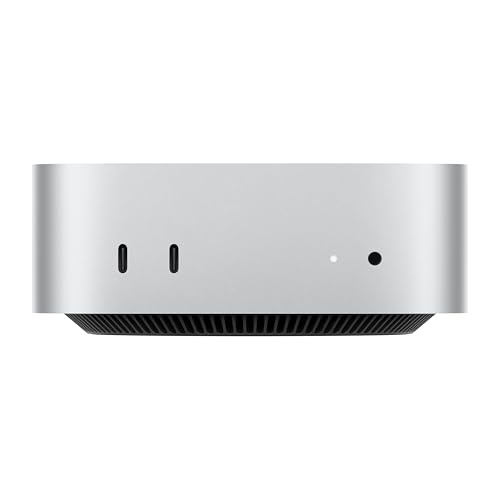 Apple Mac mini M4, 16GB, 256GB
Apple households, students, and home workers who want a quiet, low-maintenance desktop that simply works.
Best budget
 Beelink Mini S12 Pro, N100, 16GB, 500GB
Home workers, students, and media-centre builders who want a cheap, quiet Windows PC for everyday tasks.
Best for home office
 GMKtec NucBox G3 Plus, N150, 16GB, 1TB
Home workers and small offices that want a tiny, efficient PC with roomy storage and a fast wired network port.
For most buyers, the Apple Mac mini M4 is the pick if you live in the Apple world, and the Beelink Mini S12 Pro is the pick if you want the cheapest honest Windows desktop. Windows buyers who multitask hard should buy the Beelink SER5 Pro, creators should buy the Minisforum UM790 Pro, and gamers who want an upgrade path should buy the GMKtec K8 Plus for its OCuLink port. Homelab builders should look at the GEEKOM IT13 Max for its dual 2.5G ports and 16-core chip.
The picks, ranked
| Pick | Processor | Memory | Storage | Buy |
|---|---|---|---|---|
| Best overallApple Mac mini M4, 16GB, 256GB | Apple M4, 10-core CPU and 10-core GPU | 16GB unified memory, not user upgradeable | 256GB SSD, not user upgradeable | Check price |
| Best budgetBeelink Mini S12 Pro, N100, 16GB, 500GB | Intel Alder Lake N100, 4 cores, up to 3.4GHz | 16GB DDR4 | 500GB M.2 SSD, expandable | Check price |
| Best for home officeGMKtec NucBox G3 Plus, N150, 16GB, 1TB | Intel Twin Lake N150, 4 cores, up to 3.6GHz | 16GB DDR4 | 1TB PCIe M.2 SSD, plus M.2 SATA expansion slot | Check price |
 Best value RyzenBeelink SER5 Pro, Ryzen 7 5825U, 32GB, 1TB | AMD Ryzen 7 5825U, 8 cores, up to 4.5GHz | 32GB DDR4 | 1TB NVMe SSD | Check price |
 Best for worry-free ownershipGEEKOM A5 2027 Edition, Ryzen 7 7730U, 16GB, 512GB | AMD Ryzen 7 7730U, 8 cores, up to 4.5GHz | 16GB DDR4, upgradeable | 512GB NVMe SSD, plus 2.5-inch and second M.2 bays | Check price |
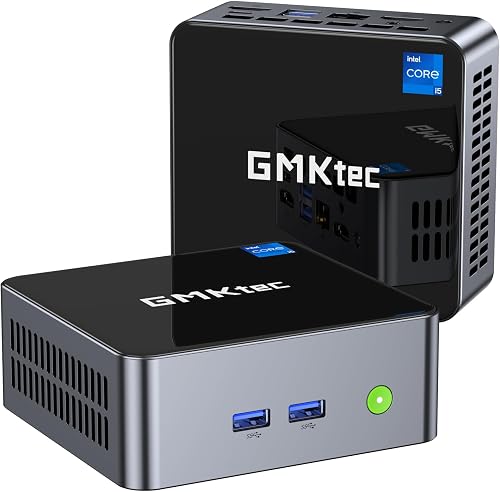 Best Intel mid-rangeGMKtec NucBox M3, Core i5-12450H, 16GB, 1TB | Intel Core i5-12450H, 8 cores, up to 4.4GHz | 16GB DDR4, dual channel | 1TB SSD | Check price |
 Best for creatorsMINISFORUM Venus UM790 Pro, Ryzen 9 7940HS, 32GB, 1TB | AMD Ryzen 9 7940HS, 8 cores, up to 5.2GHz | 32GB DDR5-5600, upgradeable to 64GB | 1TB PCIe 4.0 SSD, dual M.2 slots with RAID support | Check price |
 Best for gaming and expansionGMKtec NucBox K8 Plus, Ryzen 7 8845HS, 32GB, 1TB | AMD Ryzen 7 8845HS, 8 cores, up to 5.1GHz | 32GB DDR5-5600, upgradeable | 1TB PCIe 4.0 SSD, expandable | Check price |
 Best quiet performerBeelink SER8, Ryzen 7 8745HS, 32GB, 1TB | AMD Ryzen 7 8745HS, 8 cores, up to 4.9GHz | 32GB DDR5-5600, dual channel | 1TB PCIe 4.0 SSD, dual M.2 slots | Check price |
 Best for AI and homelabGEEKOM IT13 Max 2026, Core Ultra 9 185H, 24GB, 500GB | Intel Core Ultra 9 185H, 16 cores, up to 5.1GHz | 24GB LPDDR5, soldered | 500GB M.2 SSD, upgradeable | Check price |
Best overall
Apple Mac mini M4, 16GB, 256GB
The small Mac that replaced many towers: silent, efficient, and fast enough for most desks, in a five-inch square.
Strengths
- The M4 chip delivers fast, responsive everyday performance while staying quiet and cool, since the whole machine draws little power for the speed it offers.
- At five inches square it fits anywhere a monitor stands, and the front USB-C ports and headphone jack remove the usual reach-around for everyday connections.
- macOS works smoothly with iPhone and iPad, with features like iPhone Mirroring and shared clipboard that save Apple owners real daily friction.
Limitations
- Memory and storage are fixed at purchase, so the base configuration cannot grow later, and buyers with large photo or video libraries need external storage.
- The rear power button sits underneath the unit, which is an awkward reach on a desk where the mini sits flat.
- Windows software needs virtualisation or a separate machine, and the small number of USB-A ports means older peripherals need an adapter or hub.
What owners report
Commonly praised
- Owners love how silently it runs through long workdays without ever drawing attention to itself
- praise: Owners praise the tiny footprint that frees up desk space and tucks neatly beside a monitor
- praise: Owners value how smoothly it works alongside their phones and tablets for everyday sharing and calls
Common complaints
- Owners grumble that memory and storage cannot be increased after purchase, forcing careful choices upfront
- complaints: Owners find the power button awkwardly placed underneath the unit and hard to reach on a flat desk
- complaints: Owners note the shortage of older-style USB ports means adapters are needed for long-owned peripherals
Recurring themes from owner reviews on retailers and forums, summarised by our editors. Updated October 2026.
| Processor | Apple M4, 10-core CPU and 10-core GPU |
|---|---|
| Memory | 16GB unified memory, not user upgradeable |
| Storage | 256GB SSD, not user upgradeable |
| Ports | Thunderbolt, HDMI, Gigabit Ethernet, front USB-C, headphone jack |
| Operating system | macOS |
Best for: Apple households, students, and home workers who want a quiet, low-maintenance desktop that simply works.
Skip if: You need Windows-only software, want to upgrade memory or storage yourself, or play demanding Windows games.
Best budget
Beelink Mini S12 Pro, N100, 16GB, 500GB
The honest budget box: a frugal Intel N100, enough memory for real multitasking, and a size that vanishes behind a monitor.
Strengths
- The Intel N100 sips power and runs quietly, which makes the S12 Pro a good fit for always-on jobs like a media server or a home office that never sleeps.
- With 16GB of memory fitted, everyday multitasking stays smooth in a way that cheaper 8GB boxes cannot match.
- Dual HDMI outputs drive two 4K displays, and the VESA mount lets the whole PC hide behind a monitor for a cable-light desk.
Limitations
- The N100 is an entry-level processor, so video editing, large spreadsheets, and modern games quickly show its limits.
- Only gigabit Ethernet is fitted, so wired network speeds top out below the 2.5G ports found on pricier rivals.
- The bundled SSD is a basic unit, and buyers who store large media libraries will want to add storage sooner rather than later.
What owners report
Commonly praised
- Owners appreciate the hushed running that suits bedrooms and always-on media setups
- praise: Owners like how little space it takes, with many mounting it out of sight behind a display
- praise: Owners say everyday browsing and office tasks feel snappy thanks to the generous fitted memory
Common complaints
- Owners warn that heavier creative work quickly exposes the limits of the entry-level chip
- complaints: Owners mention the bundled drive feels basic and fills up sooner than hoped for media collections
- complaints: Owners wish for faster wired networking, finding the single gigabit port limiting for large file moves
Recurring themes from owner reviews on retailers and forums, summarised by our editors. Updated October 2026.
| Processor | Intel Alder Lake N100, 4 cores, up to 3.4GHz |
|---|---|
| Memory | 16GB DDR4 |
| Storage | 500GB M.2 SSD, expandable |
| Displays | Dual HDMI, 4K at 60Hz |
| Connectivity | Wi-Fi 6, Bluetooth 5.2, Gigabit Ethernet |
Best for: Home workers, students, and media-centre builders who want a cheap, quiet Windows PC for everyday tasks.
Skip if: You edit video, play modern games, or run heavy multitasking loads that need more than an efficient entry-level chip.
Best for home office
GMKtec NucBox G3 Plus, N150, 16GB, 1TB
The pocket-sized office PC: a newer N150 chip, a generous 1TB drive, and a 2.5G port, in a box lighter than a paperback.
Strengths
- The Intel Twin Lake N150 is a step up from the older N100 class, giving everyday office work and browsing a little more headroom.
- A 1TB SSD fitted as standard means documents, photos, and apps fit without an early storage upgrade.
- The 2.5G Ethernet port suits wired home offices and small servers, where gigabit can become a bottleneck for large file moves.
Limitations
- Four efficient cores still set a firm ceiling, so video editing and demanding creative apps are not this machine's job.
- Memory expansion is limited compared with larger mini PCs, so buyers should treat the fitted 16GB as the long-term amount.
- The tiny chassis leaves little room for extra drives, so large media collections belong on external or network storage.
What owners report
Commonly praised
- Owners praise the pocket-sized design that travels easily between rooms and desks
- praise: Owners like the roomy fitted drive that holds documents and photos without an early upgrade
- praise: Owners value the fast wired port that keeps video calls steady on a home network
Common complaints
- Owners note demanding apps and games are beyond this little chip, so expectations need adjusting
- complaints: Owners say memory growth is limited, making the fitted amount a long-term commitment
- complaints: Owners find extra internal drive space tight, so large libraries end up on external storage
Recurring themes from owner reviews on retailers and forums, summarised by our editors. Updated October 2026.
| Processor | Intel Twin Lake N150, 4 cores, up to 3.6GHz |
|---|---|
| Memory | 16GB DDR4 |
| Storage | 1TB PCIe M.2 SSD, plus M.2 SATA expansion slot |
| Displays | Dual HDMI, 4K at 60Hz |
| Connectivity | Wi-Fi 6, Bluetooth 5.2, 2.5G Ethernet |
Best for: Home workers and small offices that want a tiny, efficient PC with roomy storage and a fast wired network port.
Skip if: You need serious graphics power, or you want memory that can grow well beyond the fitted amount.
Best value Ryzen
Beelink SER5 Pro, Ryzen 7 5825U, 32GB, 1TB
The value Ryzen pick: eight cores, 32GB of memory, and triple displays, for desks that outgrew the budget boxes.
Strengths
- Eight cores and 32GB of memory handle heavy browser sessions, office suites, and light creative work together without the stutter that budget boxes show.
- Triple display support, through HDMI, DisplayPort, and USB-C, suits multi-monitor desks and trading or research setups.
- Wi-Fi 6, Bluetooth 5.2, and 2.5G Ethernet cover modern home and office networks without adapters.
Limitations
- The older Ryzen 5000 series graphics lag behind the newer Radeon 780M machines for gaming and GPU-heavy creative work.
- There is no USB4 port, so high-speed external storage and docking options are narrower than on newer rivals.
- The fan becomes audible under sustained load, which matters in a silent study or bedroom office.
What owners report
Commonly praised
- Owners enjoy the confident multitasking that comes from many cores paired with ample memory
- praise: Owners like the multi-monitor support that suits busy desks with several screens
- praise: Owners say setup is quick, with wireless and wired connections working straight out of the box
Common complaints
- Owners mention fan noise becomes noticeable during long, heavy sessions
- complaints: Owners note the older graphics generation lags behind newer rivals for gaming and GPU work
- complaints: Owners wish for a faster external port, finding the current selection narrower than on newer machines
Recurring themes from owner reviews on retailers and forums, summarised by our editors. Updated October 2026.
| Processor | AMD Ryzen 7 5825U, 8 cores, up to 4.5GHz |
|---|---|
| Memory | 32GB DDR4 |
| Storage | 1TB NVMe SSD |
| Displays | Triple display, HDMI plus DisplayPort plus USB-C |
| Connectivity | Wi-Fi 6, Bluetooth 5.2, 2.5G Ethernet |
Best for: Busy home workers and multitaskers who want eight Ryzen cores and plenty of memory without paying flagship money.
Skip if: You need the newest Ryzen graphics or USB4, or you want a machine that stays silent under sustained heavy loads.
Best for worry-free ownership
GEEKOM A5 2027 Edition, Ryzen 7 7730U, 16GB, 512GB
The worry-free office box: a proven eight-core Ryzen, a long warranty, and an SD reader, in a handsome metal case.
Strengths
- GEEKOM backs the A5 with a three-year warranty, which is longer cover than most rivals offer and matters for business buyers.
- The Ryzen 7 7730U brings eight cores to everyday office work, photo handling, and multitasking, with room for growth over budget chips.
- An SD card reader, dual HDMI, and four-display support make it a practical desk machine for photographers and multi-monitor workers.
Limitations
- The 7730U is a rebadged older-generation part, so it lacks the newer graphics and efficiency of current Ryzen mobile chips.
- Integrated Vega-era graphics limit gaming to light titles and low settings, and modern games are not its strength.
- The fitted 512GB drive fills faster than the 1TB drives on rivals, so media-heavy buyers should plan an upgrade.
What owners report
Commonly praised
- Owners value the long warranty cover that brings peace of mind for business and family use
- praise: Owners like the sturdy metal case that looks smart on a desk and survives daily handling
- praise: Owners appreciate the built-in card reader that saves photographers from carrying a separate adapter
Common complaints
- Owners note the processor generation feels older than the 2027 branding suggests
- complaints: Owners say graphics performance limits play to lighter titles at modest settings
- complaints: Owners find the fitted drive fills faster than on rivals with larger standard storage
Recurring themes from owner reviews on retailers and forums, summarised by our editors. Updated October 2026.
| Processor | AMD Ryzen 7 7730U, 8 cores, up to 4.5GHz |
|---|---|
| Memory | 16GB DDR4, upgradeable |
| Storage | 512GB NVMe SSD, plus 2.5-inch and second M.2 bays |
| Displays | Dual HDMI, up to four displays |
| Extras | SD card reader, Wi-Fi 6, Bluetooth 5.2, Gigabit Ethernet |
Best for: Home offices and small businesses that value a long warranty, a card reader, and a machine that just keeps working.
Skip if: You need the newest processor generation, or you want more than 512GB of storage fitted from the start.
Best Intel mid-range
GMKtec NucBox M3, Core i5-12450H, 16GB, 1TB
The Intel middle ground: a proper laptop-class Core i5 with eight cores, for buyers who prefer Intel to AMD.
Strengths
- The Core i5-12450H brings eight cores with a useful boost, so office apps, video calls, and browser-heavy days feel quick.
- Dual-channel 16GB of memory and a 1TB SSD give a balanced configuration that needs no immediate upgrades.
- USB-C, four USB ports, Wi-Fi 6, and 2.5G Ethernet cover the connections a modern desk actually uses.
Limitations
- Intel integrated graphics trail the Radeon 780M machines for gaming and GPU-accelerated creative work.
- There is no USB4 port, so external GPU docks and the fastest external drives are off the table.
- The compact case runs warm under sustained load, so ventilation around the unit matters more than with the N-series boxes.
What owners report
Commonly praised
- Owners like the step up in responsiveness over entry-level boxes for office and study work
- praise: Owners praise the balanced fitted memory and storage that need no immediate attention
- praise: Owners value the tidy, compact case that sits unobtrusively beside a monitor
Common complaints
- Owners note integrated graphics trail AMD rivals for gaming and accelerated creative tasks
- complaints: Owners wish for a faster external port for docks and high-speed drives
- complaints: Owners mention the small case warms up during sustained work, so airflow around it matters
Recurring themes from owner reviews on retailers and forums, summarised by our editors. Updated October 2026.
| Processor | Intel Core i5-12450H, 8 cores, up to 4.4GHz |
|---|---|
| Memory | 16GB DDR4, dual channel |
| Storage | 1TB SSD |
| Displays | HDMI 4K output, plus USB-C display |
| Connectivity | Wi-Fi 6, Bluetooth 5.2, 2.5G Ethernet, USB-C |
Best for: Office workers and students who want Intel compatibility and a real step up from entry-level N-series chips.
Skip if: You want the strongest integrated graphics in this size, or you need USB4 and the fastest wired networking.
Best for creators
MINISFORUM Venus UM790 Pro, Ryzen 9 7940HS, 32GB, 1TB
The creator favourite: a Ryzen 9 with Radeon 780M graphics, dual USB4, and four-screen output in a quiet metal case.
Strengths
- The Ryzen 9 7940HS with Radeon 780M graphics handles photo editing, light video work, and casual gaming far beyond budget boxes.
- Dual USB4 ports, dual HDMI 2.1, and dual M.2 slots give four-screen output and storage expansion that rivals small towers.
- The metal case and liquid-metal cooling design keep the machine composed under sustained work, with memory and SSD cooling included.
Limitations
- USB4 power delivery output is limited, so powering a monitor from the port needs care with the power budget.
- The fan is audible under sustained heavy load, which is the price of packing this much performance into a small case.
- Integrated graphics still cap serious gaming and heavy 3D rendering, where a discrete GPU machine remains the right buy.
What owners report
Commonly praised
- Owners love the strong everyday speed that makes photo work and heavy multitasking feel effortless
- praise: Owners praise the generous port selection that covers many monitors, docks, and fast drives
- praise: Owners value the upgrade-friendly interior that lets memory and storage grow over time
Common complaints
- Owners note the fan can be heard during long, demanding sessions in quiet rooms
- complaints: Owners find the power delivery limits on the fast ports need care when powering a display
- complaints: Owners say serious gaming and heavy rendering still call for a machine with a separate graphics card
Recurring themes from owner reviews on retailers and forums, summarised by our editors. Updated October 2026.
| Processor | AMD Ryzen 9 7940HS, 8 cores, up to 5.2GHz |
|---|---|
| Graphics | AMD Radeon 780M integrated |
| Memory | 32GB DDR5-5600, upgradeable to 64GB |
| Storage | 1TB PCIe 4.0 SSD, dual M.2 slots with RAID support |
| Connectivity | Dual USB4, Wi-Fi 6E, Bluetooth 5.3, 2.5G Ethernet |
Best for: Creators, developers, and power users who want desktop-class speed, strong integrated graphics, and serious expansion.
Skip if: Your workload is browsing and office apps, or you need a discrete graphics card for heavy rendering.
Best for gaming and expansion
GMKtec NucBox K8 Plus, Ryzen 7 8845HS, 32GB, 1TB
The best-connected Ryzen box: dual 2.5G ports, an OCuLink port for an external GPU, and four-screen output.
Strengths
- The OCuLink port opens a path to an external graphics card later, which no other box here offers, extending the machine's gaming life.
- Dual 2.5G Ethernet ports suit homelab and firewall builds, letting one box serve two networks without extra adapters.
- Four-screen output through USB4, HDMI 2.1, and DisplayPort 2.1 covers demanding multi-monitor desks and sim setups.
Limitations
- The performance mode that unlocks full speed also raises fan noise, so silent-mode users give up some graphics headroom.
- Demanding modern games still need low settings, since even the strong 780M is integrated graphics, not a discrete card.
- The dual-fan design and larger case make it less discreet than the smaller budget boxes on a tidy desk.
What owners report
Commonly praised
- Owners love the external graphics option that keeps a future upgrade path open
- praise: Owners praise the twin wired ports that suit home servers and split-network setups
- praise: Owners value the wide display support that handles demanding multi-screen desks
Common complaints
- Owners note full-speed running brings audible fan noise that silent-mode users must trade away
- complaints: Owners say demanding new games still need modest settings despite the strong integrated graphics
- complaints: Owners find the larger case less discreet than smaller boxes on a tidy desk
Recurring themes from owner reviews on retailers and forums, summarised by our editors. Updated October 2026.
| Processor | AMD Ryzen 7 8845HS, 8 cores, up to 5.1GHz |
|---|---|
| Graphics | AMD Radeon 780M integrated |
| Memory | 32GB DDR5-5600, upgradeable |
| Storage | 1TB PCIe 4.0 SSD, expandable |
| Connectivity | Dual 2.5G Ethernet, dual USB4, OCuLink, Wi-Fi 6, Bluetooth 5.2 |
Best for: Gamers, emulation fans, and homelab builders who want OCuLink expansion and dual wired networks.
Skip if: You want silent running at full speed, or you will never use an external GPU or a second network port.
Best quiet performer
Beelink SER8, Ryzen 7 8745HS, 32GB, 1TB
The quiet achiever: Ryzen 7 power with Radeon 780M graphics and triple 4K displays, in a calm silver case.
Strengths
- The Ryzen 7 8745HS with Radeon 780M graphics covers office work, creative apps, and casual gaming with headroom to spare.
- Triple 4K display support through HDMI 2.1, DisplayPort, and USB4 suits multi-monitor productivity desks.
- Dual M.2 slots and generous memory expansion keep the machine useful for years, rather than fixed at its launch specification.
Limitations
- The 8745HS lacks the neural processor found in the 8845HS, so on-device AI features run on the CPU and GPU instead.
- Only a single 2.5G Ethernet port is fitted, where the K8 Plus offers two for network-heavy builds.
- There is no SD card reader, so photographers need an external reader for camera cards.
What owners report
Commonly praised
- Owners like the calm, quiet character that suits living rooms and shared workspaces
- praise: Owners praise the multi-display support that covers productive multi-monitor setups
- praise: Owners value the roomy expansion for memory and storage that extends the machine's useful life
Common complaints
- Owners note the missing AI accelerator leaves newer on-device features to the main processor
- complaints: Owners wish for a second wired port for network-heavy builds
- complaints: Owners miss a built-in card reader, needing an external one for camera cards
Recurring themes from owner reviews on retailers and forums, summarised by our editors. Updated October 2026.
| Processor | AMD Ryzen 7 8745HS, 8 cores, up to 4.9GHz |
|---|---|
| Graphics | AMD Radeon 780M integrated |
| Memory | 32GB DDR5-5600, dual channel |
| Storage | 1TB PCIe 4.0 SSD, dual M.2 slots |
| Connectivity | USB4, Wi-Fi 6, Bluetooth 5.2, 2.5G Ethernet |
Best for: Home workers and creators who want strong performance without a loud fan, and a case that looks at home in a living room.
Skip if: You need an AI accelerator, or you want OCuLink expansion for an external graphics card.
Best for AI and homelab
GEEKOM IT13 Max 2026, Core Ultra 9 185H, 24GB, 500GB
The AI and homelab pick: a 16-core Core Ultra 9, dual 2.5G ports, Wi-Fi 7, and four-display output.
Strengths
- Sixteen Core Ultra 9 cores with a dedicated neural processor handle virtual machines, containers, and local AI work that smaller boxes struggle with.
- Dual 2.5G Ethernet ports and Wi-Fi 7 suit Proxmox hosts, firewalls, and routers built from a mini PC.
- Four-display output through dual USB4 and dual HDMI covers control-room desks and multi-monitor creative setups.
Limitations
- The fitted 500GB SSD fills quickly with virtual machines or video projects, so a storage upgrade is likely early.
- Memory is soldered rather than socketed, so the fitted 24GB cannot be increased later.
- Integrated graphics only means no discrete GPU option, so CUDA workloads and heavy rendering need another machine.
What owners report
Commonly praised
- Owners love the many-core performance that handles virtual machines and containers with ease
- praise: Owners praise the twin wired ports and modern wireless that suit serious home labs
- praise: Owners value the quiet cooling that keeps long sessions comfortable in shared spaces
Common complaints
- Owners note the fitted drive fills quickly with virtual machines and video projects
- complaints: Owners say soldered memory cannot be increased later, so the launch amount is final
- complaints: Owners find the lack of a discrete graphics option limiting for heavy rendering and CUDA work
Recurring themes from owner reviews on retailers and forums, summarised by our editors. Updated October 2026.
| Processor | Intel Core Ultra 9 185H, 16 cores, up to 5.1GHz |
|---|---|
| Memory | 24GB LPDDR5, soldered |
| Storage | 500GB M.2 SSD, upgradeable |
| Displays | Four displays, dual USB4 plus dual HDMI |
| Connectivity | Dual 2.5G Ethernet, Wi-Fi 7, dual USB4 |
Best for: Developers, homelab builders, and creators who run virtual machines, containers, or local AI workloads.
Skip if: You need lots of fitted storage, or you want upgradeable memory rather than soldered RAM.
How we chose
Processor class before brand
Mini PCs fall into clear processor classes, and the class decides what the machine can do far more than the badge on the case. Entry-level N-series chips cover browsing and office work, mid-range Ryzen and Core i5 chips cover heavy multitasking, and Ryzen 9 and Core Ultra 9 chips cover creators and homelab work. We ranked each box against its class, not against machines twice its capability.
Memory and storage as fitted
A mini PC is often bought as a complete machine, so we judged the fitted memory and storage, not just the maximum the case allows. A 1TB drive and 16GB of memory as standard beat a cheaper box that needs immediate upgrades, and soldered memory counted against a machine because it cannot grow later.
Ports and displays that match the job
Office buyers need dual displays and reliable networking, creators need fast USB and multiple monitors, and homelab builders need dual Ethernet. We credited machines whose ports match their intended job, and penalised machines that look strong on paper but miss the one port their buyer needs.
Noise, size, and living with the box
A mini PC earns its place by disappearing: quiet operation, a small footprint, and a VESA mount matter because the machine sits on a desk or behind a monitor all day. Loud fans under load and awkward power buttons counted against otherwise strong machines.
Questions, answered
Is a mini PC powerful enough to replace a desktop tower?
For most office, browsing, streaming, and light creative work, yes. Modern mini PCs carry laptop-class processors that handle everyday tasks easily, and the Ryzen 9 and Core Ultra 9 boxes here handle heavier work too. A tower still wins for discrete graphics cards, large storage arrays, and heavy rendering, so gamers and 3D artists should weigh that trade-off.
Can I upgrade a mini PC later?
Often, but not always. Most Windows mini PCs here let you add memory or storage, with dual M.2 slots on the stronger models. The Mac mini and the GEEKOM IT13 Max are exceptions, with fixed memory, so buy the configuration you will need for the machine's whole life on those models.
Do mini PCs come with Windows installed?
Most Windows mini PCs here ship with Windows 11 Pro pre-installed and ready to set up. The Mac mini ships with macOS, and barebone versions of some models ship without memory, storage, or an operating system, so check the exact listing configuration before ordering.