Best of
The Best Label Makers (2026)
The best label makers of 2026: keyboard handhelds, Bluetooth app printers and desktop label printers compared on tape systems, widths and durability.
Our top picks at a glance
Best overall
 DYMO LabelManager 160
Home and office organizing where a self-contained keyboard handheld is the fastest path to a label.
Best app-based
 Brother P-touch CUBE Plus PT-P710BT
Home, retail and craft labeling where phone-designed, wider labels are worth a premium.
Best for durability
 Brother P-touch PT-H110
Desk and garage organizing where labels must survive handling, moisture and time.
Most people should buy the DYMO LabelManager 160: a self-contained QWERTY handheld with one-touch formatting and D1 tapes you can buy anywhere. If your labels live outdoors, in kitchens or on cables, the laminated output of the Brother PT-H110 lasts longer. Phone-first users should get the Brother P-touch CUBE Plus, and desks printing labels in volume should jump to the DYMO LabelWriter 550.
The picks, ranked
| Pick | Tape system | Input | Formatting | Buy |
|---|---|---|---|---|
| Best overallDYMO LabelManager 160 | DYMO D1, 1/4, 3/8 and 1/2 in widths | QWERTY keyboard, large display | 20+ format options, 200+ symbols and clip-art | Check price |
| Best app-basedBrother P-touch CUBE Plus PT-P710BT | Brother TZe, up to 24 mm widths | Bluetooth via phone or tablet apps; USB to desktop | - | Check price |
| Best for durabilityBrother P-touch PT-H110 | Brother TZe laminated, 3.5 to 12 mm widths | QWERTY keyboard, graphical display | - | Check price |
 Best rechargeable handheldDYMO LabelManager 280 | DYMO D1, 1/4, 3/8 and 1/2 in widths | QWERTY keyboard plus PC and Mac via USB | - | Check price |
 Best desktop keyboardBrother P-touch PT-D600 | Brother TZe, up to 24 mm widths | QWERTY keyboard plus PC and Mac via USB | - | Check price |
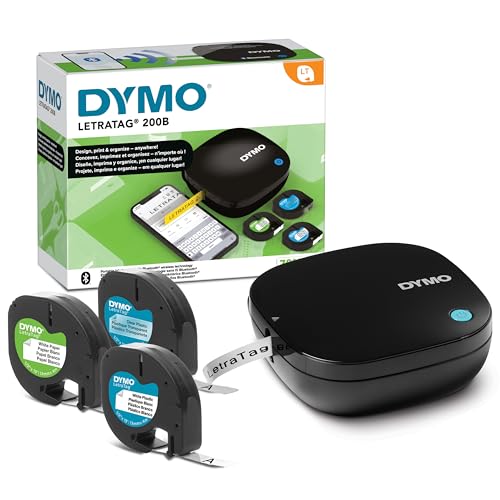 Best for home organizingDYMO LetraTag 200B Bluetooth | DYMO LetraTag LT, 12 mm widths | Bluetooth via LetraTag Connect app | - | Check price |
 Best for volumeDYMO LabelWriter 550 | - | PC and Mac via USB, DYMO Connect software | - | Check price |
 Best industrialDYMO Rhino 4200 | DYMO Industrial, 1/4 to 3/4 in widths plus heat-shrink tubes | QWERTY keyboard with Hot Keys | - | Check price |
 Best memoryEpson LabelWorks LW-400 | Epson LabelWorks, 6 to 18 mm widths | QWERTY keyboard, backlit two-line display | - | Check price |
 Best portable app printerBrother P-touch CUBE PT-P300BT | Brother TZe laminated, 3.5 to 12 mm widths | Bluetooth via P-touch Design and Print app | - | Check price |
Best overall
DYMO LabelManager 160
The classic QWERTY handheld that needs no phone and no fuss.
Strengths
- Computer-style QWERTY keyboard with one-touch smart keys for bold, italic, underline and borders, so formatting takes fewer steps.
- Over 20 ways to format text and more than 200 symbols and clip-art built in, with a large display to preview before printing.
- Uses widely available DYMO D1 tapes in 1/4, 3/8 and 1/2 inch widths, with auto power-off to stretch battery life.
Limitations
- Maximum tape width is 1/2 inch (12 mm), too narrow for large storage-bin labels.
- Runs on disposable batteries or an optional adapter, neither of which removes the refill-style running cost of D1 tape.
- No phone or PC connection, so designs live on the small built-in display only.
What owners report
Commonly praised
- QWERTY keyboard feels familiar straight away, with formatting keys close to hand
- Preview screen helps owners check symbols and borders before wasting any tape
- D1 cartridges are easy to find in shops and simple to swap between widths
Common complaints
- Half-inch ceiling feels cramped for big storage bins and shelf labels
- Disposable batteries add up, and the optional adapter costs extra
- Without a phone or PC link, designs stay limited to the small display
Recurring themes from owner reviews on retailers and forums, summarised by our editors. Updated October 2026.
| Tape system | DYMO D1, 1/4, 3/8 and 1/2 in widths |
|---|---|
| Input | QWERTY keyboard, large display |
| Formatting | 20+ format options, 200+ symbols and clip-art |
| Print method | Thermal transfer, 300 dpi class output |
| Power | Batteries or optional AC adapter; auto power-off |
Best for: Home and office organizing where a self-contained keyboard handheld is the fastest path to a label.
Skip if: You want to design labels on a big screen, or you need tape wider than 1/2 inch.
Best app-based
Brother P-touch CUBE Plus PT-P710BT
The design-led Bluetooth cube that prints wide 24 mm TZe labels.
Strengths
- Bluetooth design and print from phone, tablet or desktop using Brother Design and Print, iPrint and Label, or P-touch Editor software.
- Prints TZe tapes up to 24 mm (about 1 inch) wide, double the handheld ceiling, including premium glitter and matte tapes.
- Built-in rechargeable Li-ion battery and automatic cutter in a compact cube body, with two starter tapes in the box.
Limitations
- No keyboard or screen of its own; a phone or computer is mandatory for every label.
- Premium hardware price, and wide TZe tapes are the priciest refills in this guide.
- 180 dpi-class print resolution is lower than the sharpest desktop label printers.
What owners report
Commonly praised
- Phone design gives owners room for layouts tiny handheld screens cannot show
- Wider TZe tape suits pantry bins, retail shelves and craft projects better
- Automatic cutter and rechargeable battery make longer runs feel effortless
Common complaints
- No keyboard or screen means a dead phone stops labelling altogether
- Wide and premium TZe refills are the priciest way to keep it fed
- Print sharpness trails the crispest desktop machines on fine detail
Recurring themes from owner reviews on retailers and forums, summarised by our editors. Updated October 2026.
| Tape system | Brother TZe, up to 24 mm widths |
|---|---|
| Input | Bluetooth via phone or tablet apps; USB to desktop |
| Battery | Built-in rechargeable Li-ion |
| Cutter | Automatic |
| Included | 24 mm black on white starter tape and premium glitter gold starter tape |
Best for: Home, retail and craft labeling where phone-designed, wider labels are worth a premium.
Skip if: You want a built-in keyboard for phone-free use, or the cheapest cost per label.
Best for durability
Brother P-touch PT-H110
Laminated TZe labels and a cable-labeling mode, at a handheld price.
Strengths
- Prints on Brother TZe laminated tapes, whose laminated construction resists water, fading and peeling indoors and out.
- Dedicated cable labeling feature plus one-touch keys for fonts, sizes, styles and frames.
- Stores up to 15 labels in memory for fast reprints, with 3 fonts, 14 frames and over 250 symbols.
Limitations
- Tape tops out at 12 mm, and TZe cartridges cost more per foot than basic thermal sticker paper.
- Powered by 6 AAA batteries with the AC adapter sold separately.
- Two lines maximum per label, fine for files and cables, limiting for address-style labels.
What owners report
Commonly praised
- Laminated TZe labels shrug off splashes, handling and kitchen steam well
- Cable labelling mode earns praise from owners tidying network and AV leads
- Saved labels in memory make repeat file and jar prints quick to call back
Common complaints
- Battery appetite is thirsty work, and the mains adapter is sold separately
- TZe cartridges cost more than plain thermal paper over the long run
- Two-line limit feels tight for addresses or longer storage notes
Recurring themes from owner reviews on retailers and forums, summarised by our editors. Updated October 2026.
| Tape system | Brother TZe laminated, 3.5 to 12 mm widths |
|---|---|
| Input | QWERTY keyboard, graphical display |
| Memory | Stores up to 15 labels |
| Print method | Thermal transfer, laminated output |
| Power | 6 AAA batteries or optional AC adapter |
Best for: Desk and garage organizing where labels must survive handling, moisture and time.
Skip if: You want Bluetooth app design, or labels wider than 12 mm.
Best rechargeable handheld
DYMO LabelManager 280
The 160 formula plus a rechargeable battery and PC connection.
Strengths
- Rechargeable battery ends the disposable-battery cycle that handhelds usually impose.
- PC and Mac connectivity over USB lets you use computer fonts and graphics, beyond the built-in 20+ formats and 200+ symbols.
- Large graphical display and the same one-touch smart keys and QWERTY layout as the 160.
Limitations
- Still capped at 1/2 inch D1 tape, so wide-label jobs need a different machine.
- PC software compatibility is specified for Windows 7 or later and Mac OS X v10.8 or later in DYMO documentation, so check current OS support before relying on it.
- Costs meaningfully more than the 160 for connectivity and the battery, not print quality.
What owners report
Commonly praised
- Rechargeable pack ends the constant hunt for fresh disposable batteries
- USB link to a computer opens up proper fonts and graphics for tidier labels
- Large graphical display makes longer labels easier to proof before printing
Common complaints
- Tape still stops at half an inch, so wide bin labels need another machine
- Older stated software support leaves some owners checking OS compatibility
- Extra cost over the 160 buys connectivity, not sharper print quality
Recurring themes from owner reviews on retailers and forums, summarised by our editors. Updated October 2026.
| Tape system | DYMO D1, 1/4, 3/8 and 1/2 in widths |
|---|---|
| Input | QWERTY keyboard plus PC and Mac via USB |
| Display | Large graphical display |
| Print method | Thermal transfer |
| Power | Rechargeable battery pack |
Best for: Frequent labelers who want handheld speed plus the option to design on a computer.
Skip if: You label occasionally, where the cheaper LabelManager 160 covers the same D1 tapes.
Best desktop keyboard
Brother P-touch PT-D600
The desktop P-touch with a color display and PC design power.
Strengths
- Full-color backlit display previews the actual tape color and label design before printing, reducing wasted tape.
- Prints up to 7 lines on TZe tapes up to 24 mm wide, standalone from its keyboard or designed in P-touch Editor from a PC or Mac.
- Fast output with an automatic tape cutter, AC adapter and USB cable included in the box.
Limitations
- Desktop size and weight (about 2.1 pounds) suit a fixed desk, though batteries allow occasional moves.
- Premium price overlaps the CUBE Plus; choose based on keyboard versus app preference.
- TZe wide tapes carry the usual Brother refill premium.
What owners report
Commonly praised
- Colour preview showing actual tape colour saves owners wasted cartridges
- Multi-line output handles address and asset labels handhelds cannot manage
- Included adapter, cable and automatic cutter make it ready from the box
Common complaints
- Desk-bound weight makes it awkward to carry between rooms or sites
- Price overlaps app-based models, so the keyboard has to earn its keep
- Wide TZe tapes carry the usual Brother premium at refill time
Recurring themes from owner reviews on retailers and forums, summarised by our editors. Updated October 2026.
| Tape system | Brother TZe, up to 24 mm widths |
|---|---|
| Input | QWERTY keyboard plus PC and Mac via USB |
| Display | Full-color backlit graphical display |
| Lines per label | Up to 7 lines |
| Included | 24 mm starter tape, AC adapter, USB cable |
Best for: Office desks producing varied labels all day, including barcodes and multi-line 24 mm labels.
Skip if: You need portability, since this is an AC-powered desktop unit first.
Best for home organizing
DYMO LetraTag 200B Bluetooth
DYMO tape simplicity, designed on your phone, printed over Bluetooth.
Strengths
- Automatic Bluetooth connection to the LetraTag Connect app on iOS and Android, ready in seconds with no pairing ritual.
- App customization with 5 font sizes, 15 box styles, 100+ icons, underlining, multi-line text and date insertion.
- Works with the full LetraTag tape range, including iron-on fabric labels for clothing, and this bundle includes 3 assorted tapes.
Limitations
- LetraTag tapes are paper or basic plastic, not laminated; they suit indoor organizing, not garages or outdoors.
- Runs on 4 AA batteries (not included in the base listing), with no rechargeable option.
- No keyboard or display on the unit itself, so no phone means no labels.
What owners report
Commonly praised
- Bluetooth pairing feels painless, with the app ready quickly for most owners
- Icons, boxes and date stamps make storage and lunchbox labels more playful
- Iron-on fabric tape is a hit for naming school clothes and uniforms
Common complaints
- Paper and basic plastic tapes mark easily and suit indoor jobs only
- Batteries are not included and there is no rechargeable option
- Phone-only control frustrates owners who prefer a proper keyboard
Recurring themes from owner reviews on retailers and forums, summarised by our editors. Updated October 2026.
| Tape system | DYMO LetraTag LT, 12 mm widths |
|---|---|
| Input | Bluetooth via LetraTag Connect app |
| Customization | 5 font sizes, 15 box styles, 100+ icons |
| Print method | Direct thermal |
| Power | 4 AA batteries |
Best for: Kitchen, kids rooms and storage labeling where the phone app is easier than any built-in keyboard.
Skip if: You want laminated heavy-duty labels, or tape wider than 12 mm.
Best for volume
DYMO LabelWriter 550
The desktop roll printer for address, file and barcode labels in volume.
Strengths
- Direct thermal printing needs no ink or toner, at speeds listed up to 62 labels per minute.
- Automatic Label Recognition reports the size, type and remaining count of the loaded DYMO labels, so jobs do not die mid-run.
- Prints a wide roll range: address, file folder, barcode, name badge and multipurpose labels from DYMO Connect on PC and Mac.
Limitations
- Works exclusively with DYMO-branded LabelWriter labels, which locks refill choice and price to DYMO.
- USB-connected desktop only; no battery, no handheld use, no tape cartridges for curved or cable applications.
- Roll labels are paper-based and not the laminated, outdoor-tough output of TZe tape machines.
What owners report
Commonly praised
- Fast roll printing churns through address and file labels without ink
- Automatic recognition reporting remaining labels prevents mid-run surprises
- DYMO Connect handles barcodes, badges and multipurpose rolls from one place
Common complaints
- Only DYMO-branded rolls work, locking owners into one refill supplier
- USB-only desktop design offers no battery or handheld flexibility
- Paper roll labels lack the outdoor toughness of laminated tape output
Recurring themes from owner reviews on retailers and forums, summarised by our editors. Updated October 2026.
| Label system | DYMO LabelWriter rolls, DYMO-branded only |
|---|---|
| Input | PC and Mac via USB, DYMO Connect software |
| Print speed | Up to 62 labels per minute |
| Print method | Direct thermal, no ink or toner |
| Feature | Automatic Label Recognition (size, type, count remaining) |
Best for: Desks printing address, shipping-adjacent, file folder and barcode labels from a computer all day.
Skip if: You want portable tape labels for bins and cables; this is a desk-bound roll printer.
Best industrial
DYMO Rhino 4200
The job-site Rhino with hot keys for wires, breakers and barcodes.
Strengths
- One-touch Hot Keys build wire and cable wraps, flags, fixed-length and breaker labels, plus Code 39 and Code 128 barcodes, without menu digging.
- Prints on DYMO Industrial labels from 1/4 to 3/4 inch in multiple materials, and directly onto heat-shrink tubes.
- Favorites and Custom keys recall your common labels and saved settings, built for repetitive trade work.
Limitations
- Industrial tapes are the most expensive refills per foot in this guide.
- QWERTY keyboard and rugged design are overbuilt for home organizing.
- Battery appetite in trade reviews is real; many users run it plugged in at a bench.
What owners report
Commonly praised
- Hot Keys build wire wraps, flags and breaker labels without menu digging
- Heat-shrink printing is valued by installers labelling cables permanently
- Favourites and Custom keys speed up repetitive panel and asset work
Common complaints
- Industrial tapes are costly per foot, especially on large wiring jobs
- Rugged build and trade features feel like overkill for home organising
- Heavy battery use leads many owners to run it plugged in at a bench
Recurring themes from owner reviews on retailers and forums, summarised by our editors. Updated October 2026.
| Tape system | DYMO Industrial, 1/4 to 3/4 in widths plus heat-shrink tubes |
|---|---|
| Input | QWERTY keyboard with Hot Keys |
| Label types | Wire wraps, flags, breaker labels, barcodes (Code 39, Code 128) |
| Memory | Favorites key and Custom key for saved formats |
| Print method | Thermal transfer |
Best for: Electricians, network installers and facilities work labeling wires, panels and assets.
Skip if: Your labeling is kitchen jars and file folders, where its industrial tape costs are wasted.
Best memory
Epson LabelWorks LW-400
The backlit handheld with the biggest built-in label memory here.
Strengths
- Backlit two-line display stays readable in dark storage spaces where labeling usually happens.
- Stores up to 50 label designs in memory, the most of any handheld here, for instant reprints.
- Accepts tapes up to 18 mm wide, wider than the 12 mm DYMO and Brother handhelds, with specialty modes for barcodes and cable wraps.
Limitations
- LabelWorks tape ecosystem is smaller in retail availability than DYMO D1 or Brother TZe.
- An older platform; check current retail stock and tape supply before committing a whole office to it.
- No wireless or PC design path comparable to the Brother desktop and cube models.
What owners report
Commonly praised
- Backlit screen stays readable in dim cupboards, attics and basements
- Generous built-in memory suits owners repeating the same designs often
- Wider tape options beat most handheld rivals for clearer bin labels
Common complaints
- LabelWorks tapes are harder to find locally than DYMO or Brother refills
- Ageing platform leaves some buyers wary about long-term tape supply
- No wireless or PC design route feels limiting beside newer rivals
Recurring themes from owner reviews on retailers and forums, summarised by our editors. Updated October 2026.
| Tape system | Epson LabelWorks, 6 to 18 mm widths |
|---|---|
| Input | QWERTY keyboard, backlit two-line display |
| Memory | Stores up to 50 label designs |
| Design library | 14 fonts, 75 frames, 300+ symbols |
| Specialty modes | Barcode and cable wrap printing |
Best for: Repeat labelers who reuse the same designs and work in dim basements, attics and closets.
Skip if: You want app design or laminated tape ecosystems from Brother or DYMO.
Best portable app printer
Brother P-touch CUBE PT-P300BT
The original smartphone cube: laminated labels from a pocket-size box.
Strengths
- Very compact cube design with Bluetooth connection to the P-touch Design and Print app and its template library.
- Prints durable laminated TZe labels up to 12 mm, safe for fridge, freezer, dishwasher and garden use per Brother guidance.
- Print speed up to 20 mm per second with 180 dpi output is brisk for a battery handheld class device.
Limitations
- Runs on 6 AAA batteries or an optional adapter, with no built-in rechargeable cell.
- Manual cutter, unlike the CUBE Plus automatic cutter.
- 12 mm tape ceiling matches the handhelds, not the 24 mm CUBE Plus.
What owners report
Commonly praised
- Pocket-size cube travels easily from kitchen to garage to spare room
- App templates help owners get neat laminated labels without design fuss
- Brisk print speed feels nippy for a small battery-powered unit
Common complaints
- AAA batteries feel dated beside rechargeable rivals in this class
- Manual cutter is a small annoyance after using an automatic model
- Tape width stops at handheld size, so larger bins still look under-labelled
Recurring themes from owner reviews on retailers and forums, summarised by our editors. Updated October 2026.
| Tape system | Brother TZe laminated, 3.5 to 12 mm widths |
|---|---|
| Input | Bluetooth via P-touch Design and Print app |
| Print speed | Up to 20 mm per second, 180 dpi |
| Cutter | Manual |
| Power | 6 AAA batteries or optional AC adapter |
Best for: Around-the-home labeling where you carry the printer room to room and design on your phone.
Skip if: You need labels wider than 12 mm, or a rechargeable battery instead of AAAs.
How we chose
Input family first
Keyboard handhelds (DYMO 160 and 280, Brother PT-H110, Epson LW-400) make a label in seconds with no phone. App printers (CUBE range, LetraTag 200B) design better but need your phone for every label. Desktop machines (PT-D600, LabelWriter 550) win on volume and design depth.
Tape system and total cost
Your refill ecosystem is the real purchase: DYMO D1 for general use, Brother TZe for laminated durability, LetraTag for home and fabric, LabelWriter rolls for volume address work, and DYMO Industrial for trade. We weighed tape width range and availability accordingly.
Print durability
Laminated thermal-transfer labels (all the Brother TZe machines) shrug off water, abrasion and fading. Direct thermal paper and plastic tapes from LetraTag and LabelWriter suit indoor organizing and mailing, not garages or gardens.
Width ceiling
Handhelds stop at 12 mm, the Epson reaches 18 mm, and the Brother CUBE Plus and PT-D600 reach 24 mm. Storage bins and shelf edges want the wide machines; file folders do not care.
Questions, answered
Which tape system is cheapest to run?
Generally DYMO D1 and LetraTag tapes are the easiest and cheapest to source for everyday labels, while laminated Brother TZe and DYMO Industrial tapes cost more per foot and repay it in durability. LabelWriter rolls are economical per label at volume, but only in DYMO-branded rolls.
Do label makers need ink?
No. Every machine here is thermal: thermal-transfer models print onto coated tape using a ribbon in the cartridge (DYMO D1, Brother TZe, Rhino), and direct thermal models print on heat-sensitive labels (LetraTag 200B, LabelWriter 550).
Keyboard or app label maker: which is faster?
For a single label, a keyboard handheld wins: pick it up, type, print. For designed labels with icons, multiple lines or logos, the app and desktop machines win because you design on a real screen.
What tape width do I need?
12 mm covers files, jars, cables and most home organizing. Choose 18 to 24 mm capability (Epson LW-400, Brother CUBE Plus or PT-D600) for storage bins, shelving and workplace signage that must read at a distance.