Best of
The Best NAS Devices of 2026
Ten research-backed NAS picks across two-bay and four-bay enclosures: Intel and AMD power units, 2.5GbE values, and budget starters.
Our top picks at a glance
Best overall
 Synology DS423+
Home users who want room to grow into Plex, Docker, and virtual machines.
Best for beginners
 Synology DS223j
First-time NAS owners who want reliable network storage and backups.
Best 2.5GbE value
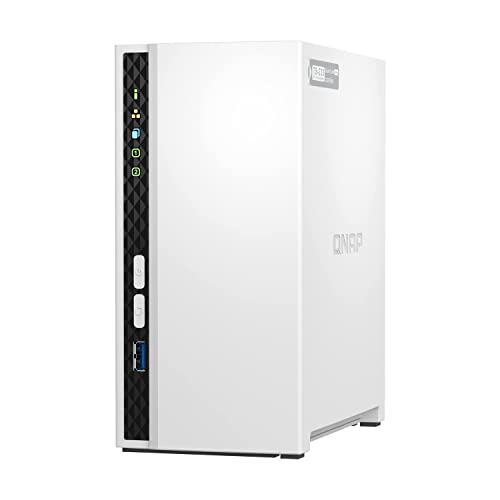 QNAP TS-233
Buyers who want faster-than-gigabit transfers without paying four-bay money.
Quick answer: Buy the Synology DS423+ if you want a NAS that handles Plex, Docker, and years of storage growth. Buy the Synology DS223j if you want the simplest possible first NAS. Buy the QNAP TS-233 if transfer speed per dollar is your priority, thanks to its 2.5GbE port.
The picks, ranked
| Pick | Drive bays | CPU | Memory | Buy |
|---|---|---|---|---|
| Best overallSynology DS423+ | 4 | Intel Celeron J4125, quad-core (2.0 GHz base, 2.7 GHz burst) | 2 GB DDR4, expandable to 6 GB | Check price |
| Best for beginnersSynology DS223j | 2 | Realtek RTD1619B, quad-core 1.7 GHz | 1 GB DDR4 (fixed, not expandable) | Check price |
| Best 2.5GbE valueQNAP TS-233 | 2 | ARM Cortex-A55, quad-core 2.0 GHz | 2 GB (fixed, not expandable) | Check price |
 Best ultra-budget pickTerraMaster F2-212 Best ultra-budget pickTerraMaster F2-212 | 2 | ARM quad-core 1.7 GHz | 1 GB DDR4 | Check price |
 Best 2-bay Intel upgradeSynology DS224+ Best 2-bay Intel upgradeSynology DS224+ | 2 | Intel Celeron J4125, quad-core (2.0 GHz base, 2.7 GHz burst) | 2 GB DDR4, expandable to 6 GB | Check price |
 Best 2.5GbE two-bayQNAP TS-264 Best 2.5GbE two-bayQNAP TS-264 | 2 | Intel Celeron N5105, quad-core (2.0 GHz base, 2.9 GHz burst) | 8 GB (2x 4 GB SODIMM) | Check price |
 Best 4-bay AMD powerSynology DS923+ Best 4-bay AMD powerSynology DS923+ | 4 | AMD Ryzen R1600, dual-core (2.6 GHz base, 3.1 GHz burst) | 4 GB DDR4 ECC, expandable to 32 GB | Check price |
 Best 4-bay all-rounderQNAP TS-453D Best 4-bay all-rounderQNAP TS-453D | 4 | Intel Celeron J4125, quad-core (2.0 GHz base, 2.7 GHz burst) | 4 GB DDR4 (expandable to 8 GB) | Check price |
 Best budget four-bayTerraMaster F4-212 Best budget four-bayTerraMaster F4-212 | 4 | ARM quad-core 1.7 GHz | 2 GB DDR4 | Check price |
 Best newcomer valueUGREEN DXP2800 Best newcomer valueUGREEN DXP2800 | 2 | Intel N100, quad-core (up to 3.4 GHz) | 8 GB DDR5 (expandable) | Check price |
Best overall
Synology DS423+
Four bays and an Intel chip: the NAS you grow into, not out of.
Strengths
- Intel Celeron J4125 with Quick Sync enables hardware-accelerated Plex transcoding
- Two M.2 NVMe slots let you add SSD cache without sacrificing a drive bay
- RAM expands from 2 GB to 6 GB, and DSM supports Docker and VMs for tinkerers
Limitations
- Costs notably more than two-bay rivals before you buy a single drive
- Still limited to 1GbE ports; no 2.5GbE despite the premium positioning
- Synology's verified-drive lists can push buyers toward pricier first-party drives
What owners report
Commonly praised
- Polished DSM software with excellent apps
- Reliable, quiet four-bay design
- Strong backup and media features
Common complaints
- Only 1GbE networking without an upgrade
- Expensive
- Earlier drive-compatibility restrictions frustrated owners
Recurring themes from owner reviews on retailers and forums, summarised by our editors. Updated October 2026.
| Drive bays | 4 |
|---|---|
| CPU | Intel Celeron J4125, quad-core (2.0 GHz base, 2.7 GHz burst) |
| Memory | 2 GB DDR4, expandable to 6 GB |
| M.2 slots | 2x 2280 NVMe for SSD cache |
| Network | 2x 1GbE RJ-45 with link aggregation |
Best for: Home users who want room to grow into Plex, Docker, and virtual machines.
Skip if: You only need basic file storage; this is more NAS than that job requires.
Best for beginners
Synology DS223j
The simplest credible NAS: DSM software, two bays, zero fuss.
Strengths
- Runs Synology DSM, the most polished and beginner-friendly NAS operating system
- Sips power and runs nearly silent, suited to always-on home use
- Straightforward setup: DSM walks a first-timer from install to shared folders in under an hour
Limitations
- Fixed 1 GB of DDR4 RAM cannot be expanded, capping multitasking headroom
- Single 1GbE port means network transfers top out around 110 MB/s in practice
- Realtek ARM processor rules out Plex hardware transcoding and heavy Docker use
What owners report
Commonly praised
- Affordable entry into Synology's software
- Easy setup
- Stable for backups and file sharing
Common complaints
- No tool-less drive trays
- Modest CPU and RAM
- Only 1GbE networking
Recurring themes from owner reviews on retailers and forums, summarised by our editors. Updated October 2026.
| Drive bays | 2 |
|---|---|
| CPU | Realtek RTD1619B, quad-core 1.7 GHz |
| Memory | 1 GB DDR4 (fixed, not expandable) |
| Network | 1x 1GbE RJ-45 |
| Operating system | Synology DSM 7.x |
Best for: First-time NAS owners who want reliable network storage and backups.
Skip if: You need 2.5GbE networking, Docker containers, or more than 1 GB of RAM.
Best 2.5GbE value
QNAP TS-233
2.5GbE networking at a two-bay price.
Strengths
- A 2.5GbE port delivers up to 2.5x the theoretical throughput of gigabit rivals
- 2 GB of RAM doubles the DS223j, helping with multitasking and apps
- QTS supports snapshots and a wide app center for backup and media duties
Limitations
- RAM is fixed at 2 GB with no expansion slot
- ARM processor limits virtualization and some heavier QTS applications
- QTS is powerful but less hand-holding than DSM for absolute beginners
What owners report
Commonly praised
- Low price for a two-bay NAS
- Good transfer speeds over gigabit
- Feature-rich QTS software
Common complaints
- Setup and interface are confusing for beginners
- Support experiences vary widely
- Some long-term reliability concerns
Recurring themes from owner reviews on retailers and forums, summarised by our editors. Updated October 2026.
| Drive bays | 2 |
|---|---|
| CPU | ARM Cortex-A55, quad-core 2.0 GHz |
| Memory | 2 GB (fixed, not expandable) |
| Network | 1x 2.5GbE RJ-45 |
| Operating system | QNAP QTS 5.x |
Best for: Buyers who want faster-than-gigabit transfers without paying four-bay money.
Skip if: You prefer Synology's DSM software polish over QNAP's more technical QTS.
Best ultra-budget pick
TerraMaster F2-212
The cheapest credible path to 2.5GbE network storage.
Strengths
- 2.5GbE port at an entry-level price undercuts every big-brand rival
- TRAID flexible RAID lets you mix drive capacities more freely than classic RAID
- Quiet, compact chassis suits a shelf or desk corner
Limitations
- Only 1 GB of DDR4 RAM, the least headroom of any unit here
- TOS 5 software is functional but thinner on apps and polish than DSM or QTS
- Smaller user community means fewer tutorials when something goes wrong
| Drive bays | 2 |
|---|---|
| CPU | ARM quad-core 1.7 GHz |
| Memory | 1 GB DDR4 |
| Network | 1x 2.5GbE RJ-45 |
| Operating system | TerraMaster TOS 5 |
Best for: Budget buyers who want 2.5GbE and can live with simpler software.
Skip if: You want the mature app ecosystem of Synology DSM or QNAP QTS.
Best 2-bay Intel upgrade
Synology DS224+
Two bays with an Intel heart: the DS223j's bigger sibling.
The DS224+ adds an Intel chip with Quick Sync and expandable RAM to the two-bay formula, making it the pick for buyers who know Plex transcoding or Docker is in their future.
Strengths
- Intel Celeron J4125 with Quick Sync enables hardware-accelerated Plex transcoding
- RAM expands from 2 GB to 6 GB, so the unit grows with heavier workloads
- Runs the full DSM package suite: Docker, virtual machines, and Surveillance Station
- Two-bay simplicity with genuine application headroom
Limitations
- Two 1GbE ports only; no 2.5GbE option at this price tier
- Only two bays, so capacity growth means replacing drives, not adding them
- Costs meaningfully more than ARM-based two-bay rivals
| Drive bays | 2 |
|---|---|
| CPU | Intel Celeron J4125, quad-core (2.0 GHz base, 2.7 GHz burst) |
| Memory | 2 GB DDR4, expandable to 6 GB |
| Network | 2x 1GbE RJ-45 with link aggregation |
| Operating system | Synology DSM 7.x |
Best for: Home users who want two bays plus Docker, Plex transcoding, and headroom to grow.
Skip if: You need 2.5GbE networking or more than two drive bays.
Best 2.5GbE two-bay
QNAP TS-264
Intel power and dual 2.5GbE in a two-bay chassis.
Intel power, 8 GB of RAM, and dual 2.5GbE ports make the TS-264 the fastest two-bay unit here for buyers who measure value in megabytes per second.
Strengths
- Intel Celeron N5105 quad-core handles Plex transcoding and light virtualization
- Dual 2.5GbE ports with link aggregation for fast multi-client transfers
- 8 GB of RAM, generous for a two-bay unit
- HDMI 2.0 output for direct media playback to a TV
Limitations
- Premium two-bay pricing approaches four-bay ARM territory
- Only two bays limits long-term storage growth
- QTS assumes more networking comfort than Synology DSM
| Drive bays | 2 |
|---|---|
| CPU | Intel Celeron N5105, quad-core (2.0 GHz base, 2.9 GHz burst) |
| Memory | 8 GB (2x 4 GB SODIMM) |
| Network | 2x 2.5GbE RJ-45 |
| Video output | 1x HDMI 2.0 (up to 4K) |
Best for: Enthusiasts who want 2.5GbE speed and Intel transcoding in a compact two-bay unit.
Skip if: Two bays will not hold your library, or you want the simplest possible software.
Best 4-bay AMD power
Synology DS923+
Four bays on AMD Ryzen: the performance Plus-series pick.
The Ryzen chip and up to 32 GB of ECC RAM give the DS923+ the most CPU and memory headroom of any unit here, ideal for VMs and heavy multitasking.
Strengths
- AMD Ryzen R1600 outperforms the Celeron chips in CPU-bound tasks and VMs
- ECC RAM expands from 4 GB to 32 GB, the most headroom in the Plus series
- Optional 10GbE network upgrade via the E10G22-T1-Mini adapter
- Four bays with SHR flexible RAID for painless capacity growth
Limitations
- No integrated GPU, so no hardware video transcoding in Plex
- 10GbE requires a separate add-in card purchase
- Premium pricing before drives
| Drive bays | 4 |
|---|---|
| CPU | AMD Ryzen R1600, dual-core (2.6 GHz base, 3.1 GHz burst) |
| Memory | 4 GB DDR4 ECC, expandable to 32 GB |
| Network | 2x 1GbE RJ-45; 10GbE via optional adapter |
| Operating system | Synology DSM 7.x |
Best for: Power users who want maximum CPU and RAM headroom in a four-bay Synology.
Skip if: You need built-in hardware transcoding; the Ryzen chip lacks Quick Sync.
Best 4-bay all-rounder
QNAP TS-453D
Four bays, dual 2.5GbE, and a PCIe slot for expansion.
Four bays, dual 2.5GbE, Intel transcoding, and a PCIe expansion slot cover nearly every home workload in a single enclosure.
Strengths
- Dual 2.5GbE ports beat every Synology four-bay on single-client transfer speed
- Intel Celeron J4125 with Quick Sync handles Plex hardware transcoding
- PCIe slot accepts 10GbE cards, QM2 M.2 cards, or wireless adapters
- HDMI 2.0 output supports direct 4K media playback
Limitations
- Base 4 GB RAM configuration feels thin for the price; budget for an upgrade
- QTS is powerful but demands more admin patience than DSM
- Larger and louder than two-bay units under load
| Drive bays | 4 |
|---|---|
| CPU | Intel Celeron J4125, quad-core (2.0 GHz base, 2.7 GHz burst) |
| Memory | 4 GB DDR4 (expandable to 8 GB) |
| Network | 2x 2.5GbE RJ-45 |
| Expansion | 1x PCIe Gen 2 x2 slot |
Best for: Buyers who want four bays, fast networking, and Intel transcoding in one box.
Skip if: You prefer DSM's simpler software, or four bays is more than you will ever fill.
Best budget four-bay
TerraMaster F4-212
Four bays at a two-bay price.
Four bays at a two-bay price with TRAID flexible RAID. The ARM chip limits apps, but for pure storage it is unmatched value.
Strengths
- Four bays at a price where big brands sell two
- TRAID flexible RAID lets you mix drive capacities as the array grows
- 2 GB of RAM, double the entry-level TerraMaster two-bay
- Quiet operation suits living-room placement
Limitations
- ARM processor rules out transcoding and heavy container use
- TOS software is thinner on apps than DSM or QTS
- 1GbE networking only; no 2.5GbE at this price
| Drive bays | 4 |
|---|---|
| CPU | ARM quad-core 1.7 GHz |
| Memory | 2 GB DDR4 |
| Network | 2x 1GbE RJ-45 |
| Operating system | TerraMaster TOS 5 |
Best for: Budget buyers who need four bays and can live with modest CPU power.
Skip if: You plan to run Plex transcoding, Docker, or virtual machines.
Best newcomer value
UGREEN DXP2800
Intel N100, 8 GB DDR5, and dual 2.5GbE from the newcomer.
An Intel N100, 8 GB of DDR5, and dual 2.5GbE for less than established Intel two-bay rivals. The software is young, but the hardware is serious.
Strengths
- Intel N100 chip is efficient and capable for transcoding and containers
- 8 GB of DDR5 RAM standard, a standout at this price
- Dual 2.5GbE ports plus dual M.2 NVMe slots for SSD caching
- Competitive pricing undercuts established Intel two-bay rivals
Limitations
- UGOS Pro software is new with a smaller app ecosystem than DSM or QTS
- Younger brand with a shorter NAS track record
- Community tutorials and third-party packages are still catching up
| Drive bays | 2 |
|---|---|
| CPU | Intel N100, quad-core (up to 3.4 GHz) |
| Memory | 8 GB DDR5 (expandable) |
| Network | 2x 2.5GbE RJ-45 |
| M.2 slots | 2x 2280 NVMe for SSD cache |
Best for: Early adopters who want modern Intel efficiency and generous RAM for the money.
Skip if: You want a decade of proven software maturity; UGOS is young.
How we chose
We weighted software maturity highest, because a NAS lives or dies by its OS over a five-plus-year lifespan. Next came network throughput (1GbE vs 2.5GbE is a real, measurable gap), then RAM and CPU headroom for media and container workloads, and finally bay count for expansion. Every spec cited comes from manufacturer documentation or published expert testing.
Questions, answered
Do NAS devices come with hard drives?
Almost never. Enclosures are sold diskless; you buy NAS-rated drives (such as WD Red or Seagate IronWolf) separately. Budget for drives on top of the enclosure price.
How much RAM does a home NAS need?
For file storage and backups, 1 GB is workable. For Plex, Docker, or virtual machines, 2 GB is the practical minimum and expandability matters, which is why the DS423+ stands out.
Is 2.5GbE worth it over gigabit?
If you move multi-gigabyte files regularly (video editing, large backups), yes: 2.5GbE roughly doubles real-world transfer speeds versus 1GbE. You will also need a 2.5GbE switch and a 2.5GbE adapter on your computer to see the benefit.
Can a NAS replace cloud storage subscriptions?
For file sync and backup, largely yes, with no monthly fee. For off-site protection against fire or theft, keep at least one backup copy elsewhere, since a NAS in your home is still a single location.