Head to head
Synology DS223j vs QNAP TS-233 (2026)
Budget two-bay NAS showdown: DSM simplicity against 2.5GbE speed. Spec-by-spec comparison with a clear recommendation.
#2 in our rankings · Best for beginners

Synology DS223j
Best for: First-time NAS owners who want reliable network storage and backups.
#3 in our rankings · Best 2.5GbE value
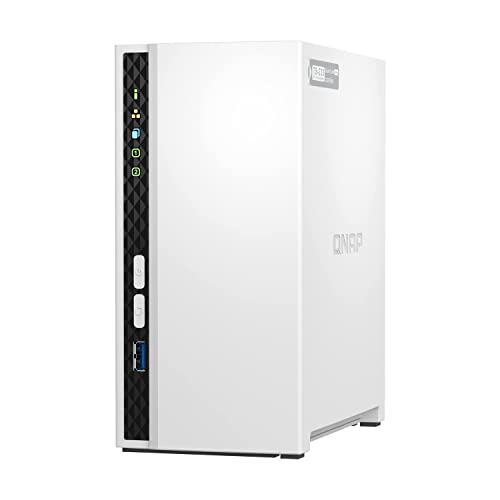
QNAP TS-233
Best for: Buyers who want faster-than-gigabit transfers without paying four-bay money.
Our recommendation
Recommendation: Buy the QNAP TS-233 if you move large files and want the most hardware for the money: 2 GB of RAM and 2.5GbE beat the DS223j's 1 GB and gigabit decisively. Buy the Synology DS223j if this is your first NAS and you want setup to just work; DSM's guided experience is worth the slower wire.
Network speed
The TS-233's 2.5GbE port delivers roughly double the real-world throughput of the DS223j's 1GbE, assuming matching network gear. For photographers ingesting cards or anyone running nightly multi-terabyte backups, this is the single biggest practical difference.
Memory
QNAP ships 2 GB against Synology's fixed 1 GB. Neither is expandable here, but the extra gigabyte gives the TS-233 more breathing room when backup jobs, media indexing, and file services run together.
Software experience
This is the DS223j's counterpunch. DSM's setup wizards, plain-language storage management, and polished mobile apps are meaningfully easier for beginners than QTS, which is powerful but assumes networking comfort. First-timers consistently get running faster on DSM.
Choose Synology DS223j if…
- This is your first NAS and you want the easiest setup
- You mainly need backups, file sharing, and photo sync
- You value polished mobile apps and plain-language menus
Choose QNAP TS-233 if…
- You regularly move large files and want 2.5GbE speed
- You want the most RAM and hardware for the money
- You are comfortable with more technical admin software
Spec-by-spec comparison
| Spec | Synology DS223j | QNAP TS-233 |
|---|---|---|
| Price tier | Budget | Mid-range |
| Drive bays | 2 | 2 |
| CPU | Realtek RTD1619B, quad-core 1.7 GHz | ARM Cortex-A55, quad-core 2.0 GHz |
| Memory | 1 GB DDR4 (fixed, not expandable) | 2 GB (fixed, not expandable) |
| Network | 1x 1GbE RJ-45 | 1x 2.5GbE RJ-45 |
| Operating system | Synology DSM 7.x | QNAP QTS 5.x |
| Best for | First-time NAS owners who want reliable network storage and backups. | Buyers who want faster-than-gigabit transfers without paying four-bay money. |
| Skip if | You need 2.5GbE networking, Docker containers, or more than 1 GB of RAM. | You prefer Synology's DSM software polish over QNAP's more technical QTS. |
Strengths and limitations
Synology DS223j
Strengths
- Runs Synology DSM, the most polished and beginner-friendly NAS operating system
- Sips power and runs nearly silent, suited to always-on home use
- Straightforward setup: DSM walks a first-timer from install to shared folders in under an hour
Limitations
- Fixed 1 GB of DDR4 RAM cannot be expanded, capping multitasking headroom
- Single 1GbE port means network transfers top out around 110 MB/s in practice
- Realtek ARM processor rules out Plex hardware transcoding and heavy Docker use
QNAP TS-233
Strengths
- A 2.5GbE port delivers up to 2.5x the theoretical throughput of gigabit rivals
- 2 GB of RAM doubles the DS223j, helping with multitasking and apps
- QTS supports snapshots and a wide app center for backup and media duties
Limitations
- RAM is fixed at 2 GB with no expansion slot
- ARM processor limits virtualization and some heavier QTS applications
- QTS is powerful but less hand-holding than DSM for absolute beginners
How they fit the wider field
- Synology DS223j: ranked #2 (Best for beginners) in The Best NAS Devices of 2026. Read the full Synology DS223j review.
- QNAP TS-233: ranked #3 (Best 2.5GbE value) in The Best NAS Devices of 2026. Read the full QNAP TS-233 review.
Neither one quite right? The full rankings cover 10 picks matched to different buyers.
Made your call?
Questions, answered
Which is better for a complete beginner?
The DS223j. DSM's guided setup is the friendliest in the category, and beginners rarely saturate even gigabit networking.
Which transfers files faster?
The TS-233, by a wide margin, once you add a 2.5GbE switch and client adapter. On a plain gigabit network, the two perform similarly.