In-depth review
TP-Link RE315 Review (2026)
In-depth review of the TP-Link RE315: AC1200 speeds, adjustable antennas, EasyMesh support, and whether it is the best budget extender.

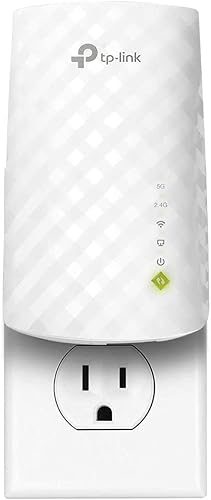
TP-Link AC1200 WiFi Extender (RE315)
The one-room fix: a compact AC1200 wall-plug extender with two adjustable antennas and EasyMesh support for a single dead zone.
Our verdict
The TP-Link RE315 is the best budget WiFi extender for most buyers, because it fixes the most common problem, one dead room, with the right combination of a usable speed class, adjustable antennas, and EasyMesh support, at a low outlay. The Fast Ethernet port is a real limit for wired devices, and it will not rescue a whole floor, but for a single room that needs browsing, calls, and streaming, the RE315 is the unit to buy first.
What we like
- Two adjustable external antennas help aim the rebroadcast signal toward the dead room, rather than relying on a fixed internal antenna.
- EasyMesh compatibility lets the RE315 join a compatible router under one network name, so devices can roam without manual network switching.
- Access point mode turns a wired connection in the dead room into a local WiFi hotspot, which suits rooms that already have an Ethernet run.
What to watch out for
- The Ethernet port is Fast Ethernet, so a wired device connected through it is capped well below Gigabit speeds.
- AC1200 WiFi 5 speeds are adequate for browsing and streaming, but the unit cannot take advantage of a WiFi 6 or WiFi 7 router.
- Coverage suits one room or a small area, not a whole floor, so buyers with several dead zones need a stronger model or a mesh system.
Who it is for
Small homes and apartments with one dead room, where a simple, inexpensive extender is enough.
A one-room tool, honestly sized
The RE315 works because it does not pretend to be more than it is. AC1200 speeds, with 867 Mbps on 5 GHz and 300 Mbps on 2.4 GHz, are enough for the browsing, video calls, and streaming that a dead bedroom or home office actually needs, and the two adjustable antennas let the user aim the rebroadcast toward the room that matters. Coverage up to 1,600 sq ft sounds generous, but in practice the useful result is one room made usable, and buyers who expect a whole floor from it will be disappointed. Judged as a one-room fix, it is well sized; judged as a whole-home solution, it is the wrong tool.
Placement, ports, and the mesh question
Placement decides the result more than any setting: halfway between router and dead room, with a signal strong enough to rebroadcast, ideally checked with the intelligent signal indicator during setup. The Fast Ethernet port is the main compromise: it wires a TV or desktop, but caps it well below Gigabit, so a device that needs full wired speed should not be wired through this unit. EasyMesh support is the forward-looking feature, since a compatible router lets the RE315 join one network name, but buyers without a compatible router simply get a standard extender, which is still fine for one room.
How it stacks up
Against the TP-Link RE220, the RE315 wins on speed class, antennas, and coverage, while the RE220 wins on a lower outlay for very light use. Against the NETGEAR EX3700, the RE315 wins on speed, antennas, and mesh support, while the EX3700 wins on a smaller, more discreet body. Against the TP-Link RE600X, the RE315 wins on outlay and simplicity, while the RE600X wins on WiFi 6 efficiency and a Gigabit port.
What owners report
Commonly praised
- App guided setup that most owners finish without fuss
- Adjustable antennas that help point coverage toward the room that needs it
- Steady everyday performance for browsing and video calls in a single room
Common complaints
- Fast Ethernet port frustrates owners who wanted full wired speed
- Coverage thins out quickly once the target room is left behind
- Pairing sometimes needs a second run before it holds
Recurring themes from owner reviews on retailers and forums, summarised by our editors. Updated October 2026.
Key specifications
- Speed class
- AC1200: 867 Mbps on 5 GHz, 300 Mbps on 2.4 GHz
- Added coverage
- Up to 1,600 sq ft
- Devices
- Up to 32 devices
- Ethernet
- 1 Fast Ethernet port
- Antennas
- 2 external, adjustable
- Mesh
- EasyMesh compatible
Also consider
TP-Link AC750 WiFi Extender (RE220)
The cheapest credible fix: a tiny AC750 wall plug that covers one weak room for browsing, email, and light streaming.
- Speed class: AC750: 433 Mbps on 5 GHz, 300 Mbps on 2.4 GHz
- Added coverage: Up to 1,200 sq ft

TP-Link AX1800 WiFi 6 Extender (RE600X)
The affordable WiFi 6 step up: AX1800 speeds, a Gigabit port, and OneMesh for households that have moved to WiFi 6 routers.
- Speed class: AX1800: 1201 Mbps on 5 GHz, 574 Mbps on 2.4 GHz
- Added coverage: Up to 1,500 sq ft
Research-based assessment. ThePickLedger has not hands-on tested this product; this evaluation synthesizes manufacturer specifications, retailer documentation, and published expert reviews.
Questions, answered
Is the RE315 enough for 4K streaming?
For one 4K stream in the extended room with a good placement, usually yes, since the 5 GHz band has headroom for it. For 4K plus other heavy use at the same time, an AX3000 model such as the RE715X is the safer choice.
Does the RE315 work with any router?
Yes, it works with any standard WiFi router as a standalone extender. EasyMesh roaming needs a compatible router; without one, it still extends the network, just under the usual extender arrangement.
Why does the Ethernet port matter on the RE315?
Because it is Fast Ethernet, not Gigabit, so a wired device through it is capped at a lower speed than the WiFi link itself can carry. For a smart TV or a light-use desktop that is fine; for a gaming PC or a fast NAS connection it is not.