Best of
The Best WiFi Extenders (2026)
The best WiFi extenders of 2026: TP-Link RE315, RE715X, RE223BE, RE650, RE600X, and NETGEAR EAX15 and EAX17, compared on generation, coverage, and port speed.
Our top picks at a glance
Best overall value
 TP-Link AC1200 WiFi Extender (RE315)
Small homes and apartments with one dead room, where a simple, inexpensive extender is enough.
Best overall WiFi 6 extender
 TP-Link AX3000 WiFi 6 Range Extender (RE715X)
Larger weak areas and device-heavy households that want one extender to cover a lot of ground well.
Best WiFi 7 extender
 TP-Link BE3200 WiFi 7 Range Extender (RE223BE)
WiFi 7 households that want the extender to match the router generation instead of bottlenecking it.
For most buyers, the TP-Link RE315 is the pick: cheap, compact, and enough for one dead room. Buyers with a WiFi 6 router should choose the TP-Link RE715X for a large weak area, the TP-Link RE600X or NETGEAR EAX15 for a smaller one, and buyers with a WiFi 7 router should choose the TP-Link RE223BE. Buyers on a WiFi 5 router who stream and game in the dead room should choose the TP-Link RE450 or RE650 instead.
The picks, ranked
| Pick | Speed class | Added coverage | Devices | Buy |
|---|---|---|---|---|
| Best overall valueTP-Link AC1200 WiFi Extender (RE315) | AC1200: 867 Mbps on 5 GHz, 300 Mbps on 2.4 GHz | Up to 1,600 sq ft | Up to 32 devices | Check price |
| Best overall WiFi 6 extenderTP-Link AX3000 WiFi 6 Range Extender (RE715X) | AX3000: 2402 Mbps on 5 GHz, 574 Mbps on 2.4 GHz | Up to 2,400 sq ft | Up to 64 devices | Check price |
| Best WiFi 7 extenderTP-Link BE3200 WiFi 7 Range Extender (RE223BE) | BE3200, dual band | Up to 2,400 sq ft | Up to 64 devices | Check price |
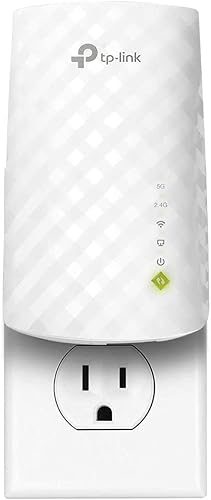 Best budget extenderTP-Link AC750 WiFi Extender (RE220) | AC750: 433 Mbps on 5 GHz, 300 Mbps on 2.4 GHz | Up to 1,200 sq ft | Up to 30 devices | Check price |
 Best value WiFi 6 extenderTP-Link AX1800 WiFi 6 Extender (RE600X) | AX1800: 1201 Mbps on 5 GHz, 574 Mbps on 2.4 GHz | Up to 1,500 sq ft | Up to 30 devices | Check price |
 Best WiFi 6 wall-plug extenderNETGEAR WiFi 6 Mesh Range Extender (EAX15) | AX1800: 1200 Mbps on 5 GHz, 600 Mbps on 2.4 GHz | Up to 1,500 sq ft | Up to 20 devices | Check price |
 Best mid-range WiFi 5 extenderTP-Link AC1750 WiFi Extender (RE450) | AC1750: 1300 Mbps on 5 GHz, 450 Mbps on 2.4 GHz | Up to 2,000 sq ft | Up to 32 devices | Check price |
 Best high-capacity WiFi 5 extenderTP-Link AC2600 WiFi Extender (RE650) | AC2600: 1733 Mbps on 5 GHz, 800 Mbps on 2.4 GHz | - | - | Check price |
 Best AX3000 wall-plug extenderNETGEAR WiFi 6 Range Extender (EAX17) | AX3000 | Up to 1,500 sq ft | Up to 20 devices | Check price |
 Best compact budget plugNETGEAR AC750 WiFi Range Extender (EX3700) | AC750: 450 Mbps on 5 GHz, 300 Mbps on 2.4 GHz | Up to 1,000 sq ft | Up to 15 devices | Check price |
Best overall value
TP-Link AC1200 WiFi Extender (RE315)
The one-room fix: a compact AC1200 wall-plug extender with two adjustable antennas and EasyMesh support for a single dead zone.
Strengths
- Two adjustable external antennas help aim the rebroadcast signal toward the dead room, rather than relying on a fixed internal antenna.
- EasyMesh compatibility lets the RE315 join a compatible router under one network name, so devices can roam without manual network switching.
- Access point mode turns a wired connection in the dead room into a local WiFi hotspot, which suits rooms that already have an Ethernet run.
Limitations
- The Ethernet port is Fast Ethernet, so a wired device connected through it is capped well below Gigabit speeds.
- AC1200 WiFi 5 speeds are adequate for browsing and streaming, but the unit cannot take advantage of a WiFi 6 or WiFi 7 router.
- Coverage suits one room or a small area, not a whole floor, so buyers with several dead zones need a stronger model or a mesh system.
What owners report
Commonly praised
- App guided setup that most owners finish without fuss
- Adjustable antennas that help point coverage toward the room that needs it
- Steady everyday performance for browsing and video calls in a single room
Common complaints
- Fast Ethernet port frustrates owners who wanted full wired speed
- Coverage thins out quickly once the target room is left behind
- Pairing sometimes needs a second run before it holds
Recurring themes from owner reviews on retailers and forums, summarised by our editors. Updated October 2026.
| Speed class | AC1200: 867 Mbps on 5 GHz, 300 Mbps on 2.4 GHz |
|---|---|
| Added coverage | Up to 1,600 sq ft |
| Devices | Up to 32 devices |
| Ethernet | 1 Fast Ethernet port |
| Antennas | 2 external, adjustable |
| Mesh | EasyMesh compatible |
Best for: Small homes and apartments with one dead room, where a simple, inexpensive extender is enough.
Skip if: You need a Gigabit Ethernet port, WiFi 6, or coverage for several weak rooms at once.
Best overall WiFi 6 extender
TP-Link AX3000 WiFi 6 Range Extender (RE715X)
The strong all-rounder: AX3000 WiFi 6, wide added coverage, and a large device capacity for a big weak area.
Strengths
- AX3000 speeds with a fast 5 GHz band give headroom for 4K streaming and gaming in the extended area, where AX1800 units start to feel thin.
- Coverage up to 2,400 sq ft and capacity for up to 64 devices suit a large weak area or a household with many connected devices.
- EasyMesh support, OFDMA, and beamforming together keep the extended network efficient and directed, not just loud.
Limitations
- The unit is larger than budget wall plugs, with two tall antennas that need clearance above and beside the outlet.
- A single Gigabit port wires only one device at full speed, so a TV plus a console in the same room needs a switch.
- WiFi 6 gains are only fully realised with WiFi 6 clients; older devices will connect, but at their own lower capability.
What owners report
Commonly praised
- Wide added coverage that rescues a large room or a whole wing
- Fast 5 GHz band that holds up under streaming and gaming together
- Large device capacity that suits busy households
Common complaints
- Tall antennas that need clearance above the outlet
- Single wired port that forces a switch for a second wired device
- Size makes it awkward on a crowded power strip
Recurring themes from owner reviews on retailers and forums, summarised by our editors. Updated October 2026.
| Speed class | AX3000: 2402 Mbps on 5 GHz, 574 Mbps on 2.4 GHz |
|---|---|
| Added coverage | Up to 2,400 sq ft |
| Devices | Up to 64 devices |
| Ethernet | 1 Gigabit Ethernet port |
| Mesh | EasyMesh compatible |
| Antennas | 2 external, adjustable |
Best for: Larger weak areas and device-heavy households that want one extender to cover a lot of ground well.
Skip if: Your dead zone is a single small room, or your router is still WiFi 5 and will not use the extra WiFi 6 capacity.
Best WiFi 7 extender
TP-Link BE3200 WiFi 7 Range Extender (RE223BE)
The WiFi 7 match: BE3200 speeds with multi-link operation for buyers whose router is already WiFi 7.
Strengths
- WiFi 7 with multi-link operation can use more than one band at once, which helps latency and resilience on supported clients.
- Coverage up to 2,400 sq ft and capacity for up to 64 devices put it alongside the RE715X for large weak areas.
- EasyMesh support lets it join a compatible WiFi 7 router under one network name for smoother roaming.
Limitations
- WiFi 7 benefits need WiFi 7 clients; older devices connect fine, but they do not unlock the new features.
- There is no 6 GHz band on this dual-band model, so it is not a tri-band WiFi 7 extender.
- As the newest model here, it is the least proven over long ownership, and it costs more than the WiFi 6 picks that cover the same area.
What owners report
Commonly praised
- WiFi 7 radio that matches a new router instead of holding it back
- Multi link operation that owners associate with smoother latency
- Wide coverage that matches the best WiFi 6 units here
Common complaints
- Gains depend on owning WiFi 7 devices, which many owners do not yet have
- No 6 GHz band, which surprises buyers expecting tri band WiFi 7
- Newest model costs more than WiFi 6 units covering the same area
Recurring themes from owner reviews on retailers and forums, summarised by our editors. Updated October 2026.
| Speed class | BE3200, dual band |
|---|---|
| Added coverage | Up to 2,400 sq ft |
| Devices | Up to 64 devices |
| WiFi 7 feature | Multi-link operation (MLO) |
| Mesh | EasyMesh compatible |
| Ethernet | Ethernet port |
Best for: WiFi 7 households that want the extender to match the router generation instead of bottlenecking it.
Skip if: Your router is WiFi 5 or WiFi 6, or you only need to fix one small dead room cheaply.
Best budget extender
TP-Link AC750 WiFi Extender (RE220)
The cheapest credible fix: a tiny AC750 wall plug that covers one weak room for browsing, email, and light streaming.
Strengths
- The small wall-plug body sits in a single outlet and is easy to move to a better spot if the first placement underperforms.
- OneMesh support pairs it with a compatible TP-Link router under one network name, avoiding a second network to manage.
- High Speed mode can dedicate one band to the router link and the other to devices, which helps keep the extended signal steady.
Limitations
- AC750 throughput is the lowest here, so 4K streaming and large downloads in the extended room will feel the limit first.
- The Fast Ethernet port caps wired connections, so it is not the right way to wire a desktop or console for speed.
- A single small unit with internal antennas cannot rescue a room that is far from the router or behind thick walls.
What owners report
Commonly praised
- Tiny plug that fits an outlet without crowding the neighbours
- Very easy to place and move when the first spot underperforms
- Reliable enough for light browsing and email in a spare room
Common complaints
- Speed drops sharply when several devices use it at once
- Internal antennas leave little room to aim the signal
- Owners wish the wired port ran faster for a connected TV or console
Recurring themes from owner reviews on retailers and forums, summarised by our editors. Updated October 2026.
| Speed class | AC750: 433 Mbps on 5 GHz, 300 Mbps on 2.4 GHz |
|---|---|
| Added coverage | Up to 1,200 sq ft |
| Devices | Up to 30 devices |
| Ethernet | 1 Fast Ethernet port |
| Mesh | OneMesh compatible |
| Size | 3.0 by 4.3 inches, 0.2 lb |
Best for: Renters and light users who need one room usable again at the lowest outlay.
Skip if: You stream 4K in the dead room, game online there, or connect many devices through the extender.
Best value WiFi 6 extender
TP-Link AX1800 WiFi 6 Extender (RE600X)
The affordable WiFi 6 step up: AX1800 speeds, a Gigabit port, and OneMesh for households that have moved to WiFi 6 routers.
Strengths
- WiFi 6 with OFDMA handles many devices more efficiently than WiFi 5, which matters in a room full of phones, laptops, and smart devices.
- The Gigabit Ethernet port and access point mode give the unit a second job: wiring a device or lighting up a room that has an Ethernet run.
- OneMesh support with a compatible TP-Link router keeps one network name, so roaming between router and extender is smoother.
Limitations
- AX1800 is a mid-range WiFi 6 class, so it will not match the top speeds of an AX3000 router or extender.
- The tall body can block a neighbouring outlet on a crowded power strip, so placement needs a free wall socket.
- Two-stream WiFi 6 capacity is shared across the extended room, so very heavy simultaneous use will still show the extender penalty.
What owners report
Commonly praised
- WiFi 6 radio that copes well with a room full of connected gadgets
- Access point mode that owners value in rooms with an Ethernet cable
- Gigabit port that keeps a wired device from becoming the bottleneck
Common complaints
- Tall body that can block the socket beside it on a strip
- Throughput still falls in the extended room under heavy simultaneous use
- App setup confuses a few owners on the first attempt
Recurring themes from owner reviews on retailers and forums, summarised by our editors. Updated October 2026.
| Speed class | AX1800: 1201 Mbps on 5 GHz, 574 Mbps on 2.4 GHz |
|---|---|
| Added coverage | Up to 1,500 sq ft |
| Devices | Up to 30 devices |
| Ethernet | 1 Gigabit Ethernet port |
| Mesh | OneMesh compatible |
| Size | 1.4 by 3.1 by 5.9 inches |
Best for: WiFi 6 households that want a capable extender for one or two weak rooms without paying for AX3000 hardware.
Skip if: You need tri-band capacity, a 2.5 Gigabit port, or coverage for a large multi-room weak area.
Best WiFi 6 wall-plug extender
NETGEAR WiFi 6 Mesh Range Extender (EAX15)
The neat WiFi 6 mesh plug: an AX1800 wall unit with one network name, WPA3 security, and a Gigabit port for a single weak area.
Strengths
- Mesh design with one network name lets compatible devices roam between router and extender without manual network changes.
- WPA3 security matches modern routers, which is a genuine step up from older extenders that top out at WPA2.
- The wall-plug form keeps the unit off shelves and desks, and the Gigabit port still wires one nearby device properly.
Limitations
- AX1800 capacity is mid-range, so it suits one weak area, not a whole floor of heavy use.
- Only one Ethernet port is provided, so wiring several devices needs a separate switch.
- Full mesh roaming benefits depend on the router and the client device supporting the same roaming standards.
What owners report
Commonly praised
- Discreet wall plug that adds WiFi 6 without a shelf unit
- Single network name that makes moving around the house simpler
- WPA3 security that owners see as properly current
Common complaints
- Only one wired port, so a second wired device needs extra hardware
- Capacity that suits one area rather than a busy floor
- Roaming still depends on the phone or laptop cooperating
Recurring themes from owner reviews on retailers and forums, summarised by our editors. Updated October 2026.
| Speed class | AX1800: 1200 Mbps on 5 GHz, 600 Mbps on 2.4 GHz |
|---|---|
| Added coverage | Up to 1,500 sq ft |
| Devices | Up to 20 devices |
| Ethernet | 1 Gigabit Ethernet port |
| Security | WPA3 |
| Form | Wall plug |
Best for: Households that want WiFi 6 and mesh-style roaming from a discreet wall plug rather than a shelf unit.
Skip if: You need AX3000 speeds, several Ethernet ports, or coverage beyond one added area.
Best mid-range WiFi 5 extender
TP-Link AC1750 WiFi Extender (RE450)
The proven mid-range workhorse: three antennas, AC1750 speeds, and a Gigabit port for a room that streams and games.
Strengths
- Three adjustable external antennas and beamforming give the RE450 a stronger, more directed signal than two-antenna budget plugs.
- The Gigabit Ethernet port wires a console, PC, or TV at full wired speed, unlike the Fast Ethernet ports on budget models.
- An intelligent signal indicator light helps place the unit where the router signal is still strong enough to rebroadcast well.
Limitations
- WiFi 5 only, so it cannot use WiFi 6 features such as OFDMA that help busy networks with many devices.
- The unit is larger and heavier than wall-plug budget models, and it can crowd a double outlet.
- It is a standalone extender, not a mesh node, so roaming between router and extender depends on the device, not the network.
What owners report
Commonly praised
- Three antennas that give a noticeably stronger signal than small plugs
- Gigabit port that owners use to wire a console or desktop properly
- Signal light that takes guesswork out of finding a good spot
Common complaints
- Large body that can crowd a double outlet
- No mesh roaming, so phones sometimes stay on a weak router signal
- Older WiFi generation feels dated beside newer routers
Recurring themes from owner reviews on retailers and forums, summarised by our editors. Updated October 2026.
| Speed class | AC1750: 1300 Mbps on 5 GHz, 450 Mbps on 2.4 GHz |
|---|---|
| Added coverage | Up to 2,000 sq ft |
| Devices | Up to 32 devices |
| Ethernet | 1 Gigabit Ethernet port |
| Antennas | 3 external, adjustable |
| Size | 3.0 by 6.4 by 2.6 inches |
Best for: Households with a WiFi 5 router that need a stronger, larger-coverage extender for streaming and gaming in one area.
Skip if: You own a WiFi 6 or WiFi 7 router and want the extender to match its radio, or you need mesh roaming.
Best high-capacity WiFi 5 extender
TP-Link AC2600 WiFi Extender (RE650)
The high-capacity WiFi 5 pick: four antennas and 4x4 MU-MIMO for a busy weak area with many devices talking at once.
Strengths
- Four antennas with 4x4 MU-MIMO give the RE650 more simultaneous device capacity than any two-antenna extender here.
- Beamforming directs signal toward connected devices instead of broadcasting evenly in all directions.
- The Gigabit Ethernet port and access point mode make it a flexible fix for a wired device or a room with an Ethernet run.
Limitations
- WiFi 5 hardware cannot use WiFi 6 efficiency features, so it is a dead end for buyers already on a WiFi 6 router.
- The large four-antenna body is the bulkiest wall unit here and will dominate a double outlet.
- No mesh roaming, so device handoff between router and extender is left to each device to decide.
What owners report
Commonly praised
- Four antennas that reach further into a weak area than two antenna plugs
- Strong capacity when many devices stream and call at the same time
- Beamforming that owners credit with a steadier connection in the target area
Common complaints
- Bulky unit that dominates an outlet and draws attention
- WiFi 5 radio that cannot use newer router features
- Price sits high for owners who only need one small room fixed
Recurring themes from owner reviews on retailers and forums, summarised by our editors. Updated October 2026.
| Speed class | AC2600: 1733 Mbps on 5 GHz, 800 Mbps on 2.4 GHz |
|---|---|
| Antennas | 4 external, adjustable |
| MU-MIMO | 4x4 MU-MIMO |
| Ethernet | 1 Gigabit Ethernet port |
| Modes | Extender, access point |
| Beamforming | Yes |
Best for: Busy households on WiFi 5 routers where several devices stream, game, and call from the same extended area.
Skip if: You own a WiFi 6 router, need mesh roaming, or want the smallest possible wall plug.
Best AX3000 wall-plug extender
NETGEAR WiFi 6 Range Extender (EAX17)
The AX3000 NETGEAR alternative: faster WiFi 6 for a single added area, with one network name and WPA3 security.
Strengths
- AX3000 WiFi 6 gives the extended area real headroom for streaming, calls, and downloads at the same time.
- One WiFi name with smart roaming keeps devices on the stronger signal without manual switching, where clients support it.
- WPA3 security and a Gigabit port bring the unit up to current standards for a wall-plug extender.
Limitations
- Added coverage is one area up to 1,500 sq ft, well short of the RE715X, so large weak zones need a different pick.
- A single Ethernet port limits wired use to one nearby device.
- The wall-plug body shares its look with the smaller EAX15, so buyers should check the model number, not the photo, when ordering.
What owners report
Commonly praised
- AX3000 speed from a wall plug with no shelf unit needed
- One network name that keeps devices on the stronger signal
- WPA3 security plus a Gigabit port in a tidy package
Common complaints
- Coverage stops at one added area, short of larger units here
- Lookalike body causes confusion with the slower EAX15 when ordering
- Single wired port limits how many devices can be wired directly
Recurring themes from owner reviews on retailers and forums, summarised by our editors. Updated October 2026.
| Speed class | AX3000 |
|---|---|
| Added coverage | Up to 1,500 sq ft |
| Devices | Up to 20 devices |
| Ethernet | 1 Gigabit Ethernet port |
| Security | WPA3 |
| Form | Wall plug |
Best for: NETGEAR households that want AX3000 speed from a wall plug without a shelf-sized extender.
Skip if: You need coverage beyond one added area, several Ethernet ports, or WiFi 7.
Best compact budget plug
NETGEAR AC750 WiFi Range Extender (EX3700)
The discreet budget plug: a compact NETGEAR wall unit with a wired port for one nearby device in a small dead zone.
Strengths
- The compact wall-plug design stays out of the way and leaves no box, cable, or shelf unit to find a home for.
- Setup is a one-button WPS style process for most routers, so the unit can be running in minutes without an app account.
- The Ethernet port gives one nearby wired device, such as a smart TV or console, a steadier connection than WiFi alone.
Limitations
- AC750 speeds and a 10/100 Ethernet port both cap performance, so this is a light-use extender, not a gaming or 4K workhorse.
- There is no mesh roaming with one network name, so devices may cling to a weak router signal until they are forced to switch.
- Coverage and device capacity are modest, so it suits one room, not a floor or a busy household of devices.
What owners report
Commonly praised
- Neat wall plug that stays out of sight once installed
- One button setup that owners complete in minutes
- Wired port that gives a nearby TV a steadier link than WiFi alone
Common complaints
- Modest speed that shows quickly with video or downloads
- No single network name roaming, so devices linger on weak signals
- Small coverage that suits one room and little beyond it
Recurring themes from owner reviews on retailers and forums, summarised by our editors. Updated October 2026.
| Speed class | AC750: 450 Mbps on 5 GHz, 300 Mbps on 2.4 GHz |
|---|---|
| Added coverage | Up to 1,000 sq ft |
| Devices | Up to 15 devices |
| Ethernet | 1 10/100 Mbps Ethernet port |
| Form | Wall plug, 2.17 by 1.54 by 2.64 inches |
| Weight | 130 grams |
Best for: Small dead zones where a neat wall-plug unit and one wired device are all that is needed.
Skip if: You need WiFi 6, a Gigabit port, or a single network name with smart roaming.
How we chose
Placement before headline speed
An extender can only rebroadcast the signal it receives, so a unit placed in the dead room itself will rebroadcast a weak signal. We weighted placement guidance, signal indicators, and realistic added coverage first, since a well-placed modest extender beats a powerful one plugged in too far from the router.
Backhaul honesty
Most extenders halve throughput, because one radio talks to the router and to devices in turn. We credited models with a dedicated approach to the problem, such as High Speed mode or multi-link operation, and we did not treat aggregate speed class numbers as delivered speed in the extended room.
Port speed matters
A Fast Ethernet port caps any wired device well below Gigabit, which quietly undermines an otherwise good extender. We recorded exact port speeds, and treated a Gigabit port as a real advantage for consoles, PCs, and TVs.
Generation matching
An extender should match, not exceed or lag, the router it serves. We matched WiFi 5 extenders to WiFi 5 routers, WiFi 6 extenders to WiFi 6 routers, and the WiFi 7 model to WiFi 7 routers, rather than recommending the newest radio for every home.
Questions, answered
Will a WiFi extender make my internet faster?
No. An extender improves coverage, not your plan speed. It can make a dead room usable, and a stronger signal can improve throughput in that room, but it cannot deliver more speed than your internet plan and your router provide.
Where should I place a WiFi extender?
About halfway between the router and the dead room, in a spot where the router signal is still reasonably strong. Placing it inside the dead room is the most common mistake: the extender then has a weak signal to rebroadcast, and the result stays poor.
Do I need a WiFi 6 extender for a WiFi 6 router?
Not strictly, since extenders work across generations, but matching generations is the sensible choice. A WiFi 5 extender on a WiFi 6 router gives up WiFi 6 efficiency features, while a WiFi 7 extender on a WiFi 5 router pays for features the router cannot use.