In-depth review
Apple Mac mini M4 Review (2026)
In-depth review of the Apple Mac mini M4: silent performance, fixed memory and storage, and whether it is the best small desktop for Apple households.
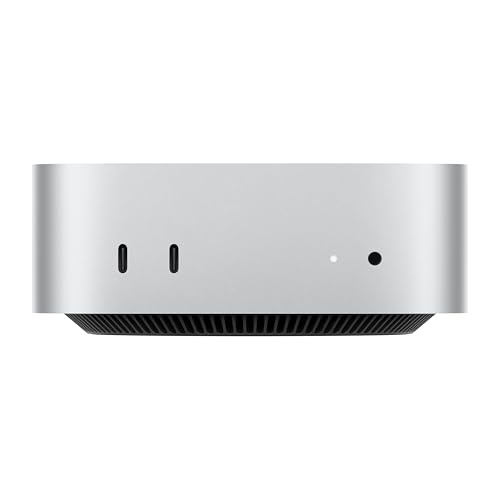
Apple Mac mini M4, 16GB, 256GB
The small Mac that replaced many towers: silent, efficient, and fast enough for most desks, in a five-inch square.
Our verdict
The Mac mini M4 is the best small desktop for Apple households, because it pairs genuinely fast, silent performance with an ecosystem that removes daily friction. Its fixed memory and storage demand a careful choice at purchase, and the under-mounted power button is an avoidable annoyance, but for buyers inside the Apple world these are footnotes to a machine that simply gets on with the job.
What we like
- The M4 chip delivers fast, responsive everyday performance while staying quiet and cool, since the whole machine draws little power for the speed it offers.
- At five inches square it fits anywhere a monitor stands, and the front USB-C ports and headphone jack remove the usual reach-around for everyday connections.
- macOS works smoothly with iPhone and iPad, with features like iPhone Mirroring and shared clipboard that save Apple owners real daily friction.
What to watch out for
- Memory and storage are fixed at purchase, so the base configuration cannot grow later, and buyers with large photo or video libraries need external storage.
- The rear power button sits underneath the unit, which is an awkward reach on a desk where the mini sits flat.
- Windows software needs virtualisation or a separate machine, and the small number of USB-A ports means older peripherals need an adapter or hub.
Who it is for
Apple households, students, and home workers who want a quiet, low-maintenance desktop and already own an iPhone or iPad.
Speed without noise
The M4 chip's appeal is not a headline benchmark but the way it behaves all day: apps open promptly, video calls stay smooth, and the machine stays quiet because it never needs to work hard for everyday tasks. That combination matters more on a desk than peak speed, since a noisy machine is a machine you notice, and the Mac mini is a machine you forget. For office work, browsing, and light creative tasks, it feels faster than its size suggests.
The fixed-configuration trap
Memory and storage cannot be changed after purchase, which turns the buying decision into a forecasting exercise. The base 16GB of memory suits most buyers for years, but the 256GB drive is tight for anyone with a large photo library or video projects, and external storage becomes a permanent part of the setup. Buyers should size storage for the machine's whole life, not for the first month, and treat a larger drive as cheap insurance against a cluttered desktop.
Living with it day to day
Daily life with the Mac mini is mostly invisible, which is the point. Front USB-C ports and a headphone jack cover everyday connections, Thunderbolt and HDMI handle monitors and fast storage, and features like iPhone Mirroring and shared clipboard quietly save Apple owners time. The rear power button underneath the unit is the one daily friction, awkward on a desk where the mini sits flat, but most owners press it rarely, since the machine sleeps and wakes cleanly.
What owners report
Commonly praised
- Owners love how silently it runs through long workdays without ever drawing attention to itself
- praise: Owners praise the tiny footprint that frees up desk space and tucks neatly beside a monitor
- praise: Owners value how smoothly it works alongside their phones and tablets for everyday sharing and calls
Common complaints
- Owners grumble that memory and storage cannot be increased after purchase, forcing careful choices upfront
- complaints: Owners find the power button awkwardly placed underneath the unit and hard to reach on a flat desk
- complaints: Owners note the shortage of older-style USB ports means adapters are needed for long-owned peripherals
Recurring themes from owner reviews on retailers and forums, summarised by our editors. Updated October 2026.
Key specifications
- Processor
- Apple M4, 10-core CPU and 10-core GPU
- Memory
- 16GB unified memory, not user upgradeable
- Storage
- 256GB SSD, not user upgradeable
- Ports
- Thunderbolt, HDMI, Gigabit Ethernet, front USB-C, headphone jack
- Operating system
- macOS
Also consider

Beelink SER5 Pro, Ryzen 7 5825U, 32GB, 1TB
The value Ryzen pick: eight cores, 32GB of memory, and triple displays, for desks that outgrew the budget boxes.
- Processor: AMD Ryzen 7 5825U, 8 cores, up to 4.5GHz
- Memory: 32GB DDR4

MINISFORUM Venus UM790 Pro, Ryzen 9 7940HS, 32GB, 1TB
The creator favourite: a Ryzen 9 with Radeon 780M graphics, dual USB4, and four-screen output in a quiet metal case.
- Processor: AMD Ryzen 9 7940HS, 8 cores, up to 5.2GHz
- Graphics: AMD Radeon 780M integrated
Research-based assessment. ThePickLedger has not hands-on tested this product; this evaluation synthesizes manufacturer specifications, retailer documentation, and published expert reviews.
Questions, answered
Is 16GB of memory enough on the Mac mini M4?
For most buyers, yes. Unified memory is used efficiently, and 16GB covers office work, browsing, video calls, and light creative tasks comfortably. Heavy video editing, large music projects, and many virtual machines benefit from more, so buyers with those workloads should choose a larger configuration at purchase, since it cannot be added later.
Can the Mac mini M4 run Windows software?
Windows software needs virtualisation on Apple silicon, since the M4 cannot boot Windows directly. Many apps run well virtualised, but games and specialised Windows-only tools may not, so buyers tied to Windows software should choose a Windows mini PC instead.
What monitors work with the Mac mini M4?
It drives modern displays over Thunderbolt and HDMI, including high-resolution monitors, and supports multiple displays for a multi-monitor desk. Check your monitor's inputs before ordering, since adapters may be needed for older DisplayPort-only or VGA displays.