Head to head
Apple Mac mini M4 vs Beelink SER8 (2026)
Mac mini M4 vs Beelink SER8: Apple silence and ecosystem against Windows flexibility and upgradeable Ryzen power, compared honestly.
#1 in our rankings · Best overall
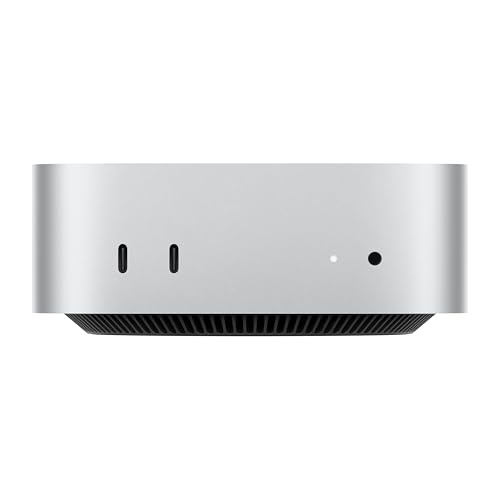
Apple Mac mini M4, 16GB, 256GB
Best for: Apple households, students, and home workers who want a quiet, low-maintenance desktop that simply works.
#9 in our rankings · Best quiet performer

Beelink SER8, Ryzen 7 8745HS, 32GB, 1TB
Best for: Home workers and creators who want strong performance without a loud fan, and a case that looks at home in a living room.
Our recommendation
Buy the Apple Mac mini M4 if you live in the Apple world and want the quietest, lowest-maintenance desktop here. Buy the Beelink SER8 if you need Windows, want to upgrade memory and storage later, or want stronger integrated graphics for gaming and creative work. Both are excellent small desktops; the choice is about ecosystem and flexibility, not raw quality.
Ecosystem and software
The Mac mini runs macOS and ties deeply into iPhone and iPad, with shared clipboard, iPhone Mirroring, and apps that Apple owners already use. The SER8 runs Windows, which covers the widest software library, including Windows-only games and business tools, and suits buyers who mix platforms or depend on Windows apps.
Upgrades and longevity
The SER8 lets owners add memory and storage through standard slots, so the machine can grow with its workload. The Mac mini is fixed at purchase, so buyers must forecast their needs for years ahead, and a wrong storage choice becomes a permanent external drive.
Graphics and displays
The SER8's Radeon 780M graphics and triple 4K display support suit gaming and multi-monitor creative desks better than the Mac mini's integrated GPU. The Mac mini counters with excellent efficiency and quiet running, and it drives high-resolution displays smoothly for office and creative work that is not GPU-bound.
Choose Apple Mac mini M4, 16GB, 256GB if…
- You own an iPhone or iPad and value the Apple ecosystem
- You want the quietest machine here with the least maintenance
- Your software runs on macOS and you do not need Windows
Choose Beelink SER8, Ryzen 7 8745HS, 32GB, 1TB if…
- You need Windows software or games
- You want to upgrade memory and storage later
- You want stronger integrated graphics and triple displays
Spec-by-spec comparison
| Spec | Apple Mac mini M4, 16GB, 256GB | Beelink SER8, Ryzen 7 8745HS, 32GB, 1TB |
|---|---|---|
| Price tier | Mid-range | Premium |
| Processor | Apple M4, 10-core CPU and 10-core GPU | AMD Ryzen 7 8745HS, 8 cores, up to 4.9GHz |
| Memory | 16GB unified memory, not user upgradeable | 32GB DDR5-5600, dual channel |
| Storage | 256GB SSD, not user upgradeable | 1TB PCIe 4.0 SSD, dual M.2 slots |
| Ports | Thunderbolt, HDMI, Gigabit Ethernet, front USB-C, headphone jack | - |
| Operating system | macOS | - |
| Graphics | - | AMD Radeon 780M integrated |
| Connectivity | - | USB4, Wi-Fi 6, Bluetooth 5.2, 2.5G Ethernet |
| Best for | Apple households, students, and home workers who want a quiet, low-maintenance desktop that simply works. | Home workers and creators who want strong performance without a loud fan, and a case that looks at home in a living room. |
| Skip if | You need Windows-only software, want to upgrade memory or storage yourself, or play demanding Windows games. | You need an AI accelerator, or you want OCuLink expansion for an external graphics card. |
Strengths and limitations
Apple Mac mini M4, 16GB, 256GB
Strengths
- The M4 chip delivers fast, responsive everyday performance while staying quiet and cool, since the whole machine draws little power for the speed it offers.
- At five inches square it fits anywhere a monitor stands, and the front USB-C ports and headphone jack remove the usual reach-around for everyday connections.
- macOS works smoothly with iPhone and iPad, with features like iPhone Mirroring and shared clipboard that save Apple owners real daily friction.
Limitations
- Memory and storage are fixed at purchase, so the base configuration cannot grow later, and buyers with large photo or video libraries need external storage.
- The rear power button sits underneath the unit, which is an awkward reach on a desk where the mini sits flat.
- Windows software needs virtualisation or a separate machine, and the small number of USB-A ports means older peripherals need an adapter or hub.
Beelink SER8, Ryzen 7 8745HS, 32GB, 1TB
Strengths
- The Ryzen 7 8745HS with Radeon 780M graphics covers office work, creative apps, and casual gaming with headroom to spare.
- Triple 4K display support through HDMI 2.1, DisplayPort, and USB4 suits multi-monitor productivity desks.
- Dual M.2 slots and generous memory expansion keep the machine useful for years, rather than fixed at its launch specification.
Limitations
- The 8745HS lacks the neural processor found in the 8845HS, so on-device AI features run on the CPU and GPU instead.
- Only a single 2.5G Ethernet port is fitted, where the K8 Plus offers two for network-heavy builds.
- There is no SD card reader, so photographers need an external reader for camera cards.
How they fit the wider field
- Apple Mac mini M4, 16GB, 256GB: ranked #1 (Best overall) in The Best Mini PCs. Read the full Apple Mac mini M4, 16GB, 256GB review.
- Beelink SER8, Ryzen 7 8745HS, 32GB, 1TB: ranked #9 (Best quiet performer) in The Best Mini PCs.
Neither one quite right? The full rankings cover 10 picks matched to different buyers.
Made your call?
Questions, answered
Which is faster for everyday work?
Both feel fast for browsing, office work, and video calls, and most buyers would not notice a speed difference in daily tasks. The SER8 pulls ahead in GPU-heavy work and gaming, while the Mac mini feels smoother in Apple apps and stays quieter under load.
Which lasts longer?
The SER8 can last longer through upgrades, since memory and storage can grow as needs change. The Mac mini's fixed configuration is its limit, though its efficient chip and build quality mean the base machine itself ages well for buyers whose needs stay stable.
Which is better for a living room desk?
The SER8's silver case blends into a living room, while the Mac mini's tiny square footprint hides almost anywhere. Both run quietly at idle, so the deciding factor is usually software: macOS or Windows.