Best of
The Best External Hard Drives (2026)
The best external hard drives of 2026: WD My Passport 5TB, Seagate Portable 2TB, LaCie Rugged Mini, Seagate Expansion Desktop 8TB, and more, compared on capacity, portability, and backup software.
Our top picks at a glance
Best overall
 WD My Passport 5TB
Most buyers who want one portable drive for backups, photo libraries, and general file storage, without choosing between capacity and convenience.
Best budget
 Seagate Portable 2TB
Buyers who want the cheapest reliable route to 2TB of extra storage for a laptop, a console, or a second backup copy.
Best rugged drive
 LaCie Rugged Mini 2TB
Photographers, videographers, and field workers who carry a drive through bags, vehicles, and outdoor locations every day.
For most buyers, the WD My Passport 5TB is the pick: capacity, backup software, and password protection in one pocket drive. Budget buyers should buy the Seagate Portable 2TB, field workers the LaCie Rugged Mini 2TB, console owners the WD_BLACK P10 5TB, and households archiving everything the Seagate Expansion Desktop 8TB. Buyers who only want plain storage should save money with the Toshiba Canvio Basics 2TB.
The picks, ranked
| Pick | Capacity | Drive type | Interface | Buy |
|---|---|---|---|---|
| Best overallWD My Passport 5TB | 5TB | Portable mechanical hard drive, 2.5 inch | USB 3.1, USB 3.0 compatible, bus powered | Check price |
| Best budgetSeagate Portable 2TB | 2TB | Portable mechanical hard drive, 2.5 inch | USB 3.0, bus powered | Check price |
| Best rugged driveLaCie Rugged Mini 2TB | 2TB | Portable mechanical hard drive, 2.5 inch | USB 3.0, USB 2.0 compatible | Check price |
 Best desktop archiveSeagate Expansion Desktop 8TB | 8TB | Desktop mechanical hard drive, 3.5 inch | USB 3.0 | Check price |
 Best for console gamingWD_BLACK P10 Game Drive 5TB | 5TB | Portable mechanical hard drive, 2.5 inch | USB 3.2 Gen 1, bus powered | Check price |
 Best for scheduled backupsSeagate One Touch 5TB | 5TB | Portable mechanical hard drive, 2.5 inch | USB 3.0, bus powered | Check price |
 Best with password protectionWD My Passport Ultra 5TB | 5TB | Portable mechanical hard drive, 2.5 inch | USB-C, USB 3.1 compatible, bus powered | Check price |
 Best for photo librariesSeagate Backup Plus Slim 2TB | 2TB | Portable mechanical hard drive, 2.5 inch | USB 3.0, bus powered | Check price |
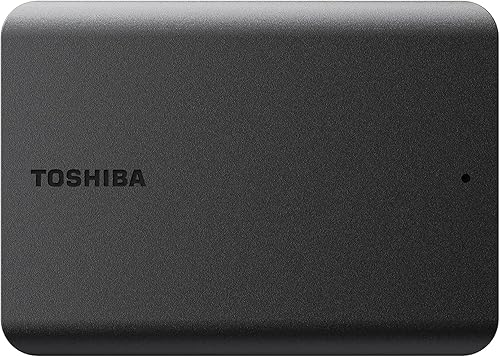 Best simple backup driveToshiba Canvio Basics 2TB | 2TB | Portable mechanical hard drive, 2.5 inch | USB 3.0, USB 2.0 compatible, bus powered | Check price |
 Best for everyday carryToshiba Canvio Advance 2TB | 2TB | Portable mechanical hard drive, 2.5 inch | USB 3.0, USB 2.0 compatible, bus powered | Check price |
Best overall
WD My Passport 5TB
The default portable drive: 5TB in a pocket-sized case, with backup software and password protection in the box.
Strengths
- The 5TB capacity covers a laptop backup, a large photo library, and a media collection in a single drive, so most buyers stop juggling several smaller drives.
- WD backup software and password protection are included, which turns a bare drive into a backup routine rather than a storage box that relies on good intentions.
- The slim, ridged case travels well in a laptop bag, and the drive runs from the USB cable alone, so there is no power brick to carry or forget.
Limitations
- As a spinning hard drive it is slower than a portable SSD, so very large video transfers take noticeably longer than they would on flash storage.
- The case is plastic and built for a bag, not for drops onto hard ground, so field workers should look at a rugged drive instead.
- The supplied cable is short, which is fine on a desk but awkward when the only free USB port sits at the back of a desktop tower.
What owners report
Commonly praised
- Owners love how much a single pocket drive holds without needing a second one alongside it
- Owners praise the backup software for turning an occasional chore into a quiet background routine
- Owners like the slim ridged case for slipping into a laptop bag without adding bulk
Common complaints
- Owners complain that very large video transfers feel slow beside flash storage
- Owners grumble about the short cable when the only free port sits at the back of a desk
- Owners worry about the plastic case when the drive gets knocked around in a busy bag
Recurring themes from owner reviews on retailers and forums, summarised by our editors. Updated October 2026.
| Capacity | 5TB |
|---|---|
| Drive type | Portable mechanical hard drive, 2.5 inch |
| Interface | USB 3.1, USB 3.0 compatible, bus powered |
| Software | WD backup software with password protection |
| Form | Pocket-sized portable case, no power adapter needed |
Best for: Most buyers who want one portable drive for backups, photo libraries, and general file storage, without choosing between capacity and convenience.
Skip if: You need a drive for rough field use, or a desktop archive that never moves, since this is a general-purpose portable drive rather than a specialist one.
Best budget
Seagate Portable 2TB
The honest budget drive: 2TB, one cable, and nothing to configure, for buyers who just need more room.
Strengths
- Setup is drag and drop: connect the cable, and the drive appears ready to use, with no software to install and no account to create.
- The slim case and bus-powered design make it a genuine pocket drive, light enough to live permanently in a laptop sleeve.
- It works across Windows, Mac, and consoles with a simple reformat where needed, so one drive can serve several machines in a household.
Limitations
- There is no bundled backup software or hardware encryption, so backups and protection depend on tools you supply yourself.
- The 2TB capacity fills quickly for video libraries and large game collections, and buyers with growing collections should consider a 5TB model.
- The plain plastic case offers no drop protection, so it needs a sleeve or a careful bag rather than a jacket pocket full of keys.
What owners report
Commonly praised
- Owners appreciate the drag-and-drop simplicity with nothing to install before the first copy
- Owners value the slim shape for keeping the drive permanently tucked into a laptop sleeve
- Owners like how easily it moves between a computer, a laptop, and a console in the same household
Common complaints
- Owners miss having backup software included for automatic copies
- Owners note that the capacity fills sooner than expected once video joins the collection
- Owners wish the plain case offered more protection against everyday knocks
Recurring themes from owner reviews on retailers and forums, summarised by our editors. Updated October 2026.
| Capacity | 2TB |
|---|---|
| Drive type | Portable mechanical hard drive, 2.5 inch |
| Interface | USB 3.0, bus powered |
| Software | None bundled; drag and drop |
| Extras | Rescue data recovery service included |
Best for: Buyers who want the cheapest reliable route to 2TB of extra storage for a laptop, a console, or a second backup copy.
Skip if: You need backup software, encryption, or a rugged case, since this drive keeps things deliberately simple.
Best rugged drive
LaCie Rugged Mini 2TB
The field drive: an orange rubber bumper, a metal core, and a design that expects to be dropped.
Strengths
- The rubber bumper and metal enclosure are built for drops, shocks, and rough handling that would worry a plain plastic drive.
- The bright orange bumper makes the drive easy to spot in a dark bag or a cluttered location kit, which is a small detail with real daily value.
- It connects to both Mac and PC, and the included cable covers modern USB-C ports as well as older USB-A ports through the supplied lead.
Limitations
- The rugged case makes it thicker and heavier than slim rivals, so it takes up more room in a slim laptop sleeve.
- The 2TB capacity is modest for video work, and heavy shooters may need to offload to a desktop archive regularly.
- You pay a premium for toughness, so desk-bound buyers get no benefit from the rugged build and should buy a cheaper drive.
What owners report
Commonly praised
- Owners trust the bumper and metal core after drops that would worry a plain drive
- Owners love spotting the bright orange case instantly in a dark kit bag
- Owners appreciate the straightforward connection to both Mac and PC machines
Common complaints
- Owners find the rugged case thicker and heavier than slim drives in a laptop sleeve
- Owners feel the capacity is modest for heavy video work
- Owners note the premium over plain drives stings when the drive rarely leaves a desk
Recurring themes from owner reviews on retailers and forums, summarised by our editors. Updated October 2026.
| Capacity | 2TB |
|---|---|
| Drive type | Portable mechanical hard drive, 2.5 inch |
| Interface | USB 3.0, USB 2.0 compatible |
| Protection | Shock, drop, and rain resistant rubber bumper enclosure |
| Extras | Data rescue service included |
Best for: Photographers, videographers, and field workers who carry a drive through bags, vehicles, and outdoor locations every day.
Skip if: You want the cheapest drive per terabyte, or a slim drive for a laptop sleeve, since toughness and looks cost extra here.
Best desktop archive
Seagate Expansion Desktop 8TB
The set-and-forget archive: 8TB on a desk, with a power adapter, for collections that never need to travel.
Strengths
- The 8TB capacity swallows a household archive whole, including video projects and full system backups, without the juggling that smaller drives force.
- Setup is genuinely plug and play: connect power and USB, and the drive is ready, with no software decisions to make.
- The included Rescue data recovery service adds reassurance for an archive drive, where the files matter far more than the hardware.
Limitations
- It needs a mains socket and a permanent desk spot, so it cannot double as a travel drive or a laptop-bag backup.
- The larger desktop mechanism is audible in a quiet room, and it belongs on a desk rather than beside a bed.
- There is no backup software in the box, so automatic backups need the operating system tools or software you choose yourself.
What owners report
Commonly praised
- Owners relish the room for an entire household archive on a single drive
- Owners praise the plug-and-play setup with no software decisions to make first
- Owners value the recovery service as reassurance for files that cannot be replaced
Common complaints
- Owners dislike needing a mains socket and a permanent desk spot for the drive
- Owners mention the audible hum in a very quiet room
- Owners would prefer backup software included rather than supplied by the operating system
Recurring themes from owner reviews on retailers and forums, summarised by our editors. Updated October 2026.
| Capacity | 8TB |
|---|---|
| Drive type | Desktop mechanical hard drive, 3.5 inch |
| Interface | USB 3.0 |
| Power | Mains power adapter included |
| Extras | Rescue data recovery service included |
Best for: Households and home offices archiving years of photos, video, documents, and system backups in one place.
Skip if: You need a drive that travels, since this desktop drive needs mains power and belongs on a desk.
Best for console gaming
WD_BLACK P10 Game Drive 5TB
The console library drive: 5TB of game storage in a tough case, built to live beside a PlayStation or Xbox.
Strengths
- Console compatibility is explicit for PlayStation and Xbox, including current-generation consoles for game storage and archiving, so setup holds no surprises.
- The rugged-looking case and longer warranty reflect a drive designed for a living room shelf and frequent moves between rooms.
- The 5TB capacity holds a large modern game library, so deleting and re-downloading games becomes rare rather than routine.
Limitations
- Current-generation console games generally cannot be played directly from a spinning USB drive, so it serves as archive storage for those titles rather than a play drive.
- It is a spinning drive, so load times from it trail a console SSD, which matters most for games played directly from the drive on older consoles.
- The gaming styling and branding add cost that non-gamers gain nothing from, so general buyers should compare with the standard My Passport.
What owners report
Commonly praised
- Owners celebrate finally keeping a large game library installed without constant deleting
- Owners like the explicit console compatibility that removes setup guesswork
- Owners appreciate the sturdy case for a living room shelf that gets frequent use
Common complaints
- Owners are disappointed that current-generation titles archive rather than play from the drive
- Owners note load times trail a console SSD for games played directly from it
- Owners feel non-gamers gain nothing from the gaming styling and branding
Recurring themes from owner reviews on retailers and forums, summarised by our editors. Updated October 2026.
| Capacity | 5TB |
|---|---|
| Drive type | Portable mechanical hard drive, 2.5 inch |
| Interface | USB 3.2 Gen 1, bus powered |
| Compatibility | PlayStation, Xbox, PC, and Mac |
| Warranty | Three-year limited warranty |
Best for: Console owners who are tired of deleting games to make room, and PC gamers who want a portable library drive.
Skip if: You do not play console games, since a general-purpose drive gives the same storage without the gaming premium.
Best for scheduled backups
Seagate One Touch 5TB
The backup-routine drive: one-touch backup, scheduled copies, and password encryption in a fabric-finished case.
Strengths
- Scheduled automatic backups remove the remembering problem entirely, which is the most common reason backups fail in practice.
- Password-activated hardware encryption protects the contents if the drive is lost or borrowed, without slowing everyday use.
- The fabric-textured case looks at home on a desk and resists fingerprints better than glossy plastic rivals.
Limitations
- The backup software works best when it is left installed and running, so buyers who dislike background software may resent it.
- The 5TB capacity in a portable case runs warmer than smaller drives during very long transfers, so ventilation matters on hot desks.
- The fabric finish can attract dust and lint in a bag, so it benefits from a sleeve more than a smooth plastic case does.
What owners report
Commonly praised
- Owners rely on scheduled backups that run without anyone remembering them
- Owners appreciate password encryption for a drive that travels to many places
- Owners like the fabric finish for resisting fingerprints on a shared desk
Common complaints
- Owners grumble about background software that must stay installed for schedules to work
- Owners notice warmth during very long transfers on a hot desk
- Owners find the fabric finish collects dust and lint in an unprotected bag
Recurring themes from owner reviews on retailers and forums, summarised by our editors. Updated October 2026.
| Capacity | 5TB |
|---|---|
| Drive type | Portable mechanical hard drive, 2.5 inch |
| Interface | USB 3.0, bus powered |
| Security | Password-activated hardware encryption |
| Software | Seagate Toolkit backup software with scheduled backups |
Best for: Buyers who want backups to happen on a schedule, with a single button press as the fallback, rather than by remembering.
Skip if: You prefer manual drag-and-drop backups, or you need a rugged case, since this drive is built around its software routine.
Best with password protection
WD My Passport Ultra 5TB
The polished My Passport: USB-C in the box, a smarter finish, and password protection for files that travel.
Strengths
- USB-C connectivity suits modern laptops directly, with no adapter hunt, while USB-A compatibility keeps older machines in play.
- Password protection with hardware encryption keeps files private if the drive is lost, which matters for work documents and personal archives.
- The metal-accented finish and slim case look and feel a step above the standard My Passport, which suits buyers who notice such things.
Limitations
- A forgotten password locks the drive, with no back door, so password management becomes part of owning this drive.
- As with every spinning drive here, large video transfers are slower than on a portable SSD, so video editors should weigh that trade.
- The premium over the standard My Passport buys finish, USB-C, and encryption rather than extra capacity or speed.
What owners report
Commonly praised
- Owners like the USB-C connection for plugging straight into a modern laptop
- Owners value password protection for work files that travel between offices
- Owners admire the smarter finish beside a premium laptop
Common complaints
- Owners warn that a forgotten password leaves no way back into the drive
- Owners find large video transfers slower than on flash storage
- Owners question whether the premium over the standard model is justified for plain storage
Recurring themes from owner reviews on retailers and forums, summarised by our editors. Updated October 2026.
| Capacity | 5TB |
|---|---|
| Drive type | Portable mechanical hard drive, 2.5 inch |
| Interface | USB-C, USB 3.1 compatible, bus powered |
| Security | Password protection with hardware encryption |
| Software | WD backup software included |
Best for: Buyers who carry sensitive work or personal files and want hardware-level password protection with modern USB-C connectivity.
Skip if: You only need plain storage and will never set a password, since the standard My Passport gives the same capacity for less.
Best for photo libraries
Seagate Backup Plus Slim 2TB
The slim photo-library drive: thin, quiet, and easy to carry, with backup software that suits large media folders.
Strengths
- The slim profile slips into a camera bag or a laptop sleeve without a bulge, which matters when a drive travels to every shoot or family event.
- Seagate backup software supports scheduled and mirrored folder backups, so a photo library can be protected without manual copying sessions.
- The drive runs quietly and stays cool in normal use, which makes it pleasant as a desk-side drive that stays connected for hours.
Limitations
- The thin case is not built for drops, so it belongs in a padded bag compartment rather than loose in a rucksack.
- The 2TB capacity suits photo libraries today but can fill fast once video enters the collection, so heavy shooters should plan for a larger drive.
- There is no hardware encryption, so anyone needing password protection on the drive itself should choose a different model.
What owners report
Commonly praised
- Owners enjoy the thin profile for carrying a photo library without a bulging camera bag
- Owners speak well of the scheduled folder backups for keeping a growing library protected
- Owners appreciate the quiet running during long sessions beside a desk
Common complaints
- Owners find the thin case less reassuring when the drive travels loose in a rucksack
- Owners feel the capacity runs short once video becomes a regular part of the library
- Owners would like password protection built into the drive itself
Recurring themes from owner reviews on retailers and forums, summarised by our editors. Updated October 2026.
| Capacity | 2TB |
|---|---|
| Drive type | Portable mechanical hard drive, 2.5 inch |
| Interface | USB 3.0, bus powered |
| Software | Seagate backup software included |
| Form | Slim portable case |
Best for: Photographers and families whose main job is keeping a growing photo and video library backed up and portable.
Skip if: You need hardware encryption or a rugged shell, since this drive trades those for thinness and simplicity.
Best simple backup drive
Toshiba Canvio Basics 2TB
The simplest backup drive of all: plug it in, drag files across, and get on with your day.
Strengths
- There is no software to learn, update, or work around, which makes it ideal for shared computers and for buyers who back up by hand.
- The matte black case is compact and understated, and it needs no power adapter, so it works anywhere a laptop works.
- USB 3.0 speeds handle documents, photos, and music libraries comfortably, and the drive is ready for both Windows and Mac use with a reformat where needed.
Limitations
- Manual backups only, so protection depends entirely on remembering to copy files, which suits disciplined owners and nobody else.
- The case is plain plastic with no shock protection, so it needs the same care as any other pocket drive.
- The 2TB capacity is a starting point rather than a long-term archive for video-heavy households, who should look at larger models.
What owners report
Commonly praised
- Owners welcome the absence of software to learn, update, or work around
- Owners like the compact matte case for disappearing into a small bag
- Owners find manual copying straightforward for documents, photos, and music
Common complaints
- Owners admit that manual backups slip when life gets busy and no schedule exists
- Owners describe the plain case as unremarkable beside smarter-looking rivals
- Owners note that video-heavy collections outgrow the capacity sooner than hoped
Recurring themes from owner reviews on retailers and forums, summarised by our editors. Updated October 2026.
| Capacity | 2TB |
|---|---|
| Drive type | Portable mechanical hard drive, 2.5 inch |
| Interface | USB 3.0, USB 2.0 compatible, bus powered |
| Software | None bundled |
| Form | Compact matte black portable case |
Best for: Buyers who distrust bundled software and want a plain, dependable drive for manual backups and file storage.
Skip if: You want automatic backup software, encryption, or a colourful case, since the Basics line deliberately offers none of those.
Best for everyday carry
Toshiba Canvio Advance 2TB
The everyday carry drive: a glossy, pocketable 2TB with backup software for buyers who want a little more than Basics.
Strengths
- The compact, glossy case disappears into a jacket pocket or a small bag, which is exactly what an everyday carry drive should do.
- Downloadable automatic backup software adds a safety net that the Basics line lacks, without adding bulk or complexity.
- Colour options let buyers pick a drive they will actually notice and like, which sounds trivial until a black drive vanishes into a black bag.
Limitations
- The glossy finish shows scratches and fingerprints quickly, so it looks worn sooner than matte rivals if carried loose.
- The 2TB capacity suits documents and photos but fills fast for video, so media-heavy buyers should step up to a 5TB model.
- There is no hardware encryption or rugged protection, so sensitive files and rough handling both need a different drive.
What owners report
Commonly praised
- Owners enjoy the pocketable size for carrying daily files everywhere
- Owners value the downloadable backup software as a safety net the Basics line lacks
- Owners like picking a colour that stands out in a crowded bag
Common complaints
- Owners complain the glossy finish shows scratches and fingerprints quickly
- Owners find the capacity tight once video enters an otherwise document-based collection
- Owners wish the drive offered encryption or tougher protection for travel
Recurring themes from owner reviews on retailers and forums, summarised by our editors. Updated October 2026.
| Capacity | 2TB |
|---|---|
| Drive type | Portable mechanical hard drive, 2.5 inch |
| Interface | USB 3.0, USB 2.0 compatible, bus powered |
| Software | Downloadable automatic backup software |
| Form | Compact glossy portable case |
Best for: Students, commuters, and office workers who want a small, good-looking drive for daily files and automatic backups.
Skip if: You need encryption, a rugged case, or more than 2TB, since this drive keeps its ambitions modest and its size small.
How we chose
Capacity against a real collection
We judged capacity against what people actually store: a laptop backup, a photo library, a video project, or a game library. A drive that fills within a year is a false economy, so we credited drives that leave headroom and penalised drives that only suit a narrow collection size.
Backup behaviour, not backup promises
A drive protects files only if backups happen, so we weighted bundled software, scheduled backups, and ease of use heavily. A drive with excellent software that nobody installs scores lower here than a simple drive its owner actually uses weekly.
Portability against toughness
Pocket drives, desk drives, and rugged drives solve different problems, so we judged each against its own job rather than against a single ideal. A desktop drive is not penalised for needing mains power, and a rugged drive is not penalised for extra bulk.
Total cost of ownership
We compared the cost of a working backup setup, including any software, cables, or adapters a drive genuinely needs. A cheap drive that needs extra purchases, or a premium drive whose extras go unused, was scored accordingly.
Questions, answered
How much external storage do I need?
Start from what you own today, then add headroom. Documents and photos fit comfortably on 2TB, a serious photo and video library usually needs 5TB, and a household archive with video and system backups justifies 8TB on a desktop drive. If in doubt, buy the next size up, since storage needs only grow.
Should I buy a hard drive or an SSD?
Buy a hard drive for capacity per pound and for large archives, and buy an SSD when speed matters most, such as editing video directly from the drive. For backups and general storage, a hard drive gives far more room for the money, and that usually matters more than transfer speed.
Do I need backup software with an external drive?
Not strictly, since you can copy files by hand, but scheduled software is the difference between a backup plan and a backup habit. If you know you will forget manual copies, choose a drive with bundled backup software, such as the WD My Passport or the Seagate One Touch, and leave it running.