Ranked on backup reliability: automatic software, scheduled copies, encryption, and capacity that fits a real household archive.
The Best External Hard Drives for Backup (2026)
External hard drives for backup compared: scheduled software, password protection, and desktop archives for a household that never loses a file.
Our top picks at a glance
Best for scheduled backups
 Seagate One Touch 5TB
Buyers who want backups to happen on a schedule, with a single button press as the fallback, rather than by remembering.
Best all-round backup drive
 WD My Passport 5TB
Most buyers who want one portable drive for backups, photo libraries, and general file storage, without choosing between capacity and convenience.
Best backup archive
 Seagate Expansion Desktop 8TB
Households and home offices archiving years of photos, video, documents, and system backups in one place.
The Seagate One Touch 5TB is the backup pick, because scheduled backups remove the remembering problem that defeats most backup plans. The WD My Passport 5TB is the better all-rounder if the drive must also travel, and the Seagate Expansion Desktop 8TB is the pick for a household archive that never moves. Manual backup fans should buy the Toshiba Canvio Basics 2TB and set a weekly reminder.
The picks, ranked
| Pick | Capacity | Drive type | Interface | Buy |
|---|---|---|---|---|
| Best for scheduled backupsSeagate One Touch 5TB | 5TB | Portable mechanical hard drive, 2.5 inch | USB 3.0, bus powered | Check price |
| Best all-round backup driveWD My Passport 5TB | 5TB | Portable mechanical hard drive, 2.5 inch | USB 3.1, USB 3.0 compatible, bus powered | Check price |
| Best backup archiveSeagate Expansion Desktop 8TB | 8TB | Desktop mechanical hard drive, 3.5 inch | USB 3.0 | Check price |
 Best backup drive for photosSeagate Backup Plus Slim 2TB | 2TB | Portable mechanical hard drive, 2.5 inch | USB 3.0, bus powered | Check price |
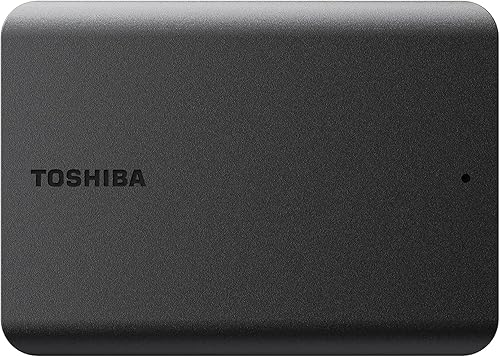 Best manual backup driveToshiba Canvio Basics 2TB | 2TB | Portable mechanical hard drive, 2.5 inch | USB 3.0, USB 2.0 compatible, bus powered | Check price |
Best for scheduled backups
Seagate One Touch 5TB
The backup-routine drive: one-touch backup, scheduled copies, and password encryption in a fabric-finished case.
Strengths
- Scheduled automatic backups remove the remembering problem entirely, which is the most common reason backups fail in practice.
- Password-activated hardware encryption protects the contents if the drive is lost or borrowed, without slowing everyday use.
- The fabric-textured case looks at home on a desk and resists fingerprints better than glossy plastic rivals.
Limitations
- The backup software works best when it is left installed and running, so buyers who dislike background software may resent it.
- The 5TB capacity in a portable case runs warmer than smaller drives during very long transfers, so ventilation matters on hot desks.
- The fabric finish can attract dust and lint in a bag, so it benefits from a sleeve more than a smooth plastic case does.
What owners report
Commonly praised
- Owners rely on scheduled backups that run without anyone remembering them
- Owners appreciate password encryption for a drive that travels to many places
- Owners like the fabric finish for resisting fingerprints on a shared desk
Common complaints
- Owners grumble about background software that must stay installed for schedules to work
- Owners notice warmth during very long transfers on a hot desk
- Owners find the fabric finish collects dust and lint in an unprotected bag
Recurring themes from owner reviews on retailers and forums, summarised by our editors. Updated October 2026.
| Capacity | 5TB |
|---|---|
| Drive type | Portable mechanical hard drive, 2.5 inch |
| Interface | USB 3.0, bus powered |
| Security | Password-activated hardware encryption |
| Software | Seagate Toolkit backup software with scheduled backups |
Best for: Buyers who want backups to happen on a schedule, with a single button press as the fallback, rather than by remembering.
Skip if: You prefer manual drag-and-drop backups, or you need a rugged case, since this drive is built around its software routine.
Best all-round backup drive
WD My Passport 5TB
The default portable drive: 5TB in a pocket-sized case, with backup software and password protection in the box.
Strengths
- The 5TB capacity covers a laptop backup, a large photo library, and a media collection in a single drive, so most buyers stop juggling several smaller drives.
- WD backup software and password protection are included, which turns a bare drive into a backup routine rather than a storage box that relies on good intentions.
- The slim, ridged case travels well in a laptop bag, and the drive runs from the USB cable alone, so there is no power brick to carry or forget.
Limitations
- As a spinning hard drive it is slower than a portable SSD, so very large video transfers take noticeably longer than they would on flash storage.
- The case is plastic and built for a bag, not for drops onto hard ground, so field workers should look at a rugged drive instead.
- The supplied cable is short, which is fine on a desk but awkward when the only free USB port sits at the back of a desktop tower.
What owners report
Commonly praised
- Owners love how much a single pocket drive holds without needing a second one alongside it
- Owners praise the backup software for turning an occasional chore into a quiet background routine
- Owners like the slim ridged case for slipping into a laptop bag without adding bulk
Common complaints
- Owners complain that very large video transfers feel slow beside flash storage
- Owners grumble about the short cable when the only free port sits at the back of a desk
- Owners worry about the plastic case when the drive gets knocked around in a busy bag
Recurring themes from owner reviews on retailers and forums, summarised by our editors. Updated October 2026.
| Capacity | 5TB |
|---|---|
| Drive type | Portable mechanical hard drive, 2.5 inch |
| Interface | USB 3.1, USB 3.0 compatible, bus powered |
| Software | WD backup software with password protection |
| Form | Pocket-sized portable case, no power adapter needed |
Best for: Most buyers who want one portable drive for backups, photo libraries, and general file storage, without choosing between capacity and convenience.
Skip if: You need a drive for rough field use, or a desktop archive that never moves, since this is a general-purpose portable drive rather than a specialist one.
Best backup archive
Seagate Expansion Desktop 8TB
The set-and-forget archive: 8TB on a desk, with a power adapter, for collections that never need to travel.
Strengths
- The 8TB capacity swallows a household archive whole, including video projects and full system backups, without the juggling that smaller drives force.
- Setup is genuinely plug and play: connect power and USB, and the drive is ready, with no software decisions to make.
- The included Rescue data recovery service adds reassurance for an archive drive, where the files matter far more than the hardware.
Limitations
- It needs a mains socket and a permanent desk spot, so it cannot double as a travel drive or a laptop-bag backup.
- The larger desktop mechanism is audible in a quiet room, and it belongs on a desk rather than beside a bed.
- There is no backup software in the box, so automatic backups need the operating system tools or software you choose yourself.
What owners report
Commonly praised
- Owners relish the room for an entire household archive on a single drive
- Owners praise the plug-and-play setup with no software decisions to make first
- Owners value the recovery service as reassurance for files that cannot be replaced
Common complaints
- Owners dislike needing a mains socket and a permanent desk spot for the drive
- Owners mention the audible hum in a very quiet room
- Owners would prefer backup software included rather than supplied by the operating system
Recurring themes from owner reviews on retailers and forums, summarised by our editors. Updated October 2026.
| Capacity | 8TB |
|---|---|
| Drive type | Desktop mechanical hard drive, 3.5 inch |
| Interface | USB 3.0 |
| Power | Mains power adapter included |
| Extras | Rescue data recovery service included |
Best for: Households and home offices archiving years of photos, video, documents, and system backups in one place.
Skip if: You need a drive that travels, since this desktop drive needs mains power and belongs on a desk.
Best backup drive for photos
Seagate Backup Plus Slim 2TB
The slim photo-library drive: thin, quiet, and easy to carry, with backup software that suits large media folders.
Strengths
- The slim profile slips into a camera bag or a laptop sleeve without a bulge, which matters when a drive travels to every shoot or family event.
- Seagate backup software supports scheduled and mirrored folder backups, so a photo library can be protected without manual copying sessions.
- The drive runs quietly and stays cool in normal use, which makes it pleasant as a desk-side drive that stays connected for hours.
Limitations
- The thin case is not built for drops, so it belongs in a padded bag compartment rather than loose in a rucksack.
- The 2TB capacity suits photo libraries today but can fill fast once video enters the collection, so heavy shooters should plan for a larger drive.
- There is no hardware encryption, so anyone needing password protection on the drive itself should choose a different model.
What owners report
Commonly praised
- Owners enjoy the thin profile for carrying a photo library without a bulging camera bag
- Owners speak well of the scheduled folder backups for keeping a growing library protected
- Owners appreciate the quiet running during long sessions beside a desk
Common complaints
- Owners find the thin case less reassuring when the drive travels loose in a rucksack
- Owners feel the capacity runs short once video becomes a regular part of the library
- Owners would like password protection built into the drive itself
Recurring themes from owner reviews on retailers and forums, summarised by our editors. Updated October 2026.
| Capacity | 2TB |
|---|---|
| Drive type | Portable mechanical hard drive, 2.5 inch |
| Interface | USB 3.0, bus powered |
| Software | Seagate backup software included |
| Form | Slim portable case |
Best for: Photographers and families whose main job is keeping a growing photo and video library backed up and portable.
Skip if: You need hardware encryption or a rugged shell, since this drive trades those for thinness and simplicity.
Best manual backup drive
Toshiba Canvio Basics 2TB
The simplest backup drive of all: plug it in, drag files across, and get on with your day.
Strengths
- There is no software to learn, update, or work around, which makes it ideal for shared computers and for buyers who back up by hand.
- The matte black case is compact and understated, and it needs no power adapter, so it works anywhere a laptop works.
- USB 3.0 speeds handle documents, photos, and music libraries comfortably, and the drive is ready for both Windows and Mac use with a reformat where needed.
Limitations
- Manual backups only, so protection depends entirely on remembering to copy files, which suits disciplined owners and nobody else.
- The case is plain plastic with no shock protection, so it needs the same care as any other pocket drive.
- The 2TB capacity is a starting point rather than a long-term archive for video-heavy households, who should look at larger models.
What owners report
Commonly praised
- Owners welcome the absence of software to learn, update, or work around
- Owners like the compact matte case for disappearing into a small bag
- Owners find manual copying straightforward for documents, photos, and music
Common complaints
- Owners admit that manual backups slip when life gets busy and no schedule exists
- Owners describe the plain case as unremarkable beside smarter-looking rivals
- Owners note that video-heavy collections outgrow the capacity sooner than hoped
Recurring themes from owner reviews on retailers and forums, summarised by our editors. Updated October 2026.
| Capacity | 2TB |
|---|---|
| Drive type | Portable mechanical hard drive, 2.5 inch |
| Interface | USB 3.0, USB 2.0 compatible, bus powered |
| Software | None bundled |
| Form | Compact matte black portable case |
Best for: Buyers who distrust bundled software and want a plain, dependable drive for manual backups and file storage.
Skip if: You want automatic backup software, encryption, or a colourful case, since the Basics line deliberately offers none of those.
Questions, answered
How often should I back up?
As often as you create files you would miss. Scheduled daily or weekly backups suit most households, while manual backups need a fixed routine, such as every Sunday evening, or they quietly stop happening.
Should I keep the backup drive connected?
For scheduled backups, yes, since software cannot copy to a drive that is in a drawer. For protection against theft or a power surge, keep a second copy elsewhere, ideally a desktop archive plus a portable drive stored separately.
Is one external drive enough for backup?
One drive protects against a computer failure, but not against theft, fire, or a faulty drive. A second copy, on another drive or in cloud storage, turns a backup from a hope into a plan.