for photographers and video creators
Best NAS for Photographers and Creators (2026)
NAS picks for photo libraries and video projects: transfer speed, Lightroom catalog handling, and backup workflows.
Our top picks at a glance
Best for creators
 Synology DS423+
Home users who want room to grow into Plex, Docker, and virtual machines.
Fastest imports per dollar
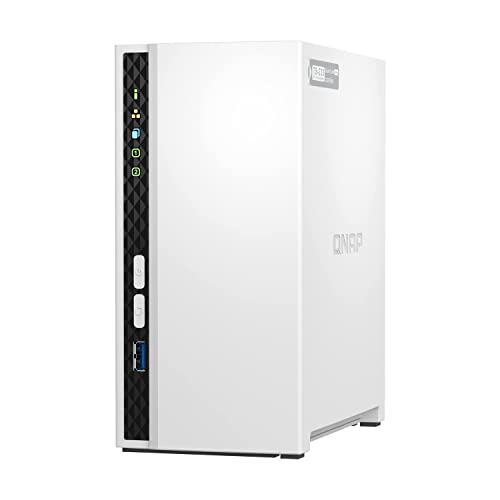 QNAP TS-233
Buyers who want faster-than-gigabit transfers without paying four-bay money.
Simplest photo backup
 Synology DS223j
First-time NAS owners who want reliable network storage and backups.
Quick answer: Creators with growing libraries should buy the Synology DS423+ for its four bays and RAM headroom. If your priority is getting cards ingested fast, the QNAP TS-233's 2.5GbE port is the spec that matters.
The picks, ranked
| Pick | Drive bays | CPU | Memory | Buy |
|---|---|---|---|---|
| Best for creatorsSynology DS423+ | 4 | Intel Celeron J4125, quad-core (2.0 GHz base, 2.7 GHz burst) | 2 GB DDR4, expandable to 6 GB | Check price |
| Fastest imports per dollarQNAP TS-233 | 2 | ARM Cortex-A55, quad-core 2.0 GHz | 2 GB (fixed, not expandable) | Check price |
| Simplest photo backupSynology DS223j | 2 | Realtek RTD1619B, quad-core 1.7 GHz | 1 GB DDR4 (fixed, not expandable) | Check price |
Best for creators
Synology DS423+
Four bays and an Intel chip: the NAS you grow into, not out of.
Strengths
- Intel Celeron J4125 with Quick Sync enables hardware-accelerated Plex transcoding
- Two M.2 NVMe slots let you add SSD cache without sacrificing a drive bay
- RAM expands from 2 GB to 6 GB, and DSM supports Docker and VMs for tinkerers
Limitations
- Costs notably more than two-bay rivals before you buy a single drive
- Still limited to 1GbE ports; no 2.5GbE despite the premium positioning
- Synology's verified-drive lists can push buyers toward pricier first-party drives
What owners report
Commonly praised
- Polished DSM software with excellent apps
- Reliable, quiet four-bay design
- Strong backup and media features
Common complaints
- Only 1GbE networking without an upgrade
- Expensive
- Earlier drive-compatibility restrictions frustrated owners
Recurring themes from owner reviews on retailers and forums, summarised by our editors. Updated October 2026.
| Drive bays | 4 |
|---|---|
| CPU | Intel Celeron J4125, quad-core (2.0 GHz base, 2.7 GHz burst) |
| Memory | 2 GB DDR4, expandable to 6 GB |
| M.2 slots | 2x 2280 NVMe for SSD cache |
| Network | 2x 1GbE RJ-45 with link aggregation |
Best for: Home users who want room to grow into Plex, Docker, and virtual machines.
Skip if: You only need basic file storage; this is more NAS than that job requires.
Fastest imports per dollar
QNAP TS-233
2.5GbE networking at a two-bay price.
Strengths
- A 2.5GbE port delivers up to 2.5x the theoretical throughput of gigabit rivals
- 2 GB of RAM doubles the DS223j, helping with multitasking and apps
- QTS supports snapshots and a wide app center for backup and media duties
Limitations
- RAM is fixed at 2 GB with no expansion slot
- ARM processor limits virtualization and some heavier QTS applications
- QTS is powerful but less hand-holding than DSM for absolute beginners
What owners report
Commonly praised
- Low price for a two-bay NAS
- Good transfer speeds over gigabit
- Feature-rich QTS software
Common complaints
- Setup and interface are confusing for beginners
- Support experiences vary widely
- Some long-term reliability concerns
Recurring themes from owner reviews on retailers and forums, summarised by our editors. Updated October 2026.
| Drive bays | 2 |
|---|---|
| CPU | ARM Cortex-A55, quad-core 2.0 GHz |
| Memory | 2 GB (fixed, not expandable) |
| Network | 1x 2.5GbE RJ-45 |
| Operating system | QNAP QTS 5.x |
Best for: Buyers who want faster-than-gigabit transfers without paying four-bay money.
Skip if: You prefer Synology's DSM software polish over QNAP's more technical QTS.
Simplest photo backup
Synology DS223j
The simplest credible NAS: DSM software, two bays, zero fuss.
Strengths
- Runs Synology DSM, the most polished and beginner-friendly NAS operating system
- Sips power and runs nearly silent, suited to always-on home use
- Straightforward setup: DSM walks a first-timer from install to shared folders in under an hour
Limitations
- Fixed 1 GB of DDR4 RAM cannot be expanded, capping multitasking headroom
- Single 1GbE port means network transfers top out around 110 MB/s in practice
- Realtek ARM processor rules out Plex hardware transcoding and heavy Docker use
What owners report
Commonly praised
- Affordable entry into Synology's software
- Easy setup
- Stable for backups and file sharing
Common complaints
- No tool-less drive trays
- Modest CPU and RAM
- Only 1GbE networking
Recurring themes from owner reviews on retailers and forums, summarised by our editors. Updated October 2026.
| Drive bays | 2 |
|---|---|
| CPU | Realtek RTD1619B, quad-core 1.7 GHz |
| Memory | 1 GB DDR4 (fixed, not expandable) |
| Network | 1x 1GbE RJ-45 |
| Operating system | Synology DSM 7.x |
Best for: First-time NAS owners who want reliable network storage and backups.
Skip if: You need 2.5GbE networking, Docker containers, or more than 1 GB of RAM.
Questions, answered
Can I edit video directly off a NAS?
Light 1080p editing works over 2.5GbE or aggregated gigabit; 4K multicam timelines still belong on local SSDs. Use the NAS as the project vault, not the scratch disk.
How should photographers back up a NAS?
Follow 3-2-1: three copies, two media types, one off-site. A two-bay mirror plus an external USB backup plus a cloud copy of selects is a solid baseline.
Does Lightroom work with catalogs on a NAS?
Adobe officially recommends local catalogs; keep the catalog on your computer and store the image files on the NAS. Smart previews make this workflow fast.