Best of
The Best Streaming Accessories (2026)
The best streaming accessories for 2026: Elgato Stream Deck, HD60 X, Logitech StreamCam, and Elgato Green Screen compared for Twitch and YouTube.
Our top picks at a glance
Best overall
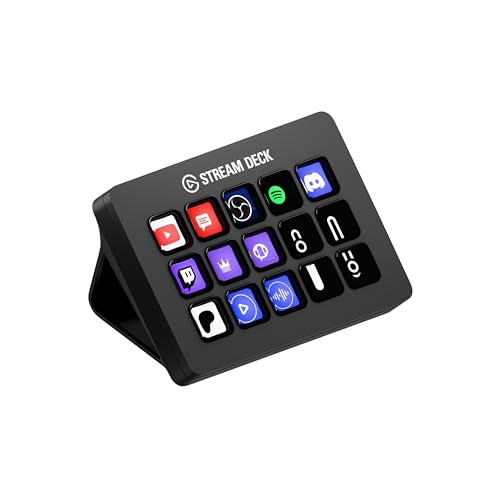 Elgato Stream Deck MK.2
Streamers and creators who switch scenes, trigger alerts, and control audio dozens of times per session.
Best for console streamers
 Elgato HD60 X
Console streamers on PS5 or Xbox Series X who want to play in 4K HDR while capturing clean 1080p60.
Best webcam
 Logitech StreamCam
Streamers who want a set-and-forget face camera with reliable autofocus and 60 fps motion.
The Elgato Stream Deck MK.2 is the best streaming accessory for most creators, because its 15 LCD keys and macro system remove the most mid-stream friction. Console streamers should start with the Elgato HD60 X for 4K60 HDR passthrough while capturing 1080p60. The Logitech StreamCam is the best face camera for streamers who want reliable 1080p60 autofocus, and the Elgato Green Screen is the cleanest way to get a professional background without permanent mounting.
The picks, ranked
| Pick | Keys | Connection | Software | Buy |
|---|---|---|---|---|
| Best overallElgato Stream Deck MK.2 | 15 customizable LCD keys | USB 2.0 via USB-C connector | Stream Deck app with plugin store | Check price |
| Best for console streamersElgato HD60 X | — | USB 3.0 (USB-C connector), HDMI in/out | — | Check price |
| Best webcamLogitech StreamCam | — | USB-C (fixed 5 ft cable) | — | Check price |
 Best background upgradeElgato Green Screen (MT) Best background upgradeElgato Green Screen (MT) | — | — | — | Check price |
 Best compact controllerElgato Stream Deck Mini Best compact controllerElgato Stream Deck Mini | 6 customizable LCD keys | USB 2.0 | Elgato Stream Deck app | Check price |
 Best for camera streamersElgato Cam Link 4K Best for camera streamersElgato Cam Link 4K | — | USB 3.0 dongle | — | Check price |
 Best lighting upgradeElgato Key Light Best lighting upgradeElgato Key Light | — | — | — | Check price |
 Best starter microphoneBlue Yeti USB Microphone Best starter microphoneBlue Yeti USB Microphone | — | USB, plug and play | — | Check price |
 Best RGB microphoneHyperX QuadCast S Best RGB microphoneHyperX QuadCast S | — | — | — | Check price |
 Best low-light webcamRazer Kiyo Pro Best low-light webcamRazer Kiyo Pro | — | USB 3.0 | Razer Synapse control | Check price |
Best overall
Elgato Stream Deck MK.2
15 LCD keys that run your entire stream.
Strengths
- 15 customizable LCD keys with folders and multi-action macros
- Deep plugin ecosystem covering OBS, Twitch, YouTube, Discord, and Spotify
- Removable faceplate and adjustable stand for desk fit
Limitations
- USB connection only; no wireless option on the MK.2
- Software setup takes a real afternoon to do well
- Overkill if you only stream one static scene
What owners report
Commonly praised
- Build quality is solid, and the keys hold up to heavy daily use
- The customisable LCD keys speed up streaming and editing workflows
- A large plugin library covers most apps owners use
Common complaints
- Firmware and software updates can run at startup and delay use
- Some updates have broken profiles or caused icons not to sync
- Support often asks for a ticket before helping, which frustrates some owners
Recurring themes from owner reviews on retailers and forums, summarised by our editors. Updated October 2026.
| Keys | 15 customizable LCD keys |
|---|---|
| Connection | USB 2.0 via USB-C connector |
| Software | Stream Deck app with plugin store |
| Mounting | Detachable stand, adjustable angle |
| Compatibility | Windows 10+ and macOS 11+ |
Best for: Streamers and creators who switch scenes, trigger alerts, and control audio dozens of times per session.
Skip if: You stream casually and rarely touch your scenes mid-broadcast; keyboard shortcuts will cover you.
Best for console streamers
Elgato HD60 X
Console capture with 4K60 HDR passthrough.
Strengths
- 4K60 HDR10 and VRR passthrough to your monitor while capturing
- 1080p60 HDR10 or 4K30 SDR capture over USB 3.0
- Works with PS5, Xbox Series X/S, and Nintendo Switch
Limitations
- External USB design caps capture below passthrough quality
- Needs a USB 3.0 port; USB 2.0 will not carry the signal
- No HDMI 2.1, so no 4K120 passthrough
What owners report
Commonly praised
- 4K60 HDR passthrough with no noticeable lag
- It works as a standard UVC device without installing Elgato software
- Compact and simple to set up with consoles
Common complaints
- Some owners report audio dropouts or audio drifting out of sync
- OBS occasionally stops picking up its audio until reconfigured
- Linux support can be unreliable on some setups
Recurring themes from owner reviews on retailers and forums, summarised by our editors. Updated October 2026.
| Capture | 1080p60 HDR10 / 4K30 SDR |
|---|---|
| Passthrough | 4K60 HDR10, VRR supported |
| Connection | USB 3.0 (USB-C connector), HDMI in/out |
| Latency | Sub-100ms via USB 3.0 (Elgato spec) |
| Compatibility | Windows 10+ and macOS 11+ |
Best for: Console streamers on PS5 or Xbox Series X who want to play in 4K HDR while capturing clean 1080p60.
Skip if: You only stream from a PC; your GPU can capture its own output with no extra hardware.
Best webcam
Logitech StreamCam
1080p60 with autofocus that tracks your face.
Strengths
- 1080p60 capture with fast, accurate autofocus
- AI auto-framing keeps you centered as you move
- Dual front-facing microphones for backup audio
Limitations
- 1080p max; no 4K option
- USB-C only, with a fixed non-detachable cable
- Auto-framing can crop tighter than some creators like
What owners report
Commonly praised
- Sharp 1080p at 60fps that looks smooth on stream
- The mount rotates for vertical video
- It is usually plug and play over USB-C
Common complaints
- Autofocus can hunt or react slowly
- Colours and white balance can look off under mixed lighting
- Some owners hit driver or recognition problems, and Mac software support is weaker
Recurring themes from owner reviews on retailers and forums, summarised by our editors. Updated October 2026.
| Resolution | 1080p at 60 fps |
|---|---|
| Focus | Autofocus with AI auto-framing |
| Field of view | 78 degrees |
| Connection | USB-C (fixed 5 ft cable) |
| Mounting | Monitor mount included, tripod thread |
Best for: Streamers who want a set-and-forget face camera with reliable autofocus and 60 fps motion.
Skip if: You want 4K resolution or already own a mirrorless camera with a capture card.
Best background upgrade
Elgato Green Screen (MT)
A wrinkle-free chroma key panel that collapses away.
Strengths
- 148 x 180 cm wrinkle-resistant panel for full-body keying
- Collapses into its aluminum base in seconds
- Dacron fabric resists wrinkles that ruin chroma keys
Limitations
- Still needs decent lighting to key cleanly
- Tall base footprint behind your chair
- Green spill can tint light-colored clothing edges
| Extended size | 148 x 180 cm (58 x 71 in) |
|---|---|
| Material | Wrinkle-resistant Dacron |
| Housing | Aluminum base, auto-locking mechanism |
| Collapsed height | Fits behind a desk or in a closet |
| Weight | 9.3 kg (20.5 lb) per Elgato spec |
Best for: Streamers who want clean background removal without mounting anything permanent.
Skip if: You have a naturally clean background or stream with a blurred virtual background already.
Best compact controller
Elgato Stream Deck Mini
Six keys of streaming control that fit anywhere.
6 LCD keys running the full Stream Deck software give you scene switching, sound effects, and chat commands in a footprint that fits anywhere. New streamers get pro control without the 15-key price.
Strengths
- 6 customizable LCD keys run scenes, media, and chat commands.
- Same Stream Deck software as the full-size model.
- Compact footprint fits beside any keyboard.
- Folders let 6 keys control far more than 6 actions.
Limitations
- 6 keys fill up fast once you add soundboards and lighting.
- No dials or faders for audio mixing.
- You will likely outgrow it if streaming becomes serious.
| Keys | 6 customizable LCD keys |
|---|---|
| Software | Elgato Stream Deck app |
| Connection | USB 2.0 |
| Profiles | Unlimited via folders |
| Size | Compact desktop footprint |
Best for: New streamers who want scene switching without the full-size price.
Skip if: You run complex multi-action macros that need 15 keys.
Best for camera streamers
Elgato Cam Link 4K
Turn your mirrorless camera into a 4K webcam.
The Cam Link 4K turns any HDMI camera into a 4K30 webcam over USB 3.0, with ultra-low latency and OBS compatibility. If you own a mirrorless camera, this is the single biggest video upgrade you can buy.
Strengths
- Captures 4K30 from any HDMI camera over USB.
- Tiny dongle form factor, no PCIe slot needed.
- Works with OBS, Streamlabs, Zoom, and Teams.
- Real camera optics beat every webcam on depth of field.
Limitations
- Requires a camera with clean HDMI output.
- 4K capture needs a strong CPU for encoding.
- No pass-through, so you cannot also record in-camera easily.
| Capture | 4K30 via HDMI to USB |
|---|---|
| Connection | USB 3.0 dongle |
| Compatibility | OBS, Streamlabs, Zoom, Teams |
| Form factor | Thumb-drive sized |
| Latency | Ultra-low, per Elgato |
Best for: Streamers with a real camera who want broadcast-quality video.
Skip if: You only own a webcam; this needs an HDMI camera to work.
Best lighting upgrade
Elgato Key Light
Studio lighting that makes webcams look twice as good.
An edge-lit panel with 2900 to 7000K adjustment and WiFi app control makes any webcam look dramatically better. Lighting upgrades image quality more than a pricier camera in most rooms.
Strengths
- Edge-lit LED panel gives soft, even facial lighting.
- 2900 to 7000K color temperature, from warm to daylight.
- WiFi app control adjusts brightness from your phone or Stream Deck.
- Slim panel stays out of frame on its desk clamp.
Limitations
- One light leaves the background dark; pairs work better.
- Premium price for what is essentially a bright panel.
- Needs a sturdy desk edge for the clamp mount.
What owners report
Commonly praised
- Bright, even light for streaming and calls
- Fine control of brightness and color temperature
- Sturdy desk-clamp pole
Common complaints
- App connection can drop after network changes
- Power adapter and short cord draw complaints
- Heavy for portable setups
Recurring themes from owner reviews on retailers and forums, summarised by our editors. Updated October 2026.
| Light type | Edge-lit LED panel, 160 LEDs |
|---|---|
| Color temperature | 2900 to 7000K adjustable |
| Control | WiFi via app or Stream Deck |
| Mount | Desk clamp pole mount |
| Brightness | Dimmable to 3 percent |
Best for: Streamers whose face cam looks grainy in room lighting.
Skip if: You already have good window light or a ring light you like.
Best starter microphone
Blue Yeti USB Microphone
The default first microphone for a reason.
Three capsules, 4 pickup patterns, and 16-bit 48kHz recording with zero-latency monitoring, all plug-and-play over USB. The Yeti remains the easiest path from headset audio to broadcast sound.
Strengths
- Tri-capsule array with 4 pickup patterns, including cardioid for solo.
- 16-bit 48kHz recording sounds excellent out of the box.
- Zero-latency headphone monitoring built in.
- Plug-and-play USB on Mac and PC, no interface needed.
Limitations
- Condenser design picks up keyboard clicks and room echo.
- Large and heavy for a desk mic.
- No XLR option if you later upgrade to a mixer.
| Capsules | 3 condenser capsules |
|---|---|
| Pickup patterns | Cardioid, omni, bidirectional, stereo |
| Recording | 16-bit, 48kHz |
| Connection | USB, plug and play |
| Monitoring | Zero-latency headphone jack |
Best for: New streamers and podcasters who want great sound with zero setup.
Skip if: Your room is noisy; a dynamic mic rejects background better.
Best RGB microphone
HyperX QuadCast S
Studio sound with RGB flair and tap-to-mute.
48kHz 16-bit audio with 4 polar patterns, tap-to-mute, a built-in shock mount, and per-zone RGB. Streamers who want their mic to look as good as it sounds should start here.
Strengths
- 4 selectable polar patterns for solo, interview, or roundtable.
- Tap-to-mute with an LED indicator you can see mid-stream.
- Built-in shock mount and pop filter reduce handling noise.
- Dynamic RGB lighting syncs with the rest of a HyperX setup.
Limitations
- Condenser pickup still catches loud keyboards.
- RGB adds cost over the non-S QuadCast.
- USB only, no XLR upgrade path.
What owners report
Commonly praised
- Good sound out of the box with a built-in shock mount and pop filter
- Tap-to-mute with a clear indicator light
- The RGB lighting is popular with streamers
Common complaints
- It is sensitive and picks up keyboard and room noise
- Some owners report USB connection drops or static after months of use
- It is large and takes up desk space
Recurring themes from owner reviews on retailers and forums, summarised by our editors. Updated October 2026.
| Pickup patterns | Stereo, omni, cardioid, bidirectional |
|---|---|
| Recording | 48kHz, 16-bit |
| Mute | Tap-to-mute with LED indicator |
| Mount | Built-in shock mount |
| Lighting | Per-zone RGB |
Best for: Streamers who want great audio plus on-camera RGB style.
Skip if: You dislike RGB or want XLR for a mixer setup.
Best low-light webcam
Razer Kiyo Pro
The low-light webcam that keeps you clear after dark.
The adaptive light sensor and uncompressed 1080p60 over USB 3.0 keep your face clear in dim rooms where other webcams turn to grain. For night streamers without studio lights, it is the practical pick.
Strengths
- Adaptive light sensor adjusts to dim rooms automatically.
- Uncompressed 1080p60 over USB 3.0 looks noticeably cleaner.
- Wide-angle lens options cover solo or group framing.
- Razer Synapse software adds fine exposure control.
Limitations
- Needs USB 3.0 for full 1080p60; USB 2.0 caps quality.
- Autofocus can hunt in very low light.
- Pricier than basic 1080p webcams.
What owners report
Commonly praised
- Strong low-light performance thanks to its large sensor
- Smooth 1080p60 with HDR
- The wide-angle lens can be adjusted in software
Common complaints
- Many owners report the camera disconnecting or freezing mid-call
- Autofocus can hunt, and some find firmware updates did not help
- Support experiences are often poor
Recurring themes from owner reviews on retailers and forums, summarised by our editors. Updated October 2026.
| Resolution | 1080p60 uncompressed |
|---|---|
| Sensor | Adaptive light sensor |
| Connection | USB 3.0 |
| Field of view | Adjustable wide angle |
| Software | Razer Synapse control |
Best for: Streamers who broadcast in dim rooms without studio lights.
Skip if: You have good lighting; cheaper 1080p webcams suffice.
How we chose
We judged accessories on four pillars. Friction removed asks how much smoother a stream runs with the product in place. Signal quality covers capture resolution, passthrough fidelity, and focus reliability. Ecosystem weighs software plugins, platform compatibility, and community support. Setup cost counts the real afternoon of configuration, not just the unboxing, because streaming gear that stays in its box helps nobody.
Questions, answered
What is the first streaming accessory a beginner should buy?
A good webcam or microphone, because viewers forgive simple production but not bad audio or a blurry face. Control surfaces and capture cards come after the basics are solid.
Do I need a capture card to stream on Twitch?
Only if you stream console gameplay. PC streamers can capture their own output through OBS or GPU software with no extra hardware. Console streamers need a card like the HD60 X to get the signal into their PC.
Is a green screen worth it for streaming?
It is if your background is distracting and you want a clean keyed look. Modern background blur and virtual backgrounds work well in good lighting, so a physical green screen is a step up, not a requirement.
Can the Stream Deck work without OBS?
Yes. The Stream Deck software runs standalone and controls Twitch, YouTube, Discord, Spotify, and system actions directly. OBS integration is a bonus, not a requirement.