In-depth review
Elgato Stream Deck MK.2 Review (2026)
Research-based review of the Elgato Stream Deck MK.2: 15 LCD keys, macro depth, plugin ecosystem, and who should skip it.
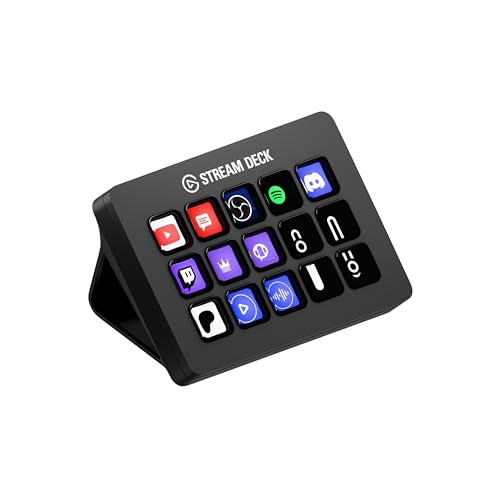
Elgato Stream Deck MK.2
15 LCD keys that run your entire stream.
Our verdict
The Stream Deck MK.2 earns its reputation the boring way: 15 physical LCD keys that always do what you programmed, a plugin library that covers every major streaming platform, and multi-action macros that collapse five-step workflows into one press. The trade-off is the setup tax. Out of the box it is 15 blank buttons; the value appears only after a genuine afternoon of configuring profiles, and streamers who never touch their scenes mid-broadcast will never recoup that afternoon.
What we like
- 15 customizable LCD keys with folders and multi-action macros
- Deep plugin ecosystem covering OBS, Twitch, YouTube, Discord, and Spotify
- Removable faceplate and adjustable stand for desk fit
What to watch out for
- USB connection only; no wireless option on the MK.2
- Software setup takes a real afternoon to do well
- Overkill if you only stream one static scene
Who it is for
Streamers, podcasters, and creators who trigger scenes, sources, audio changes, or chat actions repeatedly during live production.
Keys, macros, and profiles
The core hardware is 15 LCD keys, each showing a custom icon or live status, backed by software that supports folders, pages, and profiles that switch automatically per application. Multi-actions chain commands with delays, so one key can mute your mic, switch to a BRB scene, and post a chat message. That macro depth is what separates the Deck from a macro keypad: it is a small production switcher, not just hotkeys.
Plugin ecosystem
Elgato's plugin store covers OBS Studio, Streamlabs, Twitch, YouTube, Discord, Spotify, Philips Hue, and dozens more, with most key integrations maintained or officially supported. Because the plugins are the product as much as the hardware, check that your specific tools are covered before buying; niche software may need workarounds through hotkey or webhook plugins.
Hardware practicalities
The MK.2 connects over USB 2.0 through a USB-C connector, includes a removable faceplate for custom designs, and ships with an adjustable stand. There is no wireless option on this model and no battery to manage, which is a feature for a desk-bound controller: it is always on, always connected, always in the same place.
How it stacks up
Against the Elgato Stream Deck+, the MK.2 trades the Plus model's 8 keys, four dials, and touch strip for 7 more keys and a lower price; dial-heavy audio mixers prefer the Plus, key-heavy scene switchers prefer the MK.2. Against the Loupedeck Live, the MK.2 has the deeper streaming plugin library and larger community, while the Loupedeck counters with dials and stronger Adobe creative app integrations for editors who also stream.
What owners report
Commonly praised
- Build quality is solid, and the keys hold up to heavy daily use
- The customisable LCD keys speed up streaming and editing workflows
- A large plugin library covers most apps owners use
Common complaints
- Firmware and software updates can run at startup and delay use
- Some updates have broken profiles or caused icons not to sync
- Support often asks for a ticket before helping, which frustrates some owners
Recurring themes from owner reviews on retailers and forums, summarised by our editors. Updated October 2026.
Key specifications
- Keys
- 15 customizable LCD keys
- Connection
- USB 2.0 via USB-C connector
- Software
- Stream Deck app with plugin store
- Mounting
- Detachable stand, adjustable angle
- Compatibility
- Windows 10+ and macOS 11+
Also consider

Elgato HD60 X
Console capture with 4K60 HDR passthrough.
- Capture: 1080p60 HDR10 / 4K30 SDR
- Passthrough: 4K60 HDR10, VRR supported

Logitech StreamCam
1080p60 with autofocus that tracks your face.
- Resolution: 1080p at 60 fps
- Focus: Autofocus with AI auto-framing
Research-based assessment. ThePickLedger has not hands-on tested this product; this evaluation synthesizes manufacturer specifications, retailer documentation, and published expert reviews.
Questions, answered
Does the Stream Deck MK.2 work on Mac?
Yes, the Stream Deck software supports macOS 11 and later. Some plugins are Windows-only, so check your specific integrations if you are on a Mac.
Can I use multiple Stream Decks at once?
Yes, the software supports multiple devices with independent profiles, which is how larger productions run a Deck per operator or per function.
Is the Stream Deck useful outside streaming?
Very. Video editors, developers, and productivity users program keys for app launching, window management, and text snippets. The streaming branding undersells its general macro value.