Head to head
Elgato Stream Deck vs HD60 X: Which to Buy First
Stream Deck vs HD60 X: control hardware versus capture hardware, and which upgrade matters first for your stream.
#1 in our rankings · Best overall
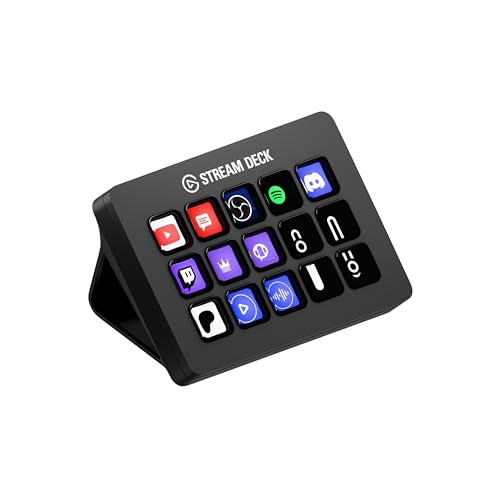
Elgato Stream Deck MK.2
Best for: Streamers and creators who switch scenes, trigger alerts, and control audio dozens of times per session.
#2 in our rankings · Best for console streamers

Elgato HD60 X
Best for: Console streamers on PS5 or Xbox Series X who want to play in 4K HDR while capturing clean 1080p60.
Our recommendation
Console streamers who cannot get gameplay into their PC should buy the HD60 X first, because no amount of scene control helps a stream with no game footage. PC streamers and anyone already capturing fine should buy the Stream Deck first, because faster scene switching, instant mutes, and one-press alerts improve every single broadcast. They solve different problems; buy the one that matches your actual bottleneck.
What problem each solves
The HD60 X solves a signal problem: getting console video into your streaming PC at 1080p60 while you play in 4K HDR. The Stream Deck solves a workflow problem: executing multi-step production actions instantly during a live show. One is infrastructure, the other is ergonomics.
Who needs which
The HD60 X is mandatory for console streamers and useless for PC-only streamers, since PC capture needs no extra hardware. The Stream Deck is useful for any live creator but only pays off once your production is complex enough that hotkeys feel slow.
Growth path
Most growing streamers end up owning both: the HD60 X early if they are on console, the Stream Deck when their scene count and chat interactions outgrow keyboard shortcuts. Neither purchase blocks the other.
Choose Elgato Stream Deck MK.2 if…
- You stream from a PC and capture already works
- You switch scenes or trigger alerts mid-stream
- You want one-press mutes and chat commands
- Your production feels clumsy, not broken
Choose Elgato HD60 X if…
- You stream PS5, Xbox, or Switch gameplay
- You have no way to get console video into your PC
- You want to play in 4K HDR while streaming 1080p60
- Your bottleneck is the signal chain, not workflow
Spec-by-spec comparison
| Spec | Elgato Stream Deck MK.2 | Elgato HD60 X |
|---|---|---|
| Price tier | Mid-range | Mid-range |
| Keys | 15 customizable LCD keys | — |
| Connection | USB 2.0 via USB-C connector | USB 3.0 (USB-C connector), HDMI in/out |
| Software | Stream Deck app with plugin store | — |
| Mounting | Detachable stand, adjustable angle | — |
| Compatibility | Windows 10+ and macOS 11+ | Windows 10+ and macOS 11+ |
| Capture | — | 1080p60 HDR10 / 4K30 SDR |
| Passthrough | — | 4K60 HDR10, VRR supported |
| Latency | — | Sub-100ms via USB 3.0 (Elgato spec) |
| Best for | Streamers and creators who switch scenes, trigger alerts, and control audio dozens of times per session. | Console streamers on PS5 or Xbox Series X who want to play in 4K HDR while capturing clean 1080p60. |
| Skip if | You stream casually and rarely touch your scenes mid-broadcast; keyboard shortcuts will cover you. | You only stream from a PC; your GPU can capture its own output with no extra hardware. |
Strengths and limitations
Elgato Stream Deck MK.2
Strengths
- 15 customizable LCD keys with folders and multi-action macros
- Deep plugin ecosystem covering OBS, Twitch, YouTube, Discord, and Spotify
- Removable faceplate and adjustable stand for desk fit
Limitations
- USB connection only; no wireless option on the MK.2
- Software setup takes a real afternoon to do well
- Overkill if you only stream one static scene
Elgato HD60 X
Strengths
- 4K60 HDR10 and VRR passthrough to your monitor while capturing
- 1080p60 HDR10 or 4K30 SDR capture over USB 3.0
- Works with PS5, Xbox Series X/S, and Nintendo Switch
Limitations
- External USB design caps capture below passthrough quality
- Needs a USB 3.0 port; USB 2.0 will not carry the signal
- No HDMI 2.1, so no 4K120 passthrough
How they fit the wider field
- Elgato Stream Deck MK.2: ranked #1 (Best overall) in The Best Streaming Accessories. Read the full Elgato Stream Deck MK.2 review.
- Elgato HD60 X: ranked #2 (Best for console streamers) in The Best Streaming Accessories. Read the full Elgato HD60 X review.
Neither one quite right? The full rankings cover 10 picks matched to different buyers.
Questions, answered
Can I use both at the same time?
Yes, they are complementary. Many console streamers run the HD60 X for capture and the Stream Deck for production control in the same setup.
Which is better value for a beginner?
Neither is a beginner's first purchase. Fix audio and camera first. Between the two, the HD60 X is the better buy only if you stream console games; otherwise the Stream Deck delivers more per-stream value.