In-depth review
QNAP TS-233 Review (2026)
Research-based review of the QNAP TS-233: 2.5GbE value, QTS software depth, and fixed-RAM limits.
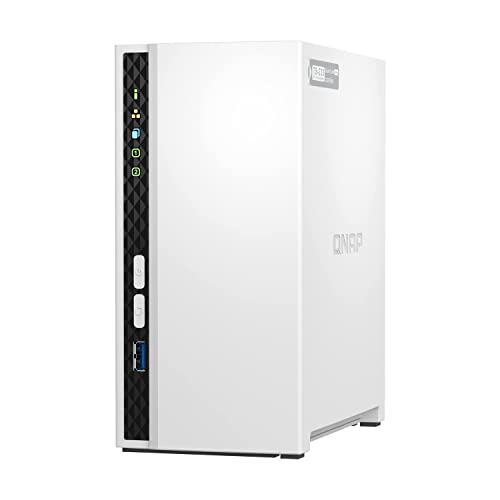
QNAP TS-233
2.5GbE networking at a two-bay price.
Our verdict
Verdict: The TS-233 is the rational pick for buyers who measure a NAS in megabytes per second per dollar. Its 2.5GbE port and 2 GB of RAM beat every gigabit rival near its price, and QTS is genuinely capable. The trade-off is software that assumes more of you: setup and troubleshooting demand more patience than DSM. Buy it for speed and value; buy Synology for hand-holding.
What we like
- A 2.5GbE port delivers up to 2.5x the theoretical throughput of gigabit rivals
- 2 GB of RAM doubles the DS223j, helping with multitasking and apps
- QTS supports snapshots and a wide app center for backup and media duties
What to watch out for
- RAM is fixed at 2 GB with no expansion slot
- ARM processor limits virtualization and some heavier QTS applications
- QTS is powerful but less hand-holding than DSM for absolute beginners
Who it is for
Value-focused buyers who move large files regularly and are comfortable with technical software.
Setup and software
QTS 5.x is powerful and occasionally overwhelming: the App Center, snapshot tools, and Hybrid Backup Sync cover serious data-protection workflows out of the box. But menus run deep, terminology assumes networking knowledge, and first-time users report a steeper climb than DSM. QNAP's documentation is thorough if you go looking for it.
Performance where it counts
The 2.5GbE port is the whole story: with a matching switch and client adapter, large sequential transfers run at roughly double the speed of gigabit NAS units. The ARM Cortex-A55 at 2.0 GHz and 2 GB of RAM keep file services and backups smooth, though virtualization and heavy containers are off the table on this chip.
What it gets wrong
RAM is fixed at 2 GB with no expansion slot, so the unit cannot grow with heavier workloads. The ARM processor excludes some x86 QTS applications. And only one 2.5GbE port means no link redundancy; if that port or cable fails, the NAS goes dark until fixed.
How it stacks up
Against the Synology DS223j, the TS-233 wins on paper in every hardware respect (2 GB vs 1 GB RAM, 2.5GbE vs 1GbE) at a similar price, losing only on software approachability. Against the TerraMaster F2-212, it offers double the RAM and far deeper software for a modest premium. Hardware-first buyers should shortlist the TS-233; software-first buyers should not.
What owners report
Commonly praised
- Low price for a two-bay NAS
- Good transfer speeds over gigabit
- Feature-rich QTS software
Common complaints
- Setup and interface are confusing for beginners
- Support experiences vary widely
- Some long-term reliability concerns
Recurring themes from owner reviews on retailers and forums, summarised by our editors. Updated October 2026.
Key specifications
- Drive bays
- 2
- CPU
- ARM Cortex-A55, quad-core 2.0 GHz
- Memory
- 2 GB (fixed, not expandable)
- Network
- 1x 2.5GbE RJ-45
- Operating system
- QNAP QTS 5.x
Also consider

Synology DS223j
The simplest credible NAS: DSM software, two bays, zero fuss.
- Drive bays: 2
- CPU: Realtek RTD1619B, quad-core 1.7 GHz

Synology DS423+
Four bays and an Intel chip: the NAS you grow into, not out of.
- Drive bays: 4
- CPU: Intel Celeron J4125, quad-core (2.0 GHz base, 2.7 GHz burst)
Research-based assessment. ThePickLedger has not hands-on tested this product; this evaluation synthesizes manufacturer specifications, retailer documentation, and published expert reviews.
Questions, answered
What do I need to actually use 2.5GbE?
A 2.5GbE-capable switch and a 2.5GbE network adapter on your computer. Without both, the NAS falls back to gigabit speeds and the headline feature goes unused.
Is QTS hard to learn?
It is deeper than Synology DSM but well documented. Expect to spend an evening learning it versus an hour with DSM; the payoff is more control over backups and storage features.
Can the TS-233 run Plex well?
For direct play, yes. The ARM chip lacks hardware transcoding, so 4K-to-1080p conversion will stutter; keep clients that direct-play your formats.