Head to head
August Wi-Fi Smart Lock vs Aqara U100 (2026)
August retrofit vs Aqara U100 full deadbolt: renter-friendliness, Home Key, fingerprint entry, and hub needs compared.
#2 in our rankings · Best for renters

August Wi-Fi Smart Lock (4th Generation)
Best for: Renters and anyone who wants smart locking without changing the outside of the door.
#5 in our rankings · Best for Apple Home
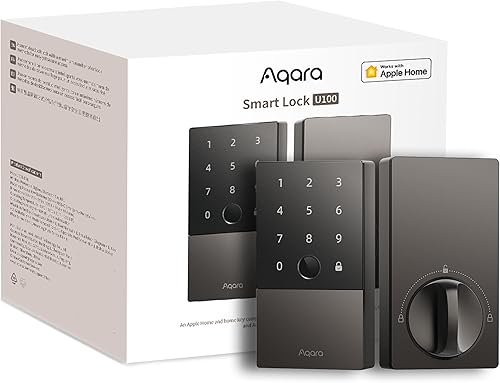
Aqara Smart Lock U100
Best for: Apple households that want Home Key and fingerprint entry without a flagship price.
Our recommendation
Buy the August Wi-Fi Smart Lock if you rent, love your existing hardware, or want the simplest install and removal. Buy the Aqara U100 if you own the door, want fingerprint and Home Key entry on the door itself, and already run, or will buy, an Aqara hub. They solve different problems, so the lease question decides first.
Installation and reversibility
The August fits over your existing deadbolt inside, changing nothing outside and keeping your keys. The Aqara replaces the whole deadbolt, which needs landlord permission in a rental and a full removal at move-out. For renters this alone settles it in favour of August.
Entry at the door
The Aqara wins hands down at the door itself: fingerprint, Home Key tap, and keypad, all built in. The August has no outdoor entry method in the box, so anyone without a phone needs the separate keypad accessory. Households with children or phone-free visitors should weigh this heavily.
Connectivity and running costs
The August has Wi-Fi built in and needs no hub, but pays for it in battery appetite. The Aqara uses efficient Zigbee and lasts for months on AAs, but needs a hub for remote access and Matter. Over two years the hub cost roughly balances the battery savings, so choose by entry needs, not running costs.
Choose August Wi-Fi Smart Lock (4th Generation) if…
- You rent or cannot change exterior hardware
- You want to keep your existing keys
- You want hub-free Wi-Fi remote control
Choose Aqara Smart Lock U100 if…
- You want fingerprint and Home Key on the door
- You already run an Aqara or Apple home hub
- Long battery life matters more than hub-free setup
Spec-by-spec comparison
| Spec | August Wi-Fi Smart Lock (4th Generation) | Aqara Smart Lock U100 |
|---|---|---|
| Price tier | Mid-range | Mid-range |
| Type | Retrofit lock, fits over an existing deadbolt | - |
| Connectivity | Built-in Wi-Fi and Bluetooth, no hub required | Bluetooth and Zigbee, Matter via Aqara hub |
| Power | 2 CR123 batteries (included) | 4 AA batteries (included) |
| Door sensing | DoorSense open and closed detection | - |
| Dimensions | 2.8 x 2.8 x 2.75 inches | - |
| Entry methods | - | Fingerprint, Apple Home Key, touchscreen keypad, app, mechanical keys |
| Weather rating | - | IP65 |
| In the box | - | Lock, 2 mechanical keys, 4 AA batteries, installation accessories |
| Best for | Renters and anyone who wants smart locking without changing the outside of the door. | Apple households that want Home Key and fingerprint entry without a flagship price. |
| Skip if | You want a keypad or fingerprint reader on the outside of the door. | You do not use Apple Home, or you want built-in Wi-Fi with no hub at all. |
Strengths and limitations
August Wi-Fi Smart Lock (4th Generation)
Strengths
- Fits over your existing deadbolt on the inside of the door, so the exterior hardware, keys, and lock cylinder all stay exactly as they were.
- DoorSense tells you whether the door is actually closed and locked, not just whether the bolt moved, and Auto-Lock secures the door behind you.
- Built-in Wi-Fi gives remote control and guest keys with no bridge, and it installs with a screwdriver in well under an hour for most standard deadbolts.
Limitations
- No keypad or fingerprint reader in the box, so code entry needs the separate August keypad accessory.
- Auto-Unlock relies on phone location and Bluetooth, which can be slow to trigger on some phones and in weak signal spots.
- The small round interior unit uses CR123 batteries, which are less likely to be in a kitchen drawer than AAs.
Aqara Smart Lock U100
Strengths
- Apple Home Key support lets you tap an iPhone or Apple Watch to unlock, with fingerprint and keypad entry as well, all at a mid-range price.
- The IP65 rated exterior shrugs off rain and dust, and the lock runs for months on four AA batteries thanks to its efficient Zigbee radio.
- Matter support through an Aqara hub keeps the lock usable across platforms as your smart home changes, rather than locking you to one app.
Limitations
- Remote access and Matter need an Aqara hub, which is an extra purchase and another device to place.
- The exterior unit is chunkier than the Yale and Level locks here, so it suits modern doors better than period hardware.
- No Wi-Fi radio in the lock itself, so hub-free buyers should look at the Yale or Schlage picks instead.
How they fit the wider field
- August Wi-Fi Smart Lock (4th Generation): ranked #2 (Best for renters) in The Best Smart Locks. Read the full August Wi-Fi Smart Lock (4th Generation) review.
- Aqara Smart Lock U100: ranked #5 (Best for Apple Home) in The Best Smart Locks.
Neither one quite right? The full rankings cover 10 picks matched to different buyers.
Made your call?
Questions, answered
Can I use both locks in one home?
Yes, and some households do: August on a rented side door and Aqara on an owned front door, for example. Running two apps is the trade-off, so most homes are happier standardising on one platform.
Which is better for guests?
The Aqara, because guests get a code or fingerprint at the door with no phone needed. The August needs the separate keypad for phone-free guests, or a shared guest key in the app.