Best of
The Best Smart Locks (2026)
The best smart locks of 2026: Schlage Encode Plus, August retrofit, Yale Assure Lock 2, Aqara U100, and more, compared on entry methods, hubs, battery life, and door fit.
Our top picks at a glance
Best overall
 Schlage Encode Plus
Households that want keypad codes, remote control, and tap-to-unlock with a phone or watch, in one proven deadbolt.
Best for renters
 August Wi-Fi Smart Lock (4th Generation)
Renters and anyone who wants smart locking without changing the outside of the door.
Best fingerprint lock
 Yale Assure Lock 2 Touch
Families who want every entry method, with fingerprint speed for daily use and codes for guests.
For most owned homes, the Schlage Encode Plus is the pick: keypad, Apple Home Key, built-in Wi-Fi, and top security ratings with no hub. Renters should get the August Wi-Fi Smart Lock, which keeps existing keys and exterior hardware. Fingerprint fans should choose the Yale Assure Lock 2 Touch, and budget buyers the eufy C220, accepting its lower security grade and missing HomeKit. Apple households on a budget should look at the Aqara U100, remembering the hub it needs for remote access.
The picks, ranked
| Pick | Entry methods | Connectivity | Power | Buy |
|---|---|---|---|---|
| Best overallSchlage Encode Plus | Touchscreen keypad, Apple Home Key, app, physical key | Built-in Wi-Fi and Bluetooth, no hub required | 4 AA batteries (included) | Check price |
| Best for rentersAugust Wi-Fi Smart Lock (4th Generation) | - | Built-in Wi-Fi and Bluetooth, no hub required | 2 CR123 batteries (included) | Check price |
| Best fingerprint lockYale Assure Lock 2 Touch | Fingerprint, touchscreen keypad, app, Auto-Unlock | Built-in Wi-Fi and Bluetooth | 4 AA batteries (included) | Check price |
 Best Yale valueYale Assure Lock 2 with Wi-Fi | Touchscreen keypad, app, Auto-Unlock, physical key | Built-in Wi-Fi and Bluetooth | 4 AA batteries (included) | Check price |
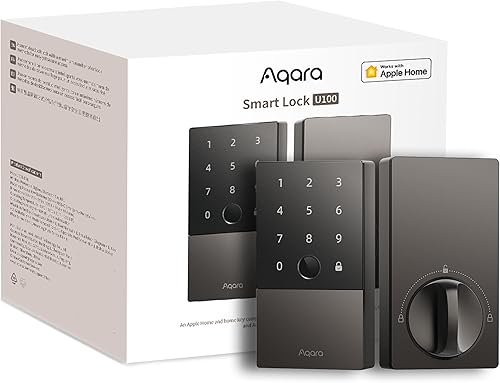 Best for Apple HomeAqara Smart Lock U100 | Fingerprint, Apple Home Key, touchscreen keypad, app, mechanical keys | Bluetooth and Zigbee, Matter via Aqara hub | 4 AA batteries (included) | Check price |
 Best for flexibilityULTRALOQ U-Bolt Pro WiFi | Fingerprint, keypad, app, auto-unlock, shake-to-open, mechanical key | Built-in Wi-Fi (2.4 GHz) and Bluetooth | - | Check price |
 Best proven keypadSchlage Encode Smart WiFi Deadbolt | Touchscreen keypad, app, physical key | Built-in Wi-Fi, no hub required | 4 AA batteries (included) | Check price |
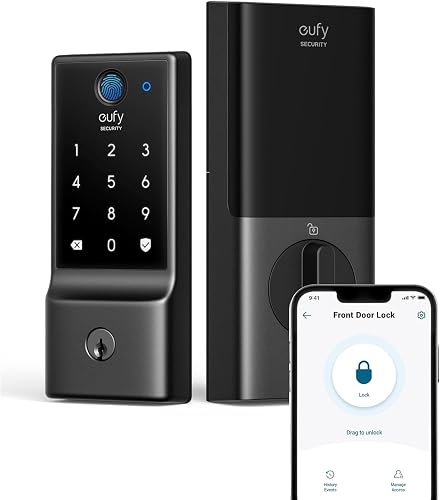 Best budgeteufy Smart Lock C220 | Fingerprint, keypad, app, Apple Watch, physical key | Built-in Wi-Fi, no hub required | 8 AA batteries, around 8 months per eufy | Check price |
 Best for re-keyingKwikset Halo Touchscreen Wi-Fi Smart Lock | Touchscreen keypad, app, geofence auto-unlock, physical key | Built-in Wi-Fi, no hub required | 4 AA batteries (included) | Check price |
 Best discreet designLevel Lock+ | Apple Home Key, app, key cards, physical keys | Bluetooth with Wi-Fi remote access via Apple Home | CR2 battery (included) | Check price |
Best overall
Schlage Encode Plus
The most complete keypad deadbolt, with Apple Home Key built in.
Strengths
- Apple Home Key support lets you tap an iPhone or Apple Watch to unlock, alongside the touchscreen keypad, the Schlage Home app, and a physical key.
- Built-in Wi-Fi means remote locking, guest codes, and activity history with no extra hub or bridge to buy and place.
- Schlage carries the highest residential security, durability, and finish ratings from BHMA, and the lock is backed by a lifetime mechanical and finish warranty.
Limitations
- A full deadbolt replacement, so it is not an option for renters whose lease forbids hardware changes.
- Wi-Fi connectivity draws more battery power than Bluetooth-only locks, so battery changes come round sooner on busy doors.
- No fingerprint reader, so children and guests who struggle with codes have no biometric fallback.
What owners report
Commonly praised
- Tap to unlock with a phone or watch feels effortless alongside the touchscreen keypad
- Remote locking and guest codes work with no extra hub to buy or place
- Solid, well finished feel that inspires confidence in the deadbolt itself
Common complaints
- Full deadbolt replacement rules it out for renters who cannot change hardware
- Wi-Fi use means batteries run down sooner on busy front doors
- No fingerprint reader for children or guests who struggle with codes
Recurring themes from owner reviews on retailers and forums, summarised by our editors. Updated October 2026.
| Entry methods | Touchscreen keypad, Apple Home Key, app, physical key |
|---|---|
| Connectivity | Built-in Wi-Fi and Bluetooth, no hub required |
| Power | 4 AA batteries (included) |
| Security rating | Highest residential BHMA ratings for security, durability, and finish |
| In the box | Deadbolt, touchscreen exterior, interior assembly, installation hardware |
Best for: Households that want keypad codes, remote control, and tap-to-unlock with a phone or watch, in one proven deadbolt.
Skip if: You rent and cannot change the deadbolt, or you want fingerprint entry as well.
Best for renters
August Wi-Fi Smart Lock (4th Generation)
The renter-friendly retrofit: smart control with your existing keys intact.
Strengths
- Fits over your existing deadbolt on the inside of the door, so the exterior hardware, keys, and lock cylinder all stay exactly as they were.
- DoorSense tells you whether the door is actually closed and locked, not just whether the bolt moved, and Auto-Lock secures the door behind you.
- Built-in Wi-Fi gives remote control and guest keys with no bridge, and it installs with a screwdriver in well under an hour for most standard deadbolts.
Limitations
- No keypad or fingerprint reader in the box, so code entry needs the separate August keypad accessory.
- Auto-Unlock relies on phone location and Bluetooth, which can be slow to trigger on some phones and in weak signal spots.
- The small round interior unit uses CR123 batteries, which are less likely to be in a kitchen drawer than AAs.
What owners report
Commonly praised
- Keeps the existing keys and outside hardware exactly as they were
- DoorSense gives real reassurance that the door is shut and locked
- Quick screwdriver install and remote guest keys with no bridge needed
Common complaints
- Code entry needs a separate keypad bought on its own
- Auto-unlock can be slow to trigger on some phones and in weak signal spots
- CR123 batteries are harder to find in a kitchen drawer than AAs
Recurring themes from owner reviews on retailers and forums, summarised by our editors. Updated October 2026.
| Type | Retrofit lock, fits over an existing deadbolt |
|---|---|
| Connectivity | Built-in Wi-Fi and Bluetooth, no hub required |
| Power | 2 CR123 batteries (included) |
| Door sensing | DoorSense open and closed detection |
| Dimensions | 2.8 x 2.8 x 2.75 inches |
Best for: Renters and anyone who wants smart locking without changing the outside of the door.
Skip if: You want a keypad or fingerprint reader on the outside of the door.
Best fingerprint lock
Yale Assure Lock 2 Touch
Fingerprint, keypad, and app in a slim, discreet deadbolt.
Strengths
- Fingerprint, touchscreen keypad, app, and optional Auto-Unlock cover every household member, from children to visitors who only need a temporary code.
- The matte touchscreen resists fingerprints and glare, and the whole unit is noticeably slimmer than older Yale deadbolts.
- DoorSense and Auto-Lock combine to confirm the door is shut and locked, with an activity log in the Yale Access app.
Limitations
- This Wi-Fi version sits at a premium price, and the fingerprint reader needs clean, dry fingers to read first time.
- No physical keyway on the key-free Touch version, so a completely flat battery leaves no key fallback, only the external 9V backup contacts.
- Some advanced automations still need a separate smart home hub, depending on your platform.
What owners report
Commonly praised
- Fingerprint plus keypad plus app covers every member of the household
- Slim matte unit looks discreet and resists fingerprints and glare
- DoorSense and auto-lock confirm the door is shut and locked behind you
Common complaints
- Premium price, and the reader wants clean dry fingers to work first time
- Key-free version leaves no key fallback once the battery is fully flat
- Some advanced automations still need a separate smart home hub
Recurring themes from owner reviews on retailers and forums, summarised by our editors. Updated October 2026.
| Entry methods | Fingerprint, touchscreen keypad, app, Auto-Unlock |
|---|---|
| Connectivity | Built-in Wi-Fi and Bluetooth |
| Power | 4 AA batteries (included) |
| Security rating | ANSI/BHMA Grade 2, IPX5 rated |
| In the box | Deadbolt, Wi-Fi smart module, DoorSense, mounting hardware |
Best for: Families who want every entry method, with fingerprint speed for daily use and codes for guests.
Skip if: You want Apple Home Key, or you need a lock that works with a full smart home hub out of the box.
Best Yale value
Yale Assure Lock 2 with Wi-Fi
The straightforward Yale: keypad, app, and remote access at a fair price.
Strengths
- The keypad-only design keeps the price down while keeping remote locking, guest codes, and scheduling in the Yale Access app.
- Same slim hardware and DoorSense door position sensing as the pricier Touch model, so nothing about fit or build feels cut down.
- Works with Alexa, Google Home, and Apple Home for voice control and routines, and pairs with Airbnb for scheduled guest access.
Limitations
- No fingerprint reader, so every entry is a code, a phone, or a key.
- The keypad needs a wake tap before code entry, which takes a beat longer than a fingerprint scan.
- Battery life depends heavily on Wi-Fi signal strength at the door, so a weak router connection shortens it.
What owners report
Commonly praised
- Keypad-only design keeps the price sensible while keeping remote control
- Same slim build and door sensing as the pricier Touch model
- Voice control and scheduled guest access suit rentals and visitors alike
Common complaints
- No fingerprint reader, so every entry is a code, a phone, or a key
- Keypad needs a wake tap before code entry, which takes a beat longer
- Battery life leans heavily on Wi-Fi signal strength at the door
Recurring themes from owner reviews on retailers and forums, summarised by our editors. Updated October 2026.
| Entry methods | Touchscreen keypad, app, Auto-Unlock, physical key |
|---|---|
| Connectivity | Built-in Wi-Fi and Bluetooth |
| Power | 4 AA batteries (included) |
| Security rating | ANSI/BHMA Grade 2, IPX5 rated |
| In the box | Deadbolt, Wi-Fi smart module, DoorSense, mounting hardware |
Best for: Buyers who want a proven Yale keypad lock with remote control, without paying for a fingerprint reader.
Skip if: You want fingerprint entry, or you live in an Apple Home household and want Home Key.
Best for Apple Home
Aqara Smart Lock U100
Apple Home Key and fingerprint at a mid-range price, for the Apple household.
Strengths
- Apple Home Key support lets you tap an iPhone or Apple Watch to unlock, with fingerprint and keypad entry as well, all at a mid-range price.
- The IP65 rated exterior shrugs off rain and dust, and the lock runs for months on four AA batteries thanks to its efficient Zigbee radio.
- Matter support through an Aqara hub keeps the lock usable across platforms as your smart home changes, rather than locking you to one app.
Limitations
- Remote access and Matter need an Aqara hub, which is an extra purchase and another device to place.
- The exterior unit is chunkier than the Yale and Level locks here, so it suits modern doors better than period hardware.
- No Wi-Fi radio in the lock itself, so hub-free buyers should look at the Yale or Schlage picks instead.
What owners report
Commonly praised
- Phone tap, fingerprint, and keypad entry together at a mid-range price
- Weather-sealed exterior copes with rain and dust without fuss
- Long AA battery life thanks to the efficient Zigbee radio
Common complaints
- Remote access and Matter support need an Aqara hub bought separately
- Chunkier exterior suits modern doors better than period hardware
- No Wi-Fi radio in the lock itself for hub-free buyers
Recurring themes from owner reviews on retailers and forums, summarised by our editors. Updated October 2026.
| Entry methods | Fingerprint, Apple Home Key, touchscreen keypad, app, mechanical keys |
|---|---|
| Connectivity | Bluetooth and Zigbee, Matter via Aqara hub |
| Power | 4 AA batteries (included) |
| Weather rating | IP65 |
| In the box | Lock, 2 mechanical keys, 4 AA batteries, installation accessories |
Best for: Apple households that want Home Key and fingerprint entry without a flagship price.
Skip if: You do not use Apple Home, or you want built-in Wi-Fi with no hub at all.
Best for flexibility
ULTRALOQ U-Bolt Pro WiFi
Eight ways in, including fingerprint and shake-to-open, at a mid-range price.
Strengths
- Fingerprint, keypad, app, auto-unlock, shake-to-open, and mechanical key give every household member a method that suits them.
- Built-in Wi-Fi means remote codes and logs with no bridge, and the door sensor reports whether the door is left open.
- ANSI Grade 1 certification and an IP65 rating put its mechanical and weather credentials ahead of most locks at this price.
Limitations
- The U-tec app is functional rather than polished, and setup has more steps than the Yale or Schlage apps.
- Auto-Unlock depends on phone Bluetooth and location, so it can lag on some Android handsets.
- The keypad and fingerprint housing are larger than the Yale Assure line, which shows on narrow stiles.
What owners report
Commonly praised
- Huge range of entry methods means every household member finds one that suits
- Built-in Wi-Fi gives remote codes and logs with no bridge
- Strong security certification and weather rating for the price
Common complaints
- App feels functional rather than polished, and setup has extra steps
- Auto-unlock can lag on some Android handsets
- Keypad and fingerprint housing look large on narrow door stiles
Recurring themes from owner reviews on retailers and forums, summarised by our editors. Updated October 2026.
| Entry methods | Fingerprint, keypad, app, auto-unlock, shake-to-open, mechanical key |
|---|---|
| Connectivity | Built-in Wi-Fi (2.4 GHz) and Bluetooth |
| Security rating | ANSI Grade 1 |
| Weather rating | IP65 |
| Door sensing | Integrated door sensor with open-door alerts |
Best for: Households and short-stay hosts who want the widest set of entry methods and a door sensor in one lock.
Skip if: You want a lock from a legacy lock brand, or a polished app experience above all else.
Best proven keypad
Schlage Encode Smart WiFi Deadbolt
The original Encode: proven Wi-Fi keypad locking for less than the Plus.
Strengths
- The long-running Encode line has years of real-world use behind it, with the same BHMA top residential ratings as the Plus.
- Built-in Wi-Fi, scheduled guest codes, and lock history work through the Schlage Home app with no hub, and it pairs with Ring and Airbnb.
- A backlit touchscreen with a fingerprint-resistant finish stays readable at night and does not show code smudges as badly as glossy keypads.
Limitations
- No Apple Home Key, which is the main reason to step up to the Encode Plus.
- The interior unit is bulkier than the Yale Assure locks, so check clearance on doors near trim or glass.
- Wi-Fi battery drain is real on busy doors, so keep spare AAs handy rather than discovering a flat lock at midnight.
What owners report
Commonly praised
- Long-running line with years of real-world use behind it
- Built-in Wi-Fi, scheduled guest codes, and lock history with no hub
- Backlit touchscreen stays readable at night without showing code smudges
Common complaints
- No Apple Home Key, which is the main reason to step up to the Plus
- Bulkier interior unit needs clearance near trim or glass
- Wi-Fi battery drain is noticeable on busy doors
Recurring themes from owner reviews on retailers and forums, summarised by our editors. Updated October 2026.
| Entry methods | Touchscreen keypad, app, physical key |
|---|---|
| Connectivity | Built-in Wi-Fi, no hub required |
| Power | 4 AA batteries (included) |
| Security rating | Highest residential BHMA ratings for security, durability, and finish |
| Smart home | Alexa, Google Assistant, Ring, Airbnb |
Best for: Buyers who want Schlage reliability and remote codes, and do not need Apple Home Key.
Skip if: You want Home Key tap-to-unlock, or fingerprint entry.
Best budget
eufy Smart Lock C220
Fingerprint and Wi-Fi for the price of a basic keypad lock.
Strengths
- Fingerprint recognition that eufy rates at well under two seconds, plus keypad, app, key, and Apple Watch entry, at a budget price.
- Built-in Wi-Fi with no bridge, an app event log, and temporary codes make it genuinely useful for families and small landlords.
- Eight AA batteries and an efficient radio stretch battery life to around eight months in typical use per eufy, with a USB backup port if they run flat.
Limitations
- BHMA Grade 3 is the lowest residential grade here, so security purists should step up to Schlage or Yale.
- No Apple HomeKit, Matter, or IFTTT support, so it lives in the eufy app plus Alexa and Google voice control only.
- The exterior unit is tall and plain, and the keypad feel is less premium than the Yale or Schlage locks.
What owners report
Commonly praised
- Fast fingerprint recognition plus keypad, app, key, and watch entry at a budget price
- Built-in Wi-Fi, event log, and temporary codes suit families and small landlords
- Long battery life with a USB backup port if the batteries run flat
Common complaints
- Lowest residential security grade here, so purists may step up
- No HomeKit, Matter, or IFTTT support, so it lives mainly in the eufy app
- Tall plain exterior and a keypad feel less premium than Yale or Schlage
Recurring themes from owner reviews on retailers and forums, summarised by our editors. Updated October 2026.
| Entry methods | Fingerprint, keypad, app, Apple Watch, physical key |
|---|---|
| Connectivity | Built-in Wi-Fi, no hub required |
| Power | 8 AA batteries, around 8 months per eufy |
| Capacity | 50 fingerprints and 100 passcodes per eufy |
| Weather rating | IP53 |
Best for: Budget buyers who still want fingerprint entry and remote control with no hub.
Skip if: You need Apple HomeKit or Matter, or you want a Grade 1 or 2 security rating.
Best for re-keying
Kwikset Halo Touchscreen Wi-Fi Smart Lock
The re-keyable Wi-Fi lock, with geofence auto-unlock for the whole family.
Strengths
- SmartKey Security lets you re-key the lock yourself in seconds with the included tool, which is a real saving after moving house or changing tenants.
- Geofence auto-unlock opens the door as you arrive, and the Kwikset app manages codes, schedules, and lock history over Wi-Fi with no hub.
- Intrusion detection and a BHMA Grade AAA rating (the top marks for security, durability, and finish) back up the convenience features.
Limitations
- No fingerprint reader and no Apple Home support, so Apple households lose the tap-to-unlock option.
- The touchscreen can be slow to wake in cold weather, and the app is plainer than the Yale or Schlage apps.
- Geofence unlocking needs location permissions always on, which some owners prefer not to grant.
What owners report
Commonly praised
- Self re-keying after a move or tenant change saves a locksmith visit
- Geofence auto-unlock opens the door as you arrive
- Intrusion detection backs up the convenience features
Common complaints
- No fingerprint reader and no Apple Home support
- Touchscreen can be slow to wake in cold weather
- Geofence unlocking needs location permissions always on
Recurring themes from owner reviews on retailers and forums, summarised by our editors. Updated October 2026.
| Entry methods | Touchscreen keypad, app, geofence auto-unlock, physical key |
|---|---|
| Connectivity | Built-in Wi-Fi, no hub required |
| Power | 4 AA batteries (included) |
| Capacity | 250 user codes per Kwikset |
| Re-keying | SmartKey Security, re-key at home with the included tool |
Best for: Owners who re-key their own locks, and households that want geofence unlocking without a hub.
Skip if: You want fingerprint entry, or you need HomeKit support.
Best discreet design
Level Lock+
The invisible smart lock: all the tech hides inside your existing deadbolt.
Strengths
- The smart hardware hides inside the door, so the exterior looks like an ordinary deadbolt, which suits period doors and strict building rules.
- Apple Home Key support means tap-to-unlock with an iPhone or Apple Watch, plus app control, key cards, and the original keys.
- Auto-lock and remote access work through Apple Home, and the lock keeps working with its physical keys if the battery or phone fails.
Limitations
- No keypad and no fingerprint reader, so code entry for guests needs the separate Level keypad accessory.
- Apple-first design means Android households get a thinner experience, with fewer features than in the Apple Home app.
- The CR2 battery is less common than AA, so keep a spare in the house rather than hunting for one at night.
What owners report
Commonly praised
- Smart hardware hides inside the door, so the exterior looks like an ordinary deadbolt
- Phone tap unlocking plus app control, key cards, and the original keys
- Physical keys still work if the battery or phone fails
Common complaints
- No keypad or fingerprint reader, so guest codes need a separate keypad
- Apple-first design gives Android households a thinner experience
- Uncommon CR2 battery means keeping a spare in the house
Recurring themes from owner reviews on retailers and forums, summarised by our editors. Updated October 2026.
| Type | Hidden smart deadbolt, replaces the bolt mechanism inside the door |
|---|---|
| Entry methods | Apple Home Key, app, key cards, physical keys |
| Connectivity | Bluetooth with Wi-Fi remote access via Apple Home |
| Power | CR2 battery (included) |
| In the box | Lock, CR2 battery, 2 strike plates, 2 key fobs, 2 keys |
Best for: Design-led owners and Apple households who want a smart lock nobody can see.
Skip if: You want a keypad or fingerprint reader on the door, or you need Android-first support.
How we chose
Fit and installation first
A lock that does not fit your door is useless, however good its app is. We checked door thickness ranges, backset compatibility, and whether each lock is a retrofit or a full replacement, and we weighted retrofit options for renters who cannot change hardware.
Entry methods that match the household
Codes suit guests and cleaners, fingerprints suit daily family use, and Home Key suits iPhone households. We credited locks that offer several methods, and penalised locks with a single method and no fallback when batteries run flat.
Hub and battery honesty
Built-in Wi-Fi is convenient but hungrier than Bluetooth or Zigbee. We treated hub requirements as a real cost and battery claims as estimates, and we favoured locks that keep working with codes or keys during an internet outage.
Security ratings over marketing
BHMA and ANSI grades are independent measures of how a lock resists force, wear, and weather. We used them as the security baseline and treated app features as a layer on top, never a substitute.
Questions, answered
Do smart locks work when the Wi-Fi goes down?
Yes, for local entry. Keypad codes, fingerprints, and physical keys all work without internet, because they are stored on the lock itself. What you lose during an outage is remote locking, guest code changes, and activity notifications until the connection returns.
Can I install a smart lock myself?
Most owners can. Retrofit locks like the August need only a screwdriver, and full deadbolts like the Yale and Schlage lines need the old deadbolt removed and the new one fitted with basic tools. The usual sticking point is door alignment: a bolt that drags will drain batteries and strain the motor, so fix alignment before blaming the lock.
Are smart locks safe from hacking?
No connected device is unhackable, but reputable locks use encrypted communication and store codes locally rather than in the cloud. Practical security matters more: use unique codes per person, turn on auto-lock, keep firmware updated, and never reuse a code you gave a tradesperson.
What happens when the batteries run flat?
Every lock here warns you in the app and with beeps or lights well before it dies. Yale and eufy locks also offer external battery contacts for a temporary boost, and keyed models still open with a physical key. Keep spare batteries in the house and treat the first low-battery warning as the deadline.