Ranked on lease-friendliness: no exterior change, no drilling, and easy removal at move-out.
The Best Smart Locks for Renters (2026)
Smart locks that do not change your exterior hardware or break a lease: retrofit locks and discreet replacements for rented homes.
Our top picks at a glance
Best for renters
 August Wi-Fi Smart Lock (4th Generation)
Renters and anyone who wants smart locking without changing the outside of the door.
Best discreet option
 Level Lock+
Design-led owners and Apple households who want a smart lock nobody can see.
Best full replacement
 Yale Assure Lock 2 with Wi-Fi
Buyers who want a proven Yale keypad lock with remote control, without paying for a fingerprint reader.
The August Wi-Fi Smart Lock is the renter pick because it changes nothing outside the door and nothing about your keys. If your lease allows a deadbolt swap, the Yale Assure Lock 2 is the better long-term lock and restores easily. Always get written permission before replacing a deadbolt, and keep the original hardware in a labelled bag for move-out day.
The picks, ranked
| Pick | Type | Connectivity | Power | Buy |
|---|---|---|---|---|
| Best for rentersAugust Wi-Fi Smart Lock (4th Generation) | Retrofit lock, fits over an existing deadbolt | Built-in Wi-Fi and Bluetooth, no hub required | 2 CR123 batteries (included) | Check price |
| Best discreet optionLevel Lock+ | Hidden smart deadbolt, replaces the bolt mechanism inside the door | Bluetooth with Wi-Fi remote access via Apple Home | CR2 battery (included) | Check price |
| Best full replacementYale Assure Lock 2 with Wi-Fi | - | Built-in Wi-Fi and Bluetooth | 4 AA batteries (included) | Check price |
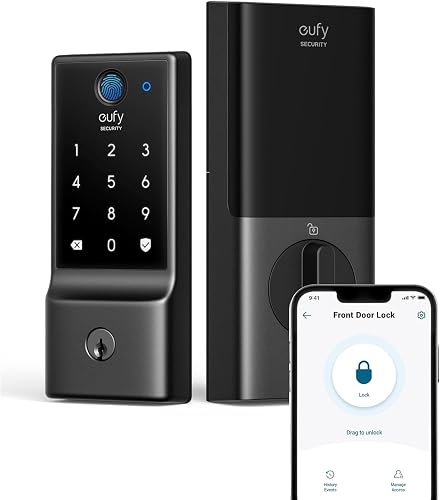 Budget renter pickeufy Smart Lock C220 | - | Built-in Wi-Fi, no hub required | 8 AA batteries, around 8 months per eufy | Check price |
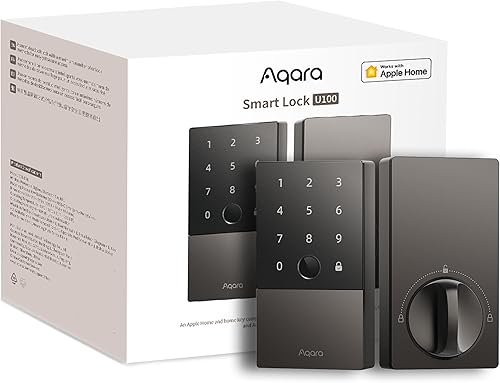 Best for Apple rentersAqara Smart Lock U100 | - | Bluetooth and Zigbee, Matter via Aqara hub | 4 AA batteries (included) | Check price |
Best for renters
August Wi-Fi Smart Lock (4th Generation)
The renter-friendly retrofit: smart control with your existing keys intact.
Strengths
- Fits over your existing deadbolt on the inside of the door, so the exterior hardware, keys, and lock cylinder all stay exactly as they were.
- DoorSense tells you whether the door is actually closed and locked, not just whether the bolt moved, and Auto-Lock secures the door behind you.
- Built-in Wi-Fi gives remote control and guest keys with no bridge, and it installs with a screwdriver in well under an hour for most standard deadbolts.
Limitations
- No keypad or fingerprint reader in the box, so code entry needs the separate August keypad accessory.
- Auto-Unlock relies on phone location and Bluetooth, which can be slow to trigger on some phones and in weak signal spots.
- The small round interior unit uses CR123 batteries, which are less likely to be in a kitchen drawer than AAs.
What owners report
Commonly praised
- Keeps the existing keys and outside hardware exactly as they were
- DoorSense gives real reassurance that the door is shut and locked
- Quick screwdriver install and remote guest keys with no bridge needed
Common complaints
- Code entry needs a separate keypad bought on its own
- Auto-unlock can be slow to trigger on some phones and in weak signal spots
- CR123 batteries are harder to find in a kitchen drawer than AAs
Recurring themes from owner reviews on retailers and forums, summarised by our editors. Updated October 2026.
| Type | Retrofit lock, fits over an existing deadbolt |
|---|---|
| Connectivity | Built-in Wi-Fi and Bluetooth, no hub required |
| Power | 2 CR123 batteries (included) |
| Door sensing | DoorSense open and closed detection |
| Dimensions | 2.8 x 2.8 x 2.75 inches |
Best for: Renters and anyone who wants smart locking without changing the outside of the door.
Skip if: You want a keypad or fingerprint reader on the outside of the door.
Best discreet option
Level Lock+
The invisible smart lock: all the tech hides inside your existing deadbolt.
Strengths
- The smart hardware hides inside the door, so the exterior looks like an ordinary deadbolt, which suits period doors and strict building rules.
- Apple Home Key support means tap-to-unlock with an iPhone or Apple Watch, plus app control, key cards, and the original keys.
- Auto-lock and remote access work through Apple Home, and the lock keeps working with its physical keys if the battery or phone fails.
Limitations
- No keypad and no fingerprint reader, so code entry for guests needs the separate Level keypad accessory.
- Apple-first design means Android households get a thinner experience, with fewer features than in the Apple Home app.
- The CR2 battery is less common than AA, so keep a spare in the house rather than hunting for one at night.
What owners report
Commonly praised
- Smart hardware hides inside the door, so the exterior looks like an ordinary deadbolt
- Phone tap unlocking plus app control, key cards, and the original keys
- Physical keys still work if the battery or phone fails
Common complaints
- No keypad or fingerprint reader, so guest codes need a separate keypad
- Apple-first design gives Android households a thinner experience
- Uncommon CR2 battery means keeping a spare in the house
Recurring themes from owner reviews on retailers and forums, summarised by our editors. Updated October 2026.
| Type | Hidden smart deadbolt, replaces the bolt mechanism inside the door |
|---|---|
| Entry methods | Apple Home Key, app, key cards, physical keys |
| Connectivity | Bluetooth with Wi-Fi remote access via Apple Home |
| Power | CR2 battery (included) |
| In the box | Lock, CR2 battery, 2 strike plates, 2 key fobs, 2 keys |
Best for: Design-led owners and Apple households who want a smart lock nobody can see.
Skip if: You want a keypad or fingerprint reader on the door, or you need Android-first support.
Best full replacement
Yale Assure Lock 2 with Wi-Fi
The straightforward Yale: keypad, app, and remote access at a fair price.
Strengths
- The keypad-only design keeps the price down while keeping remote locking, guest codes, and scheduling in the Yale Access app.
- Same slim hardware and DoorSense door position sensing as the pricier Touch model, so nothing about fit or build feels cut down.
- Works with Alexa, Google Home, and Apple Home for voice control and routines, and pairs with Airbnb for scheduled guest access.
Limitations
- No fingerprint reader, so every entry is a code, a phone, or a key.
- The keypad needs a wake tap before code entry, which takes a beat longer than a fingerprint scan.
- Battery life depends heavily on Wi-Fi signal strength at the door, so a weak router connection shortens it.
What owners report
Commonly praised
- Keypad-only design keeps the price sensible while keeping remote control
- Same slim build and door sensing as the pricier Touch model
- Voice control and scheduled guest access suit rentals and visitors alike
Common complaints
- No fingerprint reader, so every entry is a code, a phone, or a key
- Keypad needs a wake tap before code entry, which takes a beat longer
- Battery life leans heavily on Wi-Fi signal strength at the door
Recurring themes from owner reviews on retailers and forums, summarised by our editors. Updated October 2026.
| Entry methods | Touchscreen keypad, app, Auto-Unlock, physical key |
|---|---|
| Connectivity | Built-in Wi-Fi and Bluetooth |
| Power | 4 AA batteries (included) |
| Security rating | ANSI/BHMA Grade 2, IPX5 rated |
| In the box | Deadbolt, Wi-Fi smart module, DoorSense, mounting hardware |
Best for: Buyers who want a proven Yale keypad lock with remote control, without paying for a fingerprint reader.
Skip if: You want fingerprint entry, or you live in an Apple Home household and want Home Key.
Budget renter pick
eufy Smart Lock C220
Fingerprint and Wi-Fi for the price of a basic keypad lock.
Strengths
- Fingerprint recognition that eufy rates at well under two seconds, plus keypad, app, key, and Apple Watch entry, at a budget price.
- Built-in Wi-Fi with no bridge, an app event log, and temporary codes make it genuinely useful for families and small landlords.
- Eight AA batteries and an efficient radio stretch battery life to around eight months in typical use per eufy, with a USB backup port if they run flat.
Limitations
- BHMA Grade 3 is the lowest residential grade here, so security purists should step up to Schlage or Yale.
- No Apple HomeKit, Matter, or IFTTT support, so it lives in the eufy app plus Alexa and Google voice control only.
- The exterior unit is tall and plain, and the keypad feel is less premium than the Yale or Schlage locks.
What owners report
Commonly praised
- Fast fingerprint recognition plus keypad, app, key, and watch entry at a budget price
- Built-in Wi-Fi, event log, and temporary codes suit families and small landlords
- Long battery life with a USB backup port if the batteries run flat
Common complaints
- Lowest residential security grade here, so purists may step up
- No HomeKit, Matter, or IFTTT support, so it lives mainly in the eufy app
- Tall plain exterior and a keypad feel less premium than Yale or Schlage
Recurring themes from owner reviews on retailers and forums, summarised by our editors. Updated October 2026.
| Entry methods | Fingerprint, keypad, app, Apple Watch, physical key |
|---|---|
| Connectivity | Built-in Wi-Fi, no hub required |
| Power | 8 AA batteries, around 8 months per eufy |
| Capacity | 50 fingerprints and 100 passcodes per eufy |
| Weather rating | IP53 |
Best for: Budget buyers who still want fingerprint entry and remote control with no hub.
Skip if: You need Apple HomeKit or Matter, or you want a Grade 1 or 2 security rating.
Best for Apple renters
Aqara Smart Lock U100
Apple Home Key and fingerprint at a mid-range price, for the Apple household.
Strengths
- Apple Home Key support lets you tap an iPhone or Apple Watch to unlock, with fingerprint and keypad entry as well, all at a mid-range price.
- The IP65 rated exterior shrugs off rain and dust, and the lock runs for months on four AA batteries thanks to its efficient Zigbee radio.
- Matter support through an Aqara hub keeps the lock usable across platforms as your smart home changes, rather than locking you to one app.
Limitations
- Remote access and Matter need an Aqara hub, which is an extra purchase and another device to place.
- The exterior unit is chunkier than the Yale and Level locks here, so it suits modern doors better than period hardware.
- No Wi-Fi radio in the lock itself, so hub-free buyers should look at the Yale or Schlage picks instead.
What owners report
Commonly praised
- Phone tap, fingerprint, and keypad entry together at a mid-range price
- Weather-sealed exterior copes with rain and dust without fuss
- Long AA battery life thanks to the efficient Zigbee radio
Common complaints
- Remote access and Matter support need an Aqara hub bought separately
- Chunkier exterior suits modern doors better than period hardware
- No Wi-Fi radio in the lock itself for hub-free buyers
Recurring themes from owner reviews on retailers and forums, summarised by our editors. Updated October 2026.
| Entry methods | Fingerprint, Apple Home Key, touchscreen keypad, app, mechanical keys |
|---|---|
| Connectivity | Bluetooth and Zigbee, Matter via Aqara hub |
| Power | 4 AA batteries (included) |
| Weather rating | IP65 |
| In the box | Lock, 2 mechanical keys, 4 AA batteries, installation accessories |
Best for: Apple households that want Home Key and fingerprint entry without a flagship price.
Skip if: You do not use Apple Home, or you want built-in Wi-Fi with no hub at all.
Questions, answered
Do I need landlord permission for a smart lock?
For a retrofit lock like the August, usually not, since nothing outside changes and the original lock stays functional. For any full deadbolt replacement, get written permission first, because leases commonly require the original hardware to be restored at move-out.
Can I take my smart lock when I move?
Yes. Retrofit locks lift straight off, and full deadbolts unbolt the same way they went in. Keep the original deadbolt, screws, and strike plate so the door can be restored exactly as you found it.
What if my rental door has a non-standard deadbolt?
Measure the backset, door thickness, and the distance between the deadbolt and handle before ordering. Retrofit locks are the most forgiving, since they reuse your existing bolt; full replacements are pickier about measurements.