Ranked on offline capability: local codes, fingerprints, and Bluetooth control that do not depend on a router.
The Best Smart Locks Without Wi-Fi (2026)
Smart locks that work without Wi-Fi: Bluetooth and Zigbee locks for weak-signal doors, cabins, and privacy-first homes.
Our top picks at a glance
Best Zigbee lock
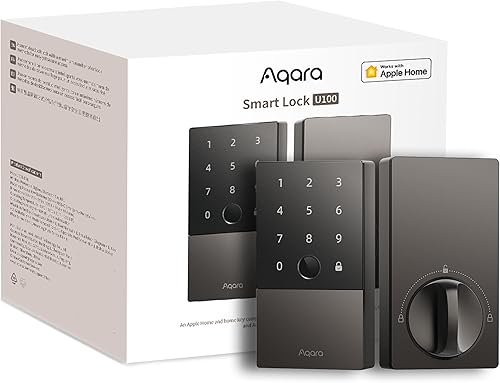 Aqara Smart Lock U100
Apple households that want Home Key and fingerprint entry without a flagship price.
Best Bluetooth lock
 Level Lock+
Design-led owners and Apple households who want a smart lock nobody can see.
Best offline fingerprint lock
 Yale Assure Lock 2 Touch
Families who want every entry method, with fingerprint speed for daily use and codes for guests.
Every good smart lock works offline for entry: codes and fingerprints live on the lock, not in the cloud. The Aqara U100 is the best purpose-built offline choice, with Zigbee efficiency and months of battery life. Buy for local entry first and treat remote access as a bonus, not the reason for the lock.
The picks, ranked
| Pick | Entry methods | Connectivity | Power | Buy |
|---|---|---|---|---|
| Best Zigbee lockAqara Smart Lock U100 | Fingerprint, Apple Home Key, touchscreen keypad, app, mechanical keys | Bluetooth and Zigbee, Matter via Aqara hub | 4 AA batteries (included) | Check price |
| Best Bluetooth lockLevel Lock+ | Apple Home Key, app, key cards, physical keys | Bluetooth with Wi-Fi remote access via Apple Home | CR2 battery (included) | Check price |
| Best offline fingerprint lockYale Assure Lock 2 Touch | Fingerprint, touchscreen keypad, app, Auto-Unlock | Built-in Wi-Fi and Bluetooth | 4 AA batteries (included) | Check price |
 Best code lock without Wi-Fi relianceKwikset Halo Touchscreen Wi-Fi Smart Lock | Touchscreen keypad, app, geofence auto-unlock, physical key | Built-in Wi-Fi, no hub required | 4 AA batteries (included) | Check price |
 Best offline flexibilityULTRALOQ U-Bolt Pro WiFi | Fingerprint, keypad, app, auto-unlock, shake-to-open, mechanical key | Built-in Wi-Fi (2.4 GHz) and Bluetooth | - | Check price |
Best Zigbee lock
Aqara Smart Lock U100
Apple Home Key and fingerprint at a mid-range price, for the Apple household.
Strengths
- Apple Home Key support lets you tap an iPhone or Apple Watch to unlock, with fingerprint and keypad entry as well, all at a mid-range price.
- The IP65 rated exterior shrugs off rain and dust, and the lock runs for months on four AA batteries thanks to its efficient Zigbee radio.
- Matter support through an Aqara hub keeps the lock usable across platforms as your smart home changes, rather than locking you to one app.
Limitations
- Remote access and Matter need an Aqara hub, which is an extra purchase and another device to place.
- The exterior unit is chunkier than the Yale and Level locks here, so it suits modern doors better than period hardware.
- No Wi-Fi radio in the lock itself, so hub-free buyers should look at the Yale or Schlage picks instead.
What owners report
Commonly praised
- Phone tap, fingerprint, and keypad entry together at a mid-range price
- Weather-sealed exterior copes with rain and dust without fuss
- Long AA battery life thanks to the efficient Zigbee radio
Common complaints
- Remote access and Matter support need an Aqara hub bought separately
- Chunkier exterior suits modern doors better than period hardware
- No Wi-Fi radio in the lock itself for hub-free buyers
Recurring themes from owner reviews on retailers and forums, summarised by our editors. Updated October 2026.
| Entry methods | Fingerprint, Apple Home Key, touchscreen keypad, app, mechanical keys |
|---|---|
| Connectivity | Bluetooth and Zigbee, Matter via Aqara hub |
| Power | 4 AA batteries (included) |
| Weather rating | IP65 |
| In the box | Lock, 2 mechanical keys, 4 AA batteries, installation accessories |
Best for: Apple households that want Home Key and fingerprint entry without a flagship price.
Skip if: You do not use Apple Home, or you want built-in Wi-Fi with no hub at all.
Best Bluetooth lock
Level Lock+
The invisible smart lock: all the tech hides inside your existing deadbolt.
Strengths
- The smart hardware hides inside the door, so the exterior looks like an ordinary deadbolt, which suits period doors and strict building rules.
- Apple Home Key support means tap-to-unlock with an iPhone or Apple Watch, plus app control, key cards, and the original keys.
- Auto-lock and remote access work through Apple Home, and the lock keeps working with its physical keys if the battery or phone fails.
Limitations
- No keypad and no fingerprint reader, so code entry for guests needs the separate Level keypad accessory.
- Apple-first design means Android households get a thinner experience, with fewer features than in the Apple Home app.
- The CR2 battery is less common than AA, so keep a spare in the house rather than hunting for one at night.
What owners report
Commonly praised
- Smart hardware hides inside the door, so the exterior looks like an ordinary deadbolt
- Phone tap unlocking plus app control, key cards, and the original keys
- Physical keys still work if the battery or phone fails
Common complaints
- No keypad or fingerprint reader, so guest codes need a separate keypad
- Apple-first design gives Android households a thinner experience
- Uncommon CR2 battery means keeping a spare in the house
Recurring themes from owner reviews on retailers and forums, summarised by our editors. Updated October 2026.
| Type | Hidden smart deadbolt, replaces the bolt mechanism inside the door |
|---|---|
| Entry methods | Apple Home Key, app, key cards, physical keys |
| Connectivity | Bluetooth with Wi-Fi remote access via Apple Home |
| Power | CR2 battery (included) |
| In the box | Lock, CR2 battery, 2 strike plates, 2 key fobs, 2 keys |
Best for: Design-led owners and Apple households who want a smart lock nobody can see.
Skip if: You want a keypad or fingerprint reader on the door, or you need Android-first support.
Best offline fingerprint lock
Yale Assure Lock 2 Touch
Fingerprint, keypad, and app in a slim, discreet deadbolt.
Strengths
- Fingerprint, touchscreen keypad, app, and optional Auto-Unlock cover every household member, from children to visitors who only need a temporary code.
- The matte touchscreen resists fingerprints and glare, and the whole unit is noticeably slimmer than older Yale deadbolts.
- DoorSense and Auto-Lock combine to confirm the door is shut and locked, with an activity log in the Yale Access app.
Limitations
- This Wi-Fi version sits at a premium price, and the fingerprint reader needs clean, dry fingers to read first time.
- No physical keyway on the key-free Touch version, so a completely flat battery leaves no key fallback, only the external 9V backup contacts.
- Some advanced automations still need a separate smart home hub, depending on your platform.
What owners report
Commonly praised
- Fingerprint plus keypad plus app covers every member of the household
- Slim matte unit looks discreet and resists fingerprints and glare
- DoorSense and auto-lock confirm the door is shut and locked behind you
Common complaints
- Premium price, and the reader wants clean dry fingers to work first time
- Key-free version leaves no key fallback once the battery is fully flat
- Some advanced automations still need a separate smart home hub
Recurring themes from owner reviews on retailers and forums, summarised by our editors. Updated October 2026.
| Entry methods | Fingerprint, touchscreen keypad, app, Auto-Unlock |
|---|---|
| Connectivity | Built-in Wi-Fi and Bluetooth |
| Power | 4 AA batteries (included) |
| Security rating | ANSI/BHMA Grade 2, IPX5 rated |
| In the box | Deadbolt, Wi-Fi smart module, DoorSense, mounting hardware |
Best for: Families who want every entry method, with fingerprint speed for daily use and codes for guests.
Skip if: You want Apple Home Key, or you need a lock that works with a full smart home hub out of the box.
Best code lock without Wi-Fi reliance
Kwikset Halo Touchscreen Wi-Fi Smart Lock
The re-keyable Wi-Fi lock, with geofence auto-unlock for the whole family.
Strengths
- SmartKey Security lets you re-key the lock yourself in seconds with the included tool, which is a real saving after moving house or changing tenants.
- Geofence auto-unlock opens the door as you arrive, and the Kwikset app manages codes, schedules, and lock history over Wi-Fi with no hub.
- Intrusion detection and a BHMA Grade AAA rating (the top marks for security, durability, and finish) back up the convenience features.
Limitations
- No fingerprint reader and no Apple Home support, so Apple households lose the tap-to-unlock option.
- The touchscreen can be slow to wake in cold weather, and the app is plainer than the Yale or Schlage apps.
- Geofence unlocking needs location permissions always on, which some owners prefer not to grant.
What owners report
Commonly praised
- Self re-keying after a move or tenant change saves a locksmith visit
- Geofence auto-unlock opens the door as you arrive
- Intrusion detection backs up the convenience features
Common complaints
- No fingerprint reader and no Apple Home support
- Touchscreen can be slow to wake in cold weather
- Geofence unlocking needs location permissions always on
Recurring themes from owner reviews on retailers and forums, summarised by our editors. Updated October 2026.
| Entry methods | Touchscreen keypad, app, geofence auto-unlock, physical key |
|---|---|
| Connectivity | Built-in Wi-Fi, no hub required |
| Power | 4 AA batteries (included) |
| Capacity | 250 user codes per Kwikset |
| Re-keying | SmartKey Security, re-key at home with the included tool |
Best for: Owners who re-key their own locks, and households that want geofence unlocking without a hub.
Skip if: You want fingerprint entry, or you need HomeKit support.
Best offline flexibility
ULTRALOQ U-Bolt Pro WiFi
Eight ways in, including fingerprint and shake-to-open, at a mid-range price.
Strengths
- Fingerprint, keypad, app, auto-unlock, shake-to-open, and mechanical key give every household member a method that suits them.
- Built-in Wi-Fi means remote codes and logs with no bridge, and the door sensor reports whether the door is left open.
- ANSI Grade 1 certification and an IP65 rating put its mechanical and weather credentials ahead of most locks at this price.
Limitations
- The U-tec app is functional rather than polished, and setup has more steps than the Yale or Schlage apps.
- Auto-Unlock depends on phone Bluetooth and location, so it can lag on some Android handsets.
- The keypad and fingerprint housing are larger than the Yale Assure line, which shows on narrow stiles.
What owners report
Commonly praised
- Huge range of entry methods means every household member finds one that suits
- Built-in Wi-Fi gives remote codes and logs with no bridge
- Strong security certification and weather rating for the price
Common complaints
- App feels functional rather than polished, and setup has extra steps
- Auto-unlock can lag on some Android handsets
- Keypad and fingerprint housing look large on narrow door stiles
Recurring themes from owner reviews on retailers and forums, summarised by our editors. Updated October 2026.
| Entry methods | Fingerprint, keypad, app, auto-unlock, shake-to-open, mechanical key |
|---|---|
| Connectivity | Built-in Wi-Fi (2.4 GHz) and Bluetooth |
| Security rating | ANSI Grade 1 |
| Weather rating | IP65 |
| Door sensing | Integrated door sensor with open-door alerts |
Best for: Households and short-stay hosts who want the widest set of entry methods and a door sensor in one lock.
Skip if: You want a lock from a legacy lock brand, or a polished app experience above all else.
Questions, answered
Will my codes still work if the internet is down?
Yes. Codes, fingerprints, and keys are stored on the lock and work with no connection at all. Only remote locking, code changes, and notifications pause until the network returns.
Why do some locks last longer on batteries than others?
Wi-Fi radios use far more power than Bluetooth or Zigbee. A Zigbee lock like the Aqara U100 can run for months longer than a Wi-Fi lock on the same door, which is the main reason to choose a hub-based lock for a busy or remote door.
Is a lock without Wi-Fi more private?
Partly. A Bluetooth or Zigbee lock sends less data to the internet and keeps its logs local until a hub syncs them. No connected lock is fully private, but fewer radios means a smaller surface for remote attack.