Ranked on lighting quality per pound spent, including what budget bars give up against BenQ flagships.
The Best Budget Monitor Light Bar (2026)
Monitor light bars that cost less without giving up glare-free optics: Quntis, Baseus, and the cheapest BenQ route.
Our top picks at a glance
Best budget overall
 Quntis ScreenLinear
Buyers who want a proper monitor light bar at the lowest price that still works well.
Best compact budget
 Baseus Monitor Light Bar
Small desks and budget buyers who want a neat, simple bar from a known accessories brand.
Best budget remote
 Quntis Monitor Light Bar with Remote
Buyers who want remote adjustments and a backlight without BenQ flagship pricing.
The Quntis ScreenLinear is the budget pick: it does the core job, glare-free desk light, for the least money. The Baseus bar is the compact alternative for small desks. Step up to the Quntis remote bar if you want a remote and backlight, or to the ScreenBar Original if BenQ optics matter more than features. Budget bars give up brightness, backlight, and control convenience, not glare control, which is the part that matters most.
The picks, ranked
| Pick | Type | Model | Control | Buy |
|---|---|---|---|---|
| Best budget overallQuntis ScreenLinear | Monitor light bar, front light only | LI-HY-0214-BK | Touch control on the bar | Check price |
| Best compact budgetBaseus Monitor Light Bar | - | DGIWK-B01 | Touch control, USB-C power | Check price |
| Best budget remoteQuntis Monitor Light Bar with Remote | - | LI-HY-0214-WT | Remote control | Check price |
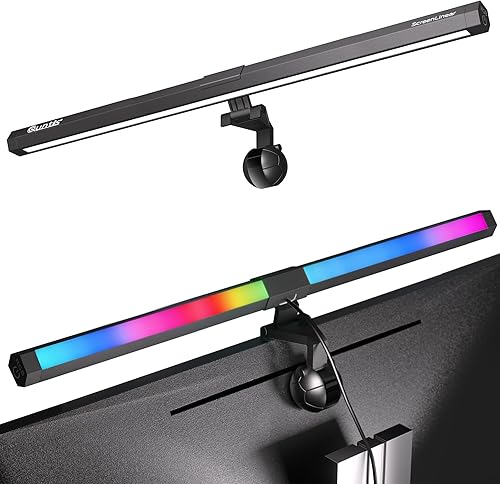 Best budget RGBQuntis ScreenLinear RGB Pro | - | LI-HY-0211-BK | - | Check price |
 Best budget BenQBenQ ScreenBar (Original) | - | ScreenBar AR17 | Touch control on the bar | Check price |
 Best budget designXiaomi Mi Computer Monitor Light Bar | - | - | Wireless remote, USB-C power | Check price |
Best budget overall
Quntis ScreenLinear
Quntis's classic bar: straightforward, affordable, glare-free desk light.
Strengths
- The cheapest honest entry into monitor bars: real asymmetric lighting without a desk lamp footprint.
- Simple controls keep daily use to a touch, with no app or controller to manage.
- Light, compact bar that fits most flat monitors without fuss.
Limitations
- No backlight and no remote, so every adjustment means reaching up to the bar.
- Brightness and colour range are narrower than the RGB Pro and BenQ models.
- Clip fit is less forgiving on very thin or strongly curved monitors.
What owners report
Commonly praised
- Cheapest honest entry into monitor bars: real asymmetric lighting without a desk lamp footprint
- Simple controls keep daily use to a touch, with no app or controller to manage
- Light compact bar that fits most flat monitors without fuss
Common complaints
- No backlight and no remote, so every adjustment means reaching up to the bar
- Brightness and colour range are narrower than the RGB Pro and BenQ models
- Clip fit is less forgiving on very thin or strongly curved monitors
Recurring themes from owner reviews on retailers and forums, summarised by our editors. Updated October 2026.
| Type | Monitor light bar, front light only |
|---|---|
| Model | LI-HY-0214-BK |
| Control | Touch control on the bar |
| Power | USB powered |
| Use | Home office and study desks |
Best for: Buyers who want a proper monitor light bar at the lowest price that still works well.
Skip if: You need a backlight, remote control, or the highest brightness class.
Best compact budget
Baseus Monitor Light Bar
The compact Baseus bar with three colour temperatures and touch control.
Strengths
- Three colour temperatures (2800K, 4000K, 5500K) cover warm evenings, neutral work, and cool daylight focus.
- Touch control on the bar keeps operation simple with no remote to lose.
- Compact, light build suits small monitors and crowded desks.
Limitations
- 5 watt, 160 lumen output is modest, so large desks stay dim at the edges.
- Monitor fit range of 0.3 to 0.8 inches thick excludes very thick or heavily curved displays.
- No backlight and no auto-dimming, so adjustments are fully manual.
What owners report
Commonly praised
- Three colour temperatures cover warm evenings, neutral work, and cool daylight focus
- Touch control on the bar keeps operation simple with no remote to lose
- Compact light build suits small monitors and crowded desks
Common complaints
- Modest output, so large desks stay dim at the edges
- Monitor fit range excludes very thick or heavily curved displays
- No backlight and no auto-dimming, so adjustments are fully manual
Recurring themes from owner reviews on retailers and forums, summarised by our editors. Updated October 2026.
| Power | 5 watts |
|---|---|
| Brightness | 160 lumens |
| Colour temperatures | 2800K, 4000K, 5500K |
| Control | Touch control, USB-C power |
| Model | DGIWK-B01 |
Best for: Small desks and budget buyers who want a neat, simple bar from a known accessories brand.
Skip if: You need a backlight, remote control, or brightness for a large desk.
Best budget remote
Quntis Monitor Light Bar with Remote
Quntis's remote-control bar with backlight and curved monitor fit.
Strengths
- Remote control adjusts brightness and colour temperature from the chair, no reaching up to the bar.
- Backlight adds wall glow for night sessions, a feature usually reserved for pricier bars.
- Designed to fit curved monitors as well as flat ones, covering more desk setups than the classic ScreenLinear.
Limitations
- Remote is one more small object to lose on a busy desk.
- Backlight is simpler than BenQ's Halo system, with less precise colour control.
- Mid-range brightness suits normal desks but not very large or very dark rooms.
What owners report
Commonly praised
- Remote control adjusts brightness and colour temperature from the chair
- Backlight adds wall glow for night sessions, a feature usually reserved for pricier bars
- Designed to fit curved monitors as well as flat ones, covering more desk setups
Common complaints
- Remote is one more small object to lose on a busy desk
- Backlight is simpler than the Halo system, with less precise colour control
- Mid-range brightness suits normal desks but not very large or very dark rooms
Recurring themes from owner reviews on retailers and forums, summarised by our editors. Updated October 2026.
| Control | Remote control |
|---|---|
| Backlight | Yes, ambient backlight |
| Model | LI-HY-0214-WT |
| Monitor fit | Flat and curved monitors |
| Power | USB powered |
Best for: Buyers who want remote adjustments and a backlight without BenQ flagship pricing.
Skip if: You prefer a physical dial, or you need the brightest bar for a very large desk.
Best budget RGB
Quntis ScreenLinear RGB Pro
Front light for work, RGB backlight for play, in one Quntis bar.
Strengths
- RGB backlight adds ambient colour behind the monitor for gaming and streaming setups, while the front bar stays neutral for work.
- Three colour temperatures on the front light cover cool daylight focus and warm evening wind-down.
- Quntis pricing undercuts BenQ flagships substantially for a dual-light bar.
Limitations
- RGB modes can distract in a work-only setup, and the backlight is decorative rather than a calibrated bias light.
- Build and optics sit a step below BenQ at the same size, with less even edge-to-edge coverage.
- Control layout takes a session to learn compared with BenQ's single dial.
What owners report
Commonly praised
- RGB backlight adds ambient colour for gaming and streaming, while the front bar stays neutral for work
- Three front colour temperatures cover cool daylight focus and warm evening wind-down
- Pricing undercuts flagship rivals substantially for a dual-light bar
Common complaints
- RGB modes can distract in a work-only setup, and the backlight is decorative rather than calibrated
- Build and optics sit a step below BenQ at the same size, with less even edge coverage
- Control layout takes a session to learn compared with a single dial
Recurring themes from owner reviews on retailers and forums, summarised by our editors. Updated October 2026.
| Front light | White light with 3 colour temperatures |
|---|---|
| Backlight | RGB ambient backlight |
| Model | LI-HY-0211-BK |
| Use | Desk work and gaming setups |
| Power | USB powered |
Best for: Desk setups that work by day and game or stream by night, where backlight colour matters.
Skip if: You want a plain professional look with no RGB, or you need BenQ-level brightness claims.
Best budget BenQ
BenQ ScreenBar (Original)
The original ScreenBar: simple touch control and proven glare-free optics.
Strengths
- Original asymmetric optics that made the category, lighting the desk without screen glare.
- Simple touch control on the bar itself, with no extra controller to lose or charge.
- Usually the cheapest route into genuine BenQ optics when on offer.
Limitations
- 500 lux output is modest next to the 1000 lux Pro and Halo 2, so large desks stay dimmer at the edges.
- Reaching up to the bar for every adjustment gets old compared with a desktop dial or remote.
- Older design lacks motion sensing, backlight, and USB-C.
What owners report
Commonly praised
- Original asymmetric optics that made the category, lighting the desk without screen glare
- Simple touch control on the bar itself, with no extra controller to lose or charge
- Usually the cheapest route into genuine BenQ optics when on offer
Common complaints
- Modest output next to the Pro and Halo 2, so large desks stay dimmer at the edges
- Reaching up to the bar for every adjustment gets old compared with a desktop dial or remote
- Older design lacks motion sensing, backlight, and USB-C
Recurring themes from owner reviews on retailers and forums, summarised by our editors. Updated October 2026.
| Brightness | 500 lux |
|---|---|
| Control | Touch control on the bar |
| Model | ScreenBar AR17 |
| Optics | Asymmetric, glare-free desk lighting |
| Power | USB powered |
Best for: Buyers who want the original BenQ formula without paying for dials, sensors, or backlights.
Skip if: You need high brightness for a large desk, or you want remote or wireless controls.
Best budget design
Xiaomi Mi Computer Monitor Light Bar
Xiaomi's minimalist bar with magnetic mount, wireless remote, and high colour accuracy.
Strengths
- High colour rendering (Ra95) keeps papers, prints, and skin tones looking natural under the bar.
- Magnetic mount makes fitting and removal tool-free, with a wireless remote for adjustments.
- Minimalist aluminium styling disappears into modern desk setups better than any bar here.
Limitations
- No backlight, so night contrast between screen and wall stays higher than Halo models.
- Magnetic mount suits standard monitor bezels but needs checking on very thin or frameless displays.
- Colour temperature range, while wide, is tuned for general use rather than specialised photo work.
What owners report
Commonly praised
- High colour rendering keeps papers, prints, and skin tones looking natural
- Magnetic mount makes fitting and removal tool-free, with a wireless remote
- Minimalist aluminium styling disappears into modern desk setups better than any bar here
Common complaints
- No backlight, so night contrast between screen and wall stays higher than Halo models
- Magnetic mount suits standard bezels but needs checking on very thin or frameless displays
- Colour range is tuned for general use rather than specialised photo work
Recurring themes from owner reviews on retailers and forums, summarised by our editors. Updated October 2026.
| Colour rendering | Ra95 |
|---|---|
| Colour temperature | 2700 to 6500 Kelvin class |
| Mount | Magnetic mount |
| Control | Wireless remote, USB-C power |
| Model family | MJGJD01YL |
Best for: Minimalist desks and Xiaomi households who want clean looks with accurate colour rendering.
Skip if: You want a backlight, or you need the highest brightness for a large desk.
Questions, answered
What do budget light bars give up?
Mostly brightness headroom, backlights, auto-dimming, and remote controls. The core asymmetric optics that prevent glare are present even on the cheapest picks here, which is why they still beat desk lamps.
Are cheap light bars a fire risk?
USB-powered bars from known brands like Quntis, Baseus, and Xiaomi run at low wattages and are safe on standard USB ports. Avoid no-name bars with no brand accountability or certification marks.
Can a budget bar light a dual monitor desk?
One bar lights one monitor's desk area well. Dual monitor desks usually need either a longer bar centred across both screens, where the mount allows, or a bar per monitor. Check mount compatibility before buying two.