Best of
The Best Monitor Light Bars (2026)
The best monitor light bars of 2026: BenQ ScreenBar Plus, Pro, Halo, and Halo 2, Quntis ScreenLinear models, Xiaomi Mi bar, and Baseus bar compared.
Our top picks at a glance
Best overall
 BenQ ScreenBar Plus
Most desk workers who want proven glare-free light with a physical dial on the desk.
Best flagship
 BenQ ScreenBar Halo 2
Buyers who want the full BenQ system: front and back light, a controller with a display, and wide curved monitor support.
Best brightness
 BenQ ScreenBar Pro
Buyers who want the brightest BenQ bar with hands-free motion sensing for shared desks.
For most people, the BenQ ScreenBar Plus is the best monitor light bar: glare-free optics, auto-dimming, and a dial on the desk. If you want everything, the ScreenBar Halo 2 adds backlight, a wireless controller with a display, and curved monitor fit. On a budget, the Quntis ScreenLinear gives real bar lighting for the least money, while the Xiaomi Mi bar is the design-led pick with Ra95 colour. Check your monitor thickness and curve before ordering any bar.
The picks, ranked
| Pick | Control | Material | Weight | Buy |
|---|---|---|---|---|
| Best overallBenQ ScreenBar Plus | Desktop dial with auto-dimming | Aluminium | 1.5 pounds | Check price |
| Best flagshipBenQ ScreenBar Halo 2 | - | - | - | Check price |
| Best brightnessBenQ ScreenBar Pro | Touch and sensor controls | - | - | Check price |
 Best budget barQuntis ScreenLinear | Touch control on the bar | - | - | Check price |
 Best designXiaomi Mi Computer Monitor Light Bar | Wireless remote, USB-C power | - | - | Check price |
 Best wireless valueBenQ ScreenBar Halo | Wireless controller | - | - | Check price |
 Best remote barQuntis Monitor Light Bar with Remote | Remote control | - | - | Check price |
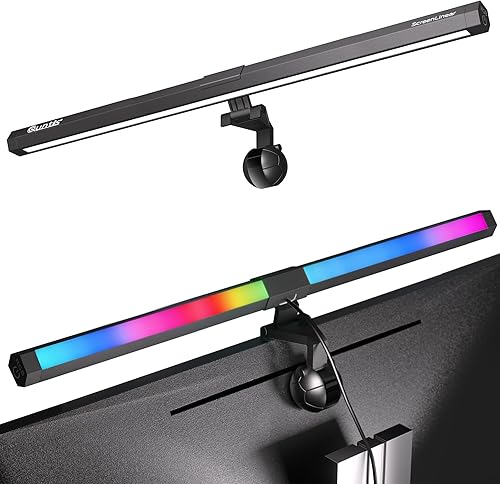 Best RGB barQuntis ScreenLinear RGB Pro | - | - | - | Check price |
 Best classicBenQ ScreenBar (Original) | Touch control on the bar | - | - | Check price |
 Best compact budgetBaseus Monitor Light Bar | Touch control, USB-C power | - | - | Check price |
Best overall
BenQ ScreenBar Plus
The classic ScreenBar with a desktop dial and auto-dimming.
Strengths
- Desktop dial puts brightness and colour temperature at your fingertips without reaching up to the bar or opening an app.
- Auto-dimming sensor adjusts output to room light, so the desk stays evenly lit as daylight changes.
- Asymmetric optics light the desk while keeping the screen reflection-free, the core ScreenBar advantage.
Limitations
- No backlight, so the wall behind the monitor stays dark compared with Halo models.
- Wired dial adds a cable to manage, and the dial needs desk space near the keyboard.
- Premium price for a bar without the motion sensing or backlight of newer BenQ models.
What owners report
Commonly praised
- Desktop dial puts brightness and colour temperature at your fingertips
- Auto-dimming sensor adjusts output to room light as daylight changes
- Asymmetric optics light the desk while keeping the screen reflection-free
Common complaints
- No backlight, so the wall behind the monitor stays dark compared with Halo models
- Wired dial adds a cable to manage, and the dial needs desk space near the keyboard
- Premium price for a bar without the motion sensing or backlight of newer BenQ models
Recurring themes from owner reviews on retailers and forums, summarised by our editors. Updated October 2026.
| Control | Desktop dial with auto-dimming |
|---|---|
| Material | Aluminium |
| Weight | 1.5 pounds |
| Dimensions | 3.54"D x 17.72"W x 3.62"H |
| Power | USB powered |
Best for: Most desk workers who want proven glare-free light with a physical dial on the desk.
Skip if: You want a backlight glow behind the monitor, or you need wireless controls.
Best flagship
BenQ ScreenBar Halo 2
BenQ's flagship: front light, backlight, wireless controller, and curved monitor fit.
Strengths
- Front light plus backlight lets you balance desk brightness against wall glow, cutting eye strain in dark rooms.
- Wireless controller with a display shows exact brightness and colour temperature, so adjustments are precise rather than guessed.
- Fits flat and curved monitors from 0.43 to 6 centimetres thick, covering ultrawide curved displays other bars reject.
Limitations
- The highest price in this guide, and the controller needs charging or battery care over time.
- More features than most users need daily, since most owners settle on one setting and leave it.
- Larger footprint and weight than simpler bars, so small desks feel the difference.
What owners report
Commonly praised
- Front light plus backlight lets you balance desk brightness against wall glow
- Wireless controller with a display shows exact brightness and colour temperature
- Fits flat and curved monitors, covering ultrawide curved displays other bars reject
Common complaints
- Highest price in this guide, and the controller needs charging or battery care over time
- More features than most users need daily, since most settle on one setting and leave it
- Larger footprint and weight than simpler bars, so small desks feel the difference
Recurring themes from owner reviews on retailers and forums, summarised by our editors. Updated October 2026.
| Front light | Colour rendering Ra 95 or better |
|---|---|
| Illuminance | Centre illuminance over 1000 lux at 50 centimetres |
| Coverage | 85 by 50 centimetres at 500 lux |
| Power | Up to 15 watts, USB-C |
| Monitor fit | Flat and curved, 0.43 to 6 centimetres (0.17 to 2.36 inches) thick |
Best for: Buyers who want the full BenQ system: front and back light, a controller with a display, and wide curved monitor support.
Skip if: Your budget is tight, or you only need simple front lighting.
Best brightness
BenQ ScreenBar Pro
The brighter, smarter ScreenBar with motion sensing and USB-C.
Strengths
- 1000 lux output lights larger desks and darker rooms better than the older ScreenBar models.
- Motion sensor switches the bar on as you sit down, which suits shared desks and forgetful owners.
- USB-C power keeps the cable modern and matches laptop and monitor chargers.
Limitations
- No backlight glow, so it cannot soften the contrast between a bright screen and a dark wall.
- Motion sensing can surprise users who prefer a bar that only changes when told to.
- Premium pricing without the wireless controller of the Halo 2.
What owners report
Commonly praised
- Strong output lights larger desks and darker rooms better than older ScreenBar models
- Motion sensor switches the bar on as you sit down, suiting shared desks
- USB-C power keeps the cable modern and matches laptop and monitor chargers
Common complaints
- No backlight glow, so it cannot soften the contrast between a bright screen and a dark wall
- Motion sensing can surprise users who prefer a bar that only changes when told to
- Premium pricing without the wireless controller of the Halo 2
Recurring themes from owner reviews on retailers and forums, summarised by our editors. Updated October 2026.
| Brightness | Up to 1000 lux |
|---|---|
| Power | 8.5 watts, USB-C |
| Sensor | Motion sensor (time-of-flight) |
| Control | Touch and sensor controls |
| Part number | 9H.W4KWT.US2 |
Best for: Buyers who want the brightest BenQ bar with hands-free motion sensing for shared desks.
Skip if: You want a backlight, or you prefer a physical dial to touch and sensor controls.
Best budget bar
Quntis ScreenLinear
Quntis's classic bar: straightforward, affordable, glare-free desk light.
Strengths
- The cheapest honest entry into monitor bars: real asymmetric lighting without a desk lamp footprint.
- Simple controls keep daily use to a touch, with no app or controller to manage.
- Light, compact bar that fits most flat monitors without fuss.
Limitations
- No backlight and no remote, so every adjustment means reaching up to the bar.
- Brightness and colour range are narrower than the RGB Pro and BenQ models.
- Clip fit is less forgiving on very thin or strongly curved monitors.
What owners report
Commonly praised
- Cheapest honest entry into monitor bars: real asymmetric lighting without a desk lamp footprint
- Simple controls keep daily use to a touch, with no app or controller to manage
- Light compact bar that fits most flat monitors without fuss
Common complaints
- No backlight and no remote, so every adjustment means reaching up to the bar
- Brightness and colour range are narrower than the RGB Pro and BenQ models
- Clip fit is less forgiving on very thin or strongly curved monitors
Recurring themes from owner reviews on retailers and forums, summarised by our editors. Updated October 2026.
| Type | Monitor light bar, front light only |
|---|---|
| Model | LI-HY-0214-BK |
| Control | Touch control on the bar |
| Power | USB powered |
| Use | Home office and study desks |
Best for: Buyers who want a proper monitor light bar at the lowest price that still works well.
Skip if: You need a backlight, remote control, or the highest brightness class.
Best design
Xiaomi Mi Computer Monitor Light Bar
Xiaomi's minimalist bar with magnetic mount, wireless remote, and high colour accuracy.
Strengths
- High colour rendering (Ra95) keeps papers, prints, and skin tones looking natural under the bar.
- Magnetic mount makes fitting and removal tool-free, with a wireless remote for adjustments.
- Minimalist aluminium styling disappears into modern desk setups better than any bar here.
Limitations
- No backlight, so night contrast between screen and wall stays higher than Halo models.
- Magnetic mount suits standard monitor bezels but needs checking on very thin or frameless displays.
- Colour temperature range, while wide, is tuned for general use rather than specialised photo work.
What owners report
Commonly praised
- High colour rendering keeps papers, prints, and skin tones looking natural
- Magnetic mount makes fitting and removal tool-free, with a wireless remote
- Minimalist aluminium styling disappears into modern desk setups better than any bar here
Common complaints
- No backlight, so night contrast between screen and wall stays higher than Halo models
- Magnetic mount suits standard bezels but needs checking on very thin or frameless displays
- Colour range is tuned for general use rather than specialised photo work
Recurring themes from owner reviews on retailers and forums, summarised by our editors. Updated October 2026.
| Colour rendering | Ra95 |
|---|---|
| Colour temperature | 2700 to 6500 Kelvin class |
| Mount | Magnetic mount |
| Control | Wireless remote, USB-C power |
| Model family | MJGJD01YL |
Best for: Minimalist desks and Xiaomi households who want clean looks with accurate colour rendering.
Skip if: You want a backlight, or you need the highest brightness for a large desk.
Best wireless value
BenQ ScreenBar Halo
The first Halo: wireless controller and backlight at a lower price than the Halo 2.
Strengths
- Wireless controller frees adjustments from the bar, with front, back, and combined lighting modes.
- Backlight softens the contrast between screen and wall, a real comfort gain for night workers.
- 800 lux front light with auto-dimming covers most desks without washing out the screen.
Limitations
- Older Halo design with narrower curved monitor support than the Halo 2.
- 6.5 watt output sits below the Pro and Halo 2 for very large desks.
- Controller battery and USB power need occasional attention compared with a simple wired bar.
What owners report
Commonly praised
- Wireless controller frees adjustments from the bar, with front, back, and combined modes
- Backlight softens the contrast between screen and wall, a real comfort gain at night
- Front light with auto-dimming covers most desks without washing out the screen
Common complaints
- Older Halo design with narrower curved monitor support than the Halo 2
- Lower output than the Pro and Halo 2 for very large desks
- Controller battery and USB power need occasional attention compared with a simple wired bar
Recurring themes from owner reviews on retailers and forums, summarised by our editors. Updated October 2026.
| Brightness | 800 lux |
|---|---|
| Power | 6.5 watts, USB |
| Control | Wireless controller |
| Lighting modes | Front, back, and combined |
| Monitor fit | Clips monitors 0.28 to 1.57 inches thick, including curved |
Best for: Buyers who want Halo backlight and wireless control without paying Halo 2 money.
Skip if: You need the Halo 2's wider curved monitor fit, or you want the newest sensor package.
Best remote bar
Quntis Monitor Light Bar with Remote
Quntis's remote-control bar with backlight and curved monitor fit.
Strengths
- Remote control adjusts brightness and colour temperature from the chair, no reaching up to the bar.
- Backlight adds wall glow for night sessions, a feature usually reserved for pricier bars.
- Designed to fit curved monitors as well as flat ones, covering more desk setups than the classic ScreenLinear.
Limitations
- Remote is one more small object to lose on a busy desk.
- Backlight is simpler than BenQ's Halo system, with less precise colour control.
- Mid-range brightness suits normal desks but not very large or very dark rooms.
What owners report
Commonly praised
- Remote control adjusts brightness and colour temperature from the chair
- Backlight adds wall glow for night sessions, a feature usually reserved for pricier bars
- Designed to fit curved monitors as well as flat ones, covering more desk setups
Common complaints
- Remote is one more small object to lose on a busy desk
- Backlight is simpler than the Halo system, with less precise colour control
- Mid-range brightness suits normal desks but not very large or very dark rooms
Recurring themes from owner reviews on retailers and forums, summarised by our editors. Updated October 2026.
| Control | Remote control |
|---|---|
| Backlight | Yes, ambient backlight |
| Model | LI-HY-0214-WT |
| Monitor fit | Flat and curved monitors |
| Power | USB powered |
Best for: Buyers who want remote adjustments and a backlight without BenQ flagship pricing.
Skip if: You prefer a physical dial, or you need the brightest bar for a very large desk.
Best RGB bar
Quntis ScreenLinear RGB Pro
Front light for work, RGB backlight for play, in one Quntis bar.
Strengths
- RGB backlight adds ambient colour behind the monitor for gaming and streaming setups, while the front bar stays neutral for work.
- Three colour temperatures on the front light cover cool daylight focus and warm evening wind-down.
- Quntis pricing undercuts BenQ flagships substantially for a dual-light bar.
Limitations
- RGB modes can distract in a work-only setup, and the backlight is decorative rather than a calibrated bias light.
- Build and optics sit a step below BenQ at the same size, with less even edge-to-edge coverage.
- Control layout takes a session to learn compared with BenQ's single dial.
What owners report
Commonly praised
- RGB backlight adds ambient colour for gaming and streaming, while the front bar stays neutral for work
- Three front colour temperatures cover cool daylight focus and warm evening wind-down
- Pricing undercuts flagship rivals substantially for a dual-light bar
Common complaints
- RGB modes can distract in a work-only setup, and the backlight is decorative rather than calibrated
- Build and optics sit a step below BenQ at the same size, with less even edge coverage
- Control layout takes a session to learn compared with a single dial
Recurring themes from owner reviews on retailers and forums, summarised by our editors. Updated October 2026.
| Front light | White light with 3 colour temperatures |
|---|---|
| Backlight | RGB ambient backlight |
| Model | LI-HY-0211-BK |
| Use | Desk work and gaming setups |
| Power | USB powered |
Best for: Desk setups that work by day and game or stream by night, where backlight colour matters.
Skip if: You want a plain professional look with no RGB, or you need BenQ-level brightness claims.
Best classic
BenQ ScreenBar (Original)
The original ScreenBar: simple touch control and proven glare-free optics.
Strengths
- Original asymmetric optics that made the category, lighting the desk without screen glare.
- Simple touch control on the bar itself, with no extra controller to lose or charge.
- Usually the cheapest route into genuine BenQ optics when on offer.
Limitations
- 500 lux output is modest next to the 1000 lux Pro and Halo 2, so large desks stay dimmer at the edges.
- Reaching up to the bar for every adjustment gets old compared with a desktop dial or remote.
- Older design lacks motion sensing, backlight, and USB-C.
What owners report
Commonly praised
- Original asymmetric optics that made the category, lighting the desk without screen glare
- Simple touch control on the bar itself, with no extra controller to lose or charge
- Usually the cheapest route into genuine BenQ optics when on offer
Common complaints
- Modest output next to the Pro and Halo 2, so large desks stay dimmer at the edges
- Reaching up to the bar for every adjustment gets old compared with a desktop dial or remote
- Older design lacks motion sensing, backlight, and USB-C
Recurring themes from owner reviews on retailers and forums, summarised by our editors. Updated October 2026.
| Brightness | 500 lux |
|---|---|
| Control | Touch control on the bar |
| Model | ScreenBar AR17 |
| Optics | Asymmetric, glare-free desk lighting |
| Power | USB powered |
Best for: Buyers who want the original BenQ formula without paying for dials, sensors, or backlights.
Skip if: You need high brightness for a large desk, or you want remote or wireless controls.
Best compact budget
Baseus Monitor Light Bar
The compact Baseus bar with three colour temperatures and touch control.
Strengths
- Three colour temperatures (2800K, 4000K, 5500K) cover warm evenings, neutral work, and cool daylight focus.
- Touch control on the bar keeps operation simple with no remote to lose.
- Compact, light build suits small monitors and crowded desks.
Limitations
- 5 watt, 160 lumen output is modest, so large desks stay dim at the edges.
- Monitor fit range of 0.3 to 0.8 inches thick excludes very thick or heavily curved displays.
- No backlight and no auto-dimming, so adjustments are fully manual.
What owners report
Commonly praised
- Three colour temperatures cover warm evenings, neutral work, and cool daylight focus
- Touch control on the bar keeps operation simple with no remote to lose
- Compact light build suits small monitors and crowded desks
Common complaints
- Modest output, so large desks stay dim at the edges
- Monitor fit range excludes very thick or heavily curved displays
- No backlight and no auto-dimming, so adjustments are fully manual
Recurring themes from owner reviews on retailers and forums, summarised by our editors. Updated October 2026.
| Power | 5 watts |
|---|---|
| Brightness | 160 lumens |
| Colour temperatures | 2800K, 4000K, 5500K |
| Control | Touch control, USB-C power |
| Model | DGIWK-B01 |
Best for: Small desks and budget buyers who want a neat, simple bar from a known accessories brand.
Skip if: You need a backlight, remote control, or brightness for a large desk.
How we chose
Glare control first
Every pick uses asymmetric optics that light the desk without reflecting on the screen. We treated that as the entry requirement: a bar that glares is a failed bar no matter how bright it is.
Brightness in context
We compared lux and lumen figures where manufacturers publish them, but judged them against desk size: 500 lux suits a small desk, 1000 lux suits a large one. More brightness is not automatically better if it washes out the screen.
Controls you will actually use
We favoured dials and remotes over bar-top touch controls, because reaching up to a bar breaks flow. Auto-dimming and motion sensing earned credit for hands-free desks, while app dependence earned none.
Fit honesty
Curved and very thin monitors reject bars that flat screens accept. We published every fit range we could source and flagged picks with narrow compatibility.
Questions, answered
Will a monitor light bar cause screen glare?
No, if it uses asymmetric optics like every bar in this guide. The light is angled forward onto the desk and away from the screen, so the display stays reflection-free. Cheap LED strips without asymmetric optics are a different product and will glare.
Do I need a backlight as well as a front light?
Not essential, but helpful at night. A backlight glows on the wall behind the monitor, reducing the contrast between a bright screen and a dark room, which many users find easier on the eyes. Halo and Quntis remote models include one; Plus and Pro models do not.
Will a light bar fit my curved monitor?
Check thickness and curve against the bar's published fit range. The Halo 2 covers flat and curved monitors from 0.43 to 6 centimetres thick, the widest range here. The Baseus bar only fits 0.3 to 0.8 inches, so thick or deeply curved displays need a BenQ or Quntis remote model instead.
What colour temperature should I use?
Cool white (around 5500 to 6500K) suits daytime focus, neutral (around 4000K) suits general work, and warm (around 2700 to 3000K) suits evenings. Bars with adjustable temperature let you shift through the day; fixed-temperature bars force a compromise.
Can a monitor light bar replace my desk lamp?
For computer work, yes, and it frees the desk space a lamp occupies. For reading paper books away from the screen or lighting a whole room, a traditional lamp still wins, since a bar's light is aimed at the desk in front of the monitor.