In-depth review
Anker 575 USB-C Docking Station Review (2026)
In-depth review of the Anker 575: thirteen ports, 85W charging, and whether it is still the best USB-C dock for non-Thunderbolt laptops.

Anker 575 USB-C Docking Station (13-in-1)
The USB-C dock for everyone else: triple display support, 85W charging, and every port a desk is likely to need.
Our verdict
The Anker 575 is the best USB-C dock for most non-Thunderbolt laptops, because it gives a complete desk, thirteen ports, triple displays, and 85W charging, over a port that millions of laptops already have. Its triple-display output is limited to 1080p per monitor and its Mac display behaviour needs understanding, but neither caveat changes the verdict for its audience: Windows and ChromeOS owners without Thunderbolt, and budget buyers who want the whole docking idea at once.
What we like
- Thirteen ports from one USB-C connection covers the realistic desk: two HDMI, a DisplayPort, fast USB, wired networking, card readers, and audio, with nothing important left out.
- The 85W laptop charging plus an 18W phone charging port means the laptop and the phone both charge from the dock, which removes two chargers from the desk.
- Because it works over ordinary USB-C with DisplayPort Alt Mode, it suits a much wider range of laptops than any Thunderbolt dock, including many budget and business machines.
What to watch out for
- Triple display output is limited to 1080p on each monitor, so buyers chasing triple 4K should look at a DisplayLink dock or a Thunderbolt dock instead.
- Mac owners get mirrored displays rather than extended desktops from this dock, which is a macOS limitation of this design, not a fault, but it surprises buyers.
- The 5Gbps USB-A ports are a step behind the 10Gbps ports on Thunderbolt docks, so very fast external SSDs will not reach their top speeds here.
Who it is for
Windows, ChromeOS, and USB-C laptop owners without Thunderbolt who want a complete, affordable desk setup.
Thirteen ports, zero drama
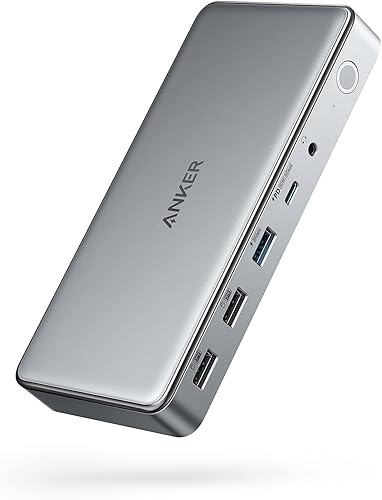
The 575's port list reads like a desk inventory: two HDMI, a DisplayPort, a 10Gbps USB-C port, three USB-A ports, Gigabit Ethernet, SD and microSD readers, and a 3.5mm audio jack, plus an 18W phone charging port. Nothing on a normal desk is left homeless, and the 135W adapter means the dock runs everything at once while charging the laptop at 85W. For a laptop with one or two USB-C ports and nothing else, this single box is the difference between a portable computer and a workstation.
The display limits, stated plainly
Three monitors at 1080p each is the honest headline, and it suits office work, browsing, and documents perfectly. Buyers chasing triple 4K need a different dock, and Mac owners need to know that macOS mirrors rather than extends across this dock's extra displays. Neither limit is a defect: they follow from the USB-C bandwidth and macOS display architecture the dock is built on. But they are the two facts most likely to disappoint a buyer who skipped the details, so they belong at the top of any review, not the bottom.
How it stacks up
Against the UGREEN Revodok Pro 10-in-1, the Anker wins on port count and triple-display support, while the UGREEN wins on price and on its metal build. Against the Anker 563, the 575 wins on simplicity, since it needs no DisplayLink driver, while the 563 wins for Mac owners who need three extended displays. Against the Plugable TBT4-UD5, the 575 wins on laptop compatibility and price, while the Plugable wins outright on bandwidth and display quality for Thunderbolt owners.
What owners report
Commonly praised
- Owners like the sheer number of ports, which leaves nothing on an ordinary desk unconnected
- Owners like that the dock works with a wide range of Windows and Chromebook laptops without Thunderbolt
- Owners like having laptop and phone charging handled by the same box
Common complaints
- Owners are disappointed that three monitors run at a lower resolution than a single display
- Owners find the mirrored Mac display behaviour confusing until it is explained
- Owners note that the fastest external drives do not reach full speed on the slower USB ports
Recurring themes from owner reviews on retailers and forums, summarised by our editors. Updated October 2026.
Key specifications
- Host connection
- USB-C with DisplayPort Alt Mode
- Laptop charging
- 85W power delivery
- Video
- 2x HDMI plus DisplayPort, up to 3 monitors
- Data
- 10Gbps USB-C, 5Gbps USB-A
- In the box
- 135W power adapter, 1m USB-C cable
Also consider

UGREEN Revodok Pro 10-in-1 USB-C Docking Station
The budget way into a real dock: dual 4K, 100W charging, and a metal body, at the lowest sensible outlay here.
- Host connection: USB-C with DisplayPort Alt Mode
- Laptop charging: 100W power delivery
Anker 563 USB-C Docking Station (10-in-1)
The three-monitor trick for MacBooks: DisplayLink smarts that give even a base Apple Silicon Mac a triple-display desk.
- Host connection: USB-C with DisplayLink
- Laptop charging: 100W power delivery
Research-based assessment. ThePickLedger has not hands-on tested this product; this evaluation synthesizes manufacturer specifications, retailer documentation, and published expert reviews.
Questions, answered
Will the Anker 575 work with my laptop?
If your laptop's USB-C port supports DisplayPort Alt Mode and power delivery, yes. Check the laptop manual or maker's specifications for those two features: without DisplayPort Alt Mode there will be no video, and without power delivery the dock will run peripherals but will not charge the laptop.
Can it run three 4K monitors?
No. Triple display output on the 575 is limited to 1080p per monitor. A single 4K monitor at 60Hz is supported, and dual displays can reach higher resolutions than triple, but three 4K monitors need a DisplayLink dock or a Thunderbolt dock.
Why does my Dell laptop warn about slow charging?
Dell laptops use a proprietary charging protocol, so a non-Dell charger can trigger a slow-charging warning even when the wattage is sufficient. The 85W delivery still charges the laptop for routine use, but Dell owners who want the warning gone should consider the Dell WD22TB4.