Head to head
Plugable TBT4-UD5 vs Anker 777 Apex (2026)
TBT4-UD5 vs Anker 777 Apex: the value Thunderbolt dock against the premium HDMI-focused rival, compared honestly.
#1 in our rankings · Best overall
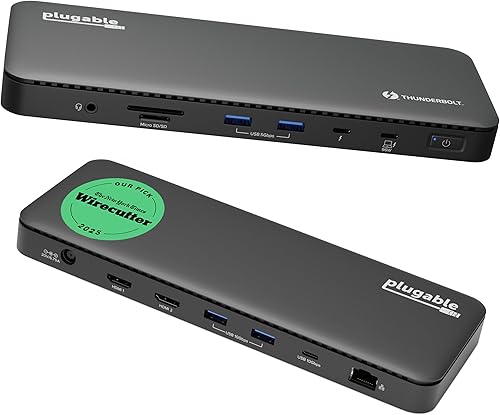
Plugable TBT4-UD5 Thunderbolt 4 Dock
Best for: Thunderbolt 4 and USB4 laptop owners who want dual monitors, fast storage, and full charging from one cable, without paying a premium brand tax.
#8 in our rankings · Best dual-HDMI Thunderbolt dock

Anker 777 Thunderbolt Docking Station (Apex, 12-in-1)
Best for: Windows Thunderbolt laptop owners with two HDMI monitors who want a single-cable desk without buying video adapters.
Our recommendation
Buy the Plugable TBT4-UD5 if you want the best Thunderbolt value: dual 4K over HDMI, 100W charging, and certification at a mid-range price. Buy the Anker 777 Apex if your desk is built on two HDMI monitors, you value Anker's support history, or you want the stronger 20W phone charging port. Both are excellent Thunderbolt docks; the Plugable wins on value, the Anker on HDMI focus and brand familiarity.
Charging and phone power
The Plugable delivers 100W to the laptop, 96W certified, against the Anker's 90W, which gives the Plugable a small edge for larger laptops. The Anker answers with a 20W USB-C phone charging port, against the Plugable's less generous phone charging, so the phone on your desk charges faster on the Anker. Neither difference decides the purchase alone, but they point in opposite directions for laptop-first versus phone-first desks.
Compatibility
The Plugable is the broader citizen: it works across Thunderbolt 4, USB4, and Thunderbolt 3 hosts from many makers, with certification backing that claim. The Anker is narrower by design, supporting Windows Thunderbolt 4 laptops and non-M1 MacBooks, while excluding M1 MacBooks, Linux, and ChromeOS. Buyers outside the Anker's supported list should not improvise: the Plugable is the safe choice.
Price and support story
The Plugable costs noticeably less while matching or beating the Anker on the specs that matter daily, which is why it takes the overall recommendation. The Anker counters with a longer retail history, wider availability, and a support organisation many buyers already know from chargers and cables. Brand comfort is a legitimate tiebreaker when the hardware is this close.
Choose Plugable TBT4-UD5 Thunderbolt 4 Dock if…
- You want the best Thunderbolt value available
- Your laptop needs 100W charging
- You want the broadest host compatibility
Choose Anker 777 Thunderbolt Docking Station (Apex, 12-in-1) if…
- Your desk is built on two HDMI monitors
- You want faster phone charging from the dock
- You prefer Anker's support and availability
Spec-by-spec comparison
| Spec | Plugable TBT4-UD5 Thunderbolt 4 Dock | Anker 777 Thunderbolt Docking Station (Apex, 12-in-1) |
|---|---|---|
| Price tier | Mid-range | Premium |
| Host connection | Thunderbolt 4, 40Gbps | Thunderbolt 4, 40Gbps |
| Laptop charging | 100W power delivery, 96W certified | 90W power delivery |
| Video | Dual 4K at 60Hz over HDMI, or single 8K | Dual 4K at 60Hz over HDMI, single 8K over Thunderbolt |
| Ports | 13 total, including downstream Thunderbolt 4, USB-C, USB-A, SD and microSD | 12 total, including downstream Thunderbolt 4, USB-C, USB-A, SD, Ethernet, audio |
| Network | Gigabit Ethernet | - |
| In the box | - | 120W power adapter, 0.7m Thunderbolt 4 cable |
| Best for | Thunderbolt 4 and USB4 laptop owners who want dual monitors, fast storage, and full charging from one cable, without paying a premium brand tax. | Windows Thunderbolt laptop owners with two HDMI monitors who want a single-cable desk without buying video adapters. |
| Skip if | Your laptop has only a plain USB-C port with no Thunderbolt or USB4 support, since you will not get the dual-display and bandwidth benefits that justify this dock. | You use a MacBook with an M1 chip, Linux, or ChromeOS, since Anker lists this dock as incompatible with those systems. |
Strengths and limitations
Plugable TBT4-UD5 Thunderbolt 4 Dock
Strengths
- Dual 4K monitors at 60Hz over two HDMI ports is the setup most desk workers actually want, and this dock delivers it without adapters, dongles, or a second cable.
- The 100W power delivery, 96W certified, charges even larger laptops under load while the dock still runs drives, displays, and peripherals at full speed.
- Thunderbolt certification and Intel Evo verification mean the dock behaves predictably across brands, which matters when the laptop and the dock come from different makers.
Limitations
- It is a Thunderbolt-first dock, so owners of older or basic USB-C laptops get a reduced experience and should buy a USB-C dock instead.
- The slim, low-profile case looks neat but offers no vertical stand or mounting option, so it sits flat on the desk and takes up its full footprint.
- Gigabit Ethernet, rather than 2.5GbE, is the one place where pricier Thunderbolt docks pull ahead, and it matters if your wired network is faster than a gigabit.
Anker 777 Thunderbolt Docking Station (Apex, 12-in-1)
Strengths
- Two HDMI ports driving dual 4K at 60Hz suit the most common monitor pairing, and the downstream Thunderbolt 4 port adds a single 8K display option on top.
- The 90W laptop charging plus a 20W USB-C phone charging port keep the laptop and a phone topped up from one dock, with no extra charger on the desk.
- Anker's long support window and wide availability make this one of the easier Thunderbolt docks to buy, replace, and get help with.
Limitations
- Compatibility is narrower than the Plugable: Windows Thunderbolt 4 laptops and non-M1 MacBooks only, with Linux, ChromeOS, and M1 MacBooks excluded.
- The four USB-A ports are data only, so a phone plugged into one charges slowly, and the 20W USB-C port is the only fast phone charging option.
- Its premium positioning puts it close to the Belkin and Dell docks, which offer more ports or more charging power for similar money.
How they fit the wider field
- Plugable TBT4-UD5 Thunderbolt 4 Dock: ranked #1 (Best overall) in The Best Docking Stations. Read the full Plugable TBT4-UD5 Thunderbolt 4 Dock review.
- Anker 777 Thunderbolt Docking Station (Apex, 12-in-1): ranked #8 (Best dual-HDMI Thunderbolt dock) in The Best Docking Stations.
Neither one quite right? The full rankings cover 10 picks matched to different buyers.
Made your call?
Questions, answered
Which is better for dual 4K monitors?
Both do dual 4K at 60Hz well. The Plugable does it over two HDMI ports with no adapters, and the Anker does the same, so the choice comes down to charging, compatibility, and price rather than display quality.
Which works with a MacBook?
The Plugable works with Thunderbolt MacBooks broadly. The Anker 777 works with non-M1 MacBooks only, so M1 MacBook owners should buy the Plugable, or a DisplayLink dock like the Anker 563 for multi-monitor use.
Do both need a Thunderbolt laptop?
Both show their best on Thunderbolt 4 or USB4 laptops. On a plain USB-C laptop they fall back to reduced capability, and a USB-C dock like the Anker 575 becomes the better buy.