In-depth review
OWC Thunderbolt Go Dock Review (2026)
In-depth review of the OWC Thunderbolt Go Dock: built-in power supply, 2.5GbE, and whether it is the best dock for people who move.

OWC Thunderbolt Go Dock (11 Ports)
The dock that travels: a full Thunderbolt 4 desk in one box, with the power supply built in and no brick to carry.
Our verdict
The Thunderbolt Go Dock is the best dock for people whose desk moves, because it is the first full-featured Thunderbolt dock with no power brick to pack. The 90W charging, 2.5GbE networking, and HDMI 2.1 port are all genuinely useful, and the Thunderbolt Share licence is a thoughtful extra for shared desks. Fixed-desk buyers get better value from the Plugable, but anyone who carries a dock will feel the Go Dock's advantage every single trip.
What we like
- The built-in power supply is the headline: no heavy brick to pack, lose, or untangle, just a standard power cable between the dock and the wall.
- A genuine 11-port Thunderbolt 4 feature set, including 2.5GbE networking and an HDMI 2.1 port, travels in a case small enough to fit a laptop bag.
- Thunderbolt Share support, with its licence included, lets two computers share the dock's peripherals, which is a rare and useful trick for shared desks.
What to watch out for
- The 90W laptop charging is enough for most laptops but falls short of the 100W and 130W rivals for the largest machines under load.
- One HDMI port means the second monitor needs a Thunderbolt or USB-C video connection, so a two-HDMI desk needs an adapter.
- The compact case runs warm under a full load of drives and displays, which is normal for the design but worth knowing before tucking it into a tight space.
Who it is for
Hybrid workers, creatives, and travellers who want a full Thunderbolt desk that packs into a bag without a power brick.
No brick changes everything
Every other dock here ships with a power brick, and every brick is the heaviest, most awkward item in the bag. The Go Dock builds the power supply into the case, so the whole kit is the dock plus a standard power cable. For a hybrid worker moving between home, office, and studio, that removes the daily ritual of untangling, packing, and repacking a brick, and it removes the most common failure point of a travel dock: the forgotten adapter. It is a small engineering choice with an outsized daily effect.
A serious port set in a small case
Compact docks usually compromise, but the Go Dock keeps a full set: two downstream Thunderbolt 4 ports, a 10Gbps USB-C port, fast USB-A ports, an HDMI 2.1 port, 2.5GbE networking, and an SD 4.0 reader. The 2.5GbE port is the standout, since it is faster than the Gigabit networking on most rivals and genuinely useful for video editors and photographers moving large files. The single HDMI port is the one compromise, since a second monitor needs a Thunderbolt or USB-C video connection, but that is a fair trade for the size.
How it stacks up
Against the Plugable TBT4-UD5, the OWC wins on portability and networking, while the Plugable wins on price and on its dual-HDMI simplicity for fixed desks. Against the Belkin CONNECT Pro, the OWC wins on travel and on 2.5GbE, while the Belkin wins on polish and on its second HDMI port. Against the Anker 777 Apex, the OWC wins for travellers and Mac owners, while the Anker wins for Windows desks built on two HDMI monitors.
What owners report
Commonly praised
- Owners love travelling without a power brick, since the supply lives inside the case
- Owners like the faster wired networking, which suits large photo and video transfers
- Owners like the sharing feature that lets two computers use the same desk gear
Common complaints
- Owners wish laptop charging reached the higher figure of the fixed-desk rivals
- Owners note that a second monitor needs a Thunderbolt or USB-C video link rather than a second HDMI port
- Owners mention the case feeling warm when every port is busy at once
Recurring themes from owner reviews on retailers and forums, summarised by our editors. Updated October 2026.
Key specifications
- Host connection
- Thunderbolt 4, 40Gbps
- Laptop charging
- 90W power delivery
- Video
- Up to single 8K at 60Hz, or dual 4K at 60Hz
- Network
- 2.5 Gigabit Ethernet
- Power
- Built-in power supply, no external brick
Also consider
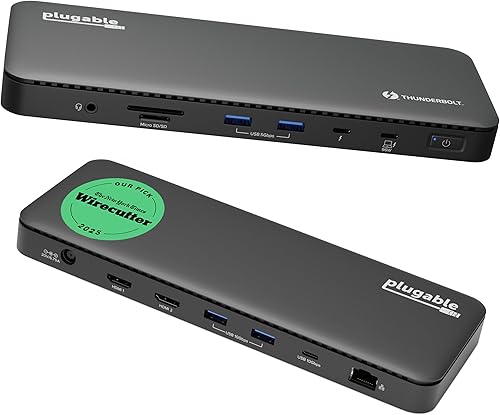
Plugable TBT4-UD5 Thunderbolt 4 Dock
The Thunderbolt dock most people should buy: dual 4K over HDMI, 100W charging, and a price that embarrasses fancier rivals.
- Host connection: Thunderbolt 4, 40Gbps
- Laptop charging: 100W power delivery, 96W certified

Belkin CONNECT Pro Thunderbolt 4 Dock
The polished premium pick: twelve ports, dual 4K, and a build that looks at home in a design-led office.
- Host connection: Thunderbolt 4, 40Gbps
- Laptop charging: 90W power delivery
Research-based assessment. ThePickLedger has not hands-on tested this product; this evaluation synthesizes manufacturer specifications, retailer documentation, and published expert reviews.
Questions, answered
Does the built-in power supply make it run hot?
It runs warm under a full load, which is expected when a power supply shares a compact aluminium case with fast ports. The aluminium body sheds heat well, and normal desk placement with a little airflow keeps it comfortable. Tucking it into a sealed drawer under load is the only setup to avoid.
What is Thunderbolt Share?
Thunderbolt Share lets two computers connect through the dock and share its peripherals, displays, and storage, with fast file transfer between them. The Go Dock includes the licence, so the feature works out of the box, which is useful for shared desks and for moving work between a laptop and a desktop.
Can it replace my desktop dock at home?
Yes, for most desks: 90W charging, dual 4K displays, 2.5GbE, and fast USB cover a full workstation. Only owners of very large laptops under heavy load, or desks built on two HDMI monitors, will find its limits, and both groups have better-fitting picks in this roundup.