In-depth review
Plugable TBT4-UD5 Review (2026)
In-depth review of the Plugable TBT4-UD5: dual 4K over HDMI, 100W charging, and whether it is still the default Thunderbolt dock.
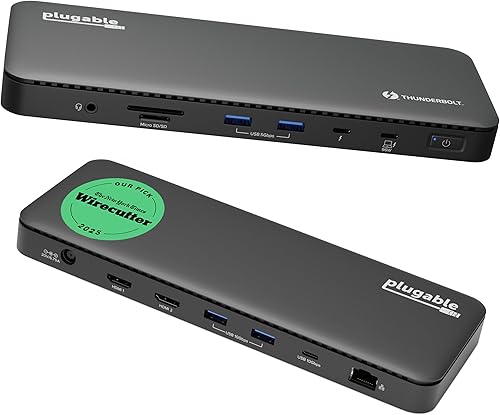
Plugable TBT4-UD5 Thunderbolt 4 Dock
The Thunderbolt dock most people should buy: dual 4K over HDMI, 100W charging, and a price that embarrasses fancier rivals.
Our verdict
The TBT4-UD5 is the best Thunderbolt dock for most people, because it nails the common case: two 4K monitors over plain HDMI, full laptop charging, and fast ports, at a price that undercuts premium rivals by a wide margin. Its weaknesses, Gigabit rather than 2.5GbE networking and no vertical stand, are minor beside that core competence. If your laptop has Thunderbolt 4 or USB4, this is the dock to buy first and compare everything else against.
What we like
- Dual 4K monitors at 60Hz over two HDMI ports is the setup most desk workers actually want, and this dock delivers it without adapters, dongles, or a second cable.
- The 100W power delivery, 96W certified, charges even larger laptops under load while the dock still runs drives, displays, and peripherals at full speed.
- Thunderbolt certification and Intel Evo verification mean the dock behaves predictably across brands, which matters when the laptop and the dock come from different makers.
What to watch out for
- It is a Thunderbolt-first dock, so owners of older or basic USB-C laptops get a reduced experience and should buy a USB-C dock instead.
- The slim, low-profile case looks neat but offers no vertical stand or mounting option, so it sits flat on the desk and takes up its full footprint.
- Gigabit Ethernet, rather than 2.5GbE, is the one place where pricier Thunderbolt docks pull ahead, and it matters if your wired network is faster than a gigabit.
Who it is for
Thunderbolt 4 and USB4 laptop owners who want a dual-monitor desk with full charging, without paying premium-brand money.
Dual 4K without adapters
The TBT4-UD5's best feature is also its most boring: two HDMI ports that drive two 4K monitors at 60Hz with ordinary cables. No USB-C video adapters, no DisplayPort converters, no wondering whether a monitor's USB-C input plays nicely. For the overwhelming majority of desk setups, which are two HDMI monitors and a laptop, this dock simply works, and that simplicity is worth more than any exotic feature. The single 8K option over the downstream Thunderbolt port is a bonus for the few who need it, not the reason to buy.
Charging and certification you can trust
The 100W power delivery, 96W certified, is enough for all but the largest laptops, and the Thunderbolt certification plus Intel Evo verification mean the dock has passed Intel's own compatibility checks rather than merely claiming compliance. That matters in practice: docks from different makers behave differently with sleep, wake, and hot-plugging, and certification is the best predictor of boring, reliable behaviour. Owners report the dock waking monitors and reconnecting drives consistently, which is exactly the unglamorous reliability a dock exists to provide.
How it stacks up
Against the Anker 777 Apex, the Plugable wins on price and on its cleaner dual-HDMI story, while the Anker wins on phone charging and on its longer support history. Against the Belkin CONNECT Pro, the Plugable wins on value by a wide margin, while the Belkin wins on polish and on its slightly tidier fast-port layout. Against the OWC Thunderbolt Go Dock, the Plugable wins on fixed-desk value, while the OWC wins for anyone who carries the dock, thanks to its built-in power supply.
What owners report
Commonly praised
- Owners like how two monitors come up over plain HDMI without hunting for adapters
- Owners like the steady laptop charging that holds up while drives and displays are all running
- Owners like the calm, predictable behaviour when waking the laptop and reconnecting peripherals
Common complaints
- Owners grumble that the wired network tops out below the faster standard some rival docks offer
- Owners wish the flat case came with a stand or a mounting option for tighter desks
- Owners note that plain USB-C laptops get only part of what this Thunderbolt dock can do
Recurring themes from owner reviews on retailers and forums, summarised by our editors. Updated October 2026.
Key specifications
- Host connection
- Thunderbolt 4, 40Gbps
- Laptop charging
- 100W power delivery, 96W certified
- Video
- Dual 4K at 60Hz over HDMI, or single 8K
- Ports
- 13 total, including downstream Thunderbolt 4, USB-C, USB-A, SD and microSD
- Network
- Gigabit Ethernet
Also consider

Anker 777 Thunderbolt Docking Station (Apex, 12-in-1)
The dual-HDMI Thunderbolt dock: two 4K monitors over plain HDMI, plus an 8K-capable Thunderbolt downstream port.
- Host connection: Thunderbolt 4, 40Gbps
- Laptop charging: 90W power delivery

OWC Thunderbolt Go Dock (11 Ports)
The dock that travels: a full Thunderbolt 4 desk in one box, with the power supply built in and no brick to carry.
- Host connection: Thunderbolt 4, 40Gbps
- Laptop charging: 90W power delivery
Research-based assessment. ThePickLedger has not hands-on tested this product; this evaluation synthesizes manufacturer specifications, retailer documentation, and published expert reviews.
Questions, answered
Does the TBT4-UD5 work with a MacBook?
Yes, with Thunderbolt 3 or 4 MacBooks and with USB4 Macs. Dual 4K works on MacBook Pro models with Pro or Max chips; base Apple Silicon MacBooks get a single external display natively, and need a DisplayLink dock like the Anker 563 for more.
Can it charge a 16-inch laptop?
Mostly yes: 100W covers most 16-inch laptops in normal use, though the very largest models under sustained heavy load may draw down slowly. Owners of such laptops who want full-speed charging should consider the Dell WD22TB4 with its 130W delivery.
Do I need to install drivers?
No. The TBT4-UD5 is driverless on modern Windows and macOS, since it uses native Thunderbolt and USB support. Plugable's own software is optional, for firmware updates and support, rather than required for daily use.