Ranked on Thunderbolt usefulness: certified bandwidth, dual-display support without adapters, charging headroom, and downstream Thunderbolt ports.
The Best Thunderbolt Docking Stations (2026)
Thunderbolt docking stations compared: Plugable, Anker Apex, Belkin, Dell, and Lenovo, ranked on bandwidth, charging, and displays.
Our top picks at a glance
Best Thunderbolt dock overall
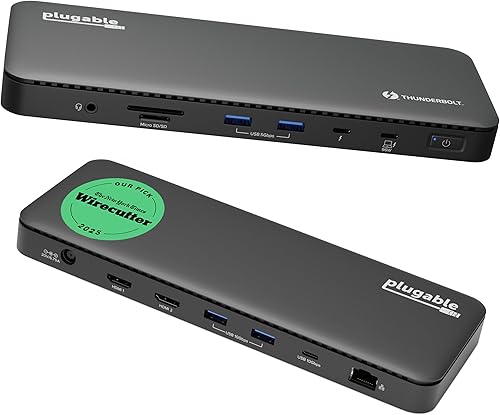 Plugable TBT4-UD5 Thunderbolt 4 Dock
Thunderbolt 4 and USB4 laptop owners who want dual monitors, fast storage, and full charging from one cable, without paying a premium brand tax.
Best Thunderbolt dock for HDMI desks
 Anker 777 Thunderbolt Docking Station (Apex, 12-in-1)
Windows Thunderbolt laptop owners with two HDMI monitors who want a single-cable desk without buying video adapters.
Best premium Thunderbolt dock
 Belkin CONNECT Pro Thunderbolt 4 Dock
Buyers who want a premium Thunderbolt 4 dock with dual HDMI, fast USB throughout, and a brand with a long support history.
The Plugable TBT4-UD5 is the Thunderbolt pick for most desks, because dual 4K over HDMI and 100W charging cover the common case at a fair price. HDMI-based desks should look at the Anker 777 Apex, Dell owners at the WD22TB4, and four-monitor offices at the Lenovo ThinkPad Universal Thunderbolt 4 Dock, which is the only dock here that drives four 4K displays.
The picks, ranked
| Pick | Host connection | Laptop charging | Video | Buy |
|---|---|---|---|---|
| Best Thunderbolt dock overallPlugable TBT4-UD5 Thunderbolt 4 Dock | Thunderbolt 4, 40Gbps | 100W power delivery, 96W certified | Dual 4K at 60Hz over HDMI, or single 8K | Check price |
| Best Thunderbolt dock for HDMI desksAnker 777 Thunderbolt Docking Station (Apex, 12-in-1) | Thunderbolt 4, 40Gbps | 90W power delivery | Dual 4K at 60Hz over HDMI, single 8K over Thunderbolt | Check price |
| Best premium Thunderbolt dockBelkin CONNECT Pro Thunderbolt 4 Dock | Thunderbolt 4, 40Gbps | 90W power delivery | Dual 4K at 60Hz over HDMI 2.0 | Check price |
 Best Thunderbolt dock for Dell laptopsDell Thunderbolt Dock WD22TB4 | Thunderbolt 4, 40Gbps | Up to 130W power delivery | HDMI and DisplayPort, multi-monitor support | Check price |
 Best Thunderbolt dock for four monitorsLenovo ThinkPad Universal Thunderbolt 4 Dock | Thunderbolt 4, 40Gbps | Up to 100W dynamic power charging | Up to 4x 4K at 60Hz, or single 8K | Check price |
Best Thunderbolt dock overall
Plugable TBT4-UD5 Thunderbolt 4 Dock
The Thunderbolt dock most people should buy: dual 4K over HDMI, 100W charging, and a price that embarrasses fancier rivals.
Strengths
- Dual 4K monitors at 60Hz over two HDMI ports is the setup most desk workers actually want, and this dock delivers it without adapters, dongles, or a second cable.
- The 100W power delivery, 96W certified, charges even larger laptops under load while the dock still runs drives, displays, and peripherals at full speed.
- Thunderbolt certification and Intel Evo verification mean the dock behaves predictably across brands, which matters when the laptop and the dock come from different makers.
Limitations
- It is a Thunderbolt-first dock, so owners of older or basic USB-C laptops get a reduced experience and should buy a USB-C dock instead.
- The slim, low-profile case looks neat but offers no vertical stand or mounting option, so it sits flat on the desk and takes up its full footprint.
- Gigabit Ethernet, rather than 2.5GbE, is the one place where pricier Thunderbolt docks pull ahead, and it matters if your wired network is faster than a gigabit.
What owners report
Commonly praised
- Owners like how two monitors come up over plain HDMI without hunting for adapters
- Owners like the steady laptop charging that holds up while drives and displays are all running
- Owners like the calm, predictable behaviour when waking the laptop and reconnecting peripherals
Common complaints
- Owners grumble that the wired network tops out below the faster standard some rival docks offer
- Owners wish the flat case came with a stand or a mounting option for tighter desks
- Owners note that plain USB-C laptops get only part of what this Thunderbolt dock can do
Recurring themes from owner reviews on retailers and forums, summarised by our editors. Updated October 2026.
| Host connection | Thunderbolt 4, 40Gbps |
|---|---|
| Laptop charging | 100W power delivery, 96W certified |
| Video | Dual 4K at 60Hz over HDMI, or single 8K |
| Ports | 13 total, including downstream Thunderbolt 4, USB-C, USB-A, SD and microSD |
| Network | Gigabit Ethernet |
Best for: Thunderbolt 4 and USB4 laptop owners who want dual monitors, fast storage, and full charging from one cable, without paying a premium brand tax.
Skip if: Your laptop has only a plain USB-C port with no Thunderbolt or USB4 support, since you will not get the dual-display and bandwidth benefits that justify this dock.
Best Thunderbolt dock for HDMI desks
Anker 777 Thunderbolt Docking Station (Apex, 12-in-1)
The dual-HDMI Thunderbolt dock: two 4K monitors over plain HDMI, plus an 8K-capable Thunderbolt downstream port.
Strengths
- Two HDMI ports driving dual 4K at 60Hz suit the most common monitor pairing, and the downstream Thunderbolt 4 port adds a single 8K display option on top.
- The 90W laptop charging plus a 20W USB-C phone charging port keep the laptop and a phone topped up from one dock, with no extra charger on the desk.
- Anker's long support window and wide availability make this one of the easier Thunderbolt docks to buy, replace, and get help with.
Limitations
- Compatibility is narrower than the Plugable: Windows Thunderbolt 4 laptops and non-M1 MacBooks only, with Linux, ChromeOS, and M1 MacBooks excluded.
- The four USB-A ports are data only, so a phone plugged into one charges slowly, and the 20W USB-C port is the only fast phone charging option.
- Its premium positioning puts it close to the Belkin and Dell docks, which offer more ports or more charging power for similar money.
What owners report
Commonly praised
- Owners like the two HDMI outputs that drive a pair of sharp monitors with ordinary cables
- Owners like the strong phone charging alongside solid laptop charging
- Owners like the familiar brand support and easy availability when help is needed
Common complaints
- Owners are frustrated by the narrower system compatibility, which rules out several popular laptop types
- Owners note that the USB-A ports charge phones only slowly
- Owners feel the premium level sits close to rivals offering more ports or more power
Recurring themes from owner reviews on retailers and forums, summarised by our editors. Updated October 2026.
| Host connection | Thunderbolt 4, 40Gbps |
|---|---|
| Laptop charging | 90W power delivery |
| Video | Dual 4K at 60Hz over HDMI, single 8K over Thunderbolt |
| Ports | 12 total, including downstream Thunderbolt 4, USB-C, USB-A, SD, Ethernet, audio |
| In the box | 120W power adapter, 0.7m Thunderbolt 4 cable |
Best for: Windows Thunderbolt laptop owners with two HDMI monitors who want a single-cable desk without buying video adapters.
Skip if: You use a MacBook with an M1 chip, Linux, or ChromeOS, since Anker lists this dock as incompatible with those systems.
Best premium Thunderbolt dock
Belkin CONNECT Pro Thunderbolt 4 Dock
The polished premium pick: twelve ports, dual 4K, and a build that looks at home in a design-led office.
Strengths
- Dual HDMI 2.0 ports giving dual 4K at 60Hz suit the common two-monitor desk without needing USB-C video adapters, which keeps the setup simple.
- The port mix is thoughtfully split between fast 10Gbps ports for storage and slower ports for keyboards and mice, so nothing competes for bandwidth it does not need.
- A 120W power supply and an included 0.8m Thunderbolt 4 cable mean the dock works properly out of the box, with no separate cable purchase to discover later.
Limitations
- At its premium positioning it is hard to justify over the Plugable TBT4-UD5 unless the Belkin design, support, or specific port layout matters to you.
- The 90W laptop charging is a step below the 100W and 130W rivals here, which can matter for the largest laptops under heavy load.
- Its single downstream Thunderbolt 4 port is one fewer than some rivals offer, so daisy-chaining several Thunderbolt devices needs more planning.
What owners report
Commonly praised
- Owners like the tidy split of fast and everyday ports, which keeps storage clear of keyboard traffic
- Owners like the dual HDMI outputs that suit a two-monitor desk with no adapters
- Owners like the included cable and power supply, which remove a surprise extra purchase
Common complaints
- Owners feel the asking level is hard to justify next to cheaper Thunderbolt docks with similar everyday performance
- Owners wish laptop charging reached the higher figure offered by some rivals
- Owners note that a single downstream Thunderbolt port limits daisy-chaining plans
Recurring themes from owner reviews on retailers and forums, summarised by our editors. Updated October 2026.
| Host connection | Thunderbolt 4, 40Gbps |
|---|---|
| Laptop charging | 90W power delivery |
| Video | Dual 4K at 60Hz over HDMI 2.0 |
| Ports | 12 total, including 2x Thunderbolt 4, USB-C, USB-A, SD, Ethernet, audio |
| In the box | 120W power supply, 0.8m Thunderbolt 4 cable |
Best for: Buyers who want a premium Thunderbolt 4 dock with dual HDMI, fast USB throughout, and a brand with a long support history.
Skip if: Your budget is tight, since this dock costs noticeably more than the Plugable while offering a very similar day-to-day experience.
Best Thunderbolt dock for Dell laptops
Dell Thunderbolt Dock WD22TB4
The office-fleet favourite: a modular Thunderbolt 4 dock with serious charging power and Dell's management extras.
Strengths
- Up to 130W of power delivery covers Dell's hungrier laptops, including models that complain about slow charging on ordinary 90W or 100W docks.
- The modular design lets the port module be swapped for servicing or upgrades, which is a genuine advantage in offices where a dead dock should not mean a dead desk.
- Multi-monitor support stretches to high resolutions across the dock's video outputs, so a demanding multi-display desk is well within its range.
Limitations
- Some of its best tricks, including Dell's management and firmware features, matter most on Dell laptops, so owners of other brands pay for extras they cannot fully use.
- The 180W power brick is large and heavy, which suits a fixed desk but makes the dock a poor choice for anyone who moves between locations.
- Setup can feel more corporate than consumer, with firmware and driver updates that home buyers may find fiddly compared with a plug-and-play rival.
What owners report
Commonly praised
- Owners like the strong charging that keeps demanding Dell laptops fed under load
- Owners like the modular construction that makes servicing a faulty unit straightforward
- Owners like the multi-monitor support that covers demanding office desk layouts
Common complaints
- Owners find the large power brick awkward to place and impossible to travel with
- Owners say the setup and firmware steps feel more corporate than a home buyer expects
- Owners note that some management extras only come alive on Dell laptops
Recurring themes from owner reviews on retailers and forums, summarised by our editors. Updated October 2026.
| Host connection | Thunderbolt 4, 40Gbps |
|---|---|
| Laptop charging | Up to 130W power delivery |
| Power adapter | 180W, included |
| Video | HDMI and DisplayPort, multi-monitor support |
| Design | Modular, with swappable port module |
Best for: Dell laptop owners, and offices standardising on Dell, who want high charging power, modular servicing, and multi-monitor support.
Skip if: You want the cheapest capable Thunderbolt dock, since Dell's modular design and management features add cost that a home user may never use.
Best Thunderbolt dock for four monitors
Lenovo ThinkPad Universal Thunderbolt 4 Dock
The four-monitor monster: the only dock here that drives four 4K displays, with office-friendly management built in.
Strengths
- Four 4K displays at 60Hz, or a single 8K display, is unmatched in this roundup, and it turns one laptop into a genuine multi-monitor workstation.
- Dynamic power charging up to 100W adjusts to the laptop connected, so a mixed fleet of ThinkPads all charge sensibly from the same dock.
- All four USB-A ports run at 10Gbps, which is faster than the mixed-speed USB on most rivals, and matters for desks full of fast storage.
Limitations
- The dock is tuned for the ThinkPad world, and while it works with other Thunderbolt laptops, some management features are Lenovo-specific.
- Its long, low case and 135W adapter take up real desk space, so it suits a fixed office desk far better than a portable setup.
- Four-display setups need care with cable types and laptop capability, so buyers should confirm their laptop supports the configuration before ordering.
What owners report
Commonly praised
- Owners like the four-display capability, which turns one laptop into a full workstation wall
- Owners like the adaptive charging that suits a mixed fleet of laptops
- Owners like the uniformly fast USB ports, which keep storage speeds consistent
Common complaints
- Owners find the long case and chunky adapter hungry for desk space
- Owners note that fleet management extras mean little outside the ThinkPad world
- Owners say four-display setups demand careful cable and laptop checks before ordering
Recurring themes from owner reviews on retailers and forums, summarised by our editors. Updated October 2026.
| Host connection | Thunderbolt 4, 40Gbps |
|---|---|
| Laptop charging | Up to 100W dynamic power charging |
| Video | Up to 4x 4K at 60Hz, or single 8K |
| USB | 4x USB-A at 10Gbps, plus USB-C and Thunderbolt 4 downstream |
| In the box | 135W power adapter, 0.7m Thunderbolt 4 cable |
Best for: ThinkPad owners and IT-managed offices that want four displays, dynamic charging, and remote dock management.
Skip if: You only need one or two monitors, since the four-display capability and fleet features add cost a home desk will not use.
Questions, answered
Does a Thunderbolt dock work with a USB-C laptop?
Usually yes, but with reduced capability: the dock falls back to USB-C behaviour, so you may lose a display, some bandwidth, or fast storage speeds. A USB-C dock is usually the better buy for a plain USB-C laptop, since you stop paying for Thunderbolt performance you cannot reach.
Is Thunderbolt 4 better than Thunderbolt 3 for a dock?
For docks, Thunderbolt 4 mainly guarantees minimum capabilities: dual 4K support, 40Gbps bandwidth, and wake-from-sleep behaviour that Thunderbolt 3 left optional. A good Thunderbolt 3 dock still works well, but Thunderbolt 4 removes the guesswork about which features a dock actually implements.
Do I need the cable that comes with the dock?
Yes, use the included cable at first. Thunderbolt performance depends on a certified cable of the right length, and a random USB-C cable can silently drop a dock to USB speeds or kill a display. If you need a longer cable, buy a certified Thunderbolt cable rated for the length you need.