Ranked on latency-relevant features: dedicated backhaul, wired ports near the console, and traffic prioritisation.
The Best Mesh Wi-Fi Systems for Gaming (2026)
Mesh systems for low-latency gaming: dedicated backhaul, multi-gig ports, and QoS controls.
Our top picks at a glance
Best for gaming
 ASUS ZenWiFi AX XT8 (2-pack)
Buyers who want router-level controls, VPN features, and lifetime security without a subscription.
Best Wi-Fi 7 gaming
 TP-Link Deco BE63 (2-pack)
Large homes with gigabit-plus plans and many connected devices.
Best Orbi gaming
 NETGEAR Orbi RBK753P
Large homes with more devices and heavier simultaneous use than the RBK753 targets.
The ASUS ZenWiFi XT8 is the gaming pick: dedicated backhaul keeps latency steady at distance, and adaptive QoS protects games when the rest of the house streams. Wire the console or PC to the nearest node wherever possible: no mesh beats a cable for gaming latency.
The picks, ranked
| Pick | Wi-Fi standard | Coverage (2-pack) | Ports per unit | Buy |
|---|---|---|---|---|
| Best for gamingASUS ZenWiFi AX XT8 (2-pack) | Wi-Fi 6, AX6600 tri-band | Up to 5,500 sq ft per ASUS | 1 x 2.5 Gbps WAN, 3 x gigabit LAN | Check price |
| Best Wi-Fi 7 gamingTP-Link Deco BE63 (2-pack) | Wi-Fi 7, BE10000 tri-band | Up to 5,800 sq ft per TP-Link | 4 x 2.5 Gbps Ethernet, 1 x USB 3.0 | Check price |
| Best Orbi gamingNETGEAR Orbi RBK753P | Wi-Fi 6, AX5200 tri-band | - | - | Check price |
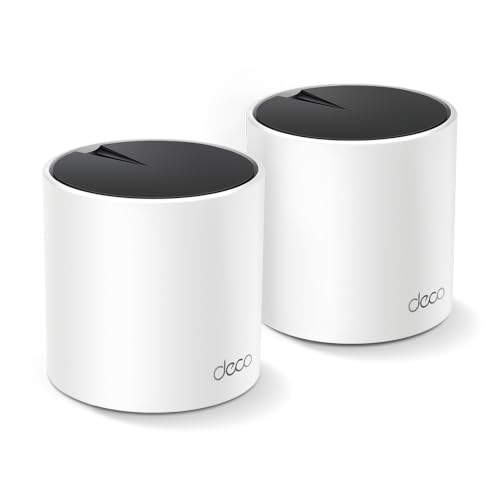 Best budget gaming meshTP-Link Deco X55 (2-pack) | Wi-Fi 6, AX3000 dual-band | Up to 4,500 sq ft per TP-Link | 3 x gigabit Ethernet | Check price |
 Best gaming coverage valueLinksys Atlas 6 (3-pack, MX20MS3) | Wi-Fi 6, AX3000 dual-band | - | - | Check price |
Best for gaming
ASUS ZenWiFi AX XT8 (2-pack)
The enthusiast mesh: tri-band Wi-Fi 6 with lifetime security and flexible configuration.
Strengths
- A dedicated 5 GHz backhaul band keeps node-to-node traffic off the bands your devices use, which preserves speed at distance better than dual-band systems.
- Lifetime AiProtection security and a full ASUS router feature set, including VPN and adaptive QoS, come without a subscription.
- A 2.5 gigabit WAN port and three separate SSIDs suit mixed households that want guest, IoT, and main networks kept apart.
Limitations
- Wi-Fi 6 rather than Wi-Fi 7, so it is a mature platform rather than a future-proof one.
- The ASUS app and web interface offer more settings than most buyers need, which can overwhelm first-time mesh owners.
- Units are larger than Deco or eero nodes and need more shelf space.
What owners report
Commonly praised
- Dedicated backhaul band preserves speed at distance better than dual-band systems
- Lifetime security plus VPN and quality controls with no subscription
- Separate networks for guests, smart devices, and the main household
Common complaints
- Wi-Fi 6 rather than Wi-Fi 7, so it is a mature platform rather than a future-proof one
- App and web interface offer more settings than most buyers need
- Units are larger than Deco or eero nodes and need more shelf space
Recurring themes from owner reviews on retailers and forums, summarised by our editors. Updated October 2026.
| Wi-Fi standard | Wi-Fi 6, AX6600 tri-band |
|---|---|
| Coverage (2-pack) | Up to 5,500 sq ft per ASUS |
| Ports per unit | 1 x 2.5 Gbps WAN, 3 x gigabit LAN |
| Backhaul | Dedicated 5 GHz band or Ethernet |
| Security | AiProtection lifetime, no subscription |
Best for: Buyers who want router-level controls, VPN features, and lifetime security without a subscription.
Skip if: You want the simplest possible app, or you need Wi-Fi 7.
Best Wi-Fi 7 gaming
TP-Link Deco BE63 (2-pack)
The Wi-Fi 7 step up: tri-band speed, multi-gig ports, and room for 200 devices.
Strengths
- Wi-Fi 7 BE10000 tri-band throughput with a 6 GHz band gives wireless backhaul real headroom, so distant nodes stay fast even under load.
- Four 2.5 gigabit Ethernet ports per unit suit multi-gigabit plans and wired servers, consoles, and network storage.
- Support for over 200 devices plus a USB 3.0 port covers smart homes that have outgrown basic routers.
Limitations
- Wi-Fi 7 benefits need Wi-Fi 7 devices; older phones and laptops see only part of the gain.
- Premium pricing is hard to justify on a sub-gigabit broadband plan.
- Two units cover up to 5,800 square feet per TP-Link, so very large homes still need a third node.
What owners report
Commonly praised
- Tri-band throughput with a fast band gives wireless backhaul real headroom
- Multi-gigabit wired ports suit faster plans and wired servers and storage
- Huge device capacity plus a USB port covers outgrown smart homes
Common complaints
- Wi-Fi 7 benefits need Wi-Fi 7 devices; older phones see only part of the gain
- Premium pricing is hard to justify on a slower broadband plan
- Very large homes still need a third node
Recurring themes from owner reviews on retailers and forums, summarised by our editors. Updated October 2026.
| Wi-Fi standard | Wi-Fi 7, BE10000 tri-band |
|---|---|
| Coverage (2-pack) | Up to 5,800 sq ft per TP-Link |
| Device capacity | 200+ devices per TP-Link |
| Ports per unit | 4 x 2.5 Gbps Ethernet, 1 x USB 3.0 |
| Security | TP-Link HomeShield included |
Best for: Large homes with gigabit-plus plans and many connected devices.
Skip if: Your broadband plan is under 500 Mbps, or your budget stops at Wi-Fi 6.
Best Orbi gaming
NETGEAR Orbi RBK753P
The faster Orbi: AX5200 tri-band speed for busier large homes.
Strengths
- AX5200 tri-band speeds lift device bandwidth over the RBK753, which helps when many people stream and video call at once.
- The same up to 7,500 square feet of coverage and dedicated backhaul band keep distant rooms fast.
- Capacity for 75 devices per NETGEAR covers busy family homes with smart devices in every room.
Limitations
- Still Wi-Fi 6, so it is an upgrade in speed rather than in wireless generation.
- NETGEAR Armor remains a trial product, not a lifetime inclusion.
- Satellite size and premium pricing match the RBK753 rather than undercutting it.
What owners report
Commonly praised
- Higher device bandwidth helps when many people stream and video call at once
- Same large coverage and dedicated backhaul keep distant rooms fast
- Capacity covers busy family homes with smart devices in every room
Common complaints
- Still older-generation wireless, so it is a speed upgrade rather than a generation jump
- Security remains a trial product, not a lifetime inclusion
- Satellite size and premium pricing match the sibling system rather than undercutting it
Recurring themes from owner reviews on retailers and forums, summarised by our editors. Updated October 2026.
| Wi-Fi standard | Wi-Fi 6, AX5200 tri-band |
|---|---|
| Coverage (3-pack) | Up to 7,500 sq ft per NETGEAR |
| Device capacity | 75 devices per NETGEAR |
| Backhaul | Dedicated 5 GHz band or Ethernet |
| Security | NETGEAR Armor, 30-day trial per listing |
Best for: Large homes with more devices and heavier simultaneous use than the RBK753 targets.
Skip if: You need Wi-Fi 7, or your device count is modest.
Best budget gaming mesh
TP-Link Deco X55 (2-pack)
The value mesh default: Wi-Fi 6 coverage for medium homes at a sensible price.
Strengths
- AX3000 Wi-Fi 6 dual-band speeds suit the vast majority of broadband plans, so the system rarely becomes the bottleneck in a normal home.
- Two units cover up to 4,500 square feet per TP-Link, which handles most three and four bedroom homes without a third node.
- Three gigabit Ethernet ports per unit plus Ethernet backhaul support give wired devices and wired node links a straightforward path.
Limitations
- Dual-band design shares a band for backhaul, so wireless node speeds drop further from the main unit than on tri-band rivals.
- Gigabit ports cap wired speeds at 1 Gbps, which limits future multi-gigabit plans.
- Advanced parental controls beyond the basics sit behind the HomeShield Pro subscription.
What owners report
Commonly praised
- Speeds suit the vast majority of broadband plans, so it rarely becomes the bottleneck
- Two units handle most three and four bedroom homes without a third node
- Plenty of wired ports per unit, with wired node links supported
Common complaints
- Dual-band design shares a band for backhaul, so distant node speeds drop
- Gigabit ports cap wired speeds, limiting future multi-gigabit plans
- Advanced parental controls beyond basics sit behind a paid subscription
Recurring themes from owner reviews on retailers and forums, summarised by our editors. Updated October 2026.
| Wi-Fi standard | Wi-Fi 6, AX3000 dual-band |
|---|---|
| Coverage (2-pack) | Up to 4,500 sq ft per TP-Link |
| Ports per unit | 3 x gigabit Ethernet |
| Backhaul | Wireless or Ethernet backhaul |
| Warranty | 2 years per TP-Link |
Best for: Medium homes up to about 4,500 square feet on plans up to gigabit speed.
Skip if: Your home is very large, or you need Wi-Fi 7 or multi-gigabit ports.
Best gaming coverage value
Linksys Atlas 6 (3-pack, MX20MS3)
The three-pack value mesh: Wi-Fi 6 for large homes at a mid-range price.
Strengths
- Three units cover up to 6,000 square feet per Linksys, which is genuine large-home coverage at a mid-range price.
- Intelligent Mesh technology steers devices to the best node and band automatically, so phones do not cling to a distant unit.
- A 3.5 year warranty per Linksys is longer than most mesh rivals offer, which matters for hardware that runs around the clock.
Limitations
- Dual-band design shares backhaul with device traffic, so wireless node speeds fall with distance more than on tri-band systems.
- Gigabit ports only, with no multi-gigabit option for faster plans.
- The Linksys app is functional rather than polished, and advanced controls are limited.
What owners report
Commonly praised
- Genuine large-home coverage at a mid-range price
- Automatic steering stops phones clinging to a distant unit
- Longer warranty than most rivals, which matters for always-on hardware
Common complaints
- Dual-band design shares backhaul with device traffic, so node speeds fall with distance
- Gigabit ports only, with no multi-gigabit option for faster plans
- App is functional rather than polished, and advanced controls are limited
Recurring themes from owner reviews on retailers and forums, summarised by our editors. Updated October 2026.
| Wi-Fi standard | Wi-Fi 6, AX3000 dual-band |
|---|---|
| Coverage (3-pack) | Up to 6,000 sq ft per Linksys |
| Device capacity | 75+ devices per Linksys |
| Mesh technology | Linksys Intelligent Mesh |
| Warranty | 3.5 years per Linksys |
Best for: Large homes that need three nodes but do not want premium tri-band pricing.
Skip if: You need a dedicated backhaul band, or your plan exceeds gigabit speed.
Questions, answered
Is mesh Wi-Fi good enough for competitive gaming?
For casual and ranked play over a good mesh with Ethernet backhaul, yes. For serious competitive play, wire the machine directly: even the best mesh adds latency variability that a cable removes.
Does Wi-Fi 7 help gaming?
Yes through multi-link operation, which uses multiple bands at once to reduce latency spikes. The benefit needs Wi-Fi 7 devices on both ends, so older consoles see less of it.
Should the gaming device use Wi-Fi or Ethernet from a node?
Ethernet from the node, always. A node with a wired port near the console gives most of the benefit of a full wired network without running cables through the house.