Ranked on budget honesty: the true stereo cost, including whether the listing is a single or a pair, against bass reach and tuning controls.
The Best Budget Studio Monitors (2026)
Budget studio monitors that still tell the truth: complete pairs and affordable five inch singles for a first home studio.
Our top picks at a glance
Best budget pair overall
 Edifier MR4 Powered Studio Monitor Speakers, Pair
First-time producers and content creators who need a complete stereo pair on the smallest sensible budget.
Best budget compact pair
 PreSonus Eris 3.5 2nd Gen Studio Monitors, Pair
Creators on a tiny desk, in a dorm, or in a bedroom corner who still want a tuned monitor pair rather than computer speakers.
Best budget five inch single
 Mackie MR524 Powered Studio Monitor, Single
Producers who want a proper five inch monitor on a tight budget and already own an interface with balanced outputs.
The Edifier MR4 pair is the budget pick because the stereo price is the listed price, with no second purchase hiding behind it. The PreSonus Eris 3.5 pair wins for the smallest desks, the Mackie MR524 wins for buyers who want a five inch driver on a budget, and the JBL 305P MkII and Yamaha HS5 are the singles worth doubling up on when the budget stretches to a proper pair.
The picks, ranked
| Pick | Woofer | Tweeter | Total power | Buy |
|---|---|---|---|---|
| Best budget pair overallEdifier MR4 Powered Studio Monitor Speakers, Pair | 4 inch | 1 inch silk dome | 42 watts (21 watts per speaker) | Check price |
| Best budget compact pairPreSonus Eris 3.5 2nd Gen Studio Monitors, Pair | 3.5 inch woven composite | 1 inch silk dome | 50 watts Class AB (25 watts per side) | Check price |
| Best budget five inch singleMackie MR524 Powered Studio Monitor, Single | 5 inch polypropylene | 1 inch silk dome | 50 watts bi-amplified Class AB | Check price |
 Best budget imaging singleJBL 305P MkII Powered 5 Inch Studio Monitor, Single | 5 inch | 1 inch soft dome | 82 watts bi-amplified Class D (41 watts LF, 41 watts HF) | Check price |
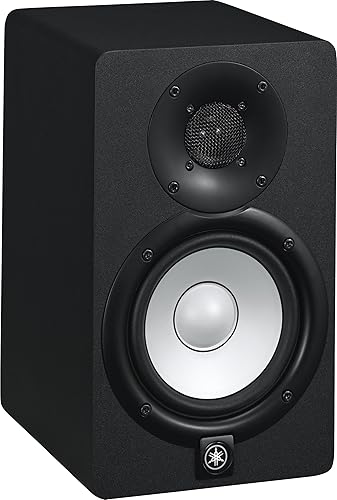 Best budget critical singleYamaha HS5 Powered Studio Monitor, Single | 5 inch cone | 1 inch dome | 70 watts bi-amplified (45 watts LF, 25 watts HF) | Check price |
Best budget pair overall
Edifier MR4 Powered Studio Monitor Speakers, Pair
The true budget pair: two four inch monitors, front headphone output, and a near-flat tune for a first home studio.
Strengths
- It arrives as a finished pair, so the headline figure is the stereo figure, with no second purchase hiding behind it.
- The front-panel headphone jack and volume knob make late-night checks and level changes quick without reaching behind the desk.
- The four inch woofer and silk dome tweeter are tuned toward flatness rather than bass boom, which suits learning to mix.
Limitations
- A four inch woofer cannot reach deep bass, so low-end work needs headphones as a second reference.
- Inputs are unbalanced TRS, RCA, and AUX only, so a balanced professional setup needs an interface with matching outputs.
- Output is modest, so a larger room or a loud tracking session will push these monitors to their limit.
What owners report
Commonly praised
- A complete pair in one box removes all guesswork for a first studio setup
- The front headphone jack and volume knob make late-night work simple and quick
- Sound stays fairly flat rather than bass-heavy, which helps beginners learn to mix honestly
Common complaints
- Deep bass is missing, so bass-heavy tracks need headphones to judge the low end
- Unbalanced inputs only, which limits use with professional interfaces
- Output runs out of headroom in a larger room or a louder session
Recurring themes from owner reviews on retailers and forums, summarised by our editors. Updated October 2026.
| Woofer | 4 inch |
|---|---|
| Tweeter | 1 inch silk dome |
| Total power | 42 watts (21 watts per speaker) |
| Frequency response | 60 Hz to 20 kHz |
| Sold as | Pair |
Best for: First-time producers and content creators who need a complete stereo pair on the smallest sensible budget.
Skip if: You mix bass-heavy music seriously, or you need balanced XLR inputs for a professional interface.
Best budget compact pair
PreSonus Eris 3.5 2nd Gen Studio Monitors, Pair
The compact desktop pair: tiny 3.5 inch monitors with front controls and tuning knobs for the smallest desks.
Strengths
- The tiny footprint fits desks where a five inch monitor would crowd the keyboard and the interface.
- Front-panel volume, headphone output, and high and low tuning knobs make everyday adjustments easy without reaching behind.
- It arrives as a pair with a woven-composite woofer and silk dome tweeter, so the stereo setup is complete out of the box.
Limitations
- A 3.5 inch woofer rolls off at 80 Hz, so bass below that range is simply not represented, and headphones must cover it.
- Output is limited to a near-field desk distance, and the pair will not fill a room for casual listening at volume.
- The small cabinet cannot move enough air for tracking loud instruments, so it is a mixing and editing tool, not a playback system.
What owners report
Commonly praised
- The tiny footprint fits desks where a five inch monitor would never squeeze in
- Front controls for volume and tuning make everyday adjustments effortless
- As a complete pair it is ready for stereo work straight out of the box
Common complaints
- Bass stops well short of the deep end, so low-end work always needs headphones
- Volume suits near-field desk listening only, and a larger room swallows the sound
- The small drivers cannot keep up with loud tracking or casual room playback
Recurring themes from owner reviews on retailers and forums, summarised by our editors. Updated October 2026.
| Woofer | 3.5 inch woven composite |
|---|---|
| Tweeter | 1 inch silk dome |
| Total power | 50 watts Class AB (25 watts per side) |
| Frequency response | 80 Hz to 20 kHz |
| Sold as | Pair |
Best for: Creators on a tiny desk, in a dorm, or in a bedroom corner who still want a tuned monitor pair rather than computer speakers.
Skip if: You mix seriously and need bass below 80 Hz, or your room is large enough for a five inch monitor.
Best budget five inch single
Mackie MR524 Powered Studio Monitor, Single
The workhorse five inch: a logarithmic waveguide, Class AB amps, and acoustic space controls at a budget-friendly single price.
Strengths
- The logarithmic waveguide widens the sweet spot, so the stereo image holds up when you lean in to adjust a plugin.
- Class AB amplification gives a smooth, unforced character that suits long sessions without listener fatigue.
- Acoustic space controls for wall and corner placement are genuinely useful, not decorative, in a bedroom studio.
Limitations
- Sold singly, so the pair total is double the single figure, which closes the gap with pair-priced rivals.
- Bass extension is limited for a five inch monitor, and the rear port needs clearance that a desk against a wall may not give.
- The cabinet design is functional rather than refined, and the front logo light divides opinion in a dark room.
What owners report
Commonly praised
- The wide sweet spot makes it easy to hear stereo placement without sitting perfectly still
- Sound stays smooth over long sessions, without the fatigue some brighter monitors cause
- Space controls genuinely help when the monitor must sit near a wall or in a corner
Common complaints
- One box holds one monitor, so stereo needs a second purchase that new buyers sometimes miss
- Bass depth is modest, and sub-bass decisions need another reference
- The front logo light is a distraction for some users in a dark room
Recurring themes from owner reviews on retailers and forums, summarised by our editors. Updated October 2026.
| Woofer | 5 inch polypropylene |
|---|---|
| Tweeter | 1 inch silk dome |
| Total power | 50 watts bi-amplified Class AB |
| Frequency response | 45 Hz to 20 kHz |
| Inputs | Balanced XLR and TRS, unbalanced RCA |
Best for: Producers who want a proper five inch monitor on a tight budget and already own an interface with balanced outputs.
Skip if: You want a finished pair in one box, or you need bass below the mid-bass without a second reference.
Best budget imaging single
JBL 305P MkII Powered 5 Inch Studio Monitor, Single
The wide sweet spot pick: JBL waveguide imaging and dual Class D amps in a compact five inch cabinet.
Strengths
- The Image Control Waveguide gives a broad, stable stereo image, so small head movements do not collapse the mix picture.
- Dual 41 watt Class D amplifiers keep woofer and tweeter on separate power, which helps transient clarity at higher levels.
- Boundary EQ and HF trim switches let the monitor be tuned for desk, wall, and corner placement without extra gear.
Limitations
- Sold singly, so check the listing carefully: the pair listing is a different ASIN and the single listing is the one used here.
- Bass extension is honest for a five inch driver but limited, and sub-bass decisions still need headphones or a subwoofer.
- The rear panel controls are small and recessed, so tuning is a set-and-forget job rather than something adjusted mid-session.
What owners report
Commonly praised
- The stereo image stays wide and stable even when listening slightly off centre
- Vocals and instruments sit clearly apart in a busy mix, which makes panning decisions easier
- The compact size fits a normal desk without crowding the keyboard or interface
Common complaints
- The single listing catches out buyers who expected a pair in the box
- Bass depth is limited, so low-end checks need a second reference
- The glossy front panel shows reflections in a brightly lit room
Recurring themes from owner reviews on retailers and forums, summarised by our editors. Updated October 2026.
| Woofer | 5 inch |
|---|---|
| Tweeter | 1 inch soft dome |
| Total power | 82 watts bi-amplified Class D (41 watts LF, 41 watts HF) |
| Frequency range | 43 Hz to 24 kHz |
| Inputs | Balanced XLR and 1/4 inch TRS |
Best for: Producers who move around the desk and need a monitor that stays coherent off axis, not only dead centre.
Skip if: You want the deepest bass from a five inch monitor, or you dislike a glossy front baffle in a bright room.
Best budget critical single
Yamaha HS5 Powered Studio Monitor, Single
The brutally honest five inch: a flat, unforgiving HS Series monitor that exposes mix problems instead of smoothing them over.
Strengths
- The HS Series voicing is deliberately flat and revealing, which makes midrange problems audible instead of hidden.
- Room Control and High Trim switches give two useful, clearly labelled corrections for wall proximity and bright rooms.
- The white cone and simple cabinet make it easy to see driver movement and to spot the monitor in a dark studio at a glance.
Limitations
- Bass rolls off noticeably below the mid-bass, so low end decisions need a subwoofer or a trusted headphone check.
- The honest voicing can sound thin or clinical on first listen, especially to buyers coming from consumer speakers.
- Sold singly, so a pair doubles the headline figure, and the rear port needs breathing room from the wall behind it.
What owners report
Commonly praised
- Mix problems show up plainly, so tracks finished here tend to travel well to other speakers
- The midrange is clear and uncoloured, which suits vocal and guitar work especially well
- Build quality feels solid and studio-ready, with simple controls that do the job
Common complaints
- The sound can feel thin or clinical to listeners coming from consumer speakers
- Bass below the midrange is limited, so low-end work needs another check
- One monitor per box means the pair price is double the headline figure
Recurring themes from owner reviews on retailers and forums, summarised by our editors. Updated October 2026.
| Woofer | 5 inch cone |
|---|---|
| Tweeter | 1 inch dome |
| Total power | 70 watts bi-amplified (45 watts LF, 25 watts HF) |
| Frequency response | 54 Hz to 30 kHz |
| Inputs | Balanced XLR and 1/4 inch TRS |
Best for: Mixers who want a reference that punishes sloppy EQ and level choices, so mixes translate to other systems.
Skip if: You want a monitor that flatters music for casual listening, or you need bass weight for hip-hop and electronic genres.
Questions, answered
Can you mix properly on budget monitors?
Yes, if you learn their limits. A budget pair that is flat and honest beats an expensive flattering speaker, provided you check bass on headphones and test mixes on other systems. The limit is usually bass extension, not midrange honesty, so low-end decisions need a second reference.
Is a pair listing always cheaper than two singles?
Not always, but it removes arithmetic errors. Two singles of a five inch monitor often cost more in total than a pair-priced rival, so compare the doubled single figure against the pair figure before deciding which budget option is genuinely cheaper.
Do budget monitors need an audio interface?
For serious mixing, yes. A basic interface gives balanced outputs, proper gain staging, and a headphone output for checks, and it avoids the noise that comes from running monitors straight from a laptop headphone jack. The Edifier and PreSonus pairs accept unbalanced inputs, so they work with simpler setups too.